


I’m not sure so many things are cooler than being able to automate repetitive processes and free up valuable time.
That is where workflow automation tools such as n8n and Make.com come in. They are designed to help you weave workflows that hook apps together, automate tasks, and thus simplify your life.
But the million-dollar question is, which is better for your needs – n8n or Make.com?
If you’re scratching your head and asking yourself what the difference is between the two, you’re not alone. Deciding which tool to go for can be difficult as both tools have their pros and cons.
In this article, we are going to break it all down for you – comparing their features, use cases, pricing, and more. By the end of the post, you’ll have a rock-solid idea of which tool is just a hand-in-glove fit for your business.
Overview of n8n vs Make.com
When we look at workflow automation tools, n8n and Make.com are two standout options. Each takes a different approach to making business processes easier, and getting to know the differences between each is how to select the right one for you.
What is n8n?
n8n is a free, open-source workflow automation software for automating and integrating between apps, combining them into a single stream without writing any code. Founded by Jan Oberhauser in Berlin in 2019, n8n provides flexibility and customization that few other products can match.
Here’s what makes n8n unique:
- Open source flexibility: Workflows can be tailored to your specific needs.
- Robust integrations: With over 400 native integrations, it syncs with popular tools such as Slack, Google Sheets, and GitHub.
- Visual workflow builder: Its drag-and-drop interface makes it easy to use for non-programmers.
- Community driven templates: Users can easily reuse workflows at the JSON format and share them with others.
- Self-Hosted: n8n can also be self hosted giving your business more control over specific requirements such as cost.
What is Make.com?
Make.com (previously known as Integromat) is a straightforward automation tool with a cloud base. It enables users to link apps, sync data, and build workflows with little technical know-how – all via a simple drag-and-drop interface.
Here’s what makes Make. com stand out:
- Ease of use: Its drag-and-drop editor means that just about anyone can start automating, with no technical knowledge required.
- Pre-built integrations: Make.com has millions of pre-built app connections available for users that need something quick.
- Scalability on the cloud: This makes it easy for businesses to scale their operations without extensive infrastructure management.
- Affordable pricing tiers: Make offers flexible plans.
Key Feature Comparisons
Customization and Flexibility
- n8n: Built as an open-source workflow automation platform, you get more flexibility than other tools. Users can create custom workflows or write JavaScript code or talk directly to APIs. It is therefore perfect for developers or companies that require specific features. And self-hosting is also supported, meaning users have full control over data and infrastructure. This is very useful for organizations with stringent compliance or security requirements.
- Make.com: Make. com is simple to use, thanks to its drag-and-drop interface and pre-built modules. It’s intended for users who like fast, no-code tools. Although customization isn’t as robust as what you get with n8n, Make. com has an easy-to-follow guided setup process.
Integration Capabilities
| Feature | n8n | Make.com |
|---|---|---|
| Number of Integrations | 400+ integrations | 1,500+ integrations |
| API Customization | Allows direct API manipulation and custom calls | Supports API integrations but less customizable |
| Webhooks | Deep webhook functionality for precise control | Standard webhook support for basic automation |
While Make.com offers a broader library of ready-to-use integrations, n8n compensates with its ability to create tailored API calls, making it better suited for businesses with proprietary systems or niche needs.
Ease of Use
- Make.com: It is well-known for its excellent user interface. It makes automation easy with multiple pre-built templates and modules. It is ideal for beginners or teams who need to set up workflows in a hurry without getting technical.
- n8n: Even though n8n has a visual workflow builder, it requires technical knowledge in order to overcome its learning curve. But it also trades off for more flexibility and control from a workflow logic perspective.
Workflow Management
- Make.com: Provides tidy workflow management with routers to process multiple paths simultaneously. It’s tuned for simple automations in situations where speed is paramount.
- n8n: Most capable of complex, advanced workflows with loops, merges, waitable steps. It is best suited for complex processes like data synchronizations or AI-driven tasks, whose branches can be run in parallel.
Error Handling and Debugging
- n8n: Provides advanced debugging tools like pinned/mock data, global error triggers, and detailed logs. These features make troubleshooting faster and more insightful, especially for complex workflows.
- Make.com: Offers manual testing and per-module error handling. While simpler to use, it may be less effective for intricate workflows requiring deep analysis.
AI Capabilities
- n8n: Supports advanced AI agents and Retrieval Augmented Generation (RAG), making it suitable for businesses leveraging cutting-edge AI technologies.
- Make.com: You get AI-driven automation development tools but without the depth of n8n’s AI capabilities
Summary of Key Features
| Feature Category | Best For n8n | Best For Make.com |
|---|---|---|
| Customization | Complex workflows requiring coding | Quick setups without technical expertise |
| Integration Options | Tailored API calls | Extensive pre-built integrations |
| Ease of Use | Developers and tech-savvy users | Beginners and non-technical users |
| Pricing | Startups needing cost-effective solutions | Businesses prioritizing scalability |
| Debugging | Detailed error handling | Simpler manual testing |
Use Cases and Suitability
Use Cases for n8n
The open-source architecture of n8n makes it a popular choice among developers or businesses that require custom solutions. Here are a few use cases:
- Complex IT Operations:Delivery Hero, for example, automates IT workflows and saves over 200 hours per month with n8n. If your processes require complex logic or custom API integrations, n8n is the right choice as it brings technology-heavy operations with precision.
- AI Integration: Businesses like SanctifAI leverage n8n to incorporate human intelligence into the AI workflow, allowing effortless prototyping and production workloads. It is thus best suited for AI-assisted solutions due to its compatibility with frameworks like LangChain.
- Data Synchronization:Companies like StepStone benefit from using n8n to integrate more than 200 of its mission-critical workflows, accelerating connections to data sources up to 25 times faster. This makes it an ideal utility for syncing massive datasets between machines.
- Web Scraping and Automation: n8n is a tool that automates stuff you do on the web, you can build workflows that replace scripts that you use to scrape stuff like pages. This is very handy when it comes to tracking prices, collecting leads, and analyzing competition.
- Marketing Campaigns: Companies such as Dropsolid are able to craft tailored marketing campaigns using n8n to join data from different sources. This allows businesses to focus better on finding their ideal customers and while saving time.
Use Cases for Make.com
Make.com’s intuitive interface and large library of pre-configured integrations make it suitable for organizations that place a high value on ease of use and rapid development.
Here are some examples:
- Integration with Lead Management and CRM: Make. com can streamline your lead capture process from forms, from emails, or from social media channels, and then sync them with CRMs including Salesforce or HubSpot. Businesses like HomeBiogas have decreased their response times from a full 24 hours down to a few minutes simply by automating their lead nurturing workflows.
- E-commerce Order Processing: Using Make, companies like Habitium reduced order processing from 15 minutes to one minute. It also connects platforms such as Shopify with inventory management systems to enable seamless functionality in high-traffic eCommerce scenarios.
- Social Media Management: Make.com automates social media posts on platforms such as Facebook, LinkedIn, and Twitter and tracks brand mentions. This is ideal for businesses that wish to have a continuously active online profile without having to spend hours doing so every day.
- Recruitment Automation: Firms like Flexiple use Make. com to automate candidates’ shortlisting and communication processes, cutting recruitment timelines from two weeks to two days. It integrates well with tools such as Airtable and Gmail to streamline the process of acquiring talent.
- Accounting and Financial Reporting: Make.com links invoicing systems to accounting platforms, such as QuickBooks or Xero, to identify differences in transactions and automatically draw up reports. It is effectively accurate in financial management and it saves a lot of time.
Suitability Comparison
| Use Case Category | Best For n8n | Best For Make.com |
|---|---|---|
| Complex Workflows | IT operations, AI agents, web scraping | Simple scenarios requiring quick setup |
| Marketing Automation | Personalized campaigns | Social media posting |
| E-commerce | Advanced integrations | Order fulfillment |
| Lead Management | Data-heavy CRM integrations | Fast lead nurturing |
| Recruitment | Custom workflows | Candidate shortlisting |
| Financial Processes | Tailored accounting automations | Pre-built financial reporting |
Pricing and Cost Efficiency
n8n vs Make.com take entirely different approaches when it comes to pricing. Although both platforms have tiered plans, both calculate cost in ways that can make a big difference in your bottom line depending on your workflow needs.
Let me break it down.
How Pricing Works
n8n
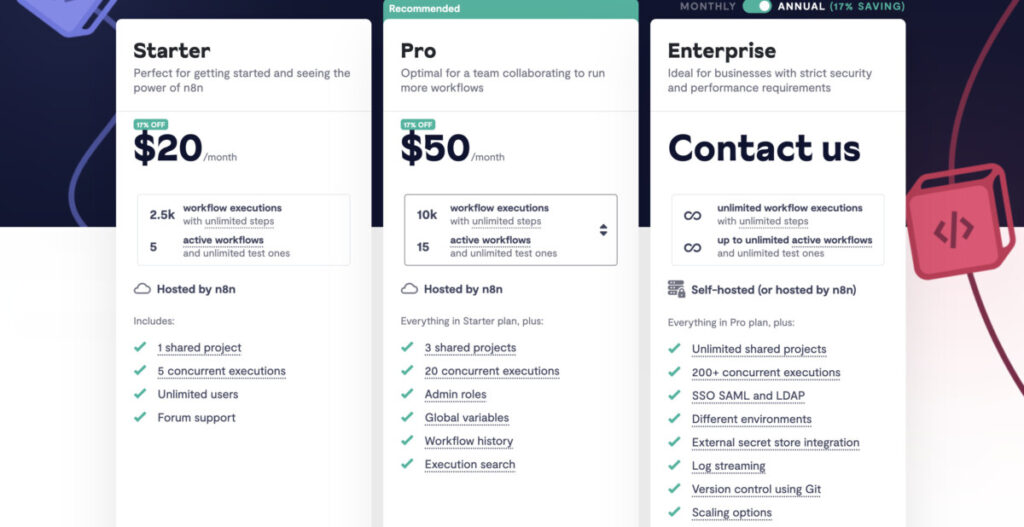
n8n billing is based on workflow executions. One execution is reported when a complete workflow is executed. In other words, regardless of how many steps or nodes are present in a workflow, you’re only charged for how many times the workflow executes.
This pricing model can be really cost-effective for businesses with multi-step or elaborate workflows. Another potential advantage is that n8n can be self-hosted, completely free of charge (other than paying for your server).
By self-hosting, businesses can scale their workflows without incurring ongoing charges, making it perfect for startups or organizations that have the technical know-how.
Make.com
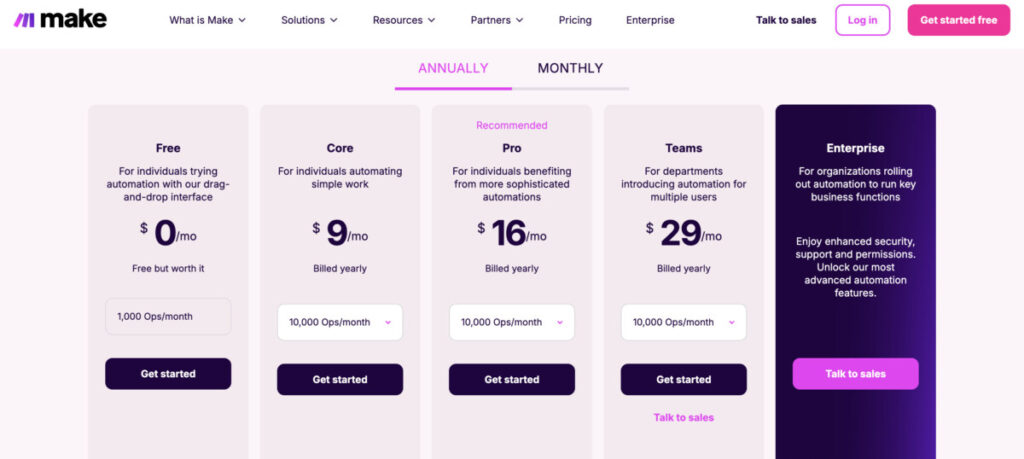
Make.com charges for each operation. Every individual action or step inside a workflow is an operation. If one workflow consists of five modules and runs 2,500 times within a month, it will eat up 12,500 operations.
There’s potential for this granular billing model to make Make.come inexpensive to run for workflows with fewer steps, but can get pricey with complex workflows that have many modules.
Cost Efficiency Analysis
- For Low Usage:
- On Make, workflows with fewer steps and more frequent executions generally leads to lower cost due to its operation-based pricing model. For instance, simply updating CRM records or syncing ticket statuses usually require simple workflows that take up fewer operations.
- For High Complexity:
- n8n is cheaper for more complex workflows with multiple steps or nodes since it is billed by execution, not by operation. Regardless of how complex the workflows are, that means businesses running over complex automations like tax filing or AI-driven processes, can enjoy predictable costs.
- Scaling Costs:
- Make.com: Costs increase significantly as workflows scale due to the accumulation of operations. Heavy users often find Make.com expensive at higher usage levels.
- n8n: Self-hosting means scaling is very cheap (approx $5-10/month) and as such is perfect for enterprises processing tons of large automation tasks.
Hidden Costs to Consider
- n8n: Free to self-host (other than server costs), but requires technical knowledge to set up and maintain. Without these skills, businesses could spend more on IT support or managing infrastructure.
- Make.com: This operation-based pricing might result in surprise costs when the workflow utilizes multiple modules or is run many times
Which Platform is More Cost-Efficient?
- If you want an easy way to get started with lightweight workflows and will pay a bit more as you scale usage, Make. com in terms of ease of use and interface
- However, for your more complex workflows or where you need an affordable way to massively scale operations, especially if you’ve got some technical know how, the self-hosting option with n8n cannot be beat in terms of long-term cost effectiveness.
Learning Curve and Support
Make.com
Make. com is designed to be very simple to use. With its drag-and-drop interface, it’s intuitive for anyone to use, even someone who’s never coded a solution before can build a workflow without technical skills.
With pre-built modules and templates for ease of setup, it is perfect for non-technical users or teams who want speed. For instance, linking up Airtable to Google Sheets takes only a handful of clicks and there’s plenty of visuals to help you out.
The simplicity keeps the hassle for documentation or resource tacking very low making it accessible to marketers, small business owners, and newcomers to automation. But with this simplicity comes a price. Make.com abstracts many technical details that could constrain flexibility for advanced users who need deeper control over their workflows.
n8n
n8n offers a developer-friendly experience, so it is the tool of choice for tech-savvy users or businesses with complex automation needs. It gives you a visual workflow builder but shows you raw data structures, custom code blocks and API manipulation on its interface.
This may seem daunting for beginners but liberating for those who are already familiar with scripting or programming concepts.
Support Options
| Feature | n8n | Make.com |
|---|---|---|
| Documentation | Extensive developer-focused guides | Beginner-friendly tutorials |
| Community Support | Active open-source community | Large user base with forums |
| Customer Support | Available for paid plans | Priority support on higher-tier plans |
| Templates | Community-shared JSON workflows | Ready-to-use templates |
- Make.com: Make.com comes with premium plans that include active customer support via ticket systems. It also contains tutorials and step by step instructions for the non-technical user. The platform’s in-depth library of templates makes creating a workflow even easier.
- n8n: n8n is highly dependent on its active open-source community for assistance. Forums, GitHub repositories and detailed documentation for advanced users and developers are available. Paid plans come with dedicated customer support but the self-hosting version is entirely reliant on community-provided resources.
Which Platform Is Easier to Learn?
- If you’re new to workflow automation, or want a no-code experience, Make.com is the top option due to its user-friendliness and mix of resources for new users. Ideal for small businesses or teams that want to automate tasks quickly without getting into technical details.
- If you are tech-savvy or have a requirement for extensive customization options, n8n is a powerful tool but is a steeper learning curve. The developer-oriented approach enables you to set up very specific workflows according to your needs, particularly if you’re familiar with coding or API integration.
The Bottom Line
Confused on n8n vs Make.com? When deciding between these two, it really comes down to what your needs are. n8n stands ahead as an open-source, highly customizable choice suited for larger, more intricate workflows and massive amounts of data, with lower-cost scaling. Best for technical users or businesses needing custom automation.
Alternatively, if you want simplicity, ease of use, and quick set up, Make. com is the better choice. With an intuitive interface and a rich library of pre-built integrations, it’s perfect for non-technical users or teams that want to automate their everyday tasks without having to enter the code.
So, assess your goals, technical knowledge, and budget, and you’re well on your way to determining the right workflow automation platform for your business.
