

People recommend n8n as the “powerful,” “flexible,” and “developer-friendly” automation tool. And yes, it lives up to that reputation.
But there’s one common question almost everyone asks before committing:
How much does n8n actually cost, and is it worth it?
On the surface, n8n’s pricing looks refreshingly simple. There’s a free option. There are paid plans. And there’s something about self-hosting that promises savings.
But once you dig in, you realize the real cost of n8n isn’t just about money. It’s about time, scale, infrastructure, and how you plan to use automation in the long run.
This article is a dedicated deep dive into n8n pricing. We’ll break down what each pricing option really means and who it’s best for.
By the end of this article, you’ll know exactly how n8n pricing works, which plan works for your use case, and when n8n is a smart financial decision and when it’s not.
How n8n Pricing Actually Works
n8n flips the script on how automation tools charge you, and that’s not an exaggeration.
Most automation platforms charge you in ways that feel almost sneaky. One task here. One step there. A trigger counts. An action counts.
Suddenly, a simple automation balloons into hundreds or thousands of billable operations. Before you know it, your monthly bill has doubled, and you’re not even sure why.
n8n does not work like that.
Instead of charging per task or per step, n8n charges by workflow execution. That means every time a workflow runs from start to finish, it counts as one execution, no matter how complex it is.
If you run a massive 50-step AI workflow? It still counts as one execution.
This pricing model is the reason many advanced users and teams are more inclined towards n8n. It rewards complexity instead of punishing it.
The more sophisticated your workflows become, the more value you squeeze out of each execution.
What Plans Are Available in n8n?
When it comes to choosing a plan with n8n, you have three broad categories:
- Community Edition (Free, Self-Hosted)
- Cloud Plans (Starter, Pro, Business, Enterprise)
- Start-Up Discount Option
Each category serves a different type of user. From individual users and small teams to larger organizations with compliance requirements.
Let’s break down what each plan includes, who it’s best suited for, and the real differences between them
1. Community Edition (Free, Self-Hosted)
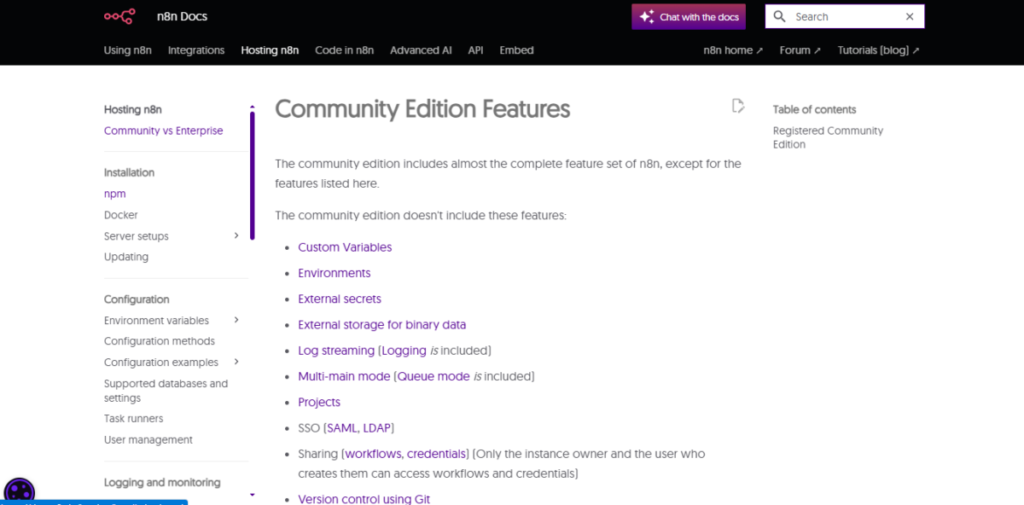
If your priority is cost control and flexibility, n8n gives you one of the most generous free options in the automation space.
It comes free with unlimited executions and workflows. This plan also comes with an unlimited number of users, and all AI nodes and integrations are included in this plan.
Because the Community Edition is open-source, you can install, update, and scale it however you want, with no subscription fees whatsoever.
This plan is ideal for developers, technical founders, and teams that already manage servers and don’t want recurring SaaS costs. The only expenses you’ll incur are infrastructure and maintenance, not license fees.
One thing to keep in mind, the free edition doesn’t come with managed hosting, SLA support, or premium features like advanced governance or enterprise-grade security. Those are reserved for higher tiers.
2. Cloud Plans (Managed by n8n)
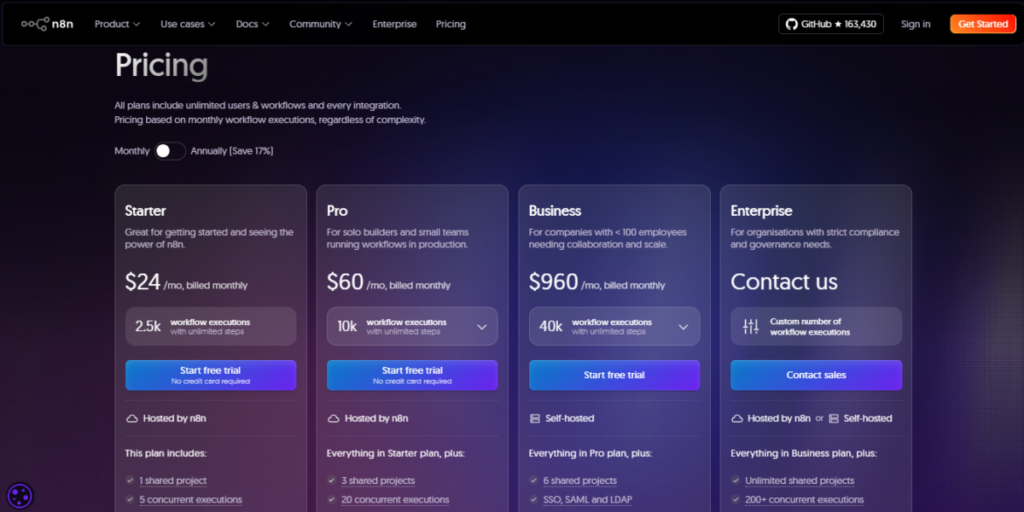
For users who want managed hosting, automated updates, and uptime commitments, n8n’s Cloud plans are where most businesses start.
All Cloud plans share a few core advantages:
- Unlimited workflows
- Unlimited users
- Unlimited automation steps within workflows
- AI nodes and integrations included
- No limits on workflow complexity, only on workflow executions per month.
The Cloud plans include:
Starter Plan
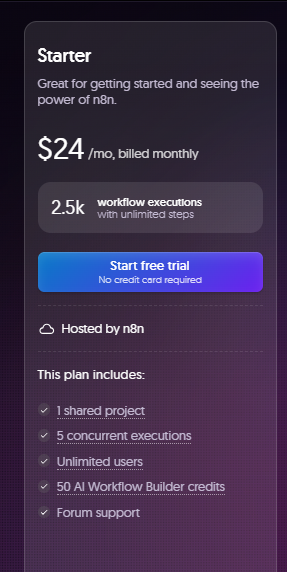
This plan offers an affordable entry point to n8n Cloud, complete with managed hosting.
However, the plan’s Execution Cap is a big disadvantage, as it can be restrictive for users who need to execute many processes.
The key features of this plan include the benefit of unlimited workflows and basic support. This plan is best for solo builders, early adopters, and individuals who are still experimenting with automation.
Overall, while it serves as an affordable way to access n8n Cloud with managed hosting, the execution cap remains a restrictive factor for heavy usage.
This tier removes most technical barriers but still limits how often workflows can run.
Pro Plan
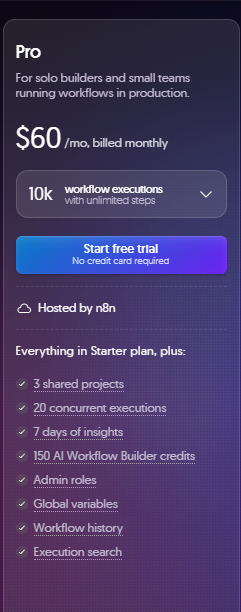
The Pro plan is where n8n starts to feel production-ready for real teams.
Priced at roughly $60 per month when billed monthly, it includes about 10,000 workflow executions per month, which is a meaningful jump from the Starter tier.
This plan is best suited for small teams and growing businesses that are moving beyond experimentation and into regular, day-to-day automation.
At this level, you get everything included in the Starter plan, plus increased execution capacity, better collaboration tools, admin roles, and extended execution logs.
These additions make it much easier to manage workflows across a team rather than as a solo user.
Where the Pro plan really shines is in handling core business processes. If you’re automating things like CRM data syncing, lead routing, internal notifications, or customer support workflows that run consistently, this tier usually fits well.
With this plan, you can run complex automations without worrying that every extra step will inflate your bill.
However, execution limits still exist. If your workflows run very frequently or you start scaling automation across multiple departments, you may eventually hit the ceiling and need to upgrade.
Still, for many teams, the Pro plan hits a practical balance between cost and capability.
Business Plan
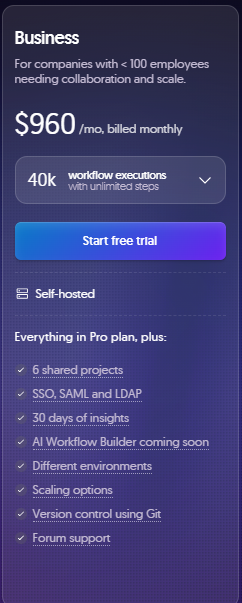
The Business plan is designed for teams that are seriously scaling automation.
At around $960 per month when billed monthly, it includes approximately 40,000 workflow executions per month, along with a stronger set of governance and collaboration features.
This plan is best suited for small to mid-sized companies where automation is no longer optional but operational.
In addition to higher execution limits, the Business plan introduces features like version control, more advanced team governance, and better scaling options. These tools help keep workflows organized and stable as more people depend on them.
The Business plan is like a bridge between Pro and Enterprise. It offers many of the controls and safeguards growing organizations need, without jumping straight into fully custom enterprise pricing.
For teams with heavier automation demands or multiple departments relying on shared workflows, this tier is definitely a clear “next level.”
The main downside is cost. The jump from Pro to Business is significant, which makes this plan most sensible only once usage and complexity justify the investment. For lighter workloads, it may be overkill.
Enterprise Plan
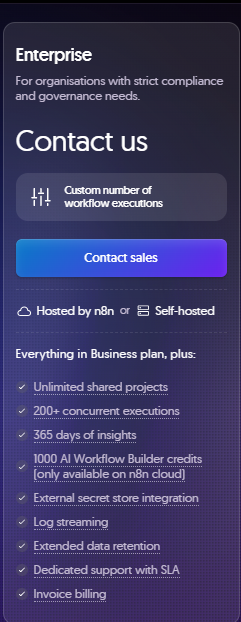
The Enterprise plan is built for organizations where automation is mission-critical.
The pricing of this plan is custom and requires contacting n8n’s sales team, with execution limits tailored specifically to your organization’s needs.
This tier is designed for large teams with strict security, compliance, and reliability requirements, or for companies running extremely high volumes of automation.
Enterprise customers get access to premium features such as dedicated support, SSO and SAML authentication, audit logs, multiple environments, and advanced analytics. Uptime guarantees and compliance considerations are also part of the package.
The biggest advantage of the Enterprise plan is flexibility.
Everything, from execution limits to support structure, is customized to fit how your organization operates.
The trade-off is that it’s no longer a self-serve plan. You’ll need to engage with sales, discuss requirements, and negotiate pricing.
3. Start-Up Plan (Discounted Business Tier)
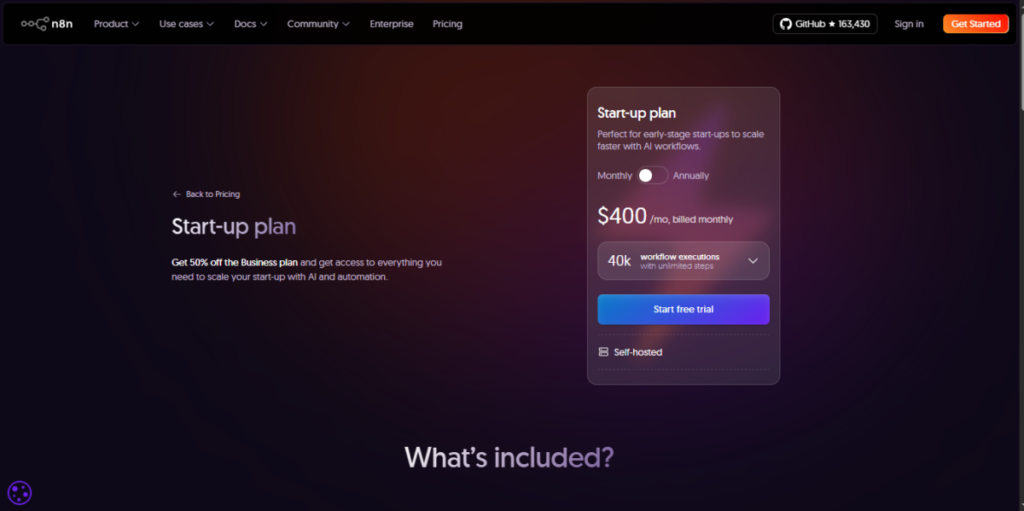
For early-stage startups, n8n offers a Startup Plan that makes its more advanced features far more accessible. This plan is a discounted version of the Business plan, offered at about 50% off, provided your company meets certain eligibility requirements.
n8n typically looks at factors like how many employees you have and your current funding stage.
This idea is to support young companies that are still finding product–market fit or scaling carefully. If you’re a small team with limited headcount and early or modest funding, there’s a good chance you’ll be eligible.
What makes this offer especially valuable is what you get in return. Startups on this plan gain access to Business-level features like higher execution limits, better governance tools, and scaling options without paying the full price that established companies do.
With this, you can build and run serious automations early, without cutting corners or worrying that you’ll outgrow your tools too quickly.
In practice, this plan gives startups room to experiment, grow, and automate core operations while keeping costs under control.
You can start with a robust setup from day one.
Pricing Comparison Table
| Plan | Price | Executions | Hosting | Best For |
| Community Edition | Free | Unlimited | Self-host | Developers & DIY teams |
| Starter | $24/month | About 2,500/month | n8n Cloud | Solo builders & hobbyists |
| Pro | $60/month | About 10,000/month | n8n Cloud | Small teams |
| Business | $960/month | About 40,000/month | n8n Cloud | Scaling businesses |
| Enterprise | Custom | Custom | Cloud or Self-host | Large enterprises |
Bottom Line
n8n’s pricing stands out because it respects how automation actually works in the real world. Instead of charging you for every tiny action or step, it focuses on workflow executions.
Whether you choose to self-host or go with the cloud, the value proposition is clear.
That said, n8n isn’t the cheapest option for everyone. If pricing predictability, flexibility, and long-term scalability matter to you, n8n is worth consideration.
If you want a deeper look at how the platform works beyond pricing, including features, strengths, and limitations, be sure to check out our full n8n review here.
