

If you make music long enough, you eventually run into the same frustration.
You find the perfect track to remix, sample, or dissect. Maybe you want the vocal for a mashup. Maybe you’re trying to study the drum groove or build a DJ edit. But the whole song is fused together in one stereo file.
For years, pulling those pieces apart meant wrestling with EQ curves, phase tricks, and a lot of trial and error. Now the process is almost absurdly simple. Upload a track, wait a minute, and suddenly you have the vocal, drums, bass, and instruments sitting in separate stems.
That shift is largely thanks to a new wave of AI-driven tools built specifically for stem separation. For producers, DJs, remixers, and curious learners, that changes the workflow completely.
What a stem splitter actually does
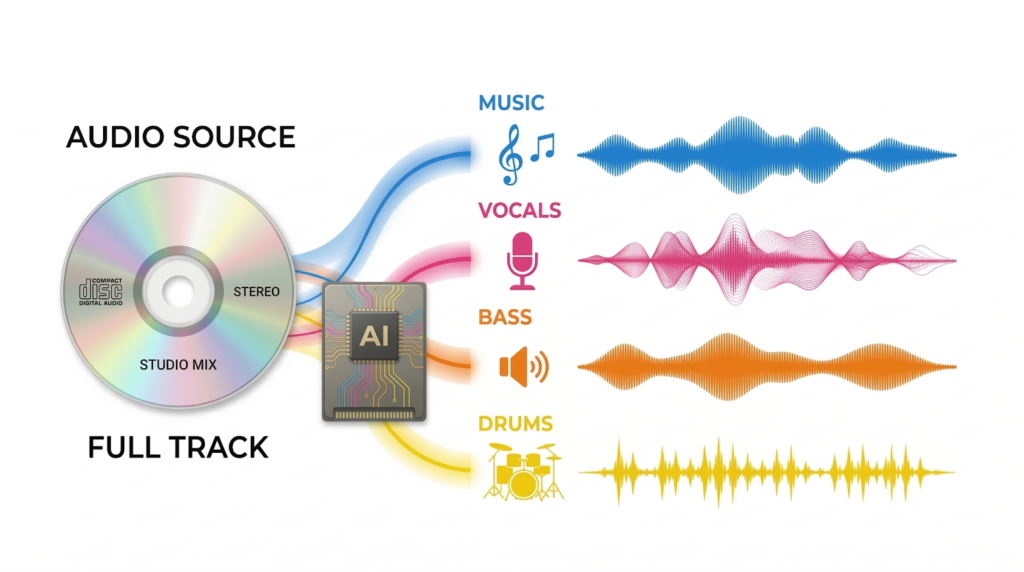
A stem splitter takes a finished piece of audio and pulls the mix apart.
Instead of one combined file, you end up with separate tracks: usually vocals, drums, bass, and a group of remaining instruments. Think of it as reverse-engineering the mix after the fact.
Under the hood, the software scans the audio for patterns: frequency ranges, rhythmic signatures, harmonic textures, and the subtle fingerprints different instruments leave behind. It then sorts those elements into individual tracks.
To be fair, the result isn’t the original studio stems, but it often gets surprisingly close.
That’s incredibly useful for things like remixes, sampling specific instruments, practicing along with isolated parts or creating backing tracks.
Why AI made stem separation dramatically better
Truth is, machine learning really changed the game. Modern systems are trained on massive collections of music: thousands of examples of vocals, kick drums, bass lines, guitars, synths, and more. Over time, the models learn what these sounds typically look like inside a mix.
That said, no AI model performs miracles. Dense mixes with heavy effects, layered synths, or aggressive mastering can still confuse the separation process. You may hear a little bleed between stems or occasional artifacts.
But compared to what producers had ten years ago, the improvement is huge.
And for many people, the only thing they really need is simple vocal removal. A quick way to strip vocals out of a track for karaoke, practice, or DJ edits. Most modern stem splitters handle that easily.
A few AI stem splitters that producers keep coming back to
There are dozens of tools floating around now, but a handful consistently show up in producer workflows.
LANDR Stems
LANDR’s stem splitter focuses on quality and simplicity. It runs on AudioShake’s award-winning AI, and the process is about as straightforward as it gets: drop in a track and the system quickly generates separate stems.
The separation is clean, and the interface stays out of your way.
Another advantage is that it connects directly with the broader LANDR ecosystem. Once you’ve built something new from those stems, you can master and distribute the track without bouncing between platforms.
One important note: if you’re using stems from copyrighted songs, make sure you have the proper rights or permissions before releasing or monetizing your work.
Moises
Moises has built a strong following among musicians and students.
The separation engine is reliable, but the real appeal is the surrounding toolkit. Users can adjust tempo, shift pitch, and isolate instruments for practice sessions. If you’re trying to learn a bass line or rehearse with a backing track, it’s extremely handy.
The interface is also friendly enough that beginners pick it up quickly.
Lalal.ai
Lalal.ai leans heavily into browser-based convenience.
It handles vocals and instruments pretty well, and it offers several separation modes for different types of material. Producers working with complex arrangements often appreciate the extra control.
RipX
RipX approaches stem separation from a different angle.
After splitting the audio, the software lets you manipulate individual elements in detail by editing notes, altering sounds, or reshaping parts of the performance. For deeper remixing and sound design work, that level of control can be powerful.
What actually matters when choosing a stem splitter
Separation quality
This is the big one. Better models produce stems that sound natural and intact, without metallic artifacts or leftover fragments of other instruments.
Speed
Some tools return results in seconds. Others take a few minutes. If you’re testing multiple tracks during a remix session, those minutes add up.
Number of stems
Basic tools split audio into two parts: vocals and instrumental. More advanced ones break the mix into several layers — drums, bass, melodic instruments, sometimes even guitar or piano.
Ease of use
Many of the best tools now run directly in the browser. Upload the file, wait for processing, download the stems. No complicated setup.
Export formats
WAV files are ideal if you’re bringing the stems into a DAW. Some tools default to compressed formats, which isn’t always what producers want.
Training ethics
As AI tools spread across music production, more creators are starting to ask where the models come from and how they were trained. Some platforms, including LANDR, have begun addressing this more openly, and for a growing number of producers, that transparency is becoming part of the decision when choosing a tool.
Finding the right tool for your workflow
What used to take real audio engineering chops can now happen in a couple of clicks.
Upload a track. Wait a minute. Suddenly the vocal, drums, bass, and instruments are sitting in separate stems, ready to remix, sample, or study.
For DJs building edits, producers sketching mashups, or musicians dissecting arrangements, AI stem splitters open up a lot of creative ground.
And the best way to figure out which one fits your workflow is simple: test them. Run the same track through a few tools, compare the results, and see which ones you actually enjoy using.
And once you get used to having stems on demand, it’s surprisingly hard to go back.