
State Of AI Video Generation In September 2026
Authored By:
State Of AI Video Generation In September 2026
Authored By:
Updated:April 21, 2026
Fact Checked By Joey Mazars
200+
Tools Tested
5000+
Research hours
20+
Years Of Expertise
AI video models and generators are waiting for their “ghibli moments” (the viral moment that made AI image generation mainstream overnight).
Sora's launch came close, but with the app shut down in early 2026, we're not convinced it stuck.
This report aims to paint a picture of the state of AI in early 2026 and all its aspects: the top models, the AI SaaS tools and the different technologies used.
The goal is not to drown you in benchmarks, but to explain in plain terms where this category stands and what you can practically do with these tools today.
The gap between early 2025 and early 2026 is significant enough that the category feels like a different product.
Clip length went from four-to-ten seconds standard in 2024 to coherent two-minute single-pass generations in 2026, with segment chaining enabling five-minute-plus videos.
Native audio generation became the breakthrough feature of the year, with sound effects matching on-screen action and accurate lip-sync eliminating separate audio post-production.
Resolution crossed a broadcast threshold, with Veo 3.1 introducing true 4K output at 60fps in January 2026. Most models now output 1080p as standard, up from 512x512 eighteen months ago.
Physics accuracy went from frequently broken to mostly realistic, with water, fabric, and complex character movement now holding up at normal viewing speed without obvious artifacts.
OpenAI shut down the Sora consumer app in March 2026, six months after Sora 2 launched. The model remains available via API but the closure signals a broader shift toward AI video as infrastructure rather than standalone product.
AI Video Models
We start with the foundational AI models (Veo, Sora, Seedance,etc.), which are separate from the AI video platforms like Synthesia and HeyGen that are often built on top of them.
See our dedicated section on that distinction further down.
Below are the top 14 companies shipping AI video models and the rankings of their latest models by quality of the video output (as per Video Arena).
| Rank | Model | Release date | Quality ELO avg | ||
|---|---|---|---|---|---|
| 🥇 |  |
Google VeoVeo 3.1 | Oct 2025 | 1,293 |
🇺🇸 |
| 🥈 | xAI |
Grok Imagine VideoGrok Imagine Video | Jan 2026 | 1,285 |
🇺🇸 |
| 🥉 | OAI |
SoraSora 2 Pro | Jan 2026 | 1,272 |
🇺🇸 |
| 4 |  |
KlingKling 3.0 Pro | Feb 2026 | 1,258 |
🇨🇳 |
| 5 |  |
PixVersePixVerse V6 | Mar 2026 | 1,235 |
🇨🇳 |
| 6 |  |
ViduVidu Q3 Pro | Jan 2026 | 1,224 |
🇨🇳 |
| 7 | RW |
RunwayRunway Gen-4.5 | Dec 2025 | 1,220 |
🇺🇸 |
| 8 |  |
SeedanceSeedance 1.5 Pro | Dec 2025 | 1,214 |
🇨🇳 |
| 9 |  |
Luma RayRay 3 | Sep 2025 | 1,203 |
🇺🇸 |
| 10 |  |
WanWan 2.6 | Dec 2025 | 1,197 |
🇨🇳 |
| 11 |  |
HailuoHailuo 2.3 | Late 2025 | 1,190 |
🇨🇳 |
| 12 |  |
LTXLTX-2 Pro | Jan 2026 | 1,103 |
🇮🇱 |
| 13 |  |
PikaPika 2.5 | Nov 2025 | 1,089 |
🇺🇸 |
| 14 |  |
HunyuanHunyuanVideo 1.5 | Nov 2025 | 1,053 |
🇨🇳 |
autogpt.net — autogpt.net/state-of-ai-video
Here is something worth noting as well, beyond rankings:
There is a difference between these models that’s often overlooked but matters to people tinkering with them and wanting to customize or train their own model.
There are 3 types of AI models (for video generation but also image or text in LLM):
Most Common
Closed (proprietary)
The model weights are not publicly available. Neither are the training data or methodology. You can’t run these locally and can use them via API or via a platform (who access it through the API)
Growing Fast
Open Weight
The model weights are available. You can run the model locally, fine-tune it, and build products on top of it. But the training data and training code are not disclosed, and the license may restrict commercial use or have other conditions
Rare At Frontier
Open Source
On top of the model weight being public, the training data and methodology are all publicly available under an OSI-approved license.
People often say Open Source but really mean Open Weight since almost no top AI models are truly Open Source.
LTX-2 comes closest since Lightricks released weights and training code, but the training data is not fully disclosed.
Note: Model weights are the millions of numerical values learned during training that define how the model thinks. Essentially the AI's knowledge and capability stored as a file you can download and run on your own hardware.
Pricing vs Quality
Most people won’t simply look at the model with the highest quality and run with it.
At scale, pricing matters just as much as quality. A model that's good enough at a lower cost per second will often beat the
Grok seems to be a noteable top tier model that's on the affordable side too.
While Google Veo and OpenAI Sora are on the more expensive side. It's worth noting that cost can vary a lot depending on the model and setup you have.
AI Video models Vs AI Video Generator Tools
This is the other important distinction to make in this space that we alluded to earlier.
What we’ve listed so far are AI video models.
That’s the actual technology doing the work if you will.
Now, most of them offer a user-friendly interface and platform for people to be able to use them.
So for example you can go right now in the Gemini app, select the video tool and use their Veo model that way.
Another way to access these models are through AI video generators tools
These can give you access to several models in one place or simply have more customization options and a more AI video dedicated interface.
Here are some of the main ones:




Some tools on the landscape above, like Pika and Hailuo, also develop their own underlying models, blurring the line between the two categories.
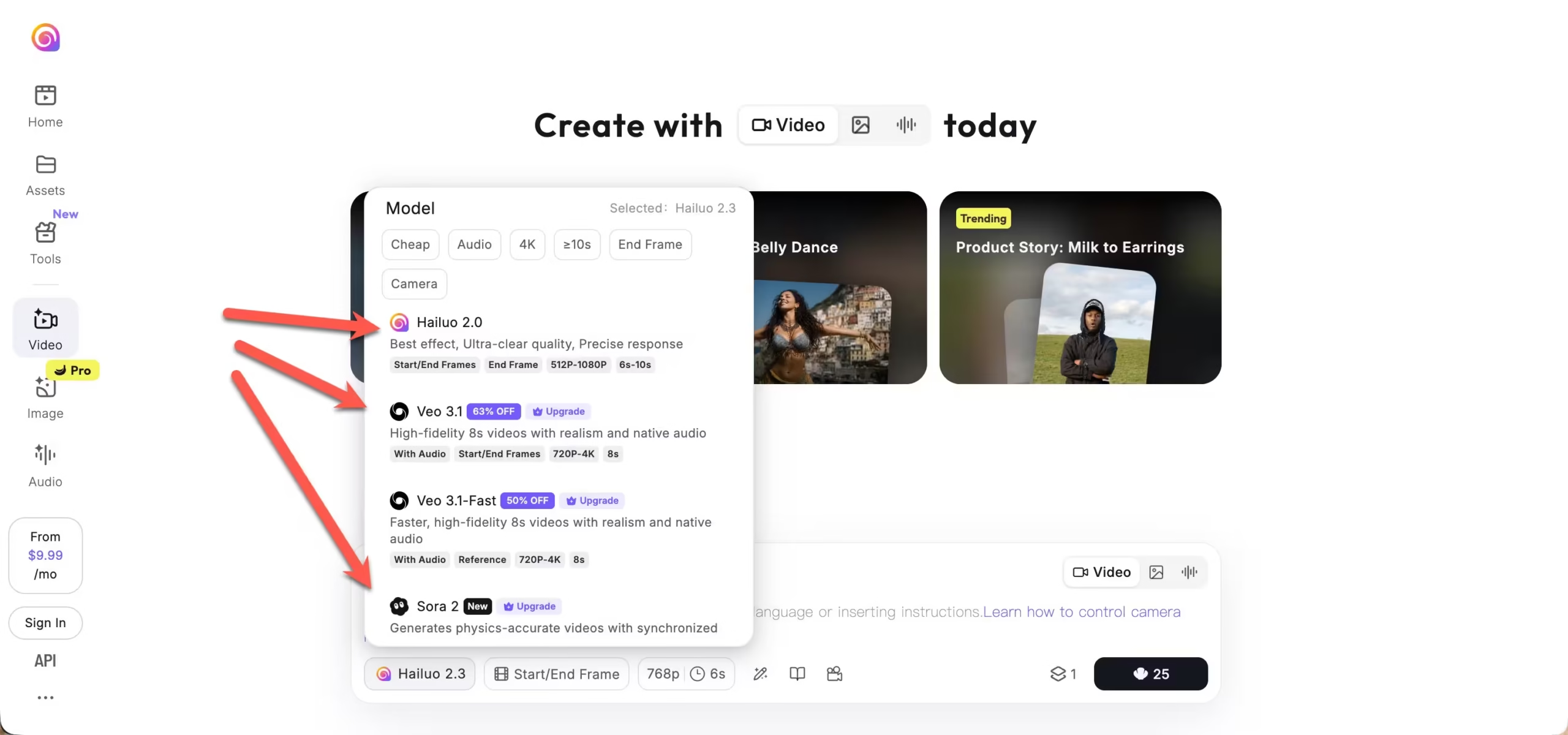
They allow you to use a range of models to create and edit the video, or to generate from an image for instance.
Some are specialized in Avatar generation some in AI lookalike versions of you, some in video editing or clipping,etc.
Below is an attempt at placing these most popular tools in a category graph to help you understand their different uses and who they cater to:
Of course this is somewhat subjective but should help you know which to explore for your personal use case.
AI Models Technologies
The last aspect of AI video models we want to showcase is the nitty gritty of how they work at the top level.
We mean the specific process and steps AI video models go through to generate a video.
There are 3 technical approaches used today:
How it works Starts with pure noise and iteratively refines it into coherent frames. Each generation solves the problem from scratch, which is why it is slow but capable of high visual fidelity. Used by
WanLTXHow it works Combines diffusion's visual generation with a transformer that deeply understands your prompt. The transformer handles semantic meaning; diffusion handles the pixels. Result is better prompt adherence and scene consistency. Used by
VeoKlingHow it works Generates video one frame at a time, each predicted from the last, similar to how LLMs predict the next word. Fast and controllable but small errors compound over time, which limits long-clip quality. Used by
PixVerseNote: most SOTA models now use a DiT approach as it tends to provide the best quality for a relatively fast generation speed.
But depending on your use case you might want to experiment with another approach.
Here is the same comparison in a different visual format:
Most production teams won't choose a model based on architecture alone, but understanding it helps explain why outputs differ across tools at similar price points.
FAQ
A model is the underlying technology that actually generates the video. A generator tool is the platform built on top of one or more models, giving you a user interface, editing features, and workflow tools.
For generative video, Pika is the most accessible entry point: fast, affordable, and forgiving with prompts.
For avatar and template-based video, HeyGen or InVideo are the most intuitive starting points depending on whether you need a talking presenter or general social content.
It depends on the tool and the pricing tier. Most platforms restrict commercial use to paid plans.
Some, like Wan (open weight, Apache 2.0 license), allow commercial use freely.
Adobe Firefly Video is notable for being trained entirely on licensed content, making it the safest option for brand work where IP risk matters.
Pricing varies widely. API access to frontier models like Veo runs around $0.15 to $0.40 per second of generated video.
Consumer subscriptions for tools like Runway, Pika, and HeyGen typically range from $10 to $35 per month for standard plans.
Open weight models like Wan and LTX can be run locally at no per-generation cost once you have capable hardware.
A few of them, yes. Wan 2.5 and LTX-2 are both open weight and can be run locally via ComfyUI.
LTX-2.3 in particular was optimized to run on consumer-grade NVIDIA GPUs. Frontier closed models like Veo, Sora, and Kling can only be accessed via API or their own platforms.
Join 17,000+ AI enthusiasts and get a weekly new
AI tool review in your inbox.