

Vidwud face swap is a free, browser-based AI tool that replaces faces in photos, videos, and GIFs.
You upload a source image or video, upload the target face, and Vidwud’s AI handles the rest in seconds. No software to install, no account required for basic photo swaps, and no watermark on the output.
That “completely free with no watermark” claim is what pulls people in.
And after testing Vidwud across 30+ face swaps (photos, group shots, short video clips, and GIFs), I can confirm it is real. You genuinely get free, watermark-free face swaps.
The question is whether the quality and reliability hold up when you compare it to tools that charge $6 to $30 per month.
Short answer: Vidwud delivers about 80 to 85 percent of the quality of paid competitors on clean, front-facing shots. That gap widens significantly on side profiles, complex lighting, and video with fast head movement.
How Does Vidwud Face Swap Work?
Three steps. That is the entire workflow.
Step 1: Go to vidwud.com/free-face-swap.html. Choose Photo, Video, or Multi-Face swap.
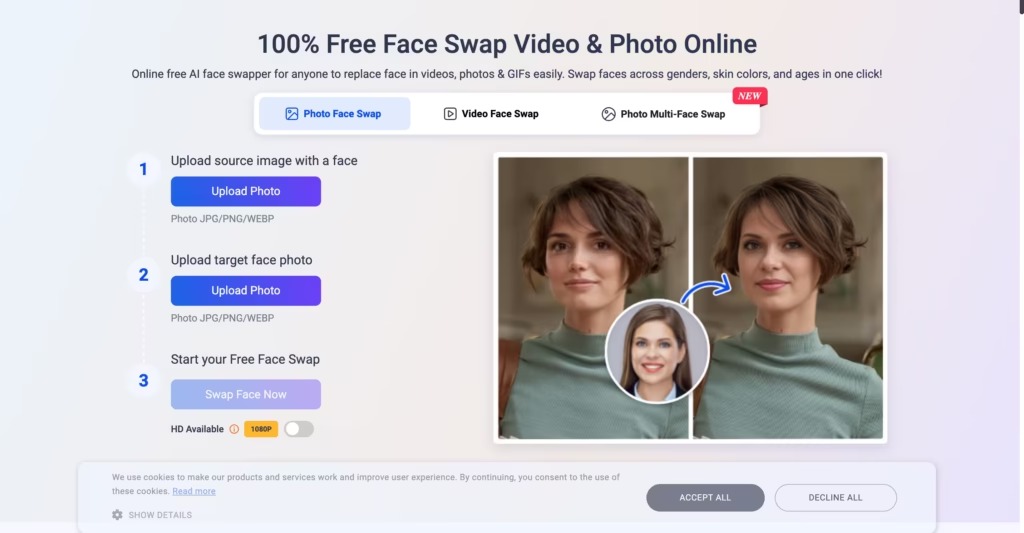
Step 2: Upload your source (the image or video with the face you want to replace) and your target (the new face).
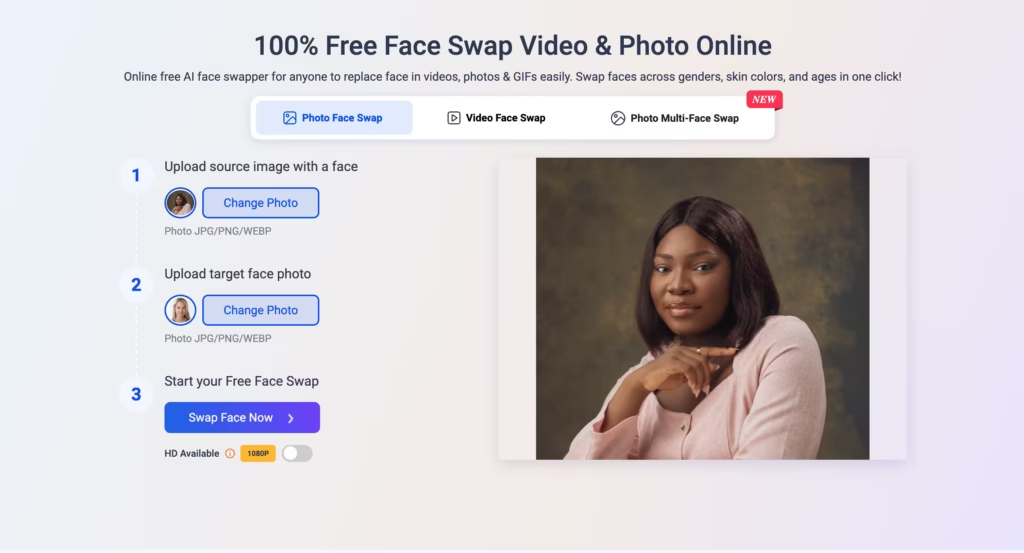
Step 3: Click swap. Wait a few seconds for photos, a few minutes for video. Download the result.
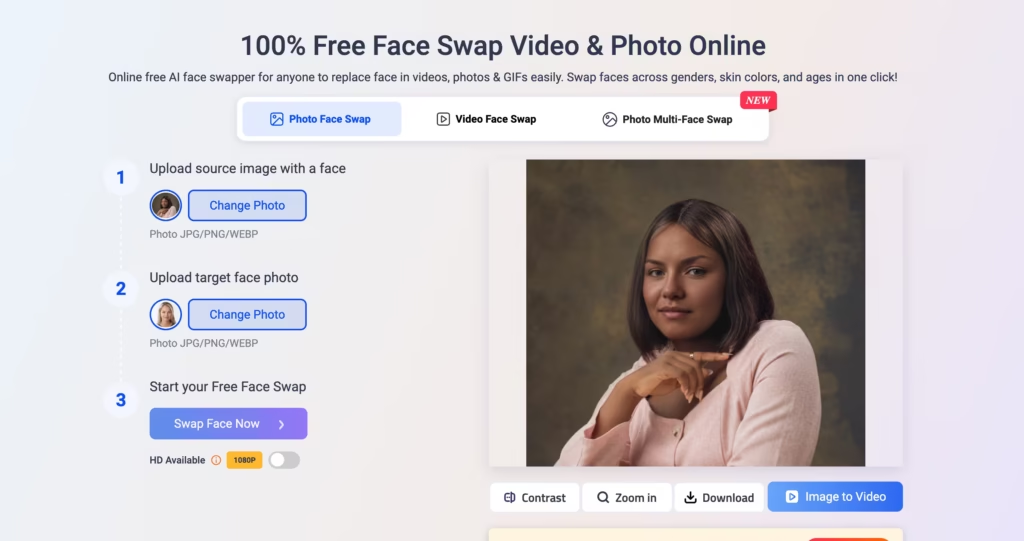
No account needed for basic photo swaps. The AI scans both faces, maps hundreds of facial keypoints (eye corners, nose bridge, lip edges, jawline), then blends the target face onto the source while matching skin tone, lighting, and expression.
All processing happens on Vidwud’s cloud servers.
Beyond the core face swap, Vidwud also offers AI Talking Photo, AI Photo Dance, AI Kissing Video, AI Head Swap (swaps the entire head including hair, not just the face), AI Clothes Changer, and an AI Image Generator.
The face swap is the flagship feature, and the one I spent the most time testing.
What Does Vidwud Face Swap Actually Cost?
This is Vidwud’s strongest selling point. The free tier is genuinely usable, not a teaser.
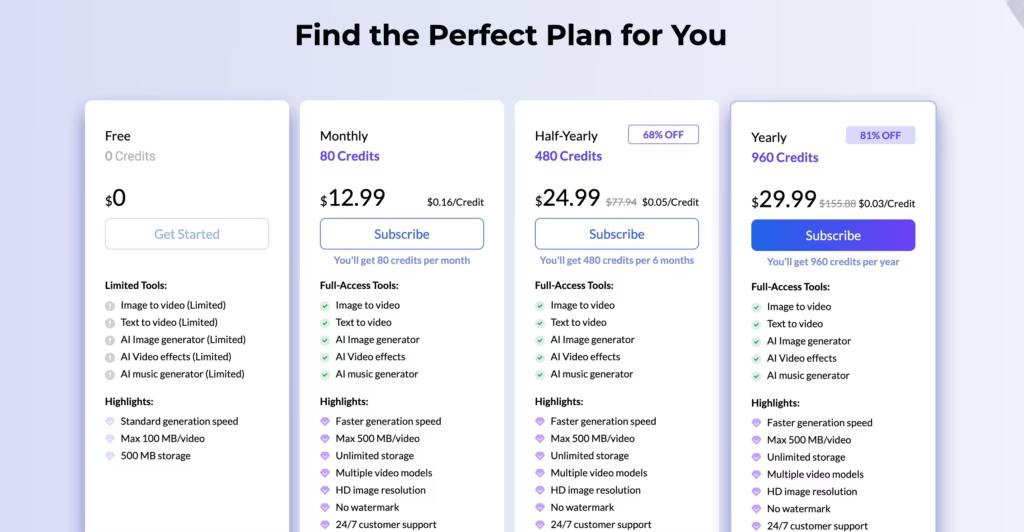
The free tier covers photos and GIFs with no restrictions I could find during testing. Video face swap requires credits, which means the Monthly plan ($12.99/month), Half-Yearly plan ($24.99/month), Yearly plan ($29.99/month) or purchasing credits separately.
Multi-face swap (swapping up to 6 faces in a single group photo) is included free, which is a genuine differentiator since many competitors lock this behind a paywall.
One thing to know: Vidwud appears to be closely related to Vidnoz, another AI video platform. Both share similar UI elements and marketing patterns.
I was not able to confirm whether they are owned by the same company, but this FaceFusion review flagged the same connection. Not necessarily a red flag, but worth being aware of.
Where Does Vidwud Face Swap Perform Well?
After running it through 30+ swaps, here is where the results impressed me:
Front-facing photos with good lighting. This is Vidwud’s sweet spot. Clean, well-lit selfies and headshots produce sharp, realistic swaps that are hard to distinguish from the original. Skin tone matching is solid. Edge blending around the jawline and hairline is clean.
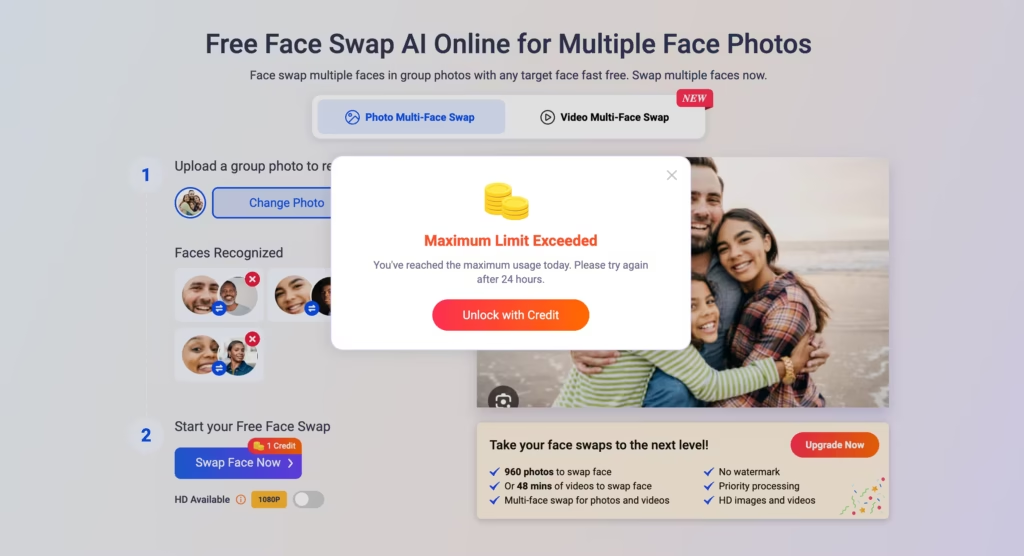
Multi-face group photos. I tested a group photo with 4 people. The AI detected all 4 faces automatically and let me assign a different target face to each one. The front-facing faces came out well. This feature being free is a genuine advantage, but hits a credit limit after one try.
Memes and casual content. For social media memes, quick laughs, and content that does not need to be pixel-perfect, Vidwud is more than good enough. The speed (seconds for photos) and the price (free) make it ideal for high-volume, low-stakes creative work.
Where Does Vidwud Face Swap Fall Short?
And here is where I ran into problems:
Side profiles are a real weakness. When I tested with angled shots (someone looking to the side, a three-quarter pose), the results degraded noticeably. The jawline did not align, the face sometimes looked warped, and one output had an uncanny valley quality that was more unsettling than funny.
This is not unique to Vidwud (most face swap tools struggle with non-frontal faces), but the quality drop is sharper here than on Remaker AI or DeepSwap.
Video processing is slow. A 30-second video clip took about 8 minutes to process on Vidwud.
FabCelebBio’s benchmarks found that DeepSwap handles a 1-minute clip in roughly 10 seconds, and Magic Hour processes the same length in about 2 minutes.
Vidwud sits at 5 to 10 minutes for comparable clips. For a free tool, the wait is understandable. For someone producing content on a deadline, it adds up fast.
Video quality trails paid competitors. The FabCelebBio comparison found slightly softer edges and less precise tracking in Vidwud video output compared to tools like Magic Hour and DeepSwap. For casual social content, you will not care. For anything professional, you will notice.
Pro plan limits are tight. 80 credits for $12.99/month is restrictive for heavy users. Remaker AI gives you 200 credits for $5.99/month, which covers more output at a lower price.
How Does Vidwud Compare to the Top Alternatives?
| Feature | Vidwud | Remaker AI | DeepSwap | Akool | FaceFusion |
| Primary strength | Free with no watermark | Best all-around balance | Speed and simplicity | Enterprise marketing | Full control (open source) |
| Photo face swap | Yes (free, unlimited) | Yes (credit-based) | Yes (credit-based) | Yes | Yes |
| Video face swap | Yes (Pro/Business plans) | Yes | Yes | Yes (with lip-sync) | Yes |
| Multi-face swap | Free (2-6 faces) | Yes | Yes | Yes | Yes |
| Head swap (with hair) | Yes (separate tool) | No | No | No | No |
| Watermark on free tier | No | No (limited swaps) | Yes | Yes | No (self-hosted) |
| Processing speed (30s video) | ~5-10 minutes | ~3 minutes | ~10 seconds | ~3 minutes | Depends on hardware |
| Side profile quality | Weak | Moderate | Moderate | Strong | Strong (with tuning) |
| Starting paid price | $12.99/month | $5.99/month | $9.99/month | ~$30/month | Free (self-hosted) |
| Batch processing | No | Yes | No | Yes | Yes |
| API available | No | No | No | Yes | Yes |
| Best for | Free casual swaps | Creators on a budget | Quick single swaps | Marketing teams | Technical users |
Which Face Swap Tool Should You Actually Pick?
| Your situation | Best pick |
| Want free face swaps with no watermark and no account | Vidwud |
| Need free multi-face group photo swaps | Vidwud |
| Producing content regularly on a budget | Remaker AI |
| Need fast video face swaps | DeepSwap |
| Enterprise marketing with lip-sync and presenters | Akool |
| Technical user who wants full local control | FaceFusion (open source) |
| Mobile-first social media content | Reface or FaceMagic |
| Professional video with complex angles and motion | Akool or DeepFaceLab |
My honest recommendation: start with Vidwud for free to see if face swapping fits your workflow at all.
If you find yourself hitting quality limits or needing video swaps regularly, upgrade to Remaker AI at $5.99/month.
It offers better quality, faster processing, and batch support at less than half of Vidwud’s Pro price. Akool only makes sense if you are a marketing team that needs lip-synced video swaps at enterprise scale.
FAQs
1) Is Vidwud face swap really free?
Yes, for photos and GIFs. You get unlimited photo face swaps, multi-face swap (2-6 faces), and GIF swaps with no watermark and no account required. Video face swap requires the paid plan starting at $12.99/month.
2) Is Vidwud face swap safe to use?
Vidwud processes all files on its cloud servers, which means your photos and videos are uploaded to their systems. The site uses HTTPS encryption and no malware has been detected by security scanners. However, as with any cloud-based face swap tool, avoid uploading sensitive or private photos you would not want stored on a third-party server.
3) Does Vidwud work on mobile?
Yes. Vidwud is entirely browser-based and works on any device with an internet connection. No app download needed. The interface adapts to mobile screens.
4) How is Vidwud different from Vidnoz?
Both platforms share similar UI elements and appear to be related, though I could not confirm shared ownership. Vidnoz focuses on AI video creation (avatars, text-to-video), while Vidwud focuses specifically on face swap and visual transformation tools.
5) Can I use Vidwud face swaps commercially?
Vidwud’s terms state that generated content belongs to the user. However, always review the terms of service directly before using AI-generated face swaps in commercial contexts, particularly for content featuring real people. Face swap technology carries ethical and legal considerations around consent that vary by jurisdiction.
6) Why does Vidwud struggle with side profiles?
When a face is turned sideways, half of it is hidden from the camera. The AI can only work with visible keypoints. The facial map it builds becomes incomplete, which produces distorted, unnatural-looking results. This limitation affects all face swap tools, but Vidwud shows it more visibly than competitors like Akool or DeepFaceLab because those tools use more advanced 3D facial reconstruction.
7) Does Vidwud support GIF face swap?
Vidwud’s face swap page lists GIF as an accepted upload format alongside video, but at least one independent review published in mid-2026 found no working GIF output and flagged it as a missing feature entirely, pointing to AIFaceswap as the GIF-capable alternative instead.
8) What happens when I hit Vidwud’s free daily limit?
The free plan is listed simply as “Limited” on the pricing page, and outside reports vary; some users say they get one free photo swap per day, others report getting more before hitting a wall.
Once you hit whatever the limit is, you’ll be prompted to buy credits or subscribe (plans start at $12.99/month), and video swaps in particular tend to hit a cap faster than photos. If predictable, repeated use matters to you, budget for the paid tier rather than counting on the free allowance.
