


Seekee is a mobile-first AI browser and assistant. One input bar, called MegaSearch, replaces the separate apps you’d normally juggle for search, writing, and image editing. Behind that single bar sits an “intelligent scheduling center,” which reads what you’re asking for and routes the task to a specialized AI agent: a language agent for a webpage summary, an image-generation agent when you ask for a picture instead.
The app’s major 2.0 update landed in October 2025 and introduced this multi-agent setup. That update moved Seekee from a basic browser extension into a fuller AI platform, and it’s the version most current reviews, including this one, are testing. Seekee runs on Android, iOS, and iPad natively, and unofficial guides exist for getting it working on PC and Android TV, though neither is officially supported.
Key Features
Seekee is a full AI platform that covers tasks like transcription, translation, document tasks, writing, content creation, studying, and divination. It’s also a streaming platform. Below are the six features I spent the most time testing.
1. AI Creation
Seekee’s writing tool drafts emails, reports, scripts, and social copy. It’s fast. For a quick first draft, it works well, though the tone leans formal and structured, so it suits professional writing more than creative fiction.
The interface is basically a chat window. I asked Seekee to create a quarterly work report on sales figures, and it handed back the content as a message. I would have preferred a file built on an actual report template, ready to download, instead.
That gap fits a pattern other reviewers have flagged too: Seekee is stretched thin across a huge breadth of capabilities, and depth is what gets sacrificed. It’s a generalist, a jack-of-all-trades that does many things without mastering any single one.

2. AI PDF
Upload a PDF, and Seekee extracts key points, summarizes long reports, and translates documents across languages. This is where Seekee outperformed what I expected. Even my dense technical academic essay came back with an accurate summary.
I also had the option to get a “viewpoint”: basically, seeing the text through the author’s eyes. Other options sit alongside it: extract the outline, generate a mind map, pull out the content, or convert the file into a different format entirely.
I pushed it further and converted it to Word, since PDF-to-Word conversions are notoriously messy. But Seekee handled it well. The Word file kept the original PDF’s formatting intact.

3. AI Images
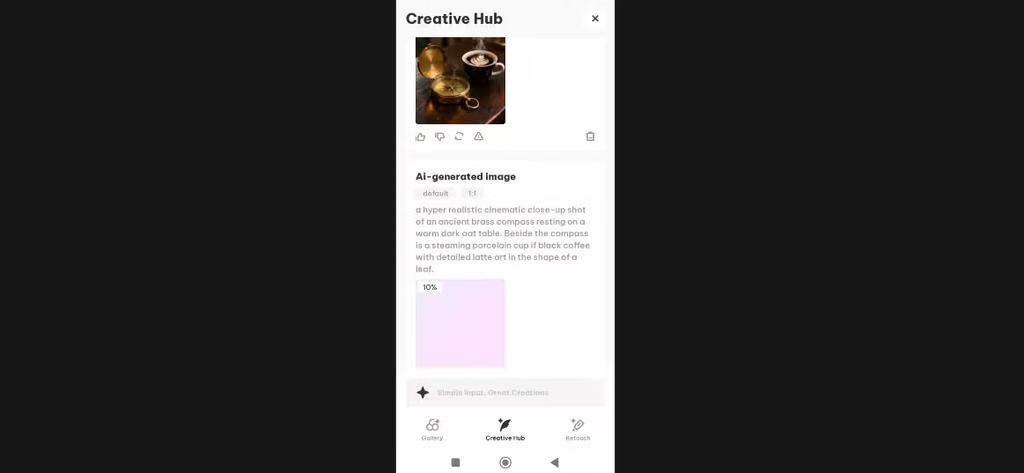
Describe an image, and Seekee generates it in seconds: in theory. For this test, I used a prompt that stressed its understanding of style, lighting, fine detail, spatial positioning, and text rendering.
And when I tested the image generator, it stalled a bit before generating a prompt-adherent image. The progress bar stuck at 10% for a while before producing an output. I’m not sure if that’s a reliability problem or a minor bug.
4. Transcription
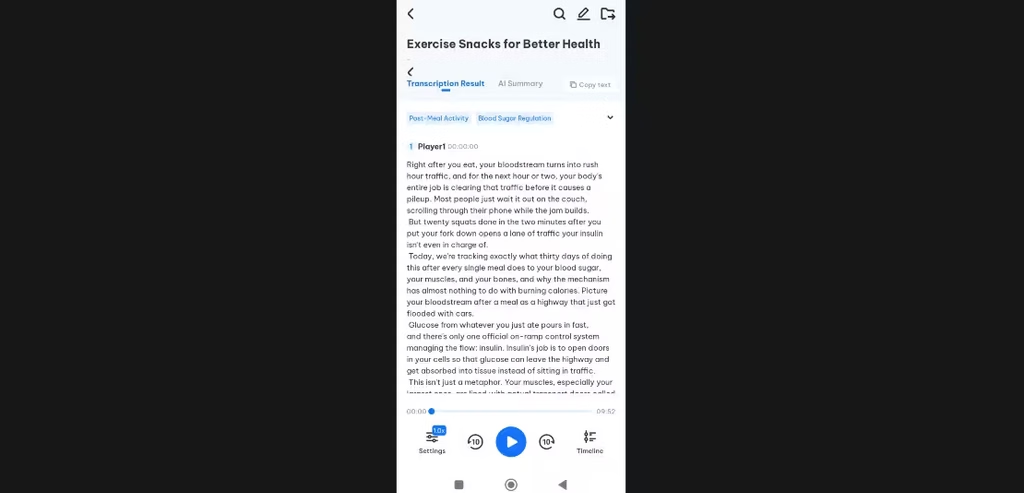
Seekee converts voice recordings, YouTube videos, and live recordings into text, which helps with meeting notes or lecture capture. I transcribed a YouTube video and the output was accurate enough to use without major editing. Because this feature lives inside the same app as your other AI tools, you can transcribe audio, then immediately summarize or translate it, all without exporting a single file elsewhere.
5. AI Study
The learning assistant includes a “Snap & Solve” feature. Photograph a math or science problem, and Seekee returns step-by-step explanations. It also reviews homework, corrects answers, and turns long study material into summaries or mind maps. A handwriting eraser tool even lets students reuse printed practice sheets. For students, this is the feature most worth the subscription.
6. Photo Recognition
Point your camera at an object, plant, animal, or landmark, and Seekee identifies it instantly. This works similarly to Google Lens, and it’s useful for shopping, travel, or general curiosity. No manual search is needed.
It was able to identify my phone charger as an iPhone charger, linking it to various Apple products. Still, I wanted to stretch Seekee further, so I took a picture of a jacket I had. Seekee actually brought my attention to the fact that below the fur, my jacket was indeed woven. I didn’t know that beforehand.

Other Features
- AI Translate: Translates text, voice, images, and documents across languages including Spanish, Portuguese, Arabic, and Simplified Chinese.
- Academic Search: Helps locate research papers and academic sources directly through the search bar.
- Travel Guide: Suggests nearby attractions and destinations, and pairs well with Photo Recognition for on-the-ground exploration.
- AI Solve Problems: Handles math and logic problems beyond the study-specific Snap & Solve tool, useful for quick calculations while browsing.
Is Seekee Worth it?
Seekee AI won’t outperform ChatGPT at writing, Midjourney at images, or Perplexity at research depth. It isn’t trying to win any single category. It’s providing convenience instead, and the math backs that up: subscribing separately to ChatGPT Plus ($20/month), Perplexity Pro ($20/month), and Adobe Acrobat ($12.99/month) runs about $52.99 a month. Seekee Pro costs roughly $8 a month. That’s a savings of nearly $45 a month if even a few of Seekee’s tools replace what you’d otherwise pay for elsewhere.
So is it worth it? In my view, yes: if you’re a student or a casual user who needs “good enough” across search, PDFs, and study help. No, if you’re a professional who depends on best-in-class writing, image generation, or research tools; the depth just isn’t there yet, and the image generator’s outright failure during testing is a real strike against it. Given the generous free tier, it costs nothing to test that judgment yourself before paying for anything.