


Submagic launched in May 2023, founded by French entrepreneurs David Zitoun and Tsi-fei Chan.
It grew fast by solving a specific, painful problem: the “Hormozi-style” animated captions that dominated TikTok and Reels in 2023 and 2024 required hours of manual keyframing in After Effects or a $50-per-clip freelance editor.
Submagic automated the entire process, and creators noticed. The platform now has over 4 million users and has become synonymous with short-form caption styling.
I tested Submagic across two weeks, processing 18 videos through the platform: 10 talking-head clips recorded on my phone (1 to 4 minutes each), 5 podcast interview highlights, and 3 screen-share tutorial clips.
My starting workflow before Submagic was CapCut for trimming and manual captioning, which took roughly 25 to 40 minutes per clip depending on length.
With Submagic, the same workflow compressed to 3 to 5 minutes per clip. Upload the video, let the AI generate captions, pick a style, review the transcript for errors, remove any flagged silences, and export. That time savings is the entire value proposition.
The caption quality lived up to the hype. On clean audio (studio mic, quiet room), transcription accuracy was 98% or higher across all 18 videos. I needed to correct 2 to 3 words per minute of footage on average, mostly proper nouns and industry jargon.
On noisier audio (phone recording in a coffee shop), accuracy dropped to about 92%, with more filler words misclassified and some sentence boundaries placed incorrectly.
The animated styling, the word-by-word highlighting, the color pops, the smooth transitions between phrases, all looked polished and platform-native without any manual adjustment.
Where Submagic showed its limits was everywhere beyond captions. There’s no timeline editor. You can’t do color grading, multi-track audio mixing, or complex transitions.
The B-roll insertion pulls from a stock library (Storyblocks on Pro and above) and places clips automatically based on keyword matching from your transcript. Sometimes the B-roll choices were spot-on (footage of a laptop when I mentioned “working remotely”).
Sometimes they were absurd (footage of a sunset when I mentioned “the end of Q3”). You can swap individual B-roll clips manually, but there’s no creative control over timing or placement beyond accept/reject.
For creators who post short-form content regularly and want professional captions without learning After Effects, Submagic delivers exactly what it promises. If you need a full video editor, this isn’t it. It’s a captioning and formatting engine, not an editing suite.
Key Features
AI Auto Captions: The Core Submagic Feature
Upload a video and Submagic transcribes it, syncs word-level timing, and applies animated caption styling in about 60 to 90 seconds for a 2-minute clip.
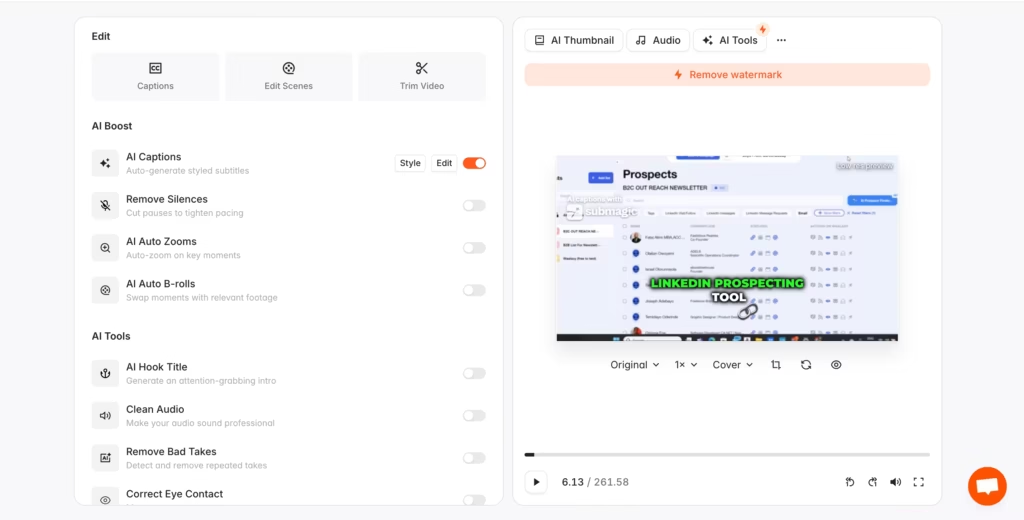
You choose from dozens of caption presets ranging from bold Hormozi-style highlighting to cleaner, minimal designs. Each preset controls font, color, animation speed, emoji insertion, and word emphasis.
I tested 8 different caption styles across the same 90-second clip. The “Viral” preset (bold white text with color-highlighted keywords) looked the most TikTok-native. The “Clean” preset (smaller font, no emoji, no color pops) worked better for LinkedIn-style professional content.
The “Neon” preset looked eye-catching but felt over-designed for talking-head content. After two weeks of posting, I settled on rotating between 3 styles to avoid visual repetition, which is a real concern.
Multiple reviewers note that after a few weeks of daily posting, the caption presets start to feel samey.
Caption accuracy on English content with a clear microphone was consistently 98% or higher. Spanish content (I tested one clip in Castilian Spanish) hit about 94%. The translation feature (Pro and above) converted my English captions to French and Portuguese.
The French translation was functionally accurate but read like a direct translation rather than natural spoken French. Good enough for accessibility. Not good enough for a native French audience expecting idiomatic phrasing.
Silence and Filler Word Removal (Pro+)
This feature scans your video, identifies pauses longer than a configurable threshold and filler words (“um,” “uh,” “like,” “you know”), and removes them automatically.
The result is a tighter, faster-paced video that feels more polished without manual jump-cut editing.
I tested this on a 4-minute unscripted talking-head video that had about 45 seconds of dead air and filler words. Submagic identified and flagged 23 cuts.
I reviewed each one in the text-based editor (you read the transcript and toggle cuts on or off), approved 20, and rejected 3 where the cut would have broken the sentence flow.
The final video came out at 3 minutes 12 seconds and felt significantly more professional. This feature alone saves 15 to 20 minutes per video compared to doing it manually in CapCut or Premiere.
AI B-Roll Insertion
Submagic analyzes your transcript and automatically inserts relevant stock footage at keyword-matched moments. On Pro and above, the B-roll comes from Storyblocks (a premium stock library).
On Starter, you get free B-roll from a smaller library.
The quality of automatic B-roll selection was hit-or-miss in my testing. Out of 10 auto-inserted clips across 3 videos, 6 were contextually appropriate and usable without changes. 4 were generic or mismatched.
The tool picks based on transcript keywords, not semantic meaning, so “conversion rate” might trigger footage of currency rather than a marketing dashboard.
You can swap any clip manually from the Storyblocks library, which takes about 30 seconds per replacement. It’s faster than sourcing and inserting B-roll from scratch, but not the fully automated experience the marketing suggests.
Eye Contact Correction (Pro+)
This AI feature adjusts your eye line so it appears you’re looking directly at the camera, even when you were reading notes or looking at a teleprompter off to the side.
I tested it on a clip where I was clearly reading from a script taped below my webcam. The correction was subtle but effective. My gaze shifted from “looking slightly down” to “looking at the viewer.”
The effect wasn’t perfect (there’s a slight uncanny quality if you look closely), but on a phone screen at normal viewing distance, it’s convincing.
Magic Clips: Long-to-Short Repurposing (Paid Add-On)
Magic Clips scans a longer video (podcast episode, webinar, interview), identifies the strongest moments based on engagement signals (hooks, emotional peaks, clear statements), and packages them as multiple ready-to-post short clips with captions already applied.
This is the feature most creators expect to be included with their subscription. It’s not.
Magic Clips costs $19/month extra on monthly billing or $12/month on annual, on top of whatever base plan you’re already paying.
That means a Pro user paying $23/month annual adds $12/month for Magic Clips, bringing the real cost to $35/month for the full feature set.
For creators who already have their short-form clips ready and just need captioning, this doesn’t matter. For podcasters and long-form creators who signed up specifically for repurposing, the add-on pricing changes the value calculation significantly.
Direct Social Publishing (Pro+)
Connect your TikTok, Instagram, and YouTube accounts via OAuth, schedule a publish date and time, and Submagic handles the upload. I connected my TikTok account and scheduled 3 posts across a week.
All 3 published on time without issues.
The scheduling interface is simple (date, time, caption text) and doesn’t try to be a full social media management tool. For creators who just want their clips to go live without manually uploading each one, it works.
Competitors Comparison
| Feature | Submagic | Opus Clip | Captions.ai | CapCut | Descript |
| Starting Price | $19/mo | $15/mo | $24.99/mo | $19.99/mo | $24/mo |
| Free Plan | Yes (3 videos, watermark) | Yes (limited) | Yes (limited) | Yes (full, watermark on some) | Yes (limited) |
| Caption Quality | Best in class (animated, word-level) | Good | Good (AI avatar integration) | Good (basic styling) | Good (text-based editing) |
| Long-to-Short Repurposing | Add-on ($12-19/mo extra) | Included in base plan | Yes | Yes (limited) | Yes |
| Silence/Filler Removal | Yes (Pro+) | Yes | Yes | Yes | Yes (text-based) |
| Eye Contact Correction | Yes (Pro+) | No | Yes | No | No |
| AI B-Roll | Yes (Storyblocks on Pro+) | Yes | Limited | Yes (stock library) | No |
| Direct Social Publishing | Yes (Pro+) | Yes | Yes | Yes | No |
| AI Avatars | No | No | Yes (core feature) | No | No |
| Timeline Editor | No | No | Basic | Yes (full) | Yes (text-based) |
| 4K Export | Business+ only | Yes (paid) | Yes (paid) | Yes (Pro) | Yes (paid) |
| Languages | 48-50 | 20+ | 100+ | 18 | 23 |
| Best For | Animated captions for short-form | Long-to-short repurposing | AI avatars + captions | Free full-featured editing | Text-based video editing |