


AI workflows depend on nonstop access to storage. When it fails or becomes corrupted, the impact is far more serious than a single file and can interrupt entire pipelines.
Hard drive corruption is not unique to AI systems, but automation makes it far more likely. We will explain why AI workflows face higher risk, what causes drive corruption, and how to deal with it when it happens.
Why AI Automation Puts Hard Drives Under Stress
AI automation can stress hard drives and introduce new security gaps.
Pipelines handle massive data volumes and put far more pressure on storage than traditional systems. Several factors drive this level of stress in AI workflows:
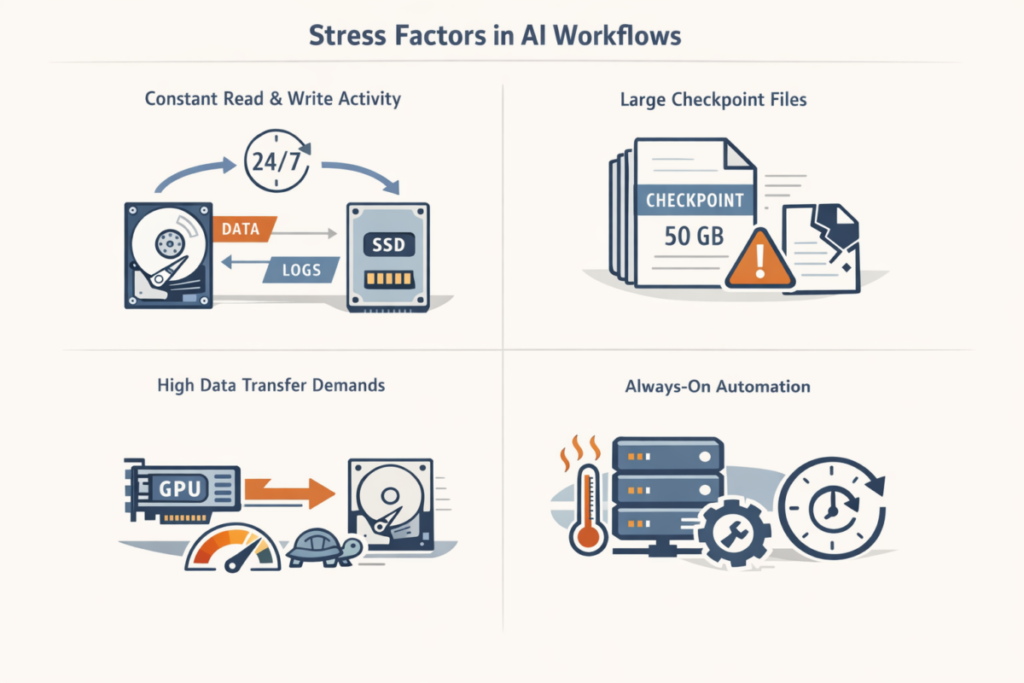
- One major source of stress is constant read and write activity, because AI systems read input data and write results, logs, and intermediate files almost nonstop. Unlike a regular computer that spends long stretches idle, these systems keep disks busy around the clock. Hard drives stay in constant motion. SSDs absorb nonstop writes, which steadily eat into a finite write budget.
- Large checkpoint files add another layer of stress. AI workflows save them often to preserve training state. Each file can reach several gigabytes. Writing them hits storage hard and fast. A checkpoint must land on disk in full. Any interruption leaves it half-written or broken.
- AI workflows also create pressure through high data transfer speed demands, since modern GPUs process data extremely fast and expect storage to keep up. When storage cannot supply data quickly enough, GPUs remain idle and overall performance drops. Older storage setups, especially single hard drives, often cannot meet these throughput requirements, which is why AI workloads need high-performance SSDs, NVMe drives, or distributed storage.
- Always-on automation makes this worse. Monitoring never stops. Decisions run automatically. Models retrain again and again and storage gets no downtime. Heat builds. Wear accelerates. HDD mechanics suffer. SSD memory cells degrade faster. If you want a real-world gut check on how drives behave at scale, Backblaze’s quarterly drive stats are a helpful reference point. Storage that performs fine under lighter or occasional use often turns into a weak link under AI load.
Once performance slips or a drive starts failing, the whole pipeline can slow, crash, or lose data. According to our analysts, this is where data backup and recovery planning stop being optional.
Common Causes of Hard Drive Corruption in AI Systems
Now, we will start by looking at how and why drives become corrupted in real systems. Drive corruption usually means unreadable data or a broken file system structure. AI workflows do not invent new failure modes. They push existing ones to the surface much faster through constant, intensive disk activity. The table below summarizes the most common causes of hard drive corruption and why they appear in AI environments.
| Cause of corruption | What happens on the drive | Why AI workflows make it worse |
| Mechanical failures (HDDs) | Read/write heads misalign, bad sectors appear, data becomes unreadable | Constant parallel reads during training increase vibration and wear |
| Hardware faults (SSDs) | Failing memory cells or controller errors corrupt blocks | Heavy I/O load expose weak cells faster |
| Power interruptions | Files or file system metadata remain partially written | Large checkpoints and logs write continuously, often without pause |
| Unsafe shutdowns | Incomplete writes and inconsistent file system state | Automated pipelines may run without UPS or manual oversight |
| File system stress | Metadata corruption, missing files, broken directories | Parallel writes, massive file counts, and high concurrency are common |
| Software bugs | Incorrect data written to disk | Custom scripts, fast-changing libraries, and multithreaded loaders raise risk |
| Disk space exhaustion | Truncated or half-written files | Logs, checkpoints, and temporary data grow rapidly |
| Overheating | Read/write errors increase, drives throttle or fail mid-write | GPUs and CPUs raise ambient temperatures in dense racks |
| Aging and wear-out | Rising error rates, unreadable sectors | Constant I/O accelerates HDD wear and SSD write exhaustion |
AI workflows run into the same corruption risks as any other system, but the intensity raises the cost of failure. HDDs usually speak up first. SMART counters climb. Reallocated sectors appear. Clicking starts. Sector damage often spreads one block at a time. SSDs behave differently. Failure can arrive without much notice, especially on consumer models where controller faults end the drive outright.
Backup and Data Recovery Strategies for AI Workflows
Data corruption shows up often in AI systems that move large datasets and run without pause. With the right response, teams avoid lasting damage and bring pipelines back online. The speed at which an AI pipeline resumes operations is typically determined by a dependable backup plan and prompt recovery measures.
Backup Strategy for AI Systems
Backups remain the first line of protection and one of the most important components of AI systems. Many companies now use different backup software to protect their data. Training datasets, model weights, checkpoints, and configuration files often represent weeks of compute time. And data loss may set everything back.
We recommend choosing backups for your project needs and scope. For example, regular, versioned backups allow teams to restore a stable state without restarting long training jobs. Snapshot-based backups work well for checkpoints because they preserve progress at specific stages of training rather than only raw input data.
File Recovery Software in AI Environments
We should not forget about data recovery. When data corruption or accidental deletion already occurs, file recovery software often becomes the only way to save files back. These tools scan affected drives and restore missing datasets, checkpoints, or logs. In AI workflows, recovery software is commonly used when drives suddenly turn unreadable or start throwing I/O errors, the same situations where the best recovery apps handle complex storage failures. Timing makes a real difference. When automated systems keep writing to disk, recoverable sectors disappear quickly and success rates drop.
Fix Corrupted Hard Drives After Data Is Safe
After teams recover important data, they can move on to fixing corrupted hard drive structures to see whether the drive still belongs in the system. File system repair, integrity checks, and disk diagnostics help separate logical damage from early signs of hardware failure. In practice, AI teams usually follow a recovery-first approach when they fix corrupted hard drives. This order lowers risk and avoids turning a recoverable issue into permanent data loss.
Final Thoughts
Teams get the best outcomes when backups run on a fixed schedule, drive health metrics stay under constant watch, and early warning signs trigger action fast. Delay hurts. Once corruption appears, we think the safest move is simple: recover critical data first, stop all writes, then isolate the drive. Repair or replacement comes later, based on how bad the damage looks. Sometimes the answer is obvious. Sometimes it is not.
Drive corruption shows up often in AI workflows, especially in systems that never pause and push large data volumes hour after hour. Heavy I/O loads stack up. Checkpoints land constantly. Automation keeps everything moving, even when storage starts to crack. Weak spots surface earlier than most teams expect. Honestly, far earlier.
FAQ
How to prevent data recovery after a factory reset?
According to our data, factory resets stop being risky when systems isolate important data from the system disk. Datasets and configuration files belong on separate storage or in external backups that automation cannot touch. Snapshots taken before updates or pipeline changes make rollback quick. When restore tests succeed, a reset feels like routine maintenance, not a data recovery event.
Can AI workloads cause hard drives to fail faster than normal systems?
Yes. AI workloads generate sustained read and write activity with very little idle time, which accelerates wear on both HDDs and SSDs. Frequent checkpoint writes, continuous logging, and parallel data access expose weak sectors or failing memory cells much faster than intermittent workloads. Drives that appear stable in traditional setups may degrade quickly once placed under AI load.
What is the single most important part of data recovery?
Speed matters more than anything once data loss appears. The first move is to stop all write activity on the affected storage. Automation keeps logs, checkpoints, and temporary files flowing, and every new write eats into recoverable space. Isolate the drive. Pause workloads. Work from a copy, not the original device. That choice often decides whether recovery tools return usable data or nothing at all.
