

I’ve been wondering why the HeyGen vs InVideo AI debate keeps coming up. I understand they both live in the “AI video” category. But they solve fundamentally different problems.
HeyGen is an AI avatar video platform. You type a script, pick a digital presenter (or clone yourself), and get a talking-head video.
On the other hand, InVideo AI is a prompt-to-video creation platform. You describe a video in plain English, and it builds the entire thing: script, stock footage, voiceover, music, captions, done.
Understanding the difference between these 2 AI video generators will save you from picking the wrong tool, and wasting your budget.
TL;DR
| Feature | HeyGen | InVideo AI |
| Primary Strength | AI avatar talking-head videos | Prompt-to-video with stock footage + AI editing |
| Starting Price | $29/mo ($24/mo annual) | $25/mo ($25/mo annual) |
| Free Plan | 1 video/mo, watermarked, 720p | 10 videos/week, watermarked, 720p |
| AI Avatars | 700+ stock avatars + instant custom digital twins | AI Twins (Express & Pro) + AI Actor library |
| Languages | 175+ with avatar lip-sync translation | 50+ languages for voiceover and avatars |
| Max Video Resolution | Up to 4K (Business plan) | Up to 4K (Max plan) |
| Stock Media Library | Limited – avatar-focused platform | 16M+ premium clips via iStock integration |
| Voice Cloning | Yes (included on paid plans) | Yes (2–5 clones depending on plan) |
| API Access | Yes (separate API plans available) | Yes (Max plan and above) |
| Editing Style | Script editor + timeline | Conversational text prompts (“Magic Box”) |
| Best Platform Fit | Sales outreach, training, product demos | YouTube, TikTok, Instagram Reels, ads |
| G2 Rating | 4.8/5 | 4.5/5 |
How Does HeyGen Create Videos? (5 Steps)
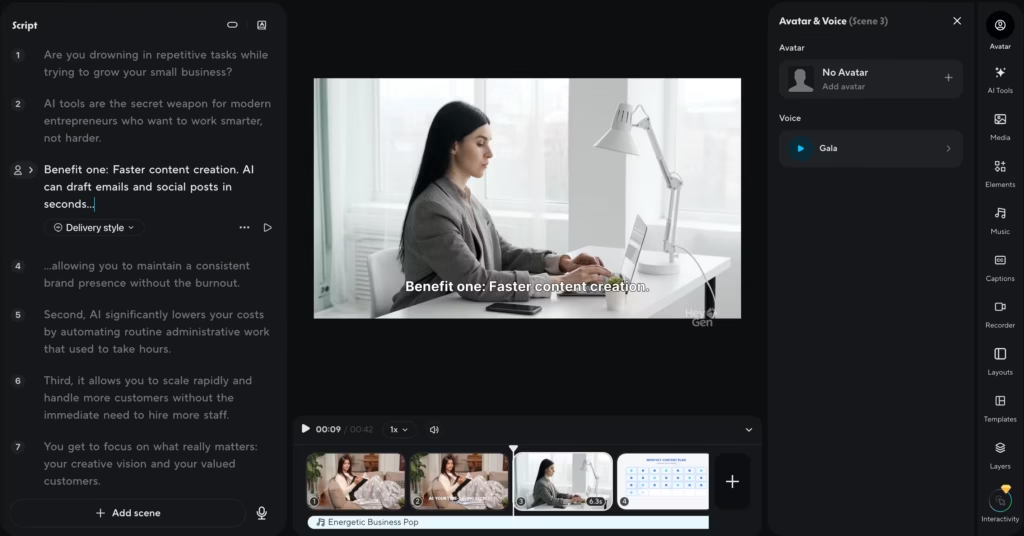
- Write or paste your script. You can type it from scratch, paste an existing script, or use the built-in ChatGPT-powered script writer to generate one.
- Pick your avatar. Browse 700+ stock avatars or create an “Instant Avatar” by recording a short selfie video. HeyGen clones your face and voice into a digital presenter.
- Select a voice and language. Choose from hundreds of AI voices spanning 175+ languages. HeyGen’s lip-sync translation means your avatar’s mouth movements match the target language.
- Customize the scene. Add backgrounds, screen recordings, text overlays, images, or brand assets using the built-in editor.
- Generate and export. Hit generate. HeyGen renders your video in a few minutes. Export at up to 1080p on Creator, or 4K on Business plans.
How Does InVideo AI Create Videos? (4 Steps)
- Describe your video. Type a plain-English prompt like “Create a 90-second YouTube Short about the benefits of cold showers for men in their 30s.” You can also paste a blog URL or upload a PDF and let InVideo extract the key points.
- AI builds the first draft. InVideo writes a script, selects matching stock footage from its 16M+ clip library, layers in voiceover, background music, and captions
- Edit with text commands. Don’t like the clip at 0:22? Tell the AI: “Replace the clip at 22 seconds with a close-up of someone jogging.” Want a different tone? Type “Make the voiceover more energetic.” This conversational editing tool is called “Magic Box” and it’s genuinely fast.
- Export. Download in up to 1080p on Plus or 4K on Max. Post directly to YouTube, TikTok, or Instagram
HeyGen vs InVideo AI Pricing
HeyGen Pricing
| Plan | Price | What You Get |
| Free | $0 | 1 videos/mo, watermark, 720p, 1 Custom Digital Twin, 500+ stock photo avatars, videos up to 3 min |
| Creator | $29/mo ($24 annual) | Unlimited videos, 1080p, 1 Custom Digital Twin, 700+ stock video avatars, voice cloning, no watermark |
| Pro | $99/mo ($79 annual) | Everything in Creator + 10x more premium usage, 4K export, faster processing, translation script editing |
| Business | $149/mo (extra seats $20/seat/mo) | Everything in Creator + 5 Custom Digital Twins, 4K export, team workspace, SCORM export, LMS integrations, videos up to 60 min |
| Enterprise | Custom | Unlimited videos and avatars, SSO, dedicated success manager, fastest processing |
InVideo AI Pricing
| Plan | Price | What You Get |
| Free | $0 | Limited credits, watermark, 720p, standard media only |
| Plus | $25/mo (~$25 annual) | 100 credits (400 Nano banana pro, 800 Nano banana 2 generations), 1080p, 100 iStock assets, 4 AI avatars and 4 clones, 20 GB storage, no watermark |
| Max | $100/mo (~$60 annual) | 400 credits (1600 Nano banana pro, 3200 Nano banana 2 generations), 200 iStock assets, 16 AI avatars voice clones, 100 GB storage, API access |
| Generative | $250/mo(~$200 annual) | 1000 credits( 4000 Nano banana pro, 8000 Nano banana 2 generations), 40 AI avatars & voice clones, 1000 iStock assets, 4K export |
| Team | $500/mo (~$400 annual) | 1600 credits, 200 iStock, 80GB storage, 20 AI avatars & voice clones per seat |
With HeyGen, “unlimited videos” on the Creator plan does not mean unlimited access to premium features like Avatar IV or lip-sync translation – those burn through your 200 monthly premium credits, which don’t roll over.
I generated 12 videos on the Creator plan in one week: six standard avatar videos (no credit cost) and six using Avatar IV with lip-sync translation. The six premium videos ate roughly 140 of my 200 credits.
By day 9, I was rationing. If you stick to standard avatars and skip translation, Creator is generous. The moment you lean on Avatar IV or multilingual features regularly, expect to either buy credit add-on packs at $15/300 credits or upgrade to Pro at $99/mo.
With InVideo AI, video minutes and credits are two separate pools, and they drain at very different speeds. On the Plus plan ($25/mo), I generated 20 videos over three weeks: 14 at Basic quality and 6 at Pro/Ultra. The 14 Basic videos barely touched my 10 monthly credits.
But those 6 Pro and Ultra videos wiped out what was left by day 8. My video minutes were fine, I still had 30+ minutes available, but zero credits meant I couldn’t generate anything using higher-quality AI models for the rest of the cycle.
The $25/mo pricing only holds up if Basic quality covers 80% or more of your output. Don’t just compare sticker prices. Compare what you’ll realistically produce each month.
HeyGen vs Invideo AI Feature Showdown
1. Who Has Better AI Avatars?
HeyGen still leads here. Its library of 700+ stock video avatars and Custom Digital Twin cloning (from a short selfie video) is more mature and polished. The Avatar IV technology produces some of the most realistic digital presenters on the market.
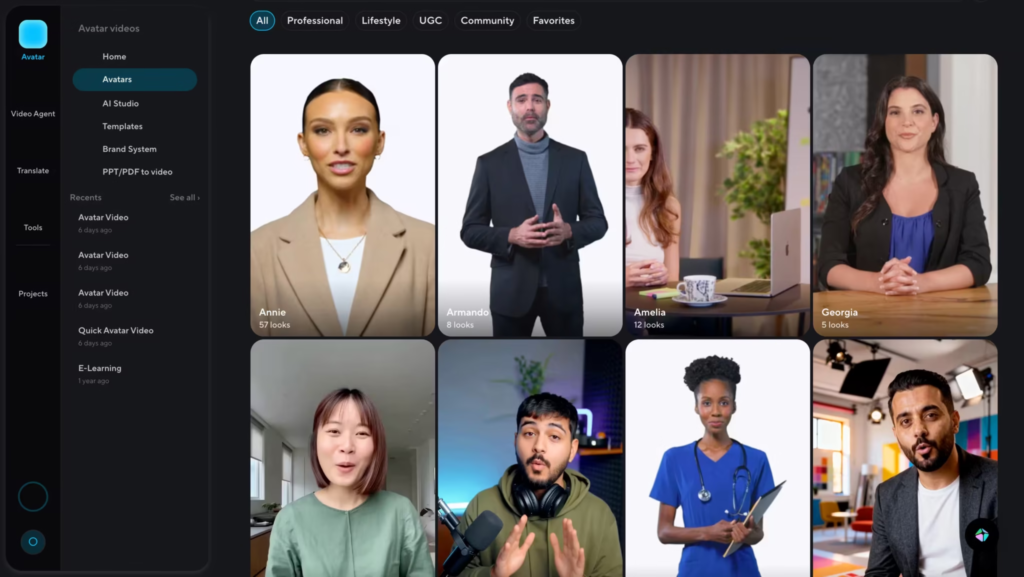
When I tested both platforms with the same script, HeyGen’s avatar held consistent eye contact and matched lip movements almost perfectly, while InVideo AI’s Express clone occasionally drifted on longer sentences.
InVideo AI caught up significantly with AI Twins v4.0, launched in June 2025. You can now create Express clones in under five minutes or submit longer recordings for studio-quality Pro Avatars.
But HeyGen’s avatar ecosystem, especially lip-synced translation across 175+ languages, remains a step ahead for anyone whose primary need is a talking-head presenter.
2. Which Tool Has a Better Stock Media Library?
InVideo AI wins this one hands down. Access to 16M+ premium clips through iStock integration, plus music, images, and templates, gives it a massive advantage for footage-driven videos.
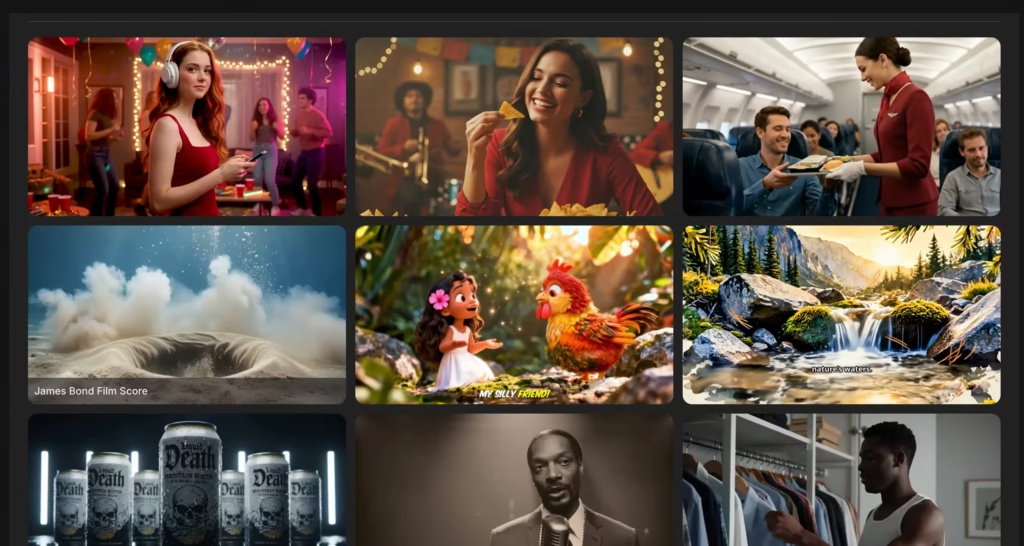
HeyGen’s media library is thinner because it’s built around avatars, not stock content. If your videos rely heavily on B-roll and visuals rather than a talking head, InVideo AI is the clear choice.
3. Which Editing Experience Is Easier for Beginners?
InVideo AI. The conversational “Magic Box” interface, where you type commands like “change subtitle outline color to Blue” feels intuitive even if you’ve never edited a video.
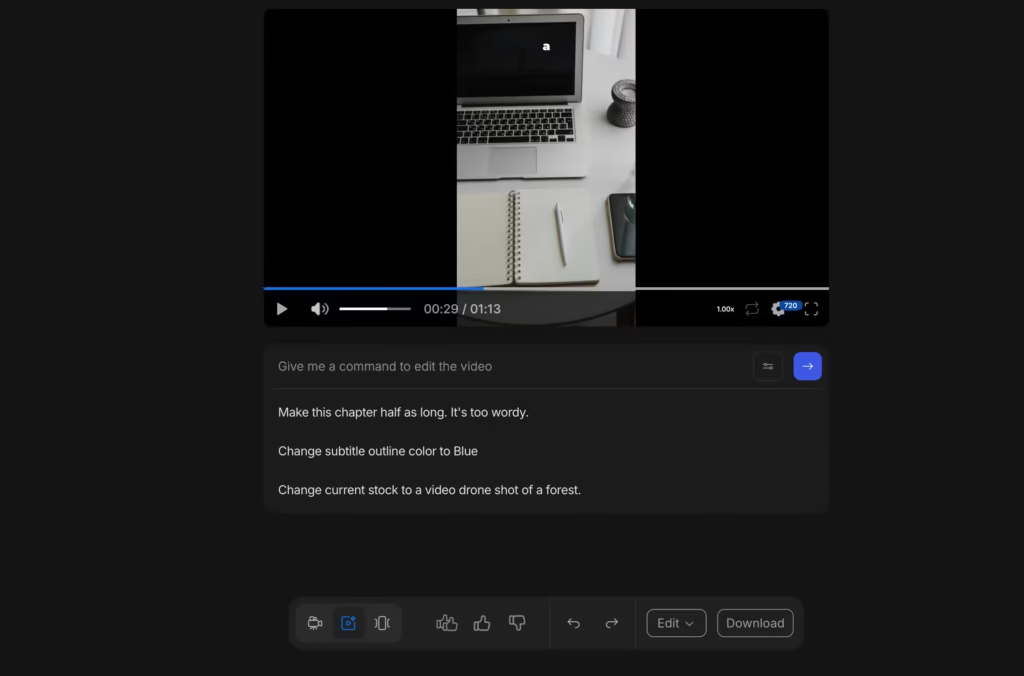
HeyGen’s script-and-timeline editor offers more granular control but has a steeper learning curve.
If you’re comfortable with tools like Canva or basic video editors, HeyGen won’t intimidate you. But for true beginners? InVideo AI is friendlier.
4. Who Handles Multilingual Video Better?
HeyGen. And it’s not close. Its lip-sync translation across 175+ languages means your avatar’s mouth actually moves to match the translated audio.
That’s a huge deal for global marketing and training content. InVideo AI supports voiceover in 50+ languages, and its AI Twins can speak in multiple languages, but the overall multilingual infrastructure, especially for corporate localization, favors HeyGen.
5. Which Platform Has Better Integrations?
HeyGen connects to Zapier, HubSpot, and Salesforce, with a robust API built for sales automation workflows. InVideo AI offers API access on Max plans and above, with social media publishing integrations. For sales and CRM workflows, HeyGen has the edge. For social media publishing pipelines, InVideo AI is better equipped.
So, What’s The Verdict?
After testing both platforms extensively, here’s what I’ll say.
If you’re a solo creator, social media manager, or small business owner who needs 5–15 videos a month for YouTube, TikTok, or Instagram, pick InVideo AI.
It’s faster from idea to finished video, the stock footage library removes the need to source your own visuals, and the Plus plan at $25/mo covers most workflows as long as you stay on Basic quality.
I produced a week’s worth of social content in a single afternoon. No other tool I’ve tested matches that speed at this price.
If you’re on a sales team, in L&D, or running multilingual marketing, pick HeyGen. Nothing else comes close on avatar realism, and the lip-synced translation across 175+ languages is a genuine competitive moat.
A single Custom Digital Twin can replace dozens of recording sessions. The Creator plan at $29/mo works if you use standard avatars most of the time, but budget for Pro ($99/mo) if Avatar IV and translation are central to your workflow.
If you’re an agency producing both avatar-led training content and high-volume social videos, use both. I’m not being diplomatic here. They genuinely cover different ground with almost zero overlap. HeyGen handles the talking-head content your clients need for onboarding and sales enablement.
InVideo AI handles the scroll-stopping social clips. Together, you’re spending under $130/mo for a production pipeline that would have cost thousands two years ago.
FAQs
1. Can I use HeyGen and InVideo AI together?
Yes. Many teams pair HeyGen for avatar-based content (training, sales) with InVideo AI for stock-footage social content. They solve different problems, so using both covers more ground than either tool alone.
2. Does InVideo AI have AI avatars now?
Yes. InVideo AI launched AI Twins v4.0 in mid-2025. You can create Express clones in under five minutes from a 60-second recording, or submit longer footage for Pro Avatars with higher realism. It also offers a library of pre-made AI Actors.
3. Does HeyGen look realistic?
HeyGen’s Avatar IV technology is among the most realistic in the AI video space as of 2026. Lip sync and facial expressions are impressive, especially at 1080p and above. That said, some subtle micro-movements can still look slightly off. For sales emails, training videos, and social content, the quality is more than good enough. For broadcast TV? Not quite there yet.
4. Is InVideo AI free?
There’s a free plan that lets you create 10 videos per week. But exports are watermarked and capped at 720p with limited media access. For any professional use, you’ll need at least the Plus plan at $28/month, which removes the watermark and unlocks 1080p exports.
5. Which is cheaper – HeyGen or InVideo AI?
At the entry level, they’re close – HeyGen Creator is $29/mo and InVideo AI Plus is $25/mo. But InVideo AI offers more volume per dollar for footage-based videos, especially at Basic generation quality.
HeyGen’s premium credit system can burn through budget quickly if you lean on features like Avatar IV or lip-sync translation. For raw cost-per-video, InVideo AI is typically the more affordable option.
6. Can HeyGen clone my voice and face?
Yes. HeyGen’s Instant Avatar feature creates a digital clone of your face and voice from a short selfie-style video recording. The clone can then deliver any script in any of HeyGen’s 175+ supported languages, with lip movements matched to the target language.
