

Invideo AI is a video creation tool that generates videos from prompts. It’s comparable to Runway ML, Synthesia, and HeyGen.
Like most other tools, it has a free plan. However, the free plan only provides a glimpse into the tool’s capabilities; the more exciting features are paywalled.
In this article, we’ll explore Invideo AI’s pricing structure, plans, and best use case scenarios.
What’s Invideo AI?
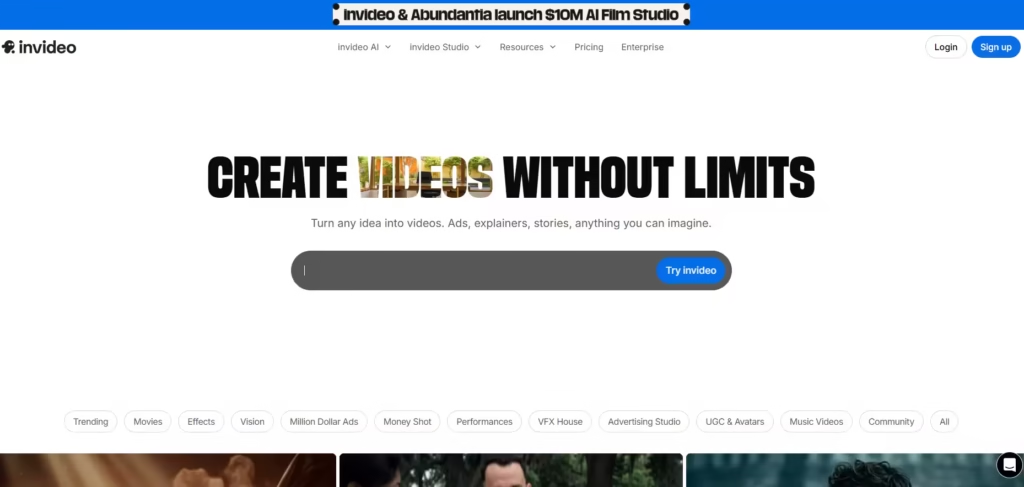
Invideo AI is an AI tool that generates complete videos from text prompts. The text prompt serves as the basis; it provides the script, voiceover, and transitions. It also directs the choice of visuals and music.
The simplicity afforded by this creation process makes video production accessible to anyone, even those without editing skills. Content creators, marketers, educators, and small businesses are the primary target audience, but also anyone who wants to put out videos online.
Also read: Invideo AI Review: Can It Really Make Videos in Minutes?
Overview of Invideo AI Pricing
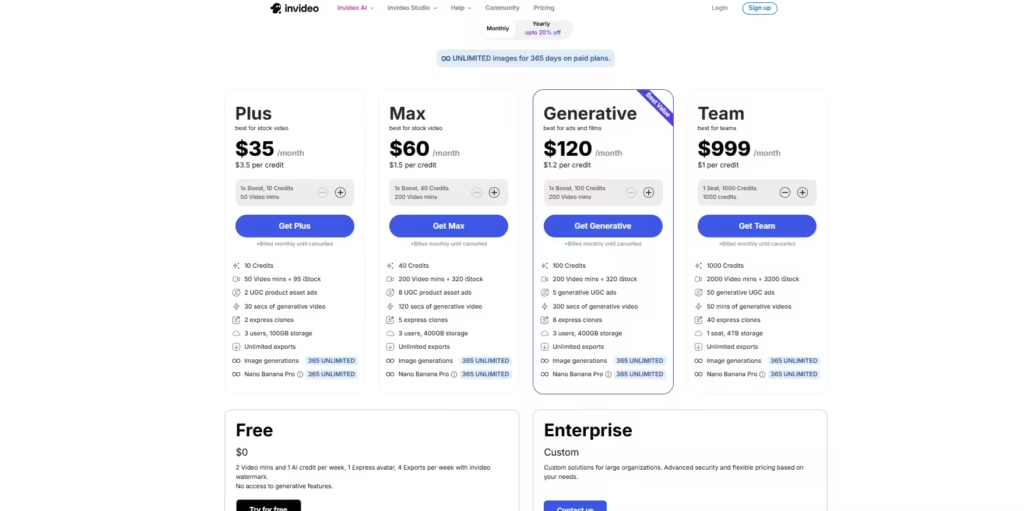
1. Plus:
- Best for stock video
- 10 credits, which translates to 50 minutes of video time.
- 95 iStock digital media
- 30 seconds of generative video and 2 express clones to be used for digital avatars and voice cloning.
- Unlimited exports of completed videos.
- Costs $35/month, billed monthly or $28/month, billed yearly.
- For the first 365 days, this plan also provides unlimited image generation and access to Nano banana pro.
2. Max:
- Best for stock video
- $60/month billed monthly or $50/month billed yearly.
- 40 credits per month ($1.5 per credit) for 200 video minutes.
- 320 iStock assets.
- It includes 120 seconds of generative AI video
- 5 express clones for digital avatars or voice profiles.
- Allows 3 users and 400GB storage.
- Unlimited exports.
3. Generative:
- It costs $120 per month (billed monthly)
- 100 credits per month for 200 video minutes.
- 300 seconds (5 minutes) of generative video per month.
- Includes 5 generative UGC ads, specifically for high-conversion social media campaigns.
- Access to 320 iStock assets
- Allows 3 users and 400GB of storage.
4. Team
- Costs $899 per month (0.90/credit) or $10,788 per year.
- 1,000 credits per month for 2,000 minutes of video time.
- 50 minutes generative video per month
- 3200 iStock assets
- 50 generative UGC product ads for massive A/B testing and multi-client campaigns.
- 40 express clones
- 4TB of storage
5. Enterprise
- Custom features and pricing.
How InVideo AI Credits Work
InVideo AI uses a system that separates AI credits from video minutes. Credits are mainly used for generative AI features. When Invideo is tasked with creating a video from a prompt, it consumes credits. Higher complexity tasks also use credits.
Video minutes, however, are counted separately from credits. It is the total amount of finished video allowed for export each month. For example, if a plan includes 50 video minutes, then the user can export up to 50 minutes of completed video content during that billing cycle, regardless of the number of clips or projects that were created.
Some iStock assets also consume credits because InVideo AI integrates premium stock media libraries. Therefore, using certain premium videos, images, or other assets may deduct credit. Users need to consider a plan that provides a good balance of credits and video minutes, streamlined to the intended use cases.
Plan and Best Use Case Scenario
The right plan depends on production volume and the type of videos (finding existing footage or generating new scenes from scratch). But generally;
1. Plus
- Ideal for users needing stock video content.
- Best for social media managers and YouTubers who need high-quality stock footage to support narrations.
- The user makes about 1-2 videos per week, where the AI acts as a search engine to find the perfect iStock clips to match the script.
- It’s the most affordable way to remove the watermark and get commercial rights.
2. Max
- Ideal for social media active content creators and small businesses.
- The user needs to produce 4-5 videos per week, needs more storage to keep project drafts alive, and more voice clones to maintain a consistent brand identity.
- Max is a significant jump to 320 iStock assets and 5 voice clones. This is a “sweet spot” for someone whose brand relies on a recognizable “voice” and visual variety.
- It is a good balance of cost and resources.
3. Generative
- Best for marketers and creators who want to build visuals that don’t exist in stock libraries.
- The ideal user needs to create innovative ads and short films that require custom cinematic scenes. Stock footage feels too “generic.”
- For very creative and highly-converting UGC (User-Generated Content) style ads.
4. Teams
- Full-scale marketing agencies, corporate L&D (Learning & Development) departments, and media houses would prefer the Teams plan.
- The ideal user manages dozens of clients or internal departments. They need to create 50+ videos a month, store massive amounts of raw 4K footage (up to 4TB), and have a library of 40 different voice clones for various brand ambassadors.
- Teams plan offers the lowest cost per credit ($0.90) and the most specialized tools for team collaboration.
InVideo AI Pricing: Pros and Cons
Pros
- There are multiple pricing tiers
- A free plan available
- It provides AI video generation and a stock media library.
Cons
- Credits can run out quickly
- Generative features are limited on the lower-priced plans
- The cost may increase with usage
Is InVideo AI Value for Money?
InVideo does a good job of producing videos with various applications. But ultimately, the value of Invideo is subject to the unique use case scenario. Creators might find it useful and worth the cost, but anyone who requires highly specific custom videos may find it an unsatisfactory and unnecessary expense.
FAQs
1. Is Invideo AI Worth Paying For?
Yes, it is. It is a video creation tool that can replace a small-scale production team. This is a good bargain for a creator working on a budget.
2. Which Invideo Subscription Is Best?
That is the Max plan. It provides a good balance between custom generative AI capabilities and price.
3. Is There Any 100% Free AI Video Generator?
No AI video generator is 100% free. Video generation takes up high compute power and running costs. Therefore, the costs are paid for by customers through subscriptions.
4. Is Invideo AI Fully Free?
Invideo AI isn’t fully free. It has a free plan with limits and paid plans with more extensive allowances and capabilities.
