


Merlin launched in 2021 as a simple ChatGPT Chrome extension.
Five million users later, it’s grown into something broader: a multi-platform AI workspace that spans a Chrome extension (Ctrl+M or Cmd+M to activate on any webpage), a web app (getmerlin.in) with heavier features, and mobile apps for iOS and Android.
The Chrome extension remains the entry point for most users. Press the keyboard shortcut on any website and a sidebar appears with your choice of 20+ AI models.
Ask it to summarize the page, rewrite a paragraph, translate text, draft an email, or generate code. It integrates directly into Gmail (compose and reply with AI), YouTube (one-click video summaries with timestamps), Google Search (AI answers alongside search results), and LinkedIn (draft connection messages and posts).
The web app adds capabilities the extension can’t handle. Projects let you build reusable knowledge bases from Google Drive files, URLs, and YouTube videos.
Upload a PDF, connect a Notion page, or paste a collection of links, and Merlin indexes everything into a searchable context you can query across future conversations.
Crafts generate diagrams, flowcharts, and code from prompts. Analyst Mode runs Python on uploaded CSVs for data analysis without leaving the browser.
I tested Merlin across two weeks as my primary AI tool, replacing ChatGPT Plus and Perplexity Pro. Over that period, I processed roughly 150 queries across research, email drafting, YouTube summarization, social media content, code debugging, and document analysis.
The experience confirmed what other hands-on reviews have found: Merlin is the best value multi-model AI assistant for individual users who need broad coverage at a single price point.
The convenience of pressing Ctrl+M and having GPT-5.2, Claude, or Gemini appear on whatever page I’m already looking at eliminated dozens of tab switches per day.
Where the experience broke down was at the edges. Responses from premium models through Merlin sometimes felt shorter and less detailed than the same models accessed directly. The YouTube summarizer was fast but occasionally shallow, catching main points while missing nuances.
And I hit the fair-use cap on day 11 of a 14-day testing period after heavy Claude Opus usage, which locked me out of premium models for the remaining 3 days of my billing cycle.
For moderate daily use across multiple models, Merlin delivers genuine value at $19/month. For power users who push a single model hard (writing a book chapter in Claude, running extended coding sessions in GPT-5.2), the fair-use cap will eventually interrupt your workflow.
Key Features
Multi-Model AI Chat on Any Website
The core feature. Press Ctrl+M (Windows) or Cmd+M (Mac) on any webpage and a sidebar opens with access to 20+ AI models.
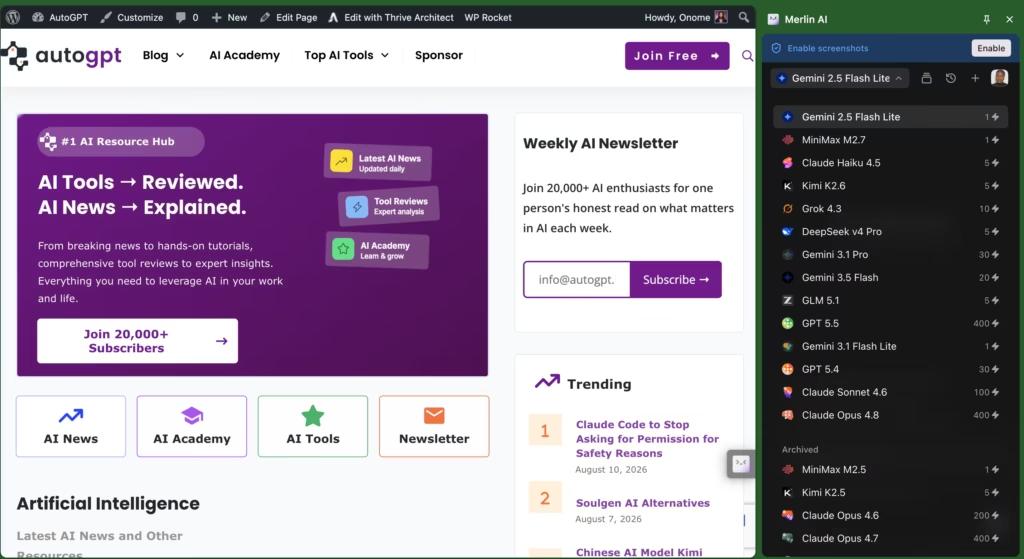
Switch between GPT-5.2, Claude Opus 4.6, Gemini 3.0 Pro, Grok 4.1, Llama 3.1, DeepSeek V3, and Mistral without opening new tabs. Each model retains its own conversation context.
I compared the same query (“explain the implications of the EU AI Act for SaaS companies”) across GPT-5.2, Claude Opus, and Gemini through Merlin. All three returned substantive answers within 4 to 8 seconds.
The responses were slightly shorter than what I’d get accessing each model directly (roughly 15 to 20% shorter on average), which suggests Merlin may apply output length limits to manage API costs.
For quick research and drafting, the difference was negligible. For deep analysis requiring long, detailed responses, I noticed it.
Gmail and Email Integration
Merlin sits inside your Gmail compose and reply windows. Click the Merlin icon and it drafts responses, rewrites messages, adjusts tone (formal, casual, friendly), and generates emails from short instructions.
I tested it on 10 email drafts across professional and casual contexts. The professional emails were polished and ready to send with minor tweaks.
The casual emails needed more editing because the AI defaulted to overly formal language even when I selected “casual” tone.
YouTube Video Summarization
Paste a YouTube URL or open any video, and Merlin generates a timestamped summary.

For a 45-minute podcast episode, I got a structured summary with 8 key points and clickable timestamps in about 12 seconds. The summary captured the main arguments accurately but missed two important counterpoints that the guest raised late in the episode.
For skimming content quickly, it works well. For detailed research where nuances matter, read the full transcript.
Projects: Reusable Knowledge Bases
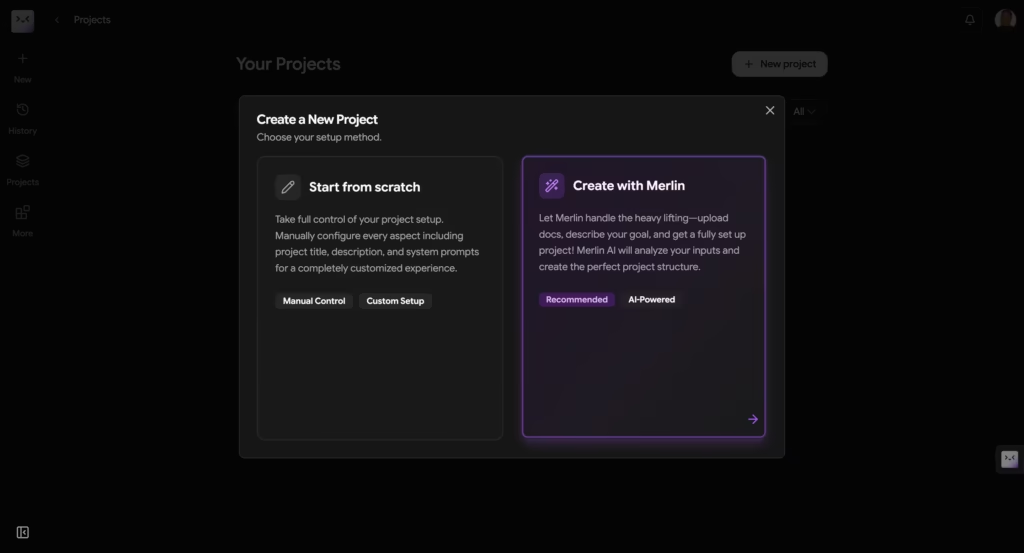
Available on the web app (getmerlin.in), Projects let you upload documents, connect Google Drive files, paste URLs, and add YouTube videos into a searchable knowledge base.
Future conversations can draw from this context, which means you don’t have to re-explain your background, company, or project details in every new chat.
I created a Project with 5 PDF research papers and 3 web articles about AI in nutrition. Merlin indexed everything in about 90 seconds.
When I asked follow-up questions referencing specific papers, the AI correctly identified the source and pulled relevant data points. This feature transforms Merlin from a one-off chat tool into something closer to a research workspace.
Crafts: Diagrams and Visualizations
Type a prompt and Merlin generates flowcharts, mind maps, org charts, and other diagrams. I tested “create a flowchart for a content approval workflow with 5 stages” and got a clean, editable diagram in about 8 seconds.
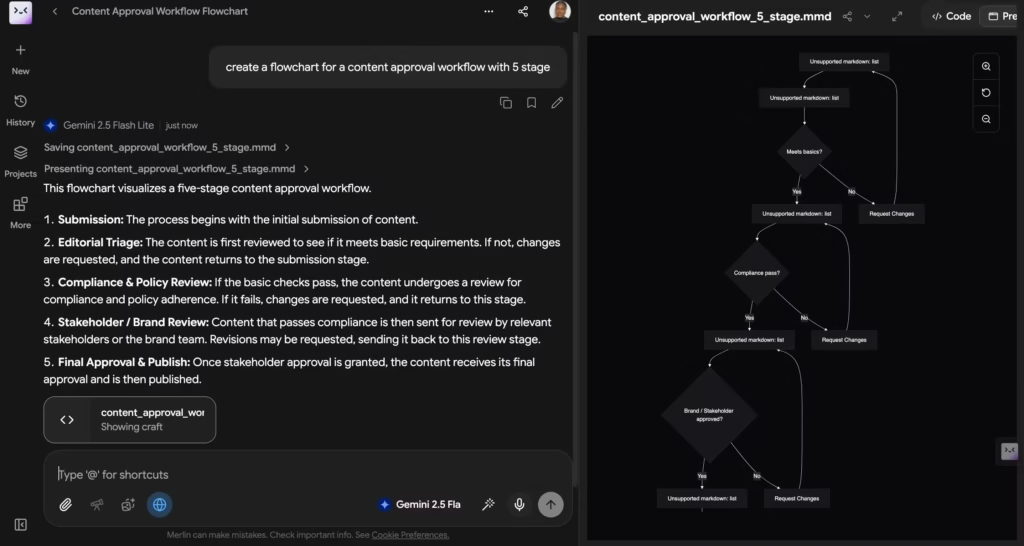
The output was basic but structurally correct. For quick visualizations during meetings or brainstorming, it saves the trip to Miro or Lucidchart.
Analyst Mode: Python on CSVs
Upload a CSV file and Merlin runs Python analysis on it without any local setup. I uploaded a 2,000-row marketing dataset and asked for a monthly revenue trend chart.
The AI wrote the Python script, executed it, and returned a clean chart in about 15 seconds. For non-technical users who need data insights without writing code, this is a standout feature.
AI Detector and Plagiarism Checker
Merlin includes a built-in AI content detector that checks whether text was likely AI-generated. It also runs plagiarism checks against web sources.
I tested the detector on 5 AI-written paragraphs and 5 human-written paragraphs. It correctly identified 4 of 5 AI samples and 5 of 5 human samples. No AI detector is 100% accurate, but as a quick gut-check before publishing, it’s useful.
Pricing
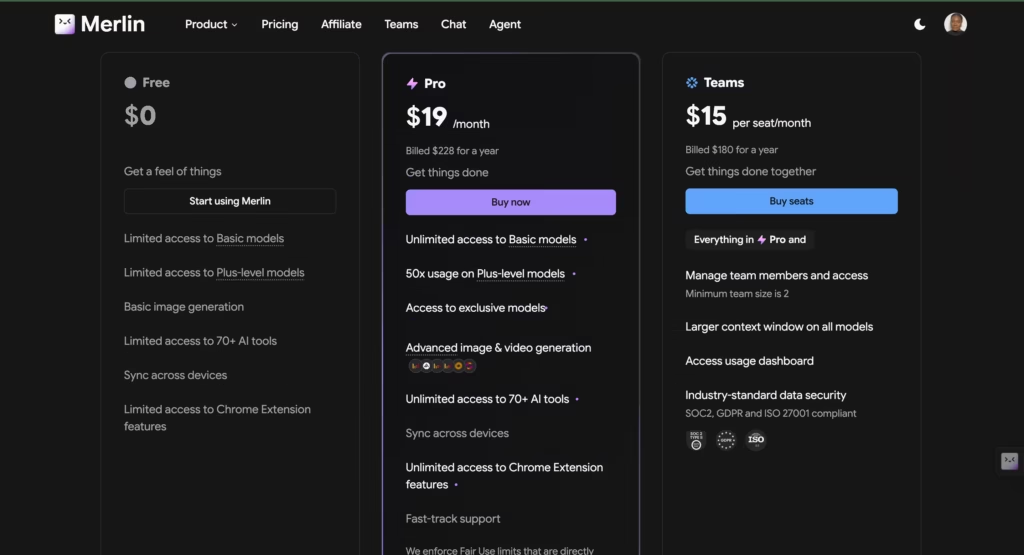
- Free: $0/month for 102 queries per day across basic and some advanced models, no credit card required. Covers casual research, summarization, and writing tasks. Resets daily. Generous compared to competitors, but model access is limited to lighter versions.
- Pro: $19/month monthly or approximately $14/month billed annually. Access to all 20+ premium models (GPT-5.2, Claude Opus 4.6, Gemini 3.0 Pro, Grok 4.1), Projects, Crafts, Analyst Mode, AI image generation, plagiarism checker, AI detector, and priority support.
- Teams: $15/seat/month with a minimum of 2 seats (reduced from 5). Shared account access, team billing, and admin controls. At $15/seat versus ChatGPT Plus at $20/seat, Merlin saves $5 per person per month while offering access to more models.
- Enterprise: Custom pricing for larger organizations. Contact sales.
Now here’s the part Merlin’s marketing doesn’t make obvious. The Pro plan says “unlimited” but enforces a fair-use policy that caps API usage at roughly $100/month ($16/day).
If you exceed that threshold, your account gets paused until the next billing cycle, with the warning: “Your account has been paused since you have exceeded fair usage limits.”
There’s no gradual slowdown or notification before you hit the wall. You’re using Merlin normally, and then suddenly you’re not.
Multiple users on Merlin’s community forum and Reddit have called this pricing structure “misleading” and “unethical.”
Merlin responded by adding a usage tracker on getmerlin.in/chat, which now shows how much of your fair-use allowance you’ve consumed. That’s an improvement over the original opaque system, but the fundamental issue remains: “unlimited” with a $100 ceiling isn’t unlimited.
If you’re a heavy user running complex queries on premium models like GPT-5.2 and Claude Opus, you can realistically exhaust the cap within 1,000 to 2,000 queries per month.
For comparison, ChatGPT Plus at $20/month gives you roughly 80 messages per 3 hours on GPT-4o.
Merlin Pro at $19/month gives you access to more models but with a monthly ceiling that heavy users will hit. Casual and moderate users will never notice the cap. Power users will.
Competitors Comparison
| Feature | Merlin AI | ChatGPT Plus | Poe | MaxAI | Monica AI |
| Starting Price | $19/mo (Pro) | $20/mo | $19.99/mo | $9.99/mo | $9.90/mo |
| Free Plan | Yes (102 queries/day) | Yes (limited GPT-4o) | Yes (limited) | Yes (limited) | Yes (limited) |
| Models Available | 20+ (GPT-5.2, Claude, Gemini, Grok, Llama, DeepSeek) | GPT-4o, GPT-5 | 10+ (GPT-4, Claude, Gemini, Llama) | 10+ (GPT-4o, Claude, Gemini) | 10+ (GPT-4o, Claude, Gemini) |
| Chrome Extension | Yes (Ctrl+M sidebar) | No (web-only) | No (web-only) | Yes | Yes |
| Web App | Yes (getmerlin.in) | Yes (chat.openai.com) | Yes (poe.com) | No | Yes |
| Mobile Apps | iOS + Android | iOS + Android | iOS + Android | No | iOS + Android |
| Gmail Integration | Yes (compose + reply) | No | No | Yes | Yes |
| YouTube Summarizer | Yes (timestamps) | No (plugin-based) | No | Yes | Yes |
| Knowledge Bases (Projects) | Yes | Yes (Custom GPTs) | No | No | No |
| Data Analysis | Yes (Analyst Mode, Python on CSVs) | Yes (Advanced Data Analysis) | No | No | No |
| AI Detector | Yes (built-in) | No | No | No | No |
| Fair-Use Cap | Yes ($100/mo hidden cap) | Yes (message limits per model) | Yes (point system) | Yes (credit system) | Yes (credit system) |
| Best For | Multi-model access from any webpage | Best single-model depth and quality | Multi-model chat with custom bots | Budget Chrome AI sidebar | Affordable multi-model assistant |
Merlin and ChatGPT Plus serve overlapping but distinct use cases.
ChatGPT Plus gives you deeper, longer responses from a single best-in-class model plus Advanced Data Analysis, Custom GPTs, and DALL-E. Merlin gives you breadth: 20+ models, browser integration, Gmail drafting, YouTube summarization, and Projects, all from one sidebar.
If you primarily use one model for deep work, ChatGPT Plus is better at that one thing. If you use 3+ models daily and want them embedded in your browser workflow, Merlin covers more ground at a lower total cost.
Poe is Merlin’s closest multi-model competitor. Both offer 10+ models at similar price points ($19-20/month). Poe’s advantage is its custom bot creation system and cleaner web interface. Merlin’s advantage is browser-level integration. Poe lives in its own tab. Merlin lives on every tab.
MaxAI and Monica AI compete on price ($9.90-9.99/month) with similar Chrome extension functionality.
Both offer fewer models and less feature depth than Merlin, but at roughly half the price, either is worth considering if you don’t need Projects, Analyst Mode, or the full 20+ model roster.
FAQ
How many free queries does Merlin AI give you per day?
102 queries per day on the free plan, refreshing every 24 hours. No credit card required. You get access to basic and some advanced models, though premium models like GPT-5.2 and Claude Opus are restricted to lighter versions on the free tier.
Is Merlin AI’s Pro plan really unlimited?
No. The Pro plan enforces a fair-use cap of roughly $100/month in API usage ($16/day). Exceeding the cap pauses your account until the next billing cycle. Heavy users running complex queries on premium models can hit this limit within 1,000 to 2,000 queries per month. A usage tracker is now available at getmerlin.in/chat to monitor consumption.
Is Merlin AI just a Chrome extension?
Not anymore. Merlin now includes a web app (getmerlin.in) with Projects, Crafts, and Analyst Mode, plus mobile apps for iOS and Android. The Chrome extension remains the primary entry point for most users, but the platform has expanded well beyond browser-only functionality.
How does Merlin AI compare to paying for ChatGPT Plus separately?
Merlin Pro costs $19/month and gives you access to GPT-5.2, Claude Opus, Gemini, and 17+ other models. ChatGPT Plus costs $20/month for GPT-4o and GPT-5 only. Merlin offers broader model access at a lower price, but responses through Merlin can be 15 to 20% shorter than direct ChatGPT access. For quick tasks, Merlin wins on value. For extended deep work on a single model, ChatGPT delivers more depth.
Read also: A ChatPDF Review: Is it Worth the Hype?
