

Murf AI is a text-to-speech platform that turns written scripts into human-sounding voiceovers using artificial intelligence.
Founded in 2020 and now serving over 1 million users across 100+ countries, it offers 200+ AI voices in 35+ languages.
But before you sign up, you probably want to know one thing: how much does Murf AI actually cost?
Here’s the short answer. Murf AI pricing follows a four-tier structure: a Free plan at $0, a Creator plan starting at $29/month, a Business plan at $99/month, and a custom-priced Enterprise plan. Each tier unlocks more voice generation time, features, and team tools.
What Are the Current Murf AI Pricing Plans?
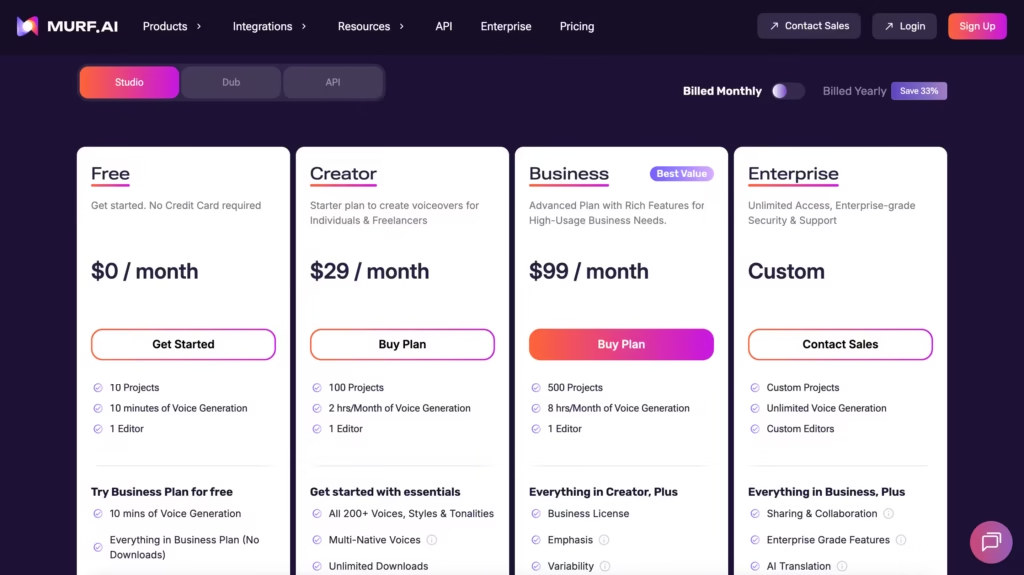
Murf AI organizes its pricing around four main tiers. The biggest difference between them isn’t the number of voices (all paid plans include 200+ voices).
It’s the amount of voice generation time you get and the features that come with each level.
Here’s a side-by-side comparison:
| Feature | Free | Creator | Business | Enterprise |
|---|---|---|---|---|
| Monthly Price (Annual Billing) | $0 | $19/month | $66/month | Custom |
| Monthly Price (Monthly Billing) | $0 | $29/month | $99/month | Custom |
| Voice Generation Time | 10 minutes total | 24 hours/year | 96 hours/year | Unlimited |
| Number of AI Voices | 32 | 200+ | 200+ | 200+ |
| Languages Supported | Limited | 20+ | 30+ | 35+ |
| Downloads | No | Yes | Yes | Yes |
| Commercial Rights | No | Yes | Yes | Yes |
| Voice Cloning | No | No | No | Yes |
| API Access | No | No | No | Yes |
| Dedicated Account Manager | No | No | No | Yes |
One important thing to note: annual billing saves you roughly 33% compared to paying month to month.
That’s a significant chunk of cash if you plan to stick around.
Is the Murf AI Free Plan Worth It?
The free plan is a test drive, not a daily driver. You get 10 minutes of voice generation time total (not per month – total), access to 32 voices, and no ability to download your audio.
You also can’t use anything you create for commercial purposes.
So what is it good for? Testing.
If you want to hear what Murf’s voices sound like before spending a dollar, the free tier lets you do exactly that. Type in a paragraph, pick a voice, and listen. That’s really its only purpose.
Most users find that they need to upgrade within their first session if they want to do anything productive.
What Do You Get with the Creator Plan at $29/Month?
The Creator plan is where Murf AI starts to become genuinely useful. At $19 per month (billed annually) or $29 per month (billed monthly), you unlock the full library of 200+ voices, downloads, commercial usage rights, and 24 hours of voice generation per year.
That 24-hour annual cap works out to about 2 hours per month.
For a freelancer producing a few YouTube videos or e-learning modules each month, that’s often plenty. You also get access to over 8,000 licensed soundtracks and 20+ languages.
Who should pick the Creator plan?
- Solo content creators who produce voiceovers regularly but not in huge volumes
- Freelancers who need commercial rights for client projects
- YouTubers and podcasters looking for a cost-effective voiceover solution
- E-learning designers building training content for small teams
The big limitation here? No voice cloning, no API access, and no team collaboration features. If you need any of those, you’ll have to step up to Business.
One real advantage of the Creator tier is that commercial rights come included.
That means you can monetize content on YouTube, sell courses with Murf voiceovers, use them in ads, basically anything commercial. Many competitors charge extra for that, so it’s a genuine win at this price point.
How Does the Business Plan Compare at $99/Month?
The Business plan costs $66/month on annual billing or $99/month if you pay monthly. It targets teams and growing businesses that need more hours and more features.
You get 96 hours of voice generation per year (about 8 hours per month), priority rendering, collaboration tools, and access to 30+ languages.
The PowerPoint plugin – a standout feature for corporate teams – is also available at this tier as a paid add-on. Note that voice cloning remains locked to the Enterprise tier.
Here’s something unusual about Murf’s Business plan that’s worth knowing.
If you choose monthly billing instead of annual billing, you actually get more voice generation time. Monthly billing gives you 20 hours per month (240 hours per year), while annual billing gives you 96 hours per year.
Both cost the same annually ($792). So if you’re a high-volume team, monthly billing could make more sense, even though it’s usually the more expensive option with other software.
Who should pick the Business plan?
- Marketing teams producing voiceovers at scale
- Agencies managing voice content for multiple clients
- E-learning departments creating multilingual training materials
- Companies that need team collaboration and the PowerPoint integration for voiceover projects
The jump from Creator ($19/month) to Business ($66/month) is steep. If your main need is just more hours and you don’t care about collaboration or the PowerPoint plugin, that price gap might sting a bit.
What Does the Enterprise Plan Include?
Enterprise pricing is custom. You’ll need to contact Murf’s sales team for a quote, which means the final cost depends on your organization’s needs.
What makes Enterprise different from Business?
Three big things: unlimited voice generation, full API access, and custom voice cloning. You also get a dedicated account manager, enterprise-grade security certifications (SOC 2 Type II, ISO 27001, HIPAA, and GDPR compliance), role-based access control, and advanced collaboration tools.
As of early 2026, Murf holds ISO 42001 certification for AI management systems, a relatively rare credential in the voice AI space. For organizations in regulated industries like healthcare, finance, or government, those compliance certifications could be the deciding factor.
A word of caution: user feedback from review platforms suggests that total Enterprise costs can run 50% to 140% higher than the base subscription once voice cloning, API usage, and custom integrations are factored in.
Always get a detailed, itemized quote before you sign anything.
How Does Murf AI’s API Pricing Work?
Murf’s API is a separate product from its Studio plans.
If you’re a developer building voice features into your own app or website, the API has its own pricing structure.
The pay-as-you-go plan charges $0.03 per 1,000 characters, with a minimum purchase of $2. You can create up to 3 API keys with concurrency limits of 15 and rate limits of 10,000 requests per minute. For larger needs, custom API plans are available through the sales team.
Murf’s Falcon model, launched in November 2025, is built specifically for real-time voice agent applications. It delivers 55 milliseconds of model latency and 130 milliseconds time-to-first-audio across 33 global locations.
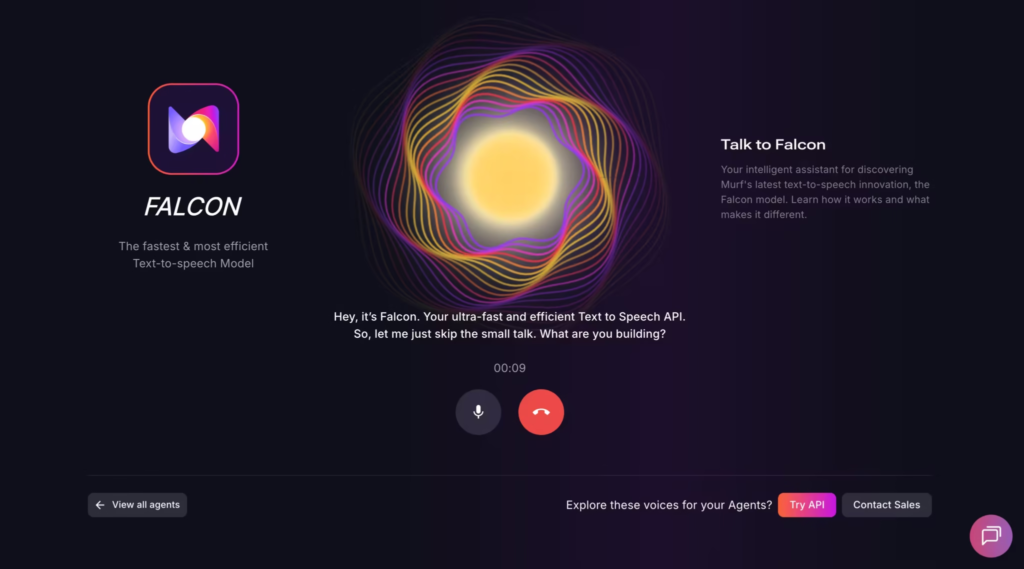
Those numbers beat competitors like ElevenLabs, OpenAI, and Deepgram in production latency tests, making it a strong option for developers who need speed.
Steps to get started with the Murf API:
- Sign up for a Murf account at murf.ai
- Navigate to the API section and select the pay-as-you-go plan
- Generate your API key (up to 3 keys allowed)
- Set up autopay to avoid workflow interruptions
- Integrate using the API documentation provided by Murf
- Contact sales if you need higher concurrency or character limits
How Does Murf AI Pricing Compare to Competitors?
You’re probably wondering how Murf stacks up against other AI voice tools. Here’s a quick look:
| Platform | Starting Price | Voice Cloning | API Access | Key Strength |
|---|---|---|---|---|
| Murf AI | $29/month | Enterprise only | Enterprise only | Studio workflow + compliance |
| ElevenLabs | $6/month | Starter plan and up | All paid plans | Voice quality + affordable entry |
| Descript | $16/month | Business plan | Limited | Video editing integration |
| Amazon Polly | Pay-per-use | No | Yes | AWS integration |
ElevenLabs offers a lower entry point at $6/month and includes voice cloning on cheaper tiers. If raw voice quality and affordable experimentation are your priorities, it’s a strong alternative.
Murf’s advantage lies in its all-in-one studio workflow, team collaboration features, and enterprise security certifications.
Worth noting: Play.ht was acquired by Meta and shut down by December 2025, which pushed many former users toward platforms like Murf and ElevenLabs.
What Is Voice Generation Time and Why Does It Matter?
Murf measures usage in Voice Generation Time (VGT) – the actual duration of the audio you create, not the length of your text or processing time. So if you generate a 5-minute voiceover, that costs you 5 minutes of VGT.
A few things that don’t consume VGT:
- Adjusting voice settings (pitch, speed, emphasis) on text you’ve already generated
- Previewing voices before rendering
- Managing projects in the editor
When your VGT runs out, voice generation simply stops. Murf doesn’t charge automatic overage fees, which is budget-friendly but can be disruptive if you’re mid-project. You’ll need to upgrade your plan or purchase additional credits to keep going.
Can You Save Money on Murf AI? Tips and Discounts
Nobody likes paying full price when they don’t have to. Here are some ways to reduce your costs:
- Choose annual billing. You’ll save roughly 33% compared to monthly payments. On the Creator plan, that’s the difference between $19/month and $29/month.
- Check for education or nonprofit discounts. Murf offers 20% off for qualifying educational institutions and nonprofits. This stacks with annual billing for up to 45% in total savings.
- Apply for the startup program. Early-stage startups can apply for Murf’s Startup Incubator, which provides 50 million free API characters over a 3-month period, or $1,500 in API credits.
- Monitor your VGT usage. Don’t pay for the Business plan if you only use 2 hours per month. Track your actual consumption before upgrading.
- Consider the monthly billing quirk for Business. As mentioned earlier, monthly billing on the Business plan gives you 2.5x more annual capacity than annual billing for the same total cost. Do the math for your situation.
What Happens If You Cancel Your Murf AI Subscription?
Murf’s refund policy is pretty strict. Payments are generally non-refundable. The only exception is when you cancel within 24 hours of purchasing and you’ve used less than 10 minutes of voice generation time.
You can also pause your subscription for up to 30 consecutive days, once per billing cycle. Your data stays intact during the pause.
After 30 days, the subscription resumes automatically unless you cancel before that window closes.
Which Murf AI Plan Should You Choose?
Here’s a simple way to think about it. If you’re just curious, start with the Free plan and test a few voices.
If you create content regularly and need downloads and commercial rights, the Creator plan at $29/month covers most solo creators.
If you run a team, need collaboration tools, or produce high volumes of audio, the Business plan at $99/month becomes necessary.
And if you need voice cloning, API access, unlimited generation, or enterprise-level security, you’ll need to talk to sales about Enterprise.
Murf AI pricing is competitive for what you get, especially the Creator tier, which undercuts many rivals on commercial-use voiceovers.
Just watch out for the VGT caps on lower plans, factor in the annual vs. monthly billing quirks, and always calculate your actual usage before committing. Your wallet will thank you.
FAQs
Does Murf AI offer a money-back guarantee?
Not really. Refunds are only available within 24 hours of purchase, and only if you’ve used less than 10 minutes. There’s no extended trial period or money-back guarantee beyond that.
Can I use Murf AI voiceovers for commercial purposes?
Yes, on all paid plans. The Creator plan and above include full commercial usage rights. The Free plan does not allow commercial use.
Is there a student discount for Murf AI?
Murf offers a 20% discount for education and nonprofit organizations. Individual student discounts aren’t separately listed, but you can apply through your institution.
How many voices does Murf AI have?
Over 200 voices across 35+ languages and multiple accents. The Free plan limits you to 32 voices.
Can I switch between Murf AI plans?
Yes. You can upgrade or downgrade your plan at any time. Upgrades take effect immediately, while downgrades typically apply at the next billing cycle.
Does Murf AI charge overage fees?
No. When you hit your voice generation limit, the platform stops generating. There are no surprise charges. You’ll need to purchase additional credits or upgrade to continue.
