

The Synthesia free plan (officially called the “Basic” plan) gives you access to Synthesia’s AI video platform at zero cost, with no credit card required.
You get 10 minutes of AI-generated video per month, 9 stock AI avatars, AI voices in 160+ languages, watermarked exports, and one editor seat. It works as a sandbox for testing the platform before you spend anything.
That’s the short version.
But the question isn’t whether a free plan exists, it’s whether it’s useful enough to actually accomplish something.
Let’s break it down.
What Exactly Is the Synthesia Free Plan?
Synthesia is a browser-based platform that turns written scripts into videos featuring AI-generated human presenters (called avatars).
You type words, pick a digital person, select a voice, and the software produces a video where that avatar delivers your script with synchronized lip movements.
The free plan, labeled “Basic” on Synthesia’s pricing page, lets anyone create an account and start making videos without paying.
You don’t need a camera, a microphone, or any editing skills. You just need a script and a few minutes of patience while the video renders.
Founded in 2017 and headquartered in London, Synthesia has grown into one of the most widely used AI video platforms, with over 1 million users according to its website.
The free tier exists to get new users comfortable with the interface before committing to a paid subscription.
What Features Does the Synthesia Free Plan Include?
Here’s where people often get confused, because the free plan is simultaneously more generous and more restrictive than you’d expect.
What you get:
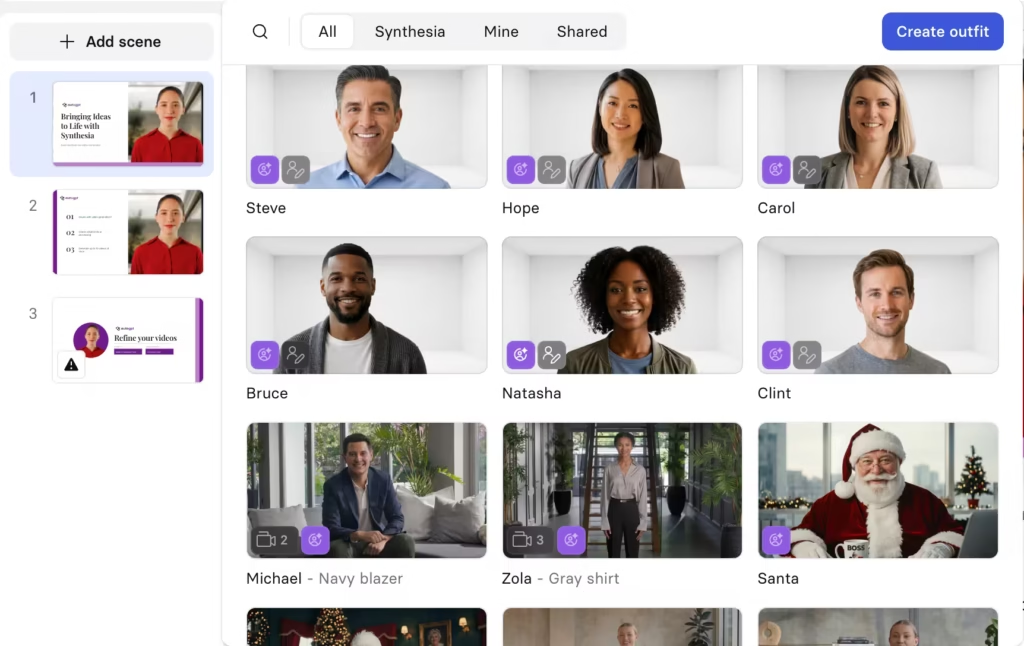
You receive 10 minutes of video generation each month. That’s enough for a couple of short explainers or several tight clips. You also get access to 9 stock AI avatars – digital presenters that range across different ages, ethnicities, and professional styles.
As of 2026, Synthesia rolled out several new features that reach all the way down to the free tier.
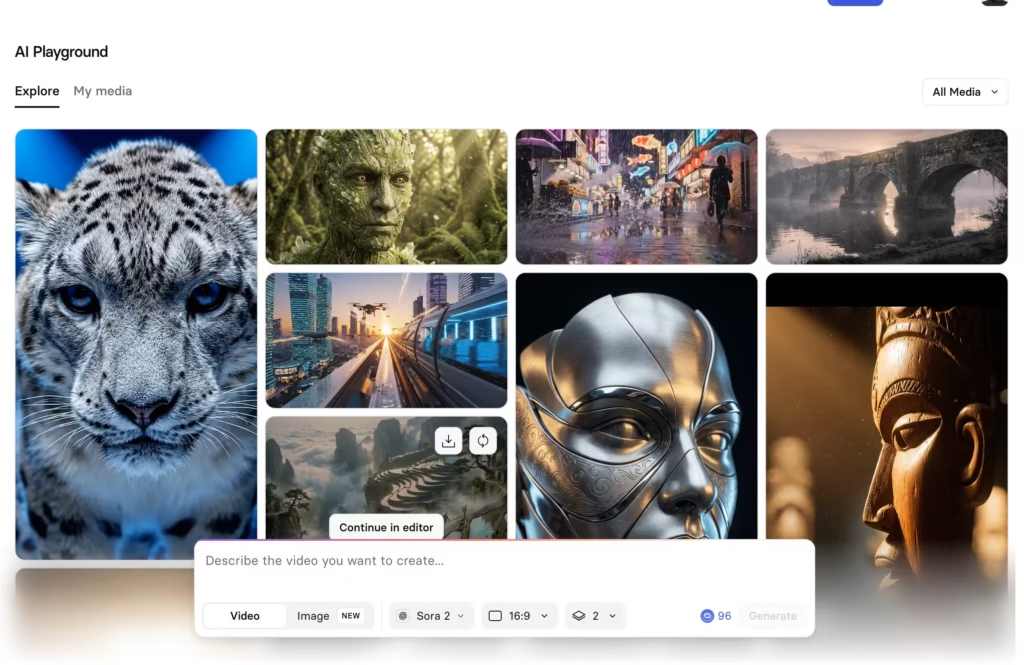
Basic users now get access to AI Playground, which includes Google’s Veo 3 and OpenAI’s Sora 2 for generating short video clips.
You can also use the enhanced PowerPoint import tool, which converts slide decks into video drafts while preserving the original design.
Even customizable avatars with action capabilities, where you can prompt avatars to perform specific tasks, are available on the free plan.
On top of that, you get AI voices in over 160 languages and accents, the built-in AI script assistant, and a limited media library through Pexels and Soundstripe.
What you don’t get:
No watermark removal. Every video you export carries a visible Synthesia watermark, which makes it unsuitable for anything client-facing or public.
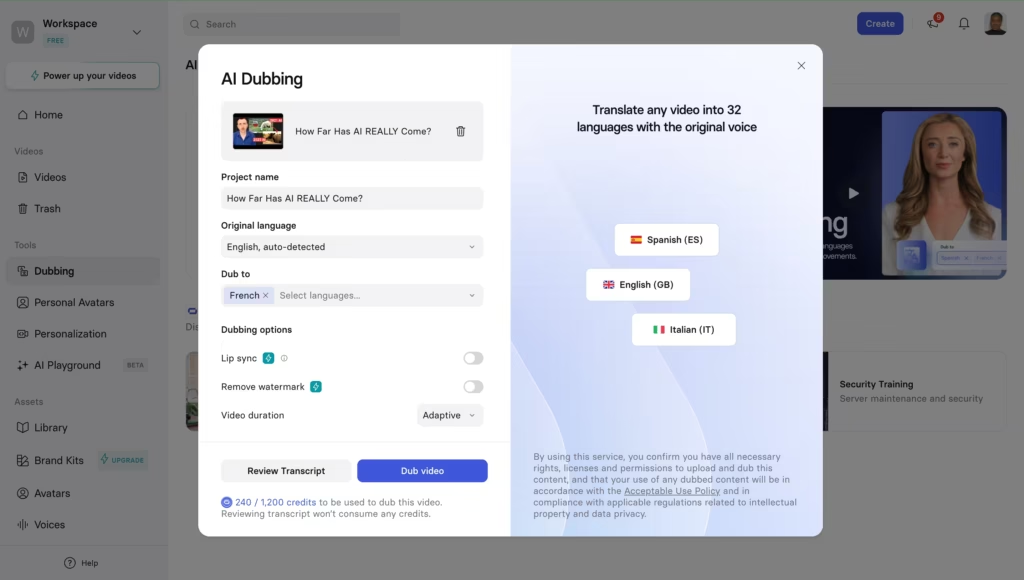
No video downloads without that branding stamp. No API access, no brand kits, no AI dubbing (actually, you get AI dubbing but with no lip sync), no interactive video features, and no collaboration tools.
Support is limited compared to paid tiers, and your avatar library stays locked at 9 options instead of the 125+ available on the Starter plan or the 240+ on Enterprise.
Is 10 Minutes Per Month Actually Enough to Do Anything?
Honestly? It depends on what “do anything” means to you.
Ten minutes per month gives you more room than most free AI video tools offer, but it still won’t sustain a content calendar.
You can’t run a YouTube channel or power a full training library on it. But the free plan was never designed for production, it’s designed for evaluation.
Here’s what 10 minutes realistically lets you accomplish each month:
- Test multiple scripts. Write two or three different 2-minute explainers, generate the videos, and compare which approach works best.
- Compare avatars and voices. Split your minutes between different avatar/voice combinations to find your ideal match.
- Show a stakeholder. Build a proof-of-concept video you can share internally to justify budget for a paid plan.
- Check voice quality across languages. Generate short clips in several languages to hear how the AI voice handles accents and pronunciation.
The key is approaching it strategically. Keep your scripts lean, 100 to 150 words per minute of video is a solid target. Preview before you generate, because previews don’t burn your minutes. Only hit “render” when you’re confident the draft is final.
How Do You Sign Up for the Synthesia Free Plan?
The process takes about two minutes:
- Go to synthesia.io and click the signup button.
- Create an account with your email or sign in through Google.
- Select the Basic (free) plan.
- Open the video editor, choose a template or start from scratch.
- Pick an avatar, write or paste your script, select a voice.
- Preview the video, make adjustments, and generate when ready.
You can also skip the full signup entirely by using Synthesia’s free demo video page.
Pick a template, type a script, and they’ll email you a generated video. It’s a zero-commitment way to see the output quality before creating an account.
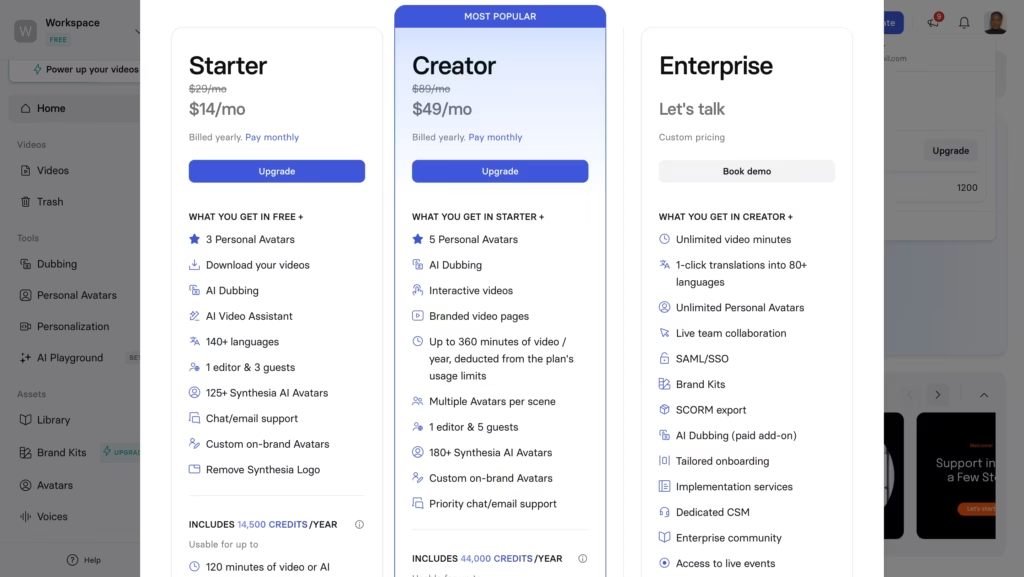
How Does the Free Plan Compare to Starter and Creator?
| Feature | Basic (Free) | Starter ($14/mo yearly) | Creator ($49/mo yearly) |
|---|---|---|---|
| Video minutes/month | 10 min | 120 min | 360 min |
| Credits | 1200 credits | 14,500 credits | 44,000 credits |
| Stock avatars | 9 | 125+ | 180+ |
| Watermark | Yes | No | No |
| Video downloads | Watermarked only | Clean downloads | Clean downloads |
| AI dubbing | Yes (without lip sync) | Yes (uses minutes) | Yes (uses minutes) |
| API access | No | No | Yes |
| Editor seats | 1 | 1 | 1 |
| Guest seats | 0 | 3 | 5 |
| AI Playground (Veo 3, Sora 2) | Yes | Yes | Yes |
The biggest jump happens between free and Starter.
Both offer 10 minutes of video per month, but Starter removes the watermark, unlocks clean downloads, expands the avatar library from 9 to 125+, and adds AI dubbing.
The jump from Starter to Creator is mainly about volume (30 minutes vs. 10), API access, and interactive features.
What Are the Biggest Limitations of the Free Plan?
1. The watermark kills external use
That branded overlay means you can’t share videos with clients, post them on social media, or embed them on your website without it looking like a draft. It’s fine for internal reviews. It’s not fine for anything public.
2. Ten minutes can disappear quickly
If you create a 5-minute video and realize the script needs a tweak, you regenerate it and suddenly you’ve used 10 minutes. You’ve hit your limit, and you’ll wait until next month for a reset. There’s no option to buy additional minutes on the free plan.
3. Nine avatars limit variety
For testing purposes, 9 presenters works. But if you’re trying to match a specific brand tone, demographic, or style, you’ll likely feel boxed in. Paid plans open that library significantly.
4. No collaboration
You can’t invite team members to review or comment on videos within the platform. Everything happens in your solo workspace.
5. Limited support
Free plan users get AI chat support only, while paid tiers unlock regular human support. Priority and dedicated support are reserved for Creator and Enterprise customers.
Who Should Use the Synthesia Free Plan?
- Freelancers exploring AI video tools
- Marketing teams evaluating vendors
- Educators and trainers curious about AI content
- Solo creators running comparisons
How Does Synthesia’s Free Plan Stack Up Against Competitors?
This matters if you’re shopping around. Every major AI video platform offers some kind of free access, but the details vary.
| Platform | Free Allowance | Avatars on Free | Watermark? | Standout Free Feature |
|---|---|---|---|---|
| Synthesia | 10 min/month | 9 stock avatars | Yes | AI Playground (Veo 3, Sora 2) |
| HeyGen | 3 videos (3 min each)/month | Limited selection | Yes | 1 custom digital twin |
| InVideo AI | 2 min/week | N/A (stock footage) | Yes | AI-powered editing |
| Colossyan | 5 min total | 60+ languages | Yes | Multi-avatar dialogue scenes |
| Vidnoz | 2 min/day | 1,500+ | Yes | Daily refresh (not monthly) |
Synthesia’s free plan is among the more generous by monthly minutes. Vidnoz offers daily refreshes (which can add up), but most competitors cap you at 3-5 minutes total.
Synthesia’s additional edge is the 2026 AI Playground addition – free access to cutting-edge generative video models like Veo 3 and Sora 2 is something competitors haven’t matched at the free tier yet.
Can You Actually Create Professional Videos on the Free Plan?
No. And Synthesia would probably agree with that assessment.
The free plan produces real AI videos, and the output quality is genuinely impressive. The avatars look professional, the lip-sync technology works well, and the voice generation handles multiple languages with solid accuracy.
But the watermark and the minute cap make it a testing environment, not a production pipeline.
Is the Synthesia Free Plan Worth Your Time?
Yes, if you use it with the right expectations. The Synthesia free plan won’t replace your video production workflow. It won’t help you publish content. And it won’t let you create anything polished enough to share publicly.
What it will do is answer the question that matters most: Is Synthesia the right tool for my needs?
You’ll learn how the editor works, whether the avatars feel natural enough for your audience, how the voice quality sounds in your target language, and whether the template system fits your workflow.
All without spending a dollar.
For a tool where paid plans start at $14/month and can scale to thousands annually at the enterprise level, spending 10 minutes on the free tier before committing is just smart decision-making.
Use the sandbox. Test your scripts. Show the proof-of-concept to your team. And if the output clicks, you’ll know exactly which paid plan to choose.
FAQs
1. Does Synthesia have a free plan?
Yes. Synthesia offers a permanent free plan called “Basic” that requires no credit card. It includes 10 minutes of AI video per month, 9 stock avatars, AI voices in 160+ languages, and access to newer features like AI Playground and PowerPoint import.
The main trade-off is that all exports carry a visible watermark, and you can’t download clean, unbranded videos without upgrading.
2. Is there any 100% free AI video generator?
A handful of tools offer genuinely free video generation with no watermark. CapCut, FlexClip, and Dreamlux all let you export watermark-free videos on their free tiers, though each comes with its own limits on length, resolution, or monthly output.
Tools like Fotor and Pixelbin also offer free watermark-free exports but cap you at a few videos per month.
For AI avatar-style videos specifically (where a digital presenter speaks your script), truly free and watermark-free options are much harder to find, most platforms, including Synthesia, add a watermark on free exports.
3. Is there a free alternative to Synthesia?
Several competitors offer free tiers worth testing. HeyGen provides 3 free videos (up to 3 minutes each) per month at 720p with a watermark, plus one custom digital twin. Colossyan gives you 5 total free minutes with multi-avatar dialogue support.
Vidnoz stands out with 2 free minutes per day (refreshed daily, not monthly) and access to 1,500+ avatars, though exports are watermarked at 720p. For a non-avatar approach, InVideo AI offers 2 minutes of AI-generated stock footage video per week. None of these match Synthesia’s full feature set, but each has strengths depending on your use case.
4. Which AI can convert text to video for free?
Multiple AI tools turn text into video at no cost. For avatar-based text-to-video (a digital human reads your script), Synthesia’s free plan, HeyGen’s free tier, and Vidnoz are the top options.
For non-avatar text-to-video (the AI generates visuals, scenes, and edits from your text), Lumen5 offers 5 free videos per month at 720p, FlexClip provides free HD exports with templates, and CapCut lets you create unlimited videos with its AI scriptwriting and editing tools.
If you just want raw AI-generated video clips from a text prompt (no presenter, no editing), Dreamlux and Pixelbin generate short clips for free without watermarks or signups.
5. Does the Synthesia free plan require a credit card?
No. You can sign up with just an email address or Google account. Synthesia won’t ask for payment information unless you choose to upgrade.
6. What happens if I exceed my free plan limit?
Your video generation gets capped until the next billing cycle. You can’t purchase extra minutes on the free plan – you’d need to upgrade to Starter or higher.
7. Can I use free plan videos commercially?
Technically, you own the videos you create. But the watermark makes commercial use impractical. For any business or client-facing purpose, you’ll want a paid plan with clean exports.
