

The HeyGen API is a developer interface that lets you generate AI avatar videos, translate existing videos into other languages, and stream real-time talking avatars – all through simple HTTP requests.
Instead of opening a browser and clicking through a video editor, you write a few lines of code and get a finished, presenter-style video back in minutes.
HeyGen (the company behind the API) built its reputation as one of the leading AI video platforms.
But for builders and businesses, the API layer is where the real leverage sits. You can plug AI-generated video directly into your apps, sales workflows, onboarding systems, and marketing funnels without ever touching the web editor
Let’s break the whole thing down.
How Does the HeyGen API Actually Work?
At its core, the HeyGen API follows a straightforward request-response pattern.
You send a POST request with details like which avatar to use, what script to read, and what voice to speak in. HeyGen’s servers render the video on their end and return a download link once it’s done.
Here’s the simplified flow:
- Authenticate your request using an API key sent in the
X-Api-Keyheader. - Choose an avatar by pulling a list of available avatars from the
/v2/avatarsendpoint. - Pick a voice from the
/v2/voicesendpoint – HeyGen supports dozens of languages and voice styles, including ElevenLabs integration. - Send your video generation request to the
/v2/video/generateendpoint with your avatar ID, voice ID, script text, and optional settings like background color or resolution. - Poll for completion using the video status endpoint. When the status flips to
completed, you get a URL to download the final video.
That’s really it. Five steps from zero to a finished AI video. The default output resolution is 1080p, and text input maxes out at 5,000 characters per request.
For folks who want even less friction, HeyGen recently launched a Video Agent endpoint at /v1/video_agent/generate.You skip the avatar and voice selection entirely – just send a plain English prompt and the system handles the rest.
How Do You Get a HeyGen API Key?
Getting your key is quick, but there’s one catch that trips people up. Here are the exact steps:
- Create a free account at heygen.com if you don’t already have one.
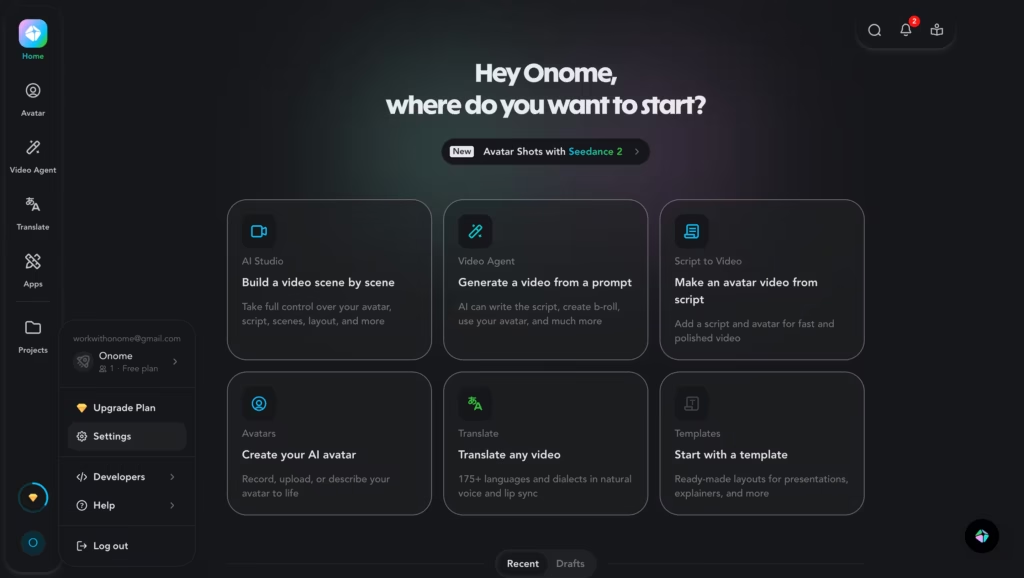
- Log in and click your profile name in the bottom-left corner.
- Select Settings from the dropdown menu.
- Navigate to API in the left sidebar.
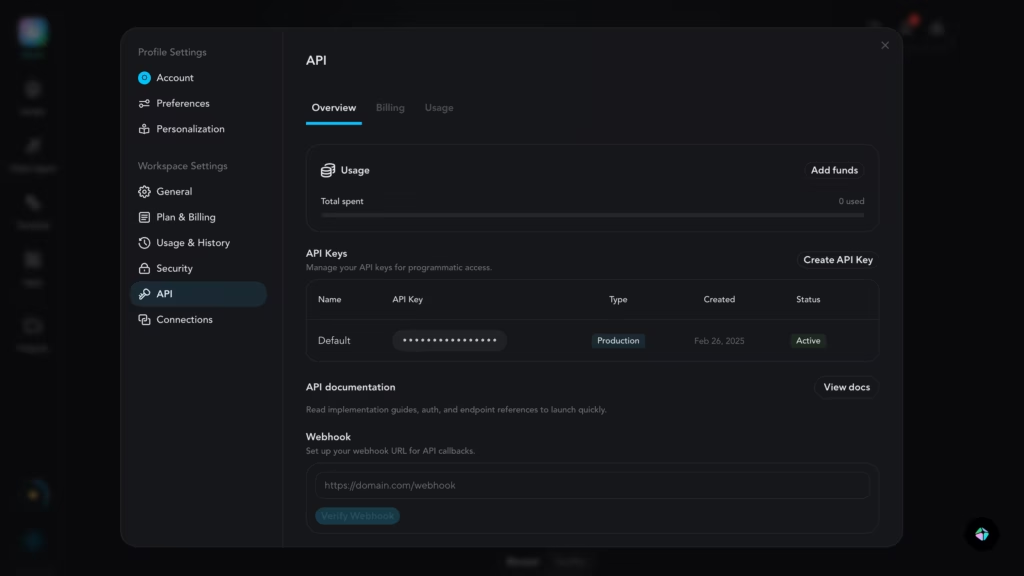
- Click “Create API Key.”
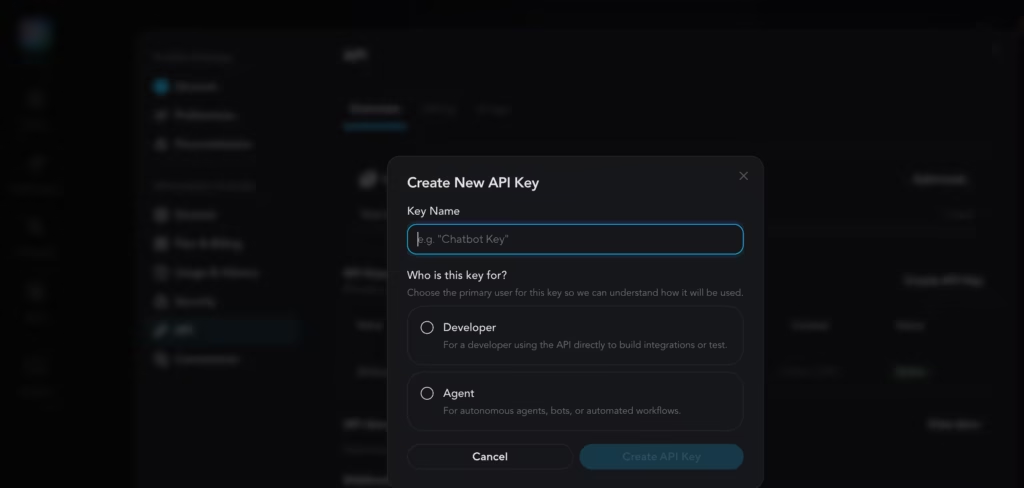
- Copy the key immediately. You will not be able to view it again after leaving the page.
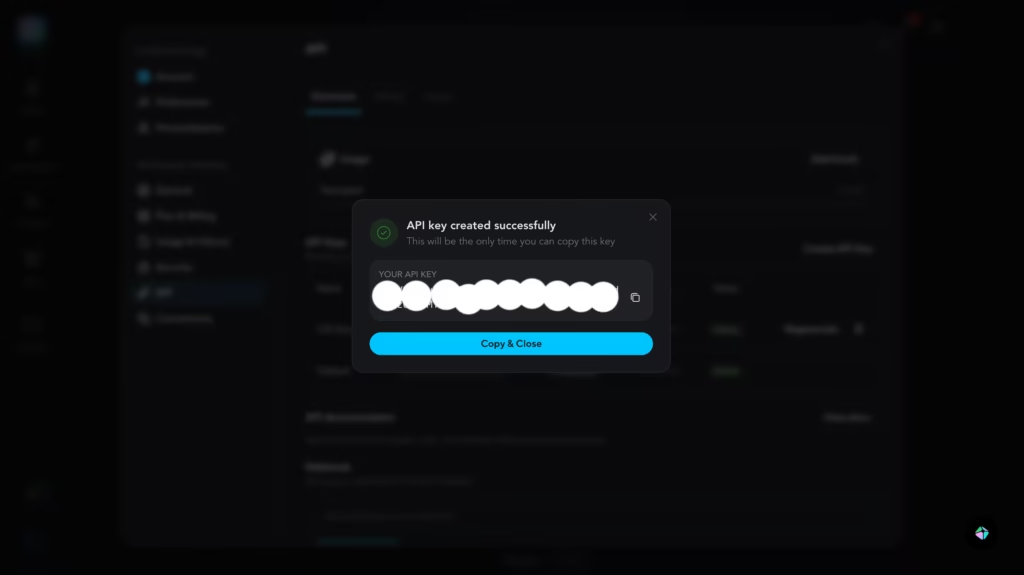
That last part deserves repeating – if you navigate away without copying the key, it’s gone.
You’ll have to regenerate a new one, which automatically invalidates the old key. Store it in a password manager or environment variable, and never commit it to a public GitHub repo.
One thing worth noting: the API key option only appears under certain account types.
Some users on older Creator plans have reported not seeing the API section in their settings.
If that happens to you, check HeyGen’s API pricing page to make sure your plan includes API access, or top up the separate API wallet (which starts at just $5).
What Are the Three Ways to Integrate HeyGen?
HeyGen actually offers three distinct integration paths, and picking the right one matters because they authenticate differently and bill from separate credit pools.
1. Direct API
This is the classic developer route. You pass your API key in the X-Api-Key header with every request. Usage gets deducted from your API dashboard balance – a wallet that’s completely separate from your web plan credits. Best for teams building custom applications or automating video pipelines.
2. MCP (Model Context Protocol)
This path connects HeyGen directly to AI assistants like Claude, Manus, or OpenAI-powered agents. It uses OAuth, so there are no API keys to manage.
Usage draws from your web plan’s premium credits instead. If you’re working inside an AI agent ecosystem and want video generation as a conversational tool, this is the cleanest route.
3. Skills
Designed for AI coding agents like Claude Code and Cursor. Skills use the same API key authentication as the Direct API, and billing comes from the API wallet. Think of this as a middle ground – structured enough for agents, flexible enough for developers.
What Can You Build With the HeyGen API? Real Use Cases
Personalized Sales Outreach at Scale
Imagine a sales team that sends 500 prospecting emails per week. Instead of generic text, each email includes a 15-second video where an AI avatar says the prospect’s name, references their company, and delivers a tailored pitch.
HeyGen’s template system makes this possible. You build a video template with dynamic variables (company name, product name, key benefit), hen hit the /v2/template/{template_id}/generate endpoint with unique data for each prospect.
Tools like Clay and HubSpot already have native integrations that automate this entire pipeline.
Automated Employee Onboarding
HR teams love this one. Instead of recording a new onboarding video every time a policy changes, you update the script text and regenerate. The avatar stays consistent, the branding stays intact, and the new video is ready in minutes. No reshoots, no editing timeline, no scheduling a presenter.
Multilingual Video Translation
Got a training video in English that needs to reach teams in Japan, Brazil, and Germany? The /v1/video_translate/translate endpoint takes your source video and a target language, then returns a version with natural lip-sync in the new language.
HeyGen’s newer “quality” translation mode produces noticeably better lip-sync than the standard mode, especially for videos with lots of facial movement, though it takes longer to render.
Real-Time Streaming Avatars
This is the frontier stuff. Using the Streaming Avatar SDK (@heygen/streaming-avatar), you can embed a live, interactive AI avatar directly into a web app. The avatar responds in real time – either repeating text you feed it or generating conversational answers powered by GPT-4o mini through HeyGen’s knowledge base feature.
Think AI customer support agents, interactive product demos, or virtual receptionists on a company website.
Internal Knowledge Base Videos
Product teams and documentation writers can use the API to convert written docs into short explainer videos. Feed the text to the Video Agent endpoint, and you’ll get a presenter-style video that walks through the content.
It’s faster than reading, more engaging than a wall of text, and in my experience, viewers retain more from a 90-second avatar walkthrough than from a two-page doc.
What Does HeyGen API Pricing Look Like?
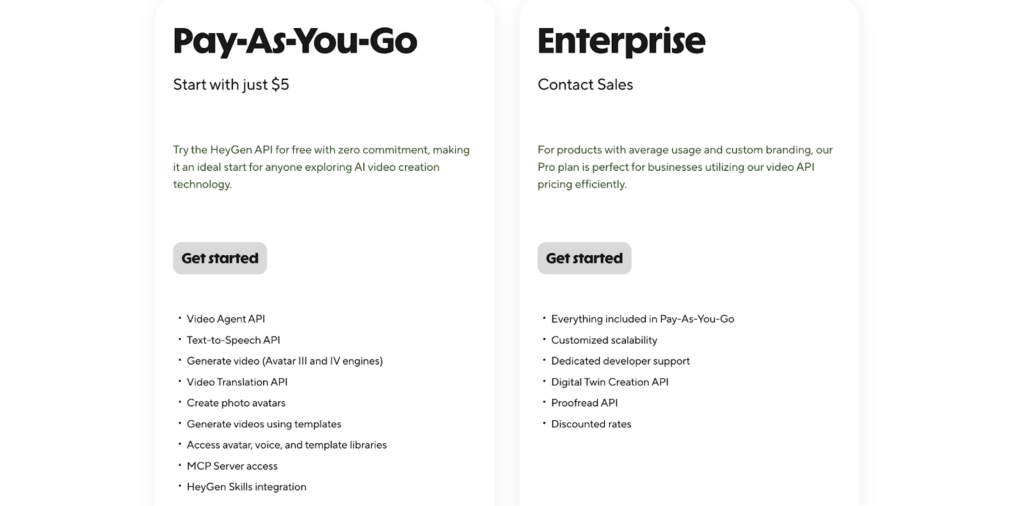
HeyGen API pricing operates on a pay-as-you-go model that’s completely separate from the web app subscription. You top up an API wallet and spend credits as you generate videos. Here’s the current breakdown:
- Pay-as-you-go: Starts at just $5. No monthly commitment. You only pay for what you generate. This is the entry point for most developers exploring HeyGen API pricing for the first time.
- Scale: Drops the per-minute cost roughly in half compared to pay-as-you-go. Unlocks video translation and the Proofread API.
- Enterprise: Everything in Scale plus dedicated developer support, Digital Twin Creation API, custom scalability, and volume discounts.
One important update: HeyGen removed free API credits in February 2026.
You can still test the web app for free (3 videos per month, watermarked, 720p), but generating videos through the API now requires a funded wallet from day one.
Also keep in mind that API credits and web plan credits are two separate pools. Generating a video through the API deducts from your API wallet. Generating through MCP deducts from your web plan’s premium credits. This catches people off guard, so budget accordingly.
What’s New With the HeyGen API in 2025 – 2026?
HeyGen ships updates aggressively. Here are some of the most notable recent additions:
- Avatar IV for Talking Photos – a new motion engine that produces much more expressive facial movement and natural head tracking. You enable it with the
use_avatar_iv_modelparameter. - Video Agent endpoint – the “one-shot” approach where a single prompt generates a complete video. No avatar or template selection required.
- ElevenLabs V3 voice model support – added alongside existing V1, V2, and Turbo models, giving you fine-grained control over voice stability and emotion.
- AssemblyAI as default STT provider – improved English transcription accuracy for video translation workflows.
- Customizable subtitles – the
/v2/video/generateendpoint now supports subtitle styling directly in the request payload. - Remote MCP Server – connect HeyGen to any MCP-compatible AI agent without running a local server or managing API keys.
Quick Tips for Working With Your HeyGen API Key
After testing the API across a few different integration projects, including a personalized outreach tool and a template-based onboarding pipeline, these are the lessons that cost me the most time:
- Always store your HeyGen API key in an environment variable. Use
HEYGEN_API_KEYand reference it in your code withprocess.env.HEYGEN_API_KEY(Node.js) oros.environ["HEYGEN_API_KEY"](Python). Never hardcode it. - Poll status patiently. Video generation isn’t instant. Build in a polling loop with reasonable intervals (every 5–10 seconds) and handle the
pending,processing, andfailedstates gracefully. - Download promptly. Completed video URLs expire after 7 days. If you’re archiving content, download and store it in your own cloud storage right away.
- Use templates for repetitive formats. If you’re generating similar videos with different variables, build a template in the HeyGen app first, then automate it through the API. It’s significantly faster than configuring every parameter from scratch.
What Are the Honest Limitations of the HeyGen API?
No tool is perfect, and the HeyGen API has a few rough edges worth knowing before you commit.
1. Generation speed is the biggest bottleneck. In my testing, a simple 20-second avatar video took around 3–4 minutes to render. Longer videos (2+ minutes) can take 10 minutes or more.
That rules out any use case where a user is waiting on-screen for a video to appear. You’ll need to design your workflow around async processing – fire the request, move on, and pick up the result later via polling or webhooks.
2. There’s no free way to test the API anymore. HeyGen removed free API credits in February 2026. The web app still has a free plan, but the API requires a funded wallet from day one. Even at $5 minimum, this means you’re paying to experiment – which feels steep when you’re just evaluating whether the API fits your stack.
3. The 3-video concurrent processing limit is tight. If you’re generating personalized videos at scale (say, 500 sales outreach videos), you can only render 3 at a time. That creates a queue, and at 3–4 minutes per video, the math gets uncomfortable fast for high-volume workflows.
4. Credit consumption is hard to predict upfront. Different features (Avatar IV, video translation, standard avatars) burn credits at different rates, and the pricing page doesn’t make it easy to estimate total cost for a specific workflow before you start building.
So, Is the HeyGen API Worth Your Time?
Here’s my honest take after building with it: the HeyGen API is production-ready for async, batch-style video workflows -personalized outreach, onboarding content, training videos, multilingual translations. For those use cases, it genuinely saves weeks of production time and thousands in video costs.
But it’s not ready for real-time, on-demand video generation where a user clicks a button and expects a video back in seconds. A 20-second clip taking 3–4 minutes to render is fine for a background job. It’s a dealbreaker for a live user experience.
If your use case fits the async model, the $5 entry point, solid documentation, and growing integration ecosystem (MCP, Zapier, HubSpot, Clay) make it one of the most accessible AI video APIs available right now. If you need instant video, you’re better off looking at the Streaming Avatar SDK for live interactions, or waiting for render speeds to improve.
If you’ve been curious, grab your HeyGen API key and make your first call. With a $5 minimum to get started, the risk is low – just go in knowing the limitations so they don’t catch you mid-build.
FAQs
1. Is the HeyGen API free to use?
Not anymore. HeyGen removed free API credits in February 2026. You now need to fund your API wallet (starting at $5) before making any calls. The web app still has a free plan for testing, but that’s separate from API access.
2. Can I use my own custom avatar with the API?
Yes. Any avatar available in your HeyGen account, including instant avatars you’ve created from your own footage – is accessible through the API. You retrieve its ID through the List All Avatars endpoint.
3. What programming languages work with the HeyGen API?
Any language that can make HTTP requests works. The docs show examples in cURL, Python, and JavaScript, but you could just as easily use Go, Ruby, PHP, or anything else.
4. How long does video generation take?
It varies based on video length and server load. Short videos (under 30 seconds) typically finish within a couple of minutes. Longer content can take 5–10 minutes or more.
5. What’s the difference between the API wallet and web plan credits?
They’re completely separate billing pools – and this is the most confusing part of HeyGen API pricing for newcomers. API wallet credits cover Direct API and Skills usage. Web plan premium credits cover MCP usage. Topping up one doesn’t affect the other.
6. Can I translate videos into any language?
HeyGen supports dozens of languages for video translation. The full list of supported languages is available in their translation documentation.
