


HeyGen is one of the most talked-about platforms in the world of AI video generation.
With its ability to transform scripts into professionally created videos with realistic avatars and voices, it has become a go-to tool for businesses, marketers, and educators who want to create content faster and at scale.
However, just like any other powerful tool, one of the biggest questions people ask before diving in is: “How much does it cost, and is it really worth it?”
That’s exactly what this article will explore.
Instead of giving a broad overview of HeyGen’s features, which we’ve already covered in our HeyGen AI review, we’ll focus on its pricing structure, break down what you actually get at each subscription level, and consider whether the value justifies the cost.
By the end, you’ll know if HeyGen lives up to the competition and if it delivers on what you’re looking for, at a price you can afford.
Understanding HeyGen AI Pricing Model
When it comes to pricing, HeyGen doesn’t stick to a one-size-fits-all approach.
Instead, it has built a segmented pricing model that corresponds to the different ways people use the platform.
Whether you’re a solo creator experimenting with video avatars, a business scaling up content for marketing campaigns, or a developer looking to embed HeyGen’s capabilities into your own product, there’s a plan for you.
Three Pricing Channels
- Web Platform – The core HeyGen experience is on its web-based platform. This is where most users, content creators, educators, and marketers subscribe to plans that offer a blend of credits, avatar options, and export quality. It’s built for ease of use and scalability.
- Mobile Platform – For users who want to create quick, on-the-go content, HeyGen offers a streamlined mobile experience. While it doesn’t always match feature-for-feature with the desktop, the pricing of a mobile app does reflect its ease of use and accessibility to all, which is great for casual users or fast-turnaround projects.
- API Access – For developers and businesses looking to embed HeyGen’s technology directly into their apps or workflows, can tap into its API. This pricing channel is more usage-based, offering flexibility for integration without the constraints of fixed subscription levels.
A Tiered Approach to Suit Every User
HeyGen’s pricing isn’t just about “basic vs premium.” It’s designed to fit user profiles:
- Creators get affordable entry-level plans with enough credits to experiment and publish regularly.
- Businesses see more value in higher-tier subscriptions, where features like premium avatars, extended usage limits, and team collaboration tools come into play.
- Developers benefit from pay-as-you-go API access. They only pay for what they use. This enables them to scale usage without paying high subscription costs.
Why This Model Works
This flexible structure highlights HeyGen’s strategy: Rather than try to put everyone in the same box, it meets users where they are.
A YouTuber that puts out two videos a week does not need the same plan as a multinational brand that is dropping dozens of localized product explainers every month.
By segmenting its pricing channels, HeyGen ensures users only pay for what they actually need, and not the extra burden.
Detailed Breakdown of HeyGen Pricing Plans
HeyGen offers multiple ways to access its platform depending on your needs.
We will discuss the individual plans- the most common starting point, the business plans and API pricing structure- for developers and integrations, and additional considerations like credits and add-ons.
Individual Pricing Plans
1. Free Plan
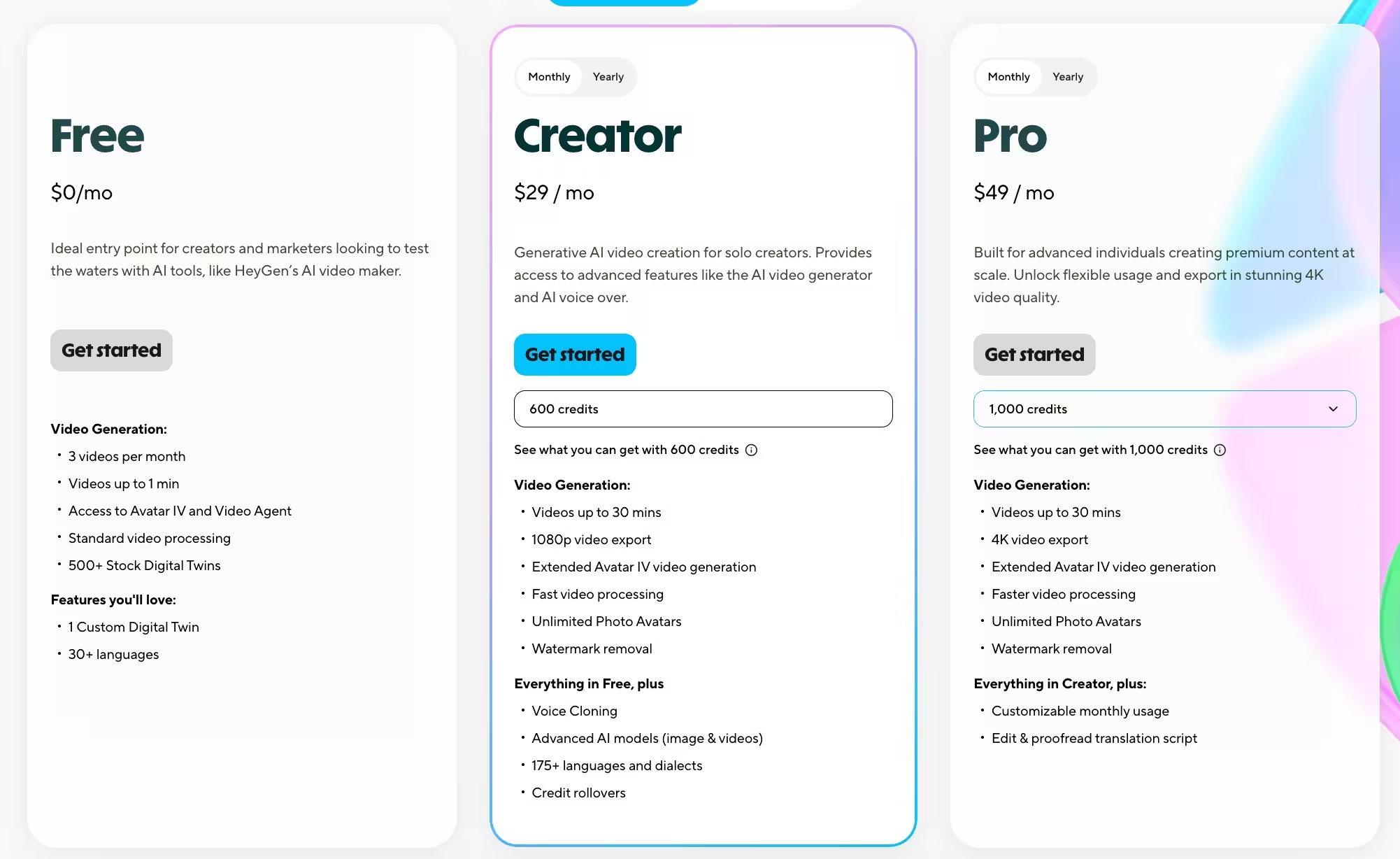
For beginners curious about HeyGen, the Free Plan provides a risk-free entry point. It includes:
- 3 videos per month
- 720p export resolution
- Watermarked output
This plan works well for testing the platform, but is limited for serious creators.
2. Creator Plan – $29/month
The Creator Plan is the most popular option for users who want professional-quality videos. It includes:
- 600 credits
- Full HD (1080p) export quality
- Voice cloning
- No watermarks
- Custom avatar add-on available
3. Pro Plan – $49/month
The Pro Plan is designed for advanced users creating premium content. Features include:
- 1,000 credits
- All Creator Plan benefits
- Support for video up to 30min and 4k resolution
- Collaboration tools for shared projects
- Faster processing and priority rendering
- 10X more premium usage
How HeyGen Credits Actually Work
Every paid HeyGen plan hands you a monthly credit allowance, and credits are the currency behind the subscription price.
The plan you pick sets your monthly credit total; what you can actually produce with those credits depends on which engine you’re using, because different video types burn credits at very different rates.
Here’s the breakdown:
- Avatar III videos – 3 credits per minute
- Avatar IV / Avatar V videos (HeyGen’s higher-fidelity avatars) – 20 credits per minute
- Video Agent (prompt-to-video generation) – 20 credits per minute
- Video Translation, full lip sync – 5 credits per minute
- Video Translation, audio dubbing only – 2 credits per minute
What Your Credits Actually Get You
Here’s roughly how far a month’s credits stretch on each plan if you’re using it for one video type exclusively:
| Plan | Monthly Credits | Avatar III minutes | Avatar IV/V minutes | Full Translation minutes |
|---|---|---|---|---|
| Creator ($29/mo) | 600 | ~200 min | ~30 min | ~120 min |
| Pro (from $49/mo) | 1,000 | ~333 min | ~50 min | ~200 min |
| Business ($149/mo) | 1,500 | ~500 min | ~75 min | ~300 min |
In other words, the Creator plan’s 600 credits sound generous until you’re making Avatar IV content: that’s only about 30 minutes of premium avatar video a month, or roughly one 5-minute video a week.
Switch to the cheaper Avatar III engine and the same 600 credits cover over three hours of footage.
Pro’s credit allocation isn’t fixed at 1,000, either. HeyGen sells Pro in tiers that scale credits up with price, from 1,000 credits at $49/month up to 100,000 credits at $4,300/month, so heavy users aren’t stuck choosing between Pro and Business just to get more volume.
Business Plans
1. Business Plan – $149/month
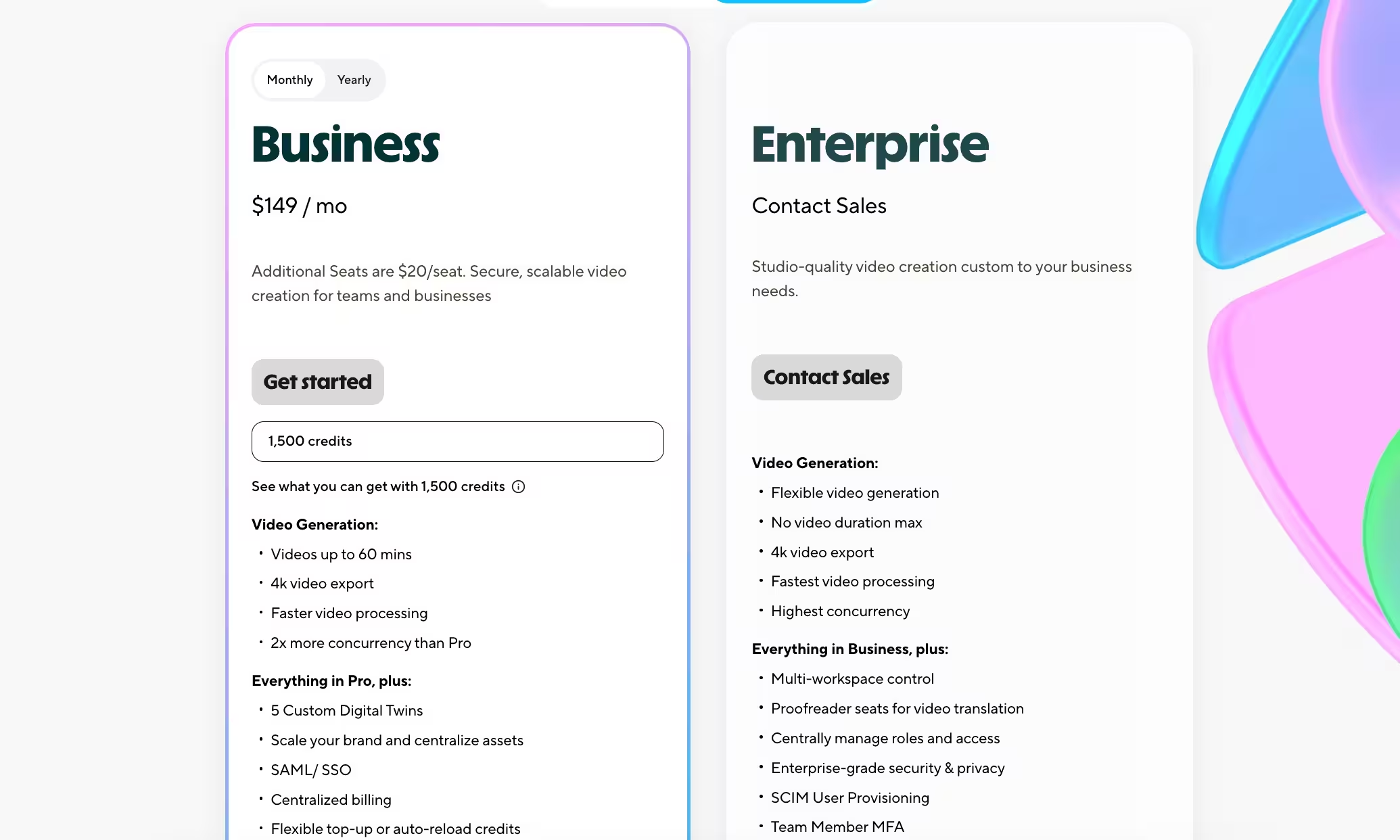
The Business Plan is designed for teams and businesses at a rate of $20 per seat. Features include:
- 1,500 credits
- Videos up to 60minutes
- 4K video export
- Faster processing and priority rendering
- Extended video generation with Avatar IV
2. Enterprise Plan – Custom Pricing
Studio-quality video creation tailored to the needs of large organizations, HeyGen provides custom Enterprise plans.
These can include:
- Higher usage limits
- No maximum video duration
- Custom avatars at scale
- Dedicated account management and premium support
Ideal for businesses, global marketing teams, or SaaS platforms that require video production to be baked into their workflows.
API Pricing Plans
The API pricing model differs from the web platform.
It is designed for developers and enterprises that want to integrate HeyGen’s video-generation capabilities into apps, workflows, or internal tools.
HeyGen now offers multiple integration paths – MCP, Skills, and Direct API – so you can build AI video into your product however you prefer.
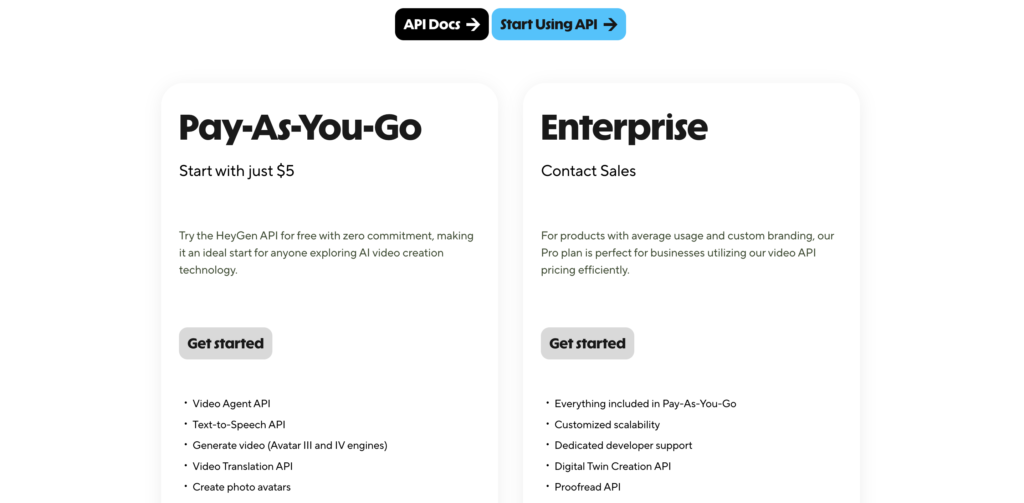
1. Pay-As-You-Go Plan
There’s no monthly commitment. You simply top up your API wallet and pay only for what you use, starting with as little as $5. This plan includes:
- Video Agent API, Text-to-Speech API, and video generation via Avatar III and IV engines
- Video Translation API
- Photo avatar creation and template-based video generation
- Access to avatar, voice, and template libraries
- MCP Server access and HeyGen Skills integration
Ideal for developers exploring AI video creation or building integrations at any scale without upfront cost.
2. Enterprise Plan
The Enterprise plan includes everything in Pay-As-You-Go, plus customized scalability, dedicated developer support, a Digital Twin Creation API, a Proofread API, and discounted rates.
Best for organizations that need tailored capacity, hands-on technical support, or advanced capabilities like digital twin creation.
Additional Pricing Features and Considerations
One of the interesting features of HeyGen’s pricing is its credit system:
- Pay-per-credit flexibility – Instead of being locked into fixed tiers, users can purchase additional credits when they run out.
- Add-ons – Features like custom avatars or extra credits can be purchased separately as optional extras, allowing more control over spending.
- Cost-effectiveness of higher tiers – While lower plans are affordable, the per-credit cost decreases at the higher tiers. For power users, upgrading often proves more economical than layering on with add-ons.
Competitor’s Comparison
| Platform | Free Plan | Starting Price | Video Length Limit | Custom Avatars | Language Support | Export Quality |
|---|---|---|---|---|---|---|
| HeyGen | Yes | $29/Month (Creator plan) | 5-30 mins | Yes (Add-on) | 40+ languages | Up to 4K |
| Synthesia | Yes | $29/Month (Starter) | Varies | No | 140+ languages | 1080p |
| Elai.io | Yes | $23/Month (Basic) | 40 mins | Yes | 130+ languages | 1080p |
| Colossyan | Yes | $19/Month (Starter) | Varies | No | 70+ languages | 720p/1080p |
| Hour One | Yes | $30/Month (Lite) | Varies | Yes | 80+ languages | 4K |
| D-ID | Yes | $4.7/Month (Lite) | Varies | Yes | 70+ languages | Varies |
HeyGen Pricing FAQ
1) Does HeyGen have a free plan?
Yes. The Free plan doesn’t require a credit card and includes 3 videos per month, each up to 1 minute long, plus access to 500+ stock avatars, 1 custom digital twin, and 30+ languages.
It’s enough to test the platform, but the 1-minute cap per video makes it more of a trial than a production tool.
2) What’s the cheapest HeyGen plan with a custom avatar?
You don’t need to upgrade for this one. HeyGen includes 1 custom digital twin even on the Free plan.
Where the paid tiers matter is volume and polish: Creator and Pro still cap you at 1+ custom digital twins, and you need Business ($149/month) to unlock 5+, plus the team and security features that come with it.
3) How does HeyGen’s pricing compare to Synthesia’s?
Both platforms start at $29/month, and both now run on a shared credit system rather than a flat per-minute allowance.
HeyGen’s Creator plan gives you 600 credits, which covers around 30 minutes of its premium Avatar IV engine per month.
Synthesia’s equivalent Starter plan gives you 1,200 credits but caps you at 10 minutes of video regardless of avatar type.
Where the platforms diverge more is at the next tier up: HeyGen Pro starts at $49/month for 1,000 credits, while Synthesia’s Creator plan jumps to $89/month for 3,600 credits and around 30 minutes.
HeyGen is generally the cheaper path to more premium-avatar minutes, while Synthesia leans more on enterprise polish and avatar variety at the top end. For the full head-to-head, see our HeyGen vs. Synthesia comparison.
