


If you want to turn an idea into video without filming anything, text to video on Videoinu is a simple place to start.
You write a prompt, describe the mood and motion, and generate a clip from text. Videoinu also supports Hunyuan AI, which it presents as a model that works with both text and image inputs and responds well to clear, structured prompts.
This workflow is useful for quick concept testing, short social clips, story scenes, and early creative drafts. It can also work well as a text to video workflow for turning prompts into short visual scenes when you want to test an idea before building something bigger.
How to Use Text to Video on Videoinu
Step 1: Start with a clear prompt
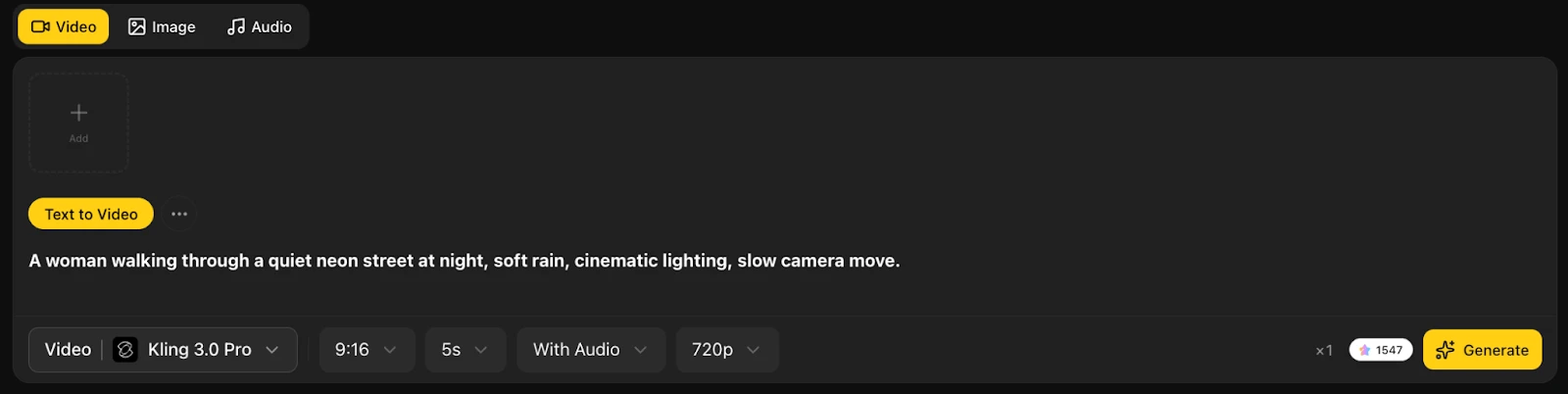
Begin with one simple idea. A short prompt usually works better than a long, overloaded one.
For example, instead of writing a full paragraph, start with something like:
A woman walking through a quiet neon street at night, soft rain, cinematic lighting, slow camera move.
Videoinu’s text-to-video flow starts with a prompt or script, then lets you add style and direction before generating the clip.
Step 2: Add style, mood, and motion
After the basic idea, add a few details that shape the result. Focus on mood, camera feel, motion, and overall style.
That might mean saying the clip should feel cinematic, animated, soft, dramatic, or fast-paced. This is usually more useful than listing every object in the scene.
A good prompt tells the model what the video should feel like, not just what should appear in the frame.
Step 3: Keep the structure simple
Text to video works best when the scene has a clear subject and a clear action. That is one reason Hunyuan AI is worth mentioning here. On Videoinu, Hunyuan AI is presented as a good fit for prompts with stronger structure and logical flow.
So if you are testing a Hunyuan AI text to video prompt for structured scene generation, keep the idea clean. One subject, one action, one mood is usually a better starting point than a complicated multi-scene description.
Step 4: Generate one clip first
Do not try to make the final version in the first round. Generate one short clip and see what works.
Ask yourself a few simple questions:
- Does the scene match the prompt?
- Does the motion feel right?
- Is the mood clear?
- Is the idea easy to read?
Videoinu says its text-to-video workflow automatically selects the most suitable AI model for the prompt, which helps keep the process simple for beginners.
Step 5: Refine and build from there
If the first version is close but not quite right, make one change at a time. You might adjust the lighting, make the motion softer, or simplify the scene.
Once one clip works, it becomes much easier to build the next one on Videoinu. That is especially useful if you want to turn a short prompt into several connected scenes instead of stopping at one test clip. Videoinu also positions its broader workflow around building longer, structured video content from text-based ideas.
Tips for Better Text to Video Results
Keep your first prompt short. Focus on one main visual idea. Add mood and motion naturally instead of stuffing in too many details. If the output feels messy, simplify the prompt before adding more.
If you are using Hunyuan AI in the workflow, clearer scene structure usually helps. Videoinu’s own Hunyuan AI guide explicitly recommends emphasizing structure and meaning in the prompt.
Final Thoughts
Text to video on Videoinu works best when you keep the idea clear and start small. Write one good prompt, shape the mood, and test one short clip first. Once that first result feels right, you can build from it much more easily.
FAQs
What is text to video on Videoinu?
It is a workflow that turns a written prompt or script into an AI-generated video.
Is Hunyuan AI available on Videoinu?
Yes. Videoinu lists Hunyuan AI as one of its supported AI video models.
How should I write a better text to video prompt?
Keep it clear, structured, and focused on one scene, one subject, and one mood.
Can I use text to video for longer projects?
Yes, but it usually works better to start with short clips and then build larger sequences from them.
Do I need editing experience?
No. Videoinu says the workflow is designed so users can generate video directly from text without traditional video editing.
