


You typed one sentence. Three minutes later, you had a finished video. Script, voiceover, stock footage, subtitles, transitions, background music. All handled.
That is the core promise of the InVideo AI video generator.
And for the most part? It delivers.
But here is the thing nobody talks about in surface-level overviews.
The AI video generator feature inside InVideo is not trying to do what HeyGen does. It is not trying to do what Synthesia does, either. These three tools get lumped together constantly, yet they solve completely different problems for completely different people.
So let’s break down what the InVideo AI video generator actually is, how its text-to-video engine works in 2026, and (most importantly) whether it is the right pick for your specific workflow.
What Exactly Is the InVideo AI Video Generator?
The InVideo AI video generator is a text-to-video engine built into the InVideo platform at invideo.io.
You give it a written prompt describing the topic, tone, target audience, and desired length.
The AI then handles everything else. It writes the script, selects matching stock footage or AI-generated visuals, adds a voiceover in your chosen language and accent, layers in background music, inserts subtitles, and assembles everything with transitions.
Think of it as hiring a junior video producer who works in minutes instead of days. You describe the video. The producer makes it. You review it. You request changes through a chat-based interface that InVideo calls the “Magic Box.” The producer revises. You export.
That loop (prompt, generate, refine, export) is the entire workflow.
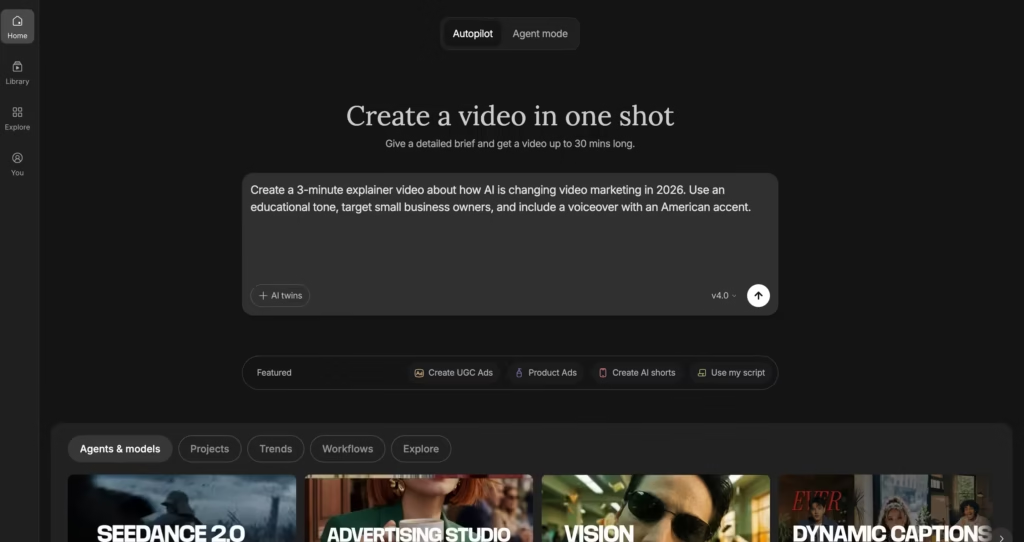
No drag-and-drop timeline. No keyframing. No manual cuts.
The Technical Details That Matter Right Now
Here’s what is currently under the hood:
InVideo now integrates over 200 AI video models, including OpenAI’s Sora 2 Pro and Google’s Veo 3.1, directly inside its pipeline for generating cinematic visuals.
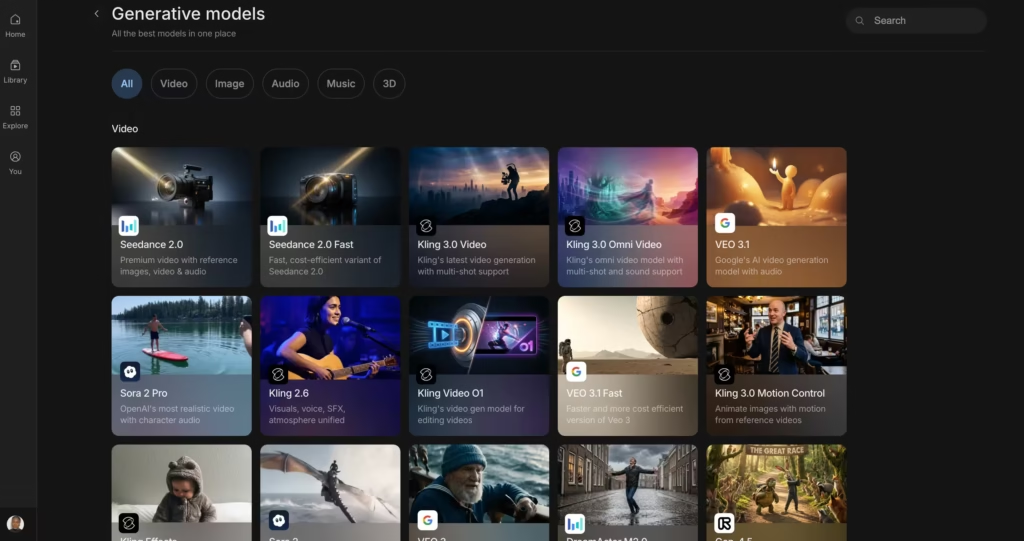
It also includes Kling 3.0, Nano Banana Pro (from Google DeepMind), and Seedream (from ByteDance) for AI-generated imagery within videos.
The stock library pulls from over 16 million assets across iStock and Storyblocks, and the AI selects clips automatically based on your prompt.
On the audio side, you get voiceover support in over 50 languages with male and female voices, accent selection, and the ability to use up to 6 different voices in a single video.
Voice cloning is also available. Upload a 30-second sample and the AI learns your voice. The Plus plan allows 2 voice clones; the Max plan allows 5.
For output, you can export simultaneously in 16:9, 9:16, and 1:1 formats. And the InVideo v4 agent can produce videos up to 30 minutes long from a single prompt.
That Sora 2 and Veo 3.1 integration is worth pausing on.
Sora 2 alone costs around $200 per month through ChatGPT Pro, and Veo 3.1 Ultra runs about $250 per month. InVideo bundles access to both starting at $28 per month.
No other single platform currently offers that combination under one subscription.
BetaNews confirmed InVideo as the first platform to offer unrestricted global access to Sora 2 back in October 2025, and Veo 3.1 was added shortly after.
How Does the InVideo AI Video Generator Compare to HeyGen and Synthesia?
This is the question everyone searches for. And the answer requires some nuance, because these tools sit in different lanes of the AI video space.
InVideo AI is a text-to-video generator. You describe what you want. It produces an entire video from scratch using stock footage, AI-generated visuals, and automated voiceover.
HeyGen is an AI avatar video platform. You write a script, pick a digital avatar (or create your own), and the avatar delivers your script on camera with lip-synced speech.
Synthesia is also an AI avatar platform, but it is built specifically for enterprise use. Training videos, onboarding content, corporate communications at scale.
See the difference? InVideo generates the whole video. HeyGen and Synthesia generate a presenter to deliver your script. That distinction shapes every downstream decision.
Feature-by-Feature Comparison Table
| Feature | InVideo AI | HeyGen | Synthesia |
| Primary approach | Text-to-full-video (stock + AI visuals) | AI avatar presenter videos | AI avatar presenter videos (enterprise) |
| Best for | YouTube, social media, marketing content | Sales videos, social clips, personalized outreach | Corporate training, L&D, onboarding |
| AI video generation | Full video from a text prompt | Avatar reads your script on camera | Avatar reads your script on camera |
| Avatar library | AI-generated characters (not the core focus) | 700+ stock avatars, custom avatar creation | 240+ stock avatars, custom avatar creation |
| Voiceover method | AI voices + voice cloning | Avatar lip-sync in 175+ languages | Avatar lip-sync in 140+ languages |
| Stock footage integration | 16M+ assets (iStock, Storyblocks) | Not a core feature | Not a core feature |
| Generative AI models | Sora 2 Pro, Veo 3.1, Kling 3.0, and more | Not applicable | Not applicable |
| Editing style | Chat-based commands (Magic Box) | Script editor + settings panel | Timeline editor + scene management |
| Starting price (paid) | $20/month (Plus) | $29/month | $29/month |
| Free plan | 10 AI min/week, watermarked, 720p | 3 videos/month, watermarked | 10 min/month, watermarked |
| Enterprise compliance | Brand kit support | SOC 2 on Business tier ($149/mo) | SOC 2 Type II, GDPR, ISO 42001 |
| E-commerce tools | Product video generation, A/B ad variants, Money Shot | Personalized product demos via avatar | Product demonstration videos |
| Ideal user | Solo creators, marketers, small teams | Creators, marketers, sales teams | L&D departments, HR teams, large organizations |
When Should You Pick InVideo Over the Other Two?
Let’s forget feature lists for a moment and talk about real-world scenarios.
Pick InVideo AI if you need to produce a high volume of content-style videos (explainers, listicles, educational content, product showcases, social media clips) without appearing on camera yourself.
The AI handles the entire production chain. You never touch an editing timeline. This is the tool for the person running three YouTube channels while holding down a day job.
Pick HeyGen if you need a human-looking presenter delivering a specific message. Sales teams sending personalized video pitches?
Marketing teams that want a “face” for their brand without hiring talent? HeyGen was built for exactly that.
According to multiple independent reviews, its Avatar IV technology currently produces some of the most realistic AI presenters on the market. And the 175-language lip-sync makes it a strong fit for global teams.
Pick Synthesia if you work inside a large organization and need to create training videos, compliance content, or internal communications at enterprise scale.
Synthesia carries the compliance certifications that IT departments and procurement teams demand: SOC 2 Type II, GDPR, and ISO 42001.
Quick Decision Table
| Your situation | Best pick |
| Running a faceless YouTube channel | InVideo AI |
| Creating social media marketing videos at scale | InVideo AI |
| Sending personalized sales videos with a “face” | HeyGen |
| Building a brand spokesperson without hiring talent | HeyGen |
| Producing 50+ training videos for a global workforce | Synthesia |
| Needing SOC 2 or GDPR compliance for video content | Synthesia |
| Making product ads and promo reels from a single photo | InVideo AI |
| Translating one video into 30+ languages with avatar lip-sync | HeyGen |
What Makes the InVideo AI Video Generator Different from Pure Clip Generators?
Pure text-to-video generators like Sora 2 or Google Veo create short cinematic clips from scratch.
You describe a scene, and the AI renders it pixel by pixel. Those tools produce impressive results, but the clips are typically 5 to 20 seconds long. You still need to stitch them together yourself into something publishable.
InVideo AI takes a completely different path. It acts as an automated video producer, not just a clip generator.
When you enter a prompt, the AI writes a full script, selects or generates visuals scene by scene, records a voiceover, adds subtitles, picks background music, handles pacing, and assembles everything into a cohesive multi-minute video.
InVideo’s CEO Sanket Shah described the platform’s agent as capable of making “over 500 creative decisions” per video, running autonomously to handle the full pipeline.
And because InVideo now integrates Sora 2 and Veo 3.1 directly into its pipeline, you get the best of both worlds. AI-generated cinematic clips woven together with stock footage, all assembled automatically.
For someone who just wants to hit “publish,” that difference saves hours on every single video.
How Much Does the InVideo AI Video Generator Cost in 2026?
Pricing is fairly straightforward, but pay close attention to how AI generation minutes work. Here is the current breakdown based on pricing:
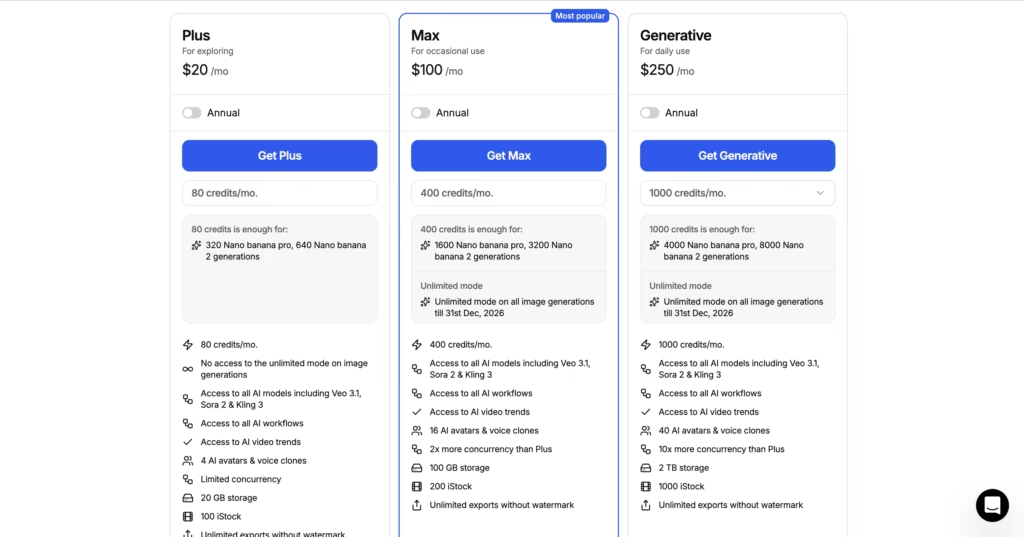
Annual billing saves roughly 20% across all paid tiers. On annual plans, Plus drops to around $17 per month and Max to about $60 per month.
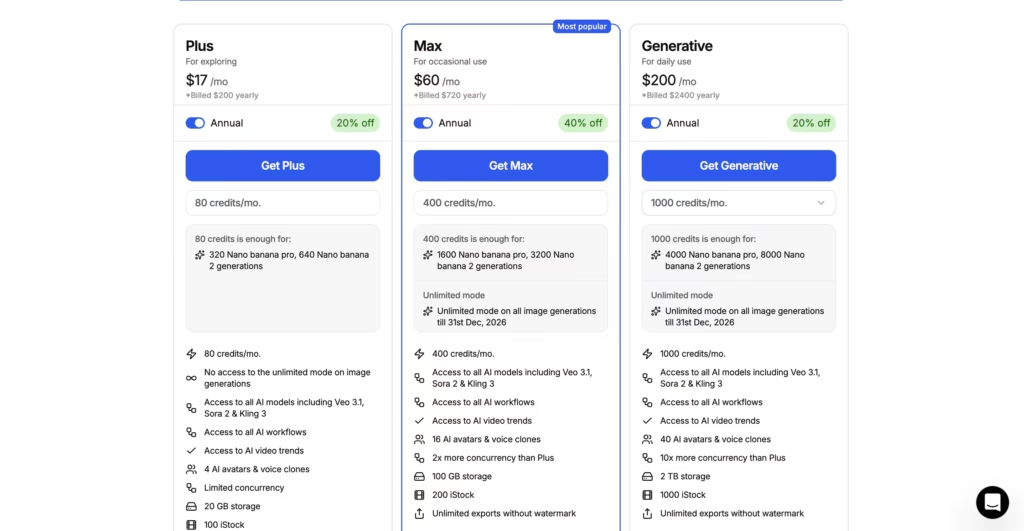
Here is my honest take on the value: the Plus plan at $20 per month is one of the better deals in the AI video space right now.
You are getting access to Sora 2 Pro and Veo 3.1 (which would cost you $450+ per month if purchased separately), a 16 million asset stock library, voice cloning, and unlimited exports.
For a solo creator or small marketing team producing 5 to 10 videos per month, that math works out heavily in your favor.
The Max plan at $100 per month makes sense only if you are consistently hitting the minute ceiling. I would not recommend jumping straight to Max unless you already know your production volume demands it.
One thing to keep in mind: AI generation minutes get consumed every time the AI creates something new. Every revision, every regeneration, every tweak through the Magic Box eats into your monthly allowance.
Heavy revisers on the Plus plan might produce somewhere between 5 and 15 finished videos per month, depending on length and how many iterations each one needs.
Also critical: unused minutes do not roll over. They reset at the start of each billing cycle regardless of how much you used. If your output volume varies month to month, factor that into your plan decision.
Does the InVideo AI Video Generator Work for E-Commerce?
This is one area where InVideo has quietly pulled ahead of the pack.
A feature that launched in early 2026 lets you upload a single product photo and generate Amazon A+ content, 360-degree product videos, A/B ad variant sets, and hero-style ad reels.
The standout tool within this suite is called “Money Shot.” You upload 4 to 8 reference photos of your product, and the AI generates a multi-shot commercial that preserves your actual packaging and logo text.
For e-commerce sellers managing dozens of SKUs, that is a genuine time saver.
Neither HeyGen nor Synthesia offer anything quite like it. HeyGen can produce personalized product demos through its avatar system, and Synthesia handles product explainers well. But neither one generates full product commercials from a handful of photos.
What Are the Actual Downsides?
Every tool has trade-offs. Here are the ones worth knowing about before you commit.
Credit consumption can surprise you. The “50 minutes per month” on the Plus plan sounds generous until you actually start using it. When I tested the Plus plan, I burned through nearly 6 minutes of credits iterating on a single 2-minute explainer video, which caught me off guard.
The AI nailed the visuals on the first pass, but I kept tweaking the voiceover pacing and swapping out a few clips, and each revision consumed more minutes.
AI-generated scripts lean generic. After generating around a dozen videos across different topics, I noticed a consistent pattern. The AI scripts state facts clearly but almost never open with an emotional hook.
The first 10 seconds of every generated script read like a Wikipedia summary instead of something that grabs a viewer’s attention. If your brand has a specific voice or messaging style, plan on rewriting at least the intro and the call-to-action before you generate the video.
Voiceover quality is inconsistent. The AI voices work well for straightforward informational content. But in my testing, they struggled with anything that needed tonal shifts. A video about budget travel tips sounded perfectly fine.
A video about overcoming creative burnout sounded flat and disconnected from the subject matter. If your content relies heavily on vocal delivery (think storytelling or persuasive sales pitches), you will notice the gap compared to a professional voice actor or even a decent voice clone.
No traditional timeline editor. The Magic Box chat-based approach is brilliant for beginners but can feel limiting for experienced editors who want frame-level control.
The free plan is for testing, not publishing. Between the watermark, the 720p limit, and the absence of commercial rights, you cannot realistically use the free tier for any business purpose.
So, Is the InVideo AI Video Generator Worth It?
The InVideo AI video generator is not the right tool for everyone.
But for the specific problem it solves (turning a text prompt into a fully produced, publish-ready video without any editing skill), it is one of the most complete options on the market right now.
It will not replace HeyGen if you need a realistic digital spokesperson reading your script to camera.
It will not replace Synthesia if your enterprise needs compliance-grade training content at scale.
But if you are a content creator, marketer, or small business owner who needs to publish polished videos regularly without the overhead of traditional video production? The InVideo AI video generator deserves a serious look.
The integration of Sora 2 Pro and Veo 3.1 into a single affordable platform, combined with the chat-based editing workflow and a massive stock library, creates a production pipeline that flat-out did not exist two years ago. For the right user, it changes the entire math on what video content creation costs in both time and money.
FAQs
1. Can I use the InVideo AI video generator to make videos I monetize on YouTube?
Yes. All paid plans (Plus and above) include commercial usage rights. That means you can monetize videos on YouTube, TikTok, Instagram, or any other platform.
The free plan does not include commercial rights, so videos made on that tier cannot be used for business or monetized purposes.
2. Is InVideo AI better than HeyGen for making marketing videos?
It depends on what kind of marketing video you need. If you want a talking-head presenter delivering a scripted message to camera, HeyGen is the stronger choice. Its Avatar IV technology produces highly realistic digital presenters.
If you want a fully produced video with stock footage, AI-generated visuals, voiceover, and transitions without anyone appearing on camera, InVideo AI handles that better.
3. How does InVideo AI compare to Runway or Pika for creative video work?
These tools serve different purposes. Runway and Pika focus on generating short, artistic, cinematic clips from text or image prompts.
They are powerful creative tools for visual experimentation. InVideo AI produces longer, structured, publish-ready videos with scripts, voiceovers, and assembled footage. Think “clip generator” versus “full video producer.”
4. Can I clone my voice in InVideo AI?
Yes. You upload a 30-second voice sample, and the AI creates a usable clone. The Plus plan includes 2 voice clones. The Max plan includes 5.
Quality is solid for social media and marketing content, though it may not fool anyone into thinking it is a studio recording.
5. What AI models does InVideo use to generate video?
As of April 2026, InVideo integrates over 200 AI models. The headline ones include OpenAI’s Sora 2 Pro, Google’s Veo 3.1, Kling 3.0, Nano Banana Pro (Google DeepMind’s image model), Seedream (ByteDance), and ElevenLabs for music.
