

CodeSignal is a cloud-based technical assessment platform that companies use to evaluate the coding skills of job candidates before hiring them.
Founded in 2015 in San Francisco, it has grown into one of the most widely used pre-employment testing tools in tech, ranked #3 among technical assessment platforms by SelectHub.
Here is what matters if you are on the candidate side: CodeSignal is free for you. You do not pay anything. The hiring company pays for the platform. You just create an account, receive an assessment invitation, and take the test.
But the experience can feel intense, especially when the platform asks for access to your camera, microphone, and screen.
After coaching dozens of candidates through CodeSignal assessments, I have seen the same questions come up over and over: Does CodeSignal record my screen? Is it watching me through my camera? How does it catch cheating?
Let’s answer all of them.
Does CodeSignal Record Your Screen?
Yes, but only during proctored assessments.
When an assessment requires proctoring, CodeSignal records your screen activity, webcam video, and microphone audio for the entire duration of the test.
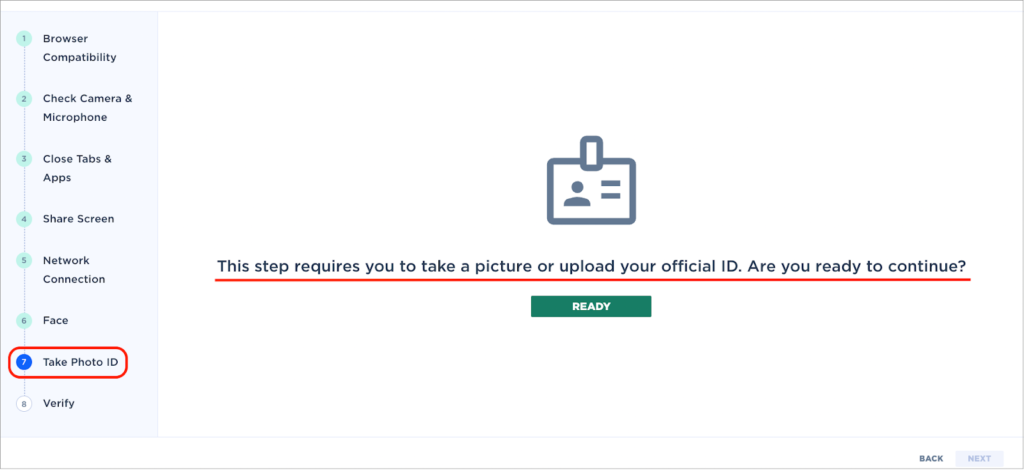
Before the timer starts, the platform prompts you to share your camera, microphone, and screen. It also asks you to show a government-issued photo ID to verify your identity.
Here is the key detail that trips people up: when CodeSignal asks you to share your screen, it requests access to your ENTIRE SCREEN, not just the browser tab. That means if you open another app, switch to a different window, or pull up a second browser tab on that screen, all of it gets captured.
Not all CodeSignal tests are proctored, though.
Practice assessments, some company-specific tests, and unproctored evaluations do not require camera, screen, or microphone access at all.
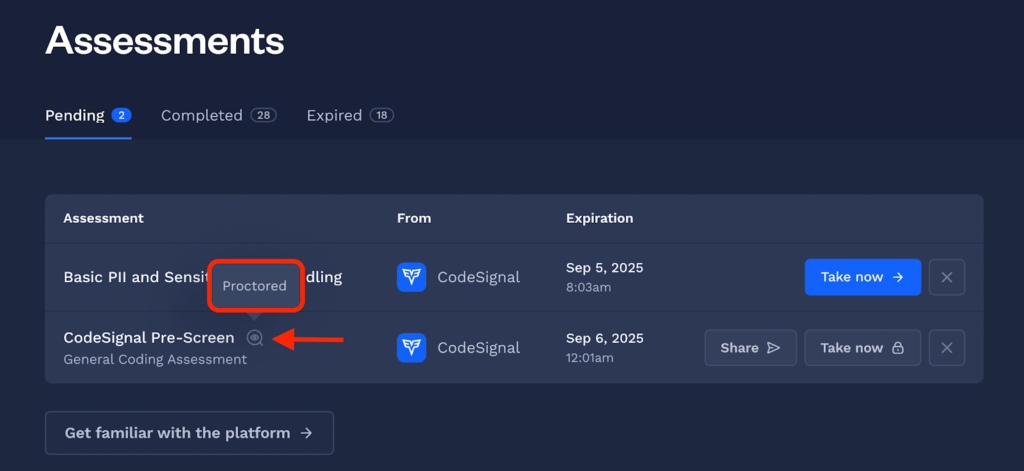
You will always know before you start whether proctoring is required because CodeSignal displays this information in your Assessment section ahead of time.
What Exactly Gets Recorded in a Proctored Session?
| What is recorded | Details |
| Screen | Everything visible on the screen you share (full screen, not just the test tab) |
| Webcam | Your face and surroundings for the entire session |
| Microphone | Audio from your environment (yes, background noise is captured) |
| Photo ID | A snapshot of your government-issued ID for identity verification |
| Keystroke replay | CodeSignal can replay every keystroke a candidate made during the test |
Does CodeSignal Record Screen and Camera Together?
Yes. During a proctored assessment, CodeSignal records your screen and your camera feed simultaneously. These are captured as separate streams but reviewed together by CodeSignal’s proctoring verification team.
A common concern I hear from candidates is whether the camera captures the entire room.
The webcam records whatever your camera can see, which is typically your face and the area directly behind you.
CodeSignal is looking for things like other people in the room, someone speaking answers to you, or evidence that you are reading from a second screen or device.
One thing to know:proctoring does not change how your code is scored.
CodeSignal calculates your assessment score automatically and independently from the verification process. The proctoring layer exists to confirm that your score is legitimate, not to grade you differently.
How Does CodeSignal Detect Cheating?
This is where it gets serious. CodeSignal published research in February 2026 showing that cheating and fraud attempt rates for proctored assessments more than doubled in 2025, rising from 16% in 2024 to 35%.
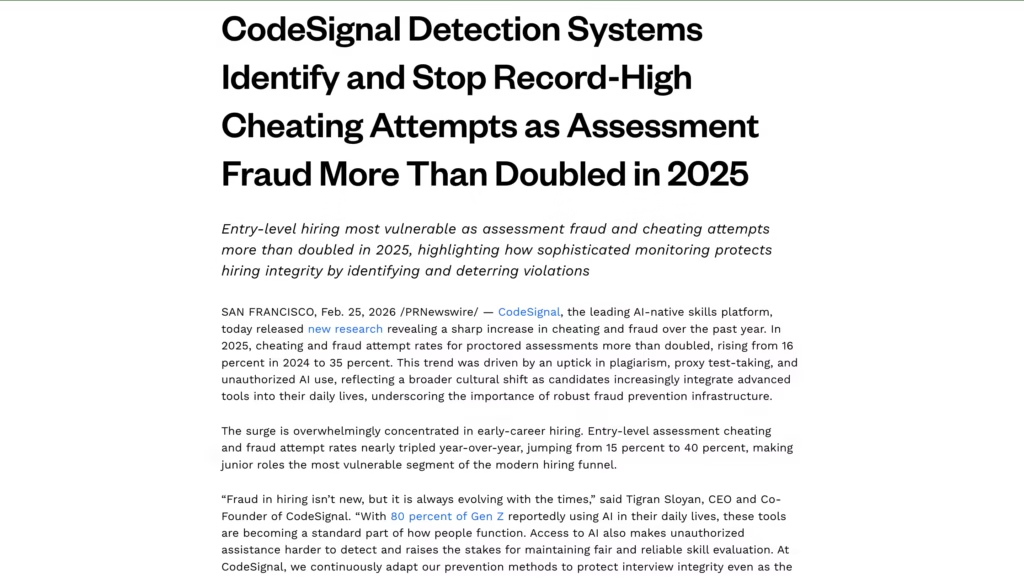
Entry-level hiring was hit hardest, with a 40% cheating attempt rate. Those numbers are striking, and they explain why CodeSignal has invested heavily in detection.
The platform uses a layered system refined over 10 years and across millions of assessments. Here are the four main ways CodeSignal catches cheating:
1. The Suspicion Score
CodeSignal assigns a proprietary Suspicion Score to every submission. This score analyzes multiple signals and synthesizes them into a single risk metric.
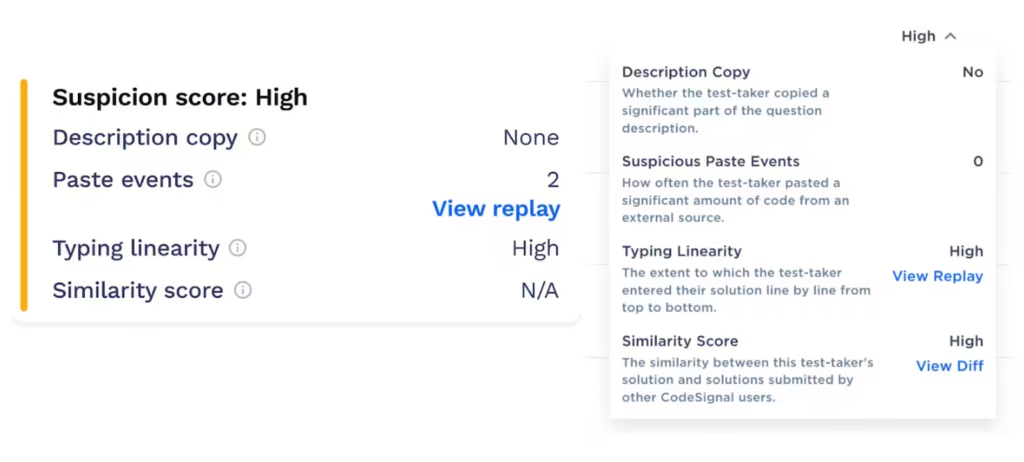
Image Credit: CodeSignal
The components include:
Typing dynamics. Human coding is messy. You start a function, pause to think, go back and refactor, delete half of what you wrote, and rebuild. CodeSignal tracks this natural rhythm. If optimized code appears fully formed without that visible struggle, the Suspicion Score spikes.
Solution similarity. CodeSignal compares your code against patterns from millions of previous assessments. If your solution closely matches known leaked answers, AI-generated output, or another candidate’s submission, it gets flagged.
Copy-paste detection. Large blocks of code pasted into the editor (especially code that matches online sources like GitHub or Stack Overflow) trigger review.
Mouse and cursor behavior. The platform tracks cursor movement patterns. Abnormal trajectories, instantaneous displacements, or unnatural ratios between idle and active time can raise flags.
2. Full-Session Proctoring
CodeSignal uses a blend of multiple AI reviews and human oversight to evaluate proctoring recordings.
The AI layer watches for behavioral signals like repeated off-screen glancing, unusual audio events, or the presence of other people. When the AI flags something, human proctoring specialists review the session.
3. Identity Verification
Every proctored session requires a government-issued photo ID. CodeSignal matches the ID photo to the person on camera to detect proxy test-taking (someone else taking the test on your behalf).
4. Leak-Resistant Assessment Design
CodeSignal rotates its question pool and uses algorithmically generated variants of problems. This makes it harder to memorize or share exact answers, unlike some competitors that reuse the same question bank for months.
What Does and Does Not Get You Flagged
After researching CodeSignal’s detection system and talking to candidates who have gone through it, I put together this table to clear up the most common confusion:
| Action | Will it flag you? |
| Using the built-in IDE features (autocomplete, syntax highlighting) | No |
| Taking short pauses to think or stretch | No |
| Briefly glancing away from the screen | No |
| A minor internet interruption or browser refresh | No |
| Pasting large blocks of code from external sources | Yes |
| Code appearing fully formed without iterative development | Yes |
| Another person visible or audible in the room | Yes |
| Repeatedly looking off-screen at a second device | Yes |
| Switching to other applications or browser tabs on shared screen | Yes |
| Solution matching a known leaked answer | Yes |
The distinction matters: CodeSignal tracks behavioral patterns, not isolated gestures. A single glance away from the screen will not get you flagged. But repeated off-screen referencing combined with code that appears without a natural development process will.
What Happens to Your Proctoring Data?
This is a legitimate concern, and I appreciate candidates who ask about it. Here is what CodeSignal’s own knowledge base states:
Your proctoring data is deleted within 15 days. That includes the video recording, audio recording, screen capture, and ID images.
The hiring company does not see the raw recordings. They receive your assessment score and a verification status (whether the result was confirmed as legitimate). They do not get your webcam footage, audio, or screen recording.
CodeSignal does not sell your proctoring data. Their privacy policy (updated September 2025) explicitly states this. They comply with both GDPR and CCPA, and you can request data deletion at any time by emailing [email protected].
Data is stored on AWS servers in the United States. All personally identifiable information is encrypted in transit and at rest.
In my honest assessment, CodeSignal’s data handling practices are among the more transparent in the technical assessment space.
The 15-day deletion window for proctoring data is short compared to some competitors, and the fact that hiring companies never see the raw footage provides a meaningful privacy layer.
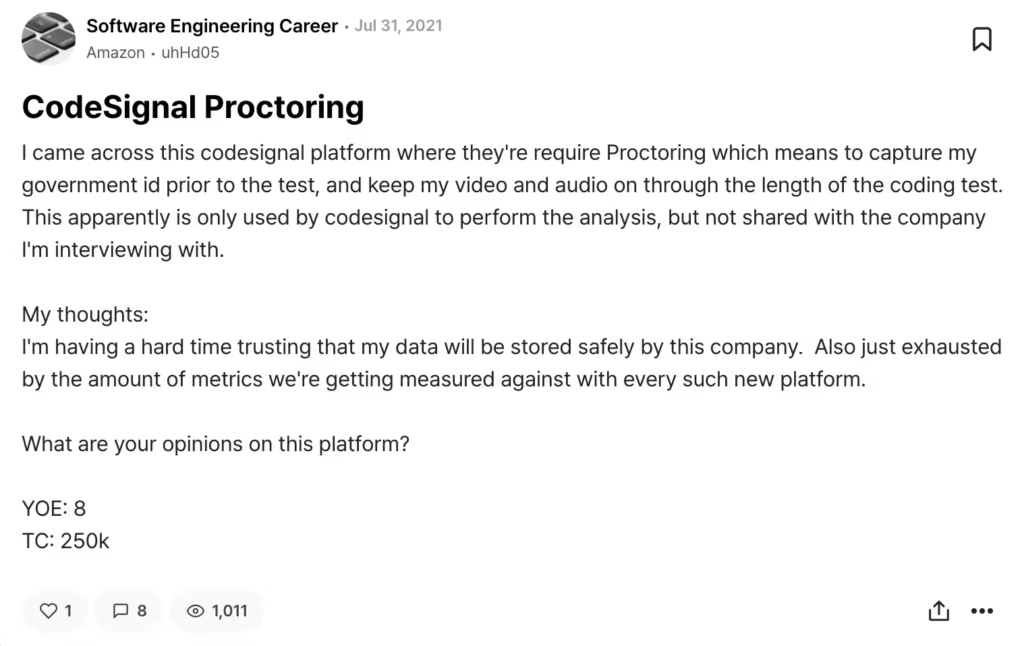
That said, you are still handing over your government ID and a video of yourself to a third-party company.
If that makes you uncomfortable, know that some candidates on Blind have pushed back on this, though declining proctoring when it is required typically means you cannot take the test.
How Should You Prepare for a CodeSignal Assessment?
After guiding candidates through this process many times, here is the preparation workflow I recommend:
Step 1: Take the practice assessment first. CodeSignal offers a free practice test in the Assessment Hub. This lets you get comfortable with the IDE, the timer, and the question format without any stakes.
Step 2: Set up your environment. Find a quiet, private room. Close every application you do not need. If proctoring is required, make sure your webcam, microphone, and internet connection work reliably. Use a clean desk with no notes, phones, or second screens visible.
Step 3: Understand what is allowed. CodeSignal permits using built-in IDE features like autocomplete and syntax highlighting.
You can use your own logic and problem-solving process. You cannot use external resources like Google, Stack Overflow, ChatGPT, or any other reference material during a proctored assessment (unless the assessment rules specifically say otherwise).
Step 4: Code naturally. This is my biggest piece of advice. Write code the way you actually think. Start messy. Refactor. Delete things. Build incrementally. The Suspicion Score is designed to detect unnatural coding patterns, so the best defense against false flags is simply coding like a human.
Step 5: Opt into proctoring if it is optional. CodeSignal has stated that opting into proctoring when it is not required can increase the likelihood that your result will be accepted by other companies that use CodeSignal. A proctored score is a verified score, and some employers weight that.
How Does CodeSignal Compare to Other Technical Assessment Platforms?
| Feature | CodeSignal | HackerRank | Codility | LeetCode (hiring) |
| Primary use | Pre-employment assessments + interviews | Pre-employment assessments + practice | Pre-employment assessments | Practice + some employer assessments |
| Proctoring available | Yes (full-session, AI + human review) | Yes (basic) | Yes (basic) | Limited |
| Suspicion Score system | Yes (proprietary, refined over 10 years) | No | No | No |
| Keystroke replay | Yes | No | No | No |
| ID verification | Yes (government-issued) | No | No | No |
| Proctoring data deleted | Within 15 days | Varies | Varies | N/A |
| Free for candidates | Yes | Yes (practice); employer tests free | Yes (employer tests) | Free tier + paid plans |
| Question variety | Leak-resistant, algorithmically varied | Large question bank | Moderate question bank | Very large question bank |
| Agentic AI assessments | Yes (launched April 2026) | No | No | No |
One thing that stood out to me during research: CodeSignal is the only platform on this list that combines keystroke replay, Suspicion Scoring, full-session proctoring with human review, and government ID verification into a single system.
That makes it the most monitored assessment experience a candidate is likely to encounter.
Whether that is reassuring (your honest score is protected) or stressful (you are being watched closely) depends on your perspective.
What Are Agentic Coding Assessments?
This is brand new and worth knowing about.
In April 2026, CodeSignal launched agentic coding assessments, a new category of evaluation designed to measure what engineers can build when working with AI tools like Claude Code, Cursor, and Codex.
Why does this matter?
A CodeSignal survey of 450 U.S. software engineers (March 2026) found that 91% already use agentic AI coding tools at work and 75% have shipped production code partially or primarily generated with AI in the last six months.
Traditional coding assessments that ban AI usage no longer reflect how engineers actually work.
The agentic assessments let candidates use AI tools during the test. The evaluation focuses on what you build, how you direct the AI, and whether the final product works, rather than whether you typed every line yourself.
If you are applying to companies in mid-to-late 2026, there is a real chance you will encounter this format. It is a significant shift in how technical skills are measured, and CodeSignal is the first platform to offer it.
So, Should You Worry About CodeSignal Proctoring?
CodeSignal is one of the most comprehensive (and most monitored) technical assessment platforms candidates will encounter in 2026.
It records your screen, camera, and microphone during proctored sessions. It assigns a Suspicion Score to every submission. It verifies your identity with a government ID. And it deletes all proctoring data within 15 days.
The system is designed to protect honest candidates as much as it is to catch dishonest ones. Unproctored assessments show score inflation more than 4X larger than proctored ones.
That means if you are genuinely skilled and you take the test honestly, proctoring actually helps you by making sure your score is not undercut by people who cheated their way to higher numbers.
Treat the proctoring as a feature, not a threat. Set up a clean environment. Code naturally. Do not try to outsmart a system that has been refined over 10 years and across millions of assessments. Just show what you can do.
FAQs
1) Can CodeSignal see my other tabs or applications?
During a proctored assessment, CodeSignal records everything on the screen you choose to share. If you selected “Entire Screen,” then yes, switching to another tab or application will be visible in the recording. If you only share a specific browser tab (when that option is available), activity in other tabs would not be captured. However, most proctored assessments require full screen sharing.
2) What happens if my internet drops during a CodeSignal test?
A brief internet interruption will not automatically flag you. CodeSignal accounts for connectivity issues. However, extended outages may affect your ability to complete the test within the time limit. If something goes wrong, contact CodeSignal support immediately at [email protected].
3) Can I retake a CodeSignal assessment?
It depends. For the General Coding Assessment (GCA), there is typically a waiting period before you can retake it. Company-specific assessments may have different retake policies set by the employer. Check your assessment invitation for specific details.
4) Does CodeSignal share my score with multiple companies?
CodeSignal offers a “Coding Score” based on your best verified GCA result. This score can be shared with multiple companies if you choose, similar to how a standardized test score works. Company-specific assessment results, however, are only shared with the company that invited you.
5) Is proctoring mandatory for all CodeSignal tests?
No. Proctoring is set by the hiring company, not by CodeSignal. Some companies require it; others make it optional; some skip it entirely. You will always see whether proctoring is required before you start the assessment.
6) Should I worry about background noise triggering a flag?
Normal household sounds (a dog barking, traffic, a door closing) will not flag you. CodeSignal monitors audio for voices that might indicate someone is feeding you answers. If you live in a noisy environment, try to find the quietest room available, but do not panic about incidental sounds.
