


Why Finance Answers Get Delayed in Daily Workflows
Work today moves quickly, and most communication in companies happens through emails, chats, and internal messaging tools. Teams constantly exchange updates, ask questions, and make decisions in real time.
But when important information is stored in a separate system, even simple questions take longer to resolve. Messages slow things down because someone still has to open another tool, find the data, and bring the answer back manually. In practice, this creates small but constant interruptions.
According to Microsoft’s 2025 Work Trend Index, during the 9–5 workday, employees are interrupted by meetings, emails, or messages every 2 minutes on average. In this kind of environment, even a short delay in getting an answer can break the flow of work.
For example, let’s take a look at a finance company that uses Slack for communication and Xero for financial management, a common setup for many teams. A sales manager asks in Slack whether a client has already paid an invoice before moving forward with a deal. To answer, someone from finance has to open Xero, search for the correct record, confirm the payment status, and then return to Slack with the update. If they are busy or unavailable, the conversation pauses, and the decision is delayed. Even though both tools are in place, they are not connected in a way that supports fast, everyday decisions.
Xero Slack integration improves how teams access financial information. The integration connects financial data from Xero with communication in Slack, allowing teams to access information without requiring users to open Xero or rely on finance teams for every request, reducing delays in everyday workflows.
In this article, we’ll take a closer look at what Xero Slack integration is, how it fits into everyday workflows, what alternatives are available, how it works in practice, and what to keep in mind to use it effectively.
How Xero Slack Integrations Work Today
A Xero Slack integration allows relevant updates from Xero to be delivered into Slack automatically. In practice, this works through a setup where both tools are connected via an integration platform, and specific conditions are configured in advance. These conditions define what should happen in Slack when something changes in Xero.
For example, the system can be configured to track certain changes in Xero and automatically send updates to Slack when those changes occur. The key idea is to reduce the need to rely on manual checks and internal follow-ups by bringing relevant information directly into Slack as soon as something happens.
For a better understanding, let’s take a closer look at how this works in practice using an integration like Zapier as an example.
The way it works follows a simple flow:
1. An event happens in Xero: This is the starting point of the workflow. It can be something like a new bank transaction, a new bill, or a new credit note.
2. The integration detects this event: The integration continuously checks for these events based on the conditions that were configured.
3. A predefined action is triggered in Slack: Once the event is detected, the system performs a specific action in Slack, such as sending a message when a new invoice or payment appears in Xero. This step is defined in advance and follows a fixed logic.
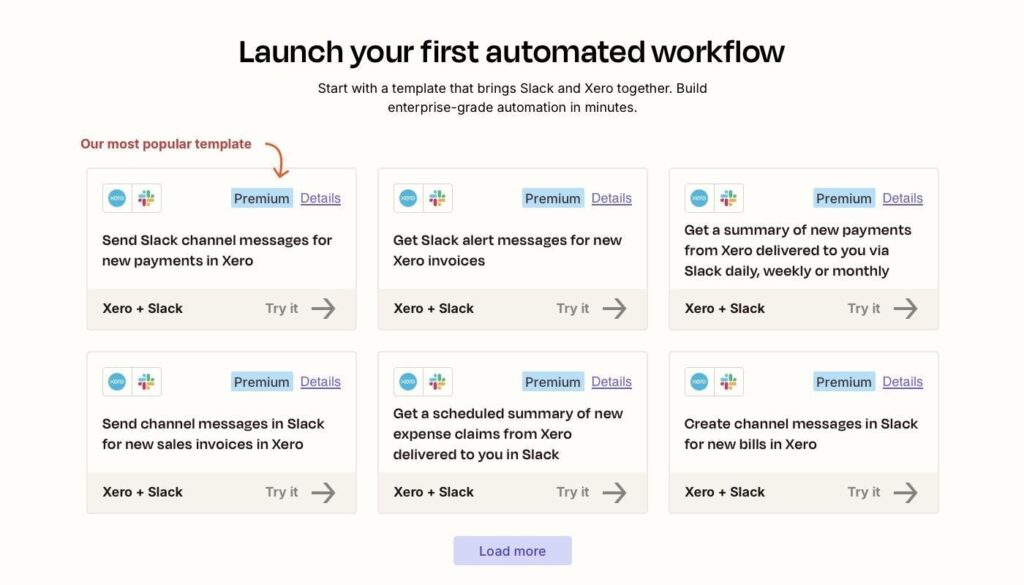
Image source: Zapier
The structure is simple and clear, but it also shows how everything is built around specific events and predefined actions. Because of this, integrations only cover the scenarios that were configured in advance, which makes them less flexible than teams often need.
In the next section, we’ll take a closer look at these limitations and what to keep in mind when using this approach.
What to Keep in Mind with Slack Xero Integration
While event-driven connectors like Zapier help automate routine updates, their capabilities are shaped by how they are designed, which is important to keep in mind when working with them.
Let’s take a closer look at the key limitations:
- Predefined workflows: Everything is built around scenarios that need to be configured in advance. If a situation was not set up beforehand, it is simply not covered.
- Focus on notifications, not access: Integrations are designed to send updates based on events. Teams receive information, but checking something specific on demand, like the payment status of a particular invoice, is not always straightforward without a dedicated workflow.
- Limited flexibility: Even though platforms like Zapier offer multiple options, customization is limited to the triggers and actions available within the integration. This means workflows can be configured, but only within predefined options, rather than fully adapted to any specific need.
Overall, integrations help simplify work and reduce time spent on repetitive tasks. At the same time, it’s important to understand not only their benefits, but also where their capabilities naturally stop, and to explore different options to choose the approach that best fits your team’s needs.
Other Ways to Connect Xero and Slack
Choosing the right way to connect Xero and Slack depends on how your team works with financial data.
As mentioned earlier, event-driven solutions are suitable when the goal is to automate routine updates from Xero to Slack. They work well for sending automated updates and notifications, such as when new invoices, payments, or other financial updates appear in Xero, especially when key scenarios can be defined in advance. It works best for predictable processes rather than situations where data needs to be accessed on demand.
When looking at other approaches available on the market, it’s hard to ignore how AI is becoming part of everyday workflows. As a result, more advanced ways of connecting Xero and Slack are starting to appear.
One example is Breadwinner AI, which is described as a financial intelligence layer for modern companies. Instead of focusing on predefined workflows, it connects financial data with Slack in a way that allows teams to access it directly during conversations. AI plays a central role in making this possible by interpreting user questions, connecting them to the underlying financial data, and returning relevant answers. As a result, teams can ask questions in natural language and receive answers without setting up specific scenarios in advance. This approach shifts the focus from sending updates to working with financial data when it’s needed.
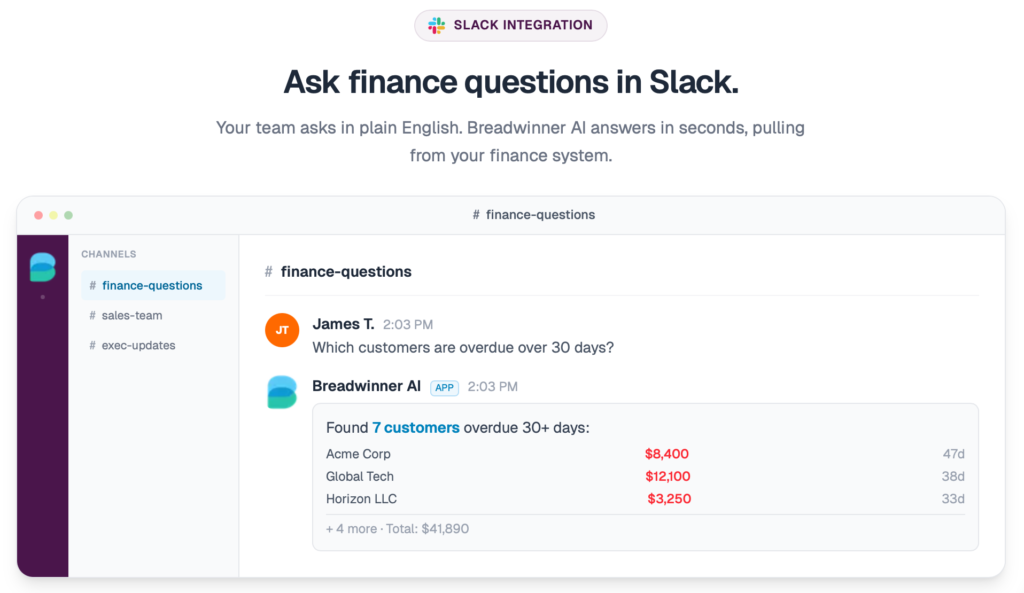
Image source: Breadwinner AI
To better understand how these approaches differ and which one may fit your team better, let’s compare them side by side. For clarity, we’ll use two specific approaches mentioned earlier as examples to illustrate how they differ in practice.
| Zapier vs Breadwinner AI Comparison | ||
|---|---|---|
| Criteria | Zapier | Breadwinner AI |
| How it works | Connects Xero and Slack through predefined triggers and actions | Breadwinner AI acts as a conversational layer between Slack and Xero, turning user requests into structured Xero data queries |
| When data appears in Slack | Information is sent only when a specific event happens | Information is returned when a user requests it, within available data and permissions |
| Flexibility | Limited to workflows that were set up in advance | Supports a wide range of questions within the configured data scope, without building separate workflows |
| Main purpose | Automates workflows between Xero and Slack based on predefined triggers and actions | Helps teams access financial data during Slack conversations |
| Data access and control | Depends on how each workflow is configured | Read-only access with role-based permissions |
The right approach depends on what your team needs from a Xero Slack connection. In cases where teams need more flexible access to financial data and the ability to get answers on demand, a financial intelligence layer approach can be especially useful. In the next section, we’ll take a closer look at how it works.
How the Financial Intelligence Layer Approach Works
Breadwinner AI, the financial intelligence layer, brings financial data from Xero into Slack and uses AI to understand what the user is asking, translate it into a data query, and return an answer based on real financial data, with read-only and permission-controlled access.
Here are the key things that define this approach:
1. Real answers, not summaries: The system runs structured queries on cached financial data and returns exact results. It is not a document search. It works with structured records.
2. Fast responses: Financial data is cached, so queries return results quickly without waiting for live calls to external systems.
3. Strictly read only: The system cannot change accounting data. It only supports data retrieval.
4. Granular permissions: Access is controlled at a detailed level so visibility can be limited by role or data scope.
5. Conversation logging: All queries and responses are stored in an admin view with an audit trail of activity.
6. No training required: Users interact through Slack in a familiar way and can ask questions directly in conversation.
Overall, Breadwinner AI is especially useful for teams that need quick access to financial information inside Slack, not just automated updates. This shift toward more direct, AI-driven access to data is becoming increasingly important. According to Deloitte’s survey, 87% of CFOs expect AI to be extremely or very important to their finance operations, reflecting the growing need for faster and more flexible ways to work with financial information. In the next section, we’ll look at how to set it up.
How to Set Up a Xero Slack Connection
To better understand how this approach works in real workflows, let’s walk through the setup step by step using Breadwinner AI as an example.
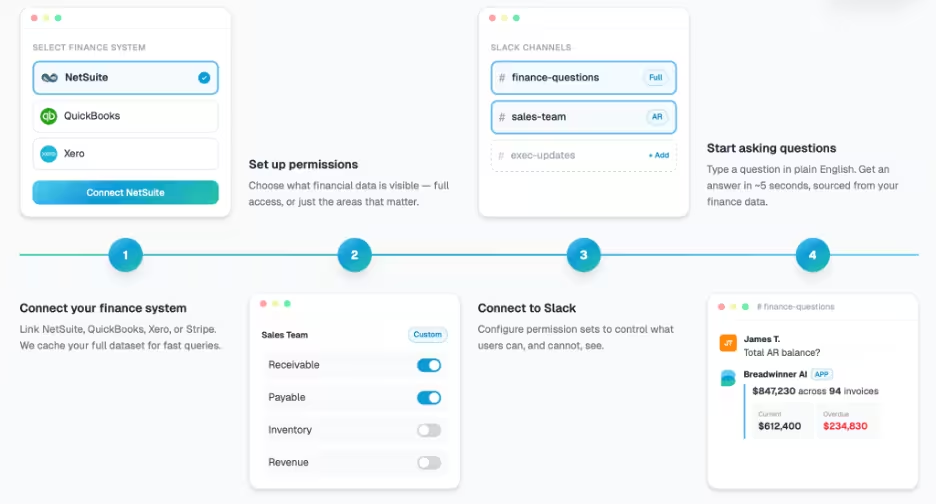
The Breadwinner AI setup process
Step 1. Connect Xero data.
First, connect Xero through a secure setup. The connection is read-only, so the system can access financial data without creating or modifying any records. This helps keep all information accurate and protected.
Step 2. Set up permissions.
Next, set up who can see what. Access can be configured based on roles or teams, so each user only gets the financial data relevant to their work. This keeps visibility controlled while still making data accessible.
Step 3. Connect Slack.
Then connect Slack and choose the channels where financial data will be available. This allows teams to access Xero data directly within their conversations, without changing their usual workflow.
Step 4. Test the workflow with real questions.
Once everything is set up, teams can try the integration in practice by asking questions directly in Slack. The system uses real financial data from Xero to answer these queries and returns results within seconds, allowing users to see how it works in real scenarios.
Best Practices for Connecting Xero and Slack
With different approaches available on the market for connecting Xero and Slack, a few best practices are worth keeping in mind.
- Keep access controlled and role-based: Not every team needs the same level of visibility. Set permissions carefully so users only see the data relevant to their role.
- Focus on real questions, not reports: These setups work best for quick, contextual answers, like checking invoice status or payments, rather than replacing full financial reporting.
- Use structured and reliable data: Accurate answers should come from real financial data, not assumptions. CFO surveys show that CFOs are prioritizing clean, connected data to unlock insight and accelerate decisions, which highlights how important it is to bring financial data into a more connected and accessible workflow.
- Reduce repetitive requests: Allow teams to find answers themselves instead of relying on finance for every question. This helps reduce back-and-forth and frees up time for more important work. This can also be extended beyond Slack, for example, through Xero integration with Salesforce, allowing financial data to support broader workflows across teams.
- Start simple and expand over time: Begin with common use cases and gradually extend how the setup is used as teams get more comfortable.
Final Thoughts: Bringing Finance Answers Into Slack
Different approaches to connecting Xero and Slack are designed for different needs, and the most important step is choosing the approach that best fits your business needs. It is also useful to explore available options, be aware of both the advantages and the limitations, and understand best practices before getting started.
In this article, we explored how Slack Xero integrations work, what they are used for, and the limitations that come with predefined workflows and automation-based setups, helping clarify where this approach fits best.
We also explored a financial intelligence layer approach, such as Breadwinner AI, how it works, how AI is used to access financial data in Slack, and what is involved in setting it up, showing how this approach opens up a more flexible way to work with financial data when needed.
As a result, when the right approach is in place, financial data becomes easier to use in day-to-day work, helping teams reduce delays, minimize interruptions, and make decisions more efficiently.
