


The Pastigio Smart Digital Calendar is a 15.6-inch touchscreen device that syncs with Google Calendar and Apple iCloud, uses AI to create events from voice commands and photos, and includes a gamified task tracker.
It costs $299.99 (Prime) or $349.99 (Regular) on Amazon with no subscription fees.
Every review of the Pastigio AI calendar tests it for families. Kids’ activities, shared household chores, family dinner planning.
But I do not have a family of five coordinating soccer practice.
I am a writer who works from home, juggles client deadlines across time zones, and has spent years trying to find a system that makes my calendar feel less like a wall of anxiety and more like a tool I actually check.
So I got the Pastigio and tested it in my home office. Not as a family hub. As a daily work tool for a solo remote worker. Here is what I found.
What Is the Pastigio AI Calendar?
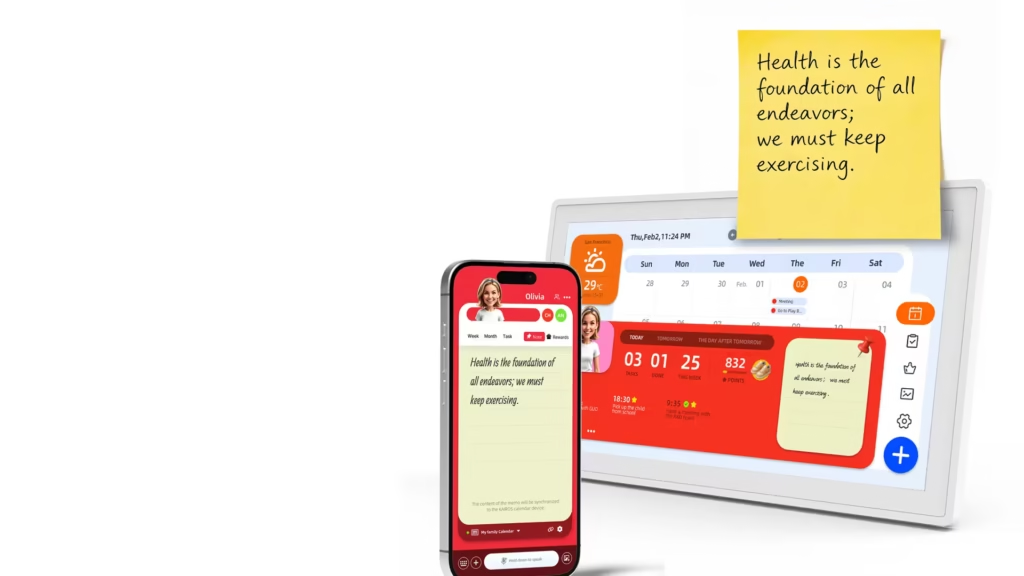
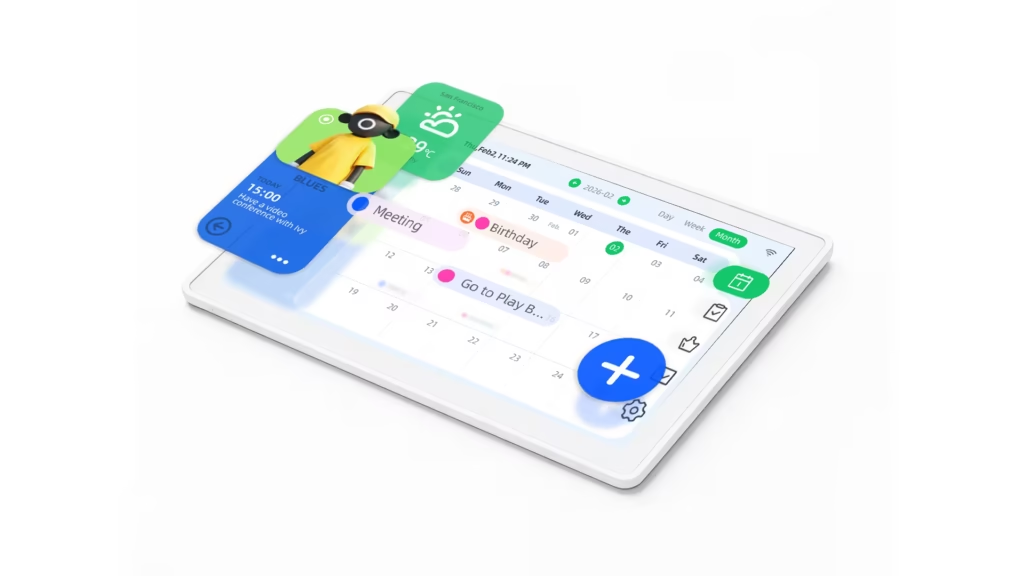
Pastigio is a hardware product that runs the Kairos companion app on a 15.6-inch IPS touchscreen. You mount it on a wall or stand it on a desk. It connects to WiFi and syncs your Google Calendar and Apple iCloud into a persistent, always-visible display.
The AI layer gives you three ways to create events without touching your phone or laptop:
Voice: Say “client call with Sarah Friday at 2 PM” to the Kairos app, and the event appears. I used this constantly. Mid-typing on a draft, a client pings me to reschedule. Instead of switching apps, I just said it out loud. Event moved. Back to writing.
Photo scanning: Take a photo of a printed schedule, conference flyer, or even a handwritten list. The AI reads it and creates events. In my testing, this nailed printed text. A conference agenda became 6 calendar events in seconds. Messy handwriting? Not so much. It misread two out of five items I scribbled on a sticky note.
Touch: Standard tap-and-swipe on the 15.6-inch screen. Day, Week, and Month views are all available. The touchscreen is responsive enough that I never felt like I was fighting the interface.
When I was not actively using it, the screen became a digital photo frame. I loaded it with landscape photos from past trips. Having something pleasant on the wall instead of a black rectangle made the home office feel less sterile.
What Does the Pastigio AI Calendar Cost?
Pastigio is the only device under $350 with zero subscription fees and AI voice scheduling.
| Item | Price |
| Pastigio 15.6″ Smart Calendar | $299.99 (Prime) / $349.99 (Regular) on Amazon |
| Monthly subscription | $0 (no subscription required, ever) |
| Kairos companion app | Free (iOS and Android) |
| Wall mount and tabletop stand | Included in the box |
The no-subscription model is what made me pull the trigger.
Competitors like Skylight charge $79/year for Skylight Plus to unlock features like Magic Import. Hearth locks advanced calendar sync behind a monthly subscription.
With Pastigio, every feature works from day one. Over two years of ownership, that saves $160 compared to Skylight Plus. For a freelancer watching expenses, that predictability matters.
What Worked in My Home Office
Voice input changed how I schedule. This was the surprise of the test. I did not expect to use voice commands as much as I did. But when you are deep in a task and someone messages “can we move our call to Thursday?”, stopping to open Google Calendar, finding the event, dragging it, and confirming the change breaks your focus for 30 to 45 seconds.
Saying “move Sarah’s call to Thursday 3 PM” to the Pastigio took 5 seconds, no context switching. Over four weeks, I estimate I used voice commands 8 to 10 times per week. That is 8 to 10 moments where my focus stayed on the work instead of the calendar app.
The always-on display kept me honest. Before Pastigio, my calendar lived on a browser tab I rarely checked until the notification popped up 10 minutes before a meeting.
With the Pastigio on my desk, my schedule was in my peripheral vision all day. I started preparing for calls earlier. I blocked writing time more deliberately because I could see the open gaps without opening anything. By week three, I noticed I was late to zero calls. Before Pastigio, I was late to at least one per week. That alone was worth the price for me.
Task tracking gave my day visible structure. The Tasks & Rewards system was designed for kids doing chores. I repurposed it. I set up daily recurring tasks: “review inbox,” “update project tracker,” “30 min deep work block,” “post on LinkedIn.” Seeing uncompleted tasks on the screen next to me created a gentle pressure that phone reminders never managed. I will not pretend it replaced Notion or ClickUp.
But as a visible daily checklist on a screen I could not minimize or swipe away, it worked.
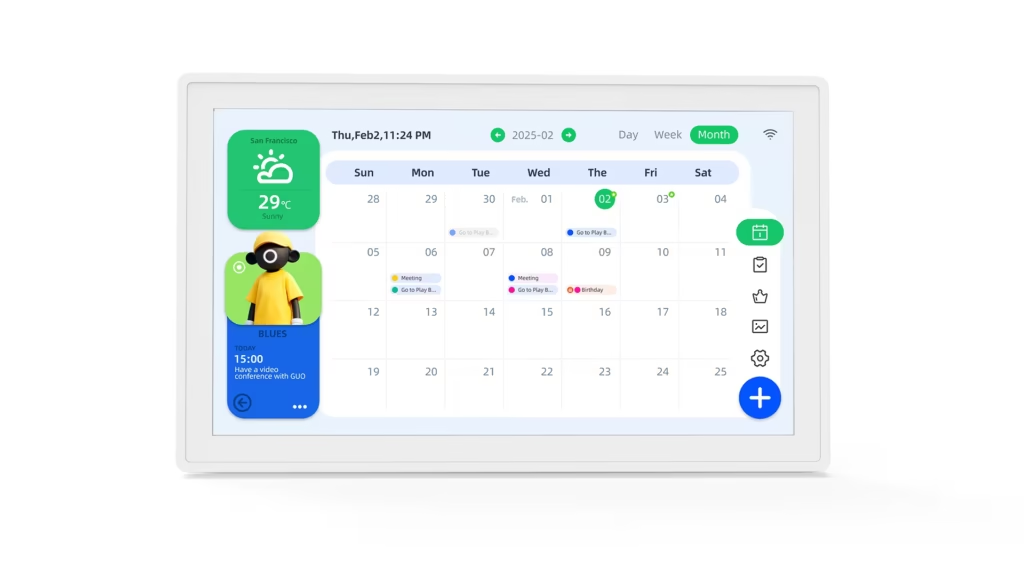
Photo scanning saved time on real occasions. I photographed a printed event agenda a client mailed me and Pastigio created the events automatically.
I also photographed a whiteboard brainstorm that included dates, and it picked up 4 out of 6 items correctly. For a remote worker who occasionally receives physical materials, this feature has a narrow but useful window.
In my view, the always-on visibility was the feature that justified the purchase. I expected voice input to be the selling point. It was the passive, constant presence of my schedule on a screen I could not close that actually changed my behavior.
What Did Not Work
No Outlook or Microsoft 365 sync. I use Google Calendar, so this did not affect me directly. But I consulted for two clients this quarter who both run on Microsoft 365. If I had recommended Pastigio to them, it would have been useless.
There is no workaround, no third-party bridge, no IFTTT connection. Google Calendar and Apple iCloud only. This single gap disqualifies the Pastigio AI calendar for any business running on Microsoft. However, support for other external calendars is already planned for a future update.
No web dashboard or desktop app. I could not manage events from my laptop. Everything goes through the physical device or the Kairos mobile app.
When I was working on my computer and wanted to quickly edit an event, I had to pick up my phone or walk to the device. That friction is small but it is real, and it happened daily.
The device lives entirely in its own ecosystem. For a freelancer whose work runs through Slack and email, that isolation means Pastigio handles scheduling but nothing around it.
The Tasks & Rewards system is too basic for real project management.It handles simple recurring tasks. It does not support due dates with priorities, subtasks, dependencies, or anything resembling actual project tracking. My Notion workflow is safe. Pastigio’s task feature is interesting and effective for a family setting, but a project manager might need something more advanced.
The Kairos app could be more polished. Syncing between the app and the device occasionally lagged by a minute or two. One event I created on my phone did not appear on the device until I manually refreshed. This happened three times over four weeks. Not a dealbreaker, but noticeable.
What I Could Not Test (And What I Think Based on What I Saw)
I am one person. Several of Pastigio’s features are designed for multiple users, which will benefit teams more than solo users.
Member Profile Cards: Each person gets their own card showing their personal 3-day view. I only had one profile, so I could not test the multi-user experience.
Based on how smoothly the single-profile view worked, I think this feature would translate well to a small office of 3 to 5 people using shared Google Calendars. The toggle between “my view” and “everyone’s view” is well-designed even if I only used half of it.
Multi-person scheduling visibility: The core premise of mounting Pastigio in a shared space so everyone sees the schedule was something I could not replicate alone.
But based on how much the always-on display changed my own behavior, I believe it would have an outsized effect in a small physical office. If it made one person more punctual and more aware of their schedule, it would do the same for a team.
Scalability beyond 5 to 6 profiles: I could not confirm how many profiles the device supports. For teams larger than 6, this could be a constraint. I would not recommend it for any team above 8 people without confirming this directly with Pastigio support.
How Does the Pastigio AI Calendar Compare to Alternatives?
| Feature | Pastigio | Skylight Calendar 15″ | DAKboard | iPad 11th Gen + Google Calendar |
| Price | $299.99 (Prime) / $349.99 (Regular) | $319 | $599 | ~$364 (iPad $349 + $15 stand) |
| Ongoing cost | $0 | $79/year (Plus) | $60/year (Essential) | $0 |
| Google Calendar sync | Yes | Yes | Yes | Yes |
| Outlook sync | No | Yes (via Skylight Plus) | Yes | Yes |
| iCloud sync | Yes | Yes | Yes | Yes |
| AI voice commands | Yes (Kairos) | No | No | Yes (Siri) |
| Photo-to-event AI | Yes | No | No | No |
| Task tracking | Yes (Tasks & Rewards) | Yes (chore chart) | No | Via apps |
| Slack/Zoom integration | No | No | No | Via apps |
| Web dashboard | No | No | Yes | Yes (iCloud/Google web) |
| Digital photo frame | Yes | Yes | Yes (screensaver mode) | Via apps |
| Subscription required | No | Optional ($79/yr) | Optional ($60/yr) | No |
| Best for | Google-based freelancers, small teams | Mixed calendar households/teams | Display-only dashboard | Maximum flexibility |
The iPad comparison is worth addressing directly.
An 11th-gen iPad on a $15 stand gives you Outlook, Slack, Zoom, email, web browsing, and every productivity app ever made. At roughly $364 total, it costs only slightly more than the Pastigio – and does infinitely more.
So why pick Pastigio over an iPad? The dedicated experience. It stays on the calendar. Nobody opens YouTube on it. Nobody closes the tab. Nobody lets it sleep. That single-purpose constraint is the feature, not the limitation.
Who Should Buy the Pastigio AI Calendar?
Buy it if you are a freelancer, solopreneur, or remote worker who uses Google Calendar, works from a physical space (home office, studio, co-working desk), and wants your schedule visible without checking your phone every 20 minutes.
The voice input alone saves enough micro-interruptions to justify the price within a few weeks. The no-subscription model means your total cost is the device itself.
It would also work well for small teams (3 to 6 people) sharing a physical office space and using Google Calendar. The Member Profile Cards, shared display, and voice input translate naturally to that environment, even though I could not test it myself.
Skip it if you or your team runs on Microsoft 365 or Outlook. Also skip it if you need Slack integration, a web dashboard, or anything beyond calendar display and basic task tracking. Pastigio is a visibility tool, not a workflow tool.
The sweet spot: a Google Calendar user who works from a dedicated physical space and wants passive, always-on scheduling visibility without subscription fees. For that specific niche, Pastigio fills a gap that no app on your phone can replicate, because you cannot mount your phone on the wall and leave it there permanently.
FAQs
Does the Pastigio AI calendar sync with Outlook?
No. It syncs with Google Calendar and Apple iCloud only. There is no Outlook, Microsoft 365, or Exchange support. No third-party workaround exists.
Is there a monthly subscription?
No. All features are included with the device purchase. No monthly fees, no annual plans, no premium tiers. The Kairos companion app is free on iOS and Android.
Can I manage the calendar from my computer?
Not directly through Pastigio. Calendar management happens on the physical device or the Kairos mobile app. However, since Pastigio syncs with Google Calendar, any event you create in Google Calendar on your computer will appear on the device within a minute or two.
Does the AI voice assistant work well?
For simple commands like “client call Friday at 2 PM,” it works reliably. For complex or multi-part commands, accuracy drops. The photo scanning feature works well with clean printed text and struggles with handwriting.
Is the Pastigio worth $300 for a single remote worker?
If you work from a dedicated physical space and use Google Calendar daily, I think yes. The voice input and always-on visibility changed how I managed my schedule in ways that no app replicated. If you work from a laptop on your couch and your schedule is light, probably not. The value scales with how actively you manage your calendar.
How does it compare to just using a tablet?
An iPad does more. Pastigio does one thing and stays on it. If you trust yourself not to open other apps on a mounted iPad, the iPad wins on flexibility. If you know that tablet will become a YouTube player within a week (like mine did), Pastigio’s single-purpose design is the better choice.
