

Now, you can easily and quickly perform small tasks by using modern smart tools. Plant care has become part of this process. In this Botan app review, we will test and analyze the practical use of this tool.
Botan compares the images of plants with its database and also uses Artificial Intelligence (AI) to detect possible diseases. Let’s take a look at some of its main features, see how it can help identify plant issues, and compare the results of its diagnosis with other similar apps.
Botan App Overview
Botan is a plant care app that was designed for people who need a quick way to identify plants and regularly care for them. It boasts photo recognition capabilities to identify species and AI engine to identify common diseases and provide care issues.
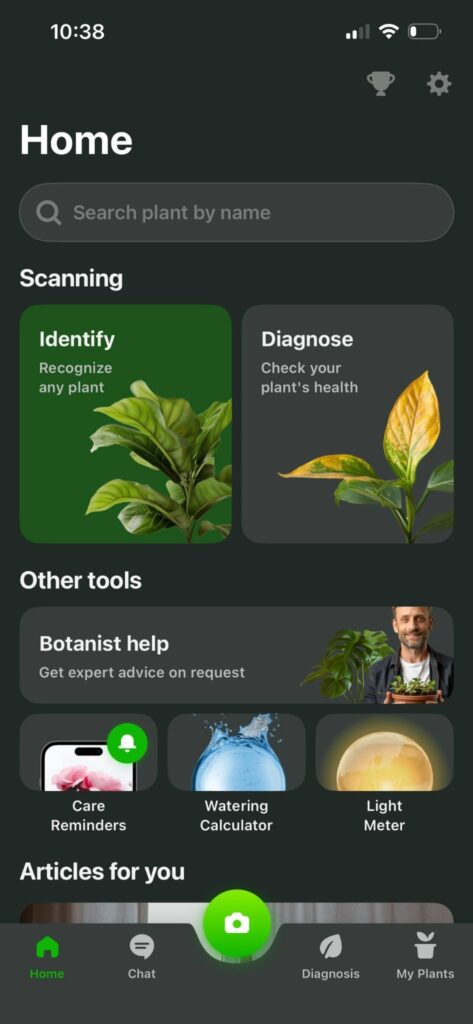
You can download Botan from Google Play or the App Store, and also find it on BotanApp.com. But this is not a scientific reference collection that you can use instead of a field guide or an experienced botanist. It just aids home gardeners in getting immediate assistance in identifying and handling plants.
Getting Started With Botan
In order to use the Botan plant identifier app, you must download it, install, and complete the setup. The process takes only a few minutes. Here is how it works:
- Download the app. Install Botan from Google Play or the App Store, or find the corresponding links on Botanapp.com. Wait for the installation to complete.
- Launch Botan. Open the app and allow access to the camera. This will allow you to scan plants and upload photos.
- Complete the setup. Select a language, familiarize yourself with the basic settings, and complete a short introductory guide. The program will then send you to the main screen.
Setup is seamless from start to finish. The menus are easy to read, and the controls are intuitive. After setting up, you can immediately scan plants, check for diseases, and use basic tools.
Testing Botan: What We Covered
We tested Botan in several everyday situations. Our goal was to determine how effectively Botan works as a practical AI plant app. We tested plant identification, reminders, light measurement, pest detection, and integrated chat to assess how useful each feature is in real-world situations.
1. Scanning 5 Different Plants
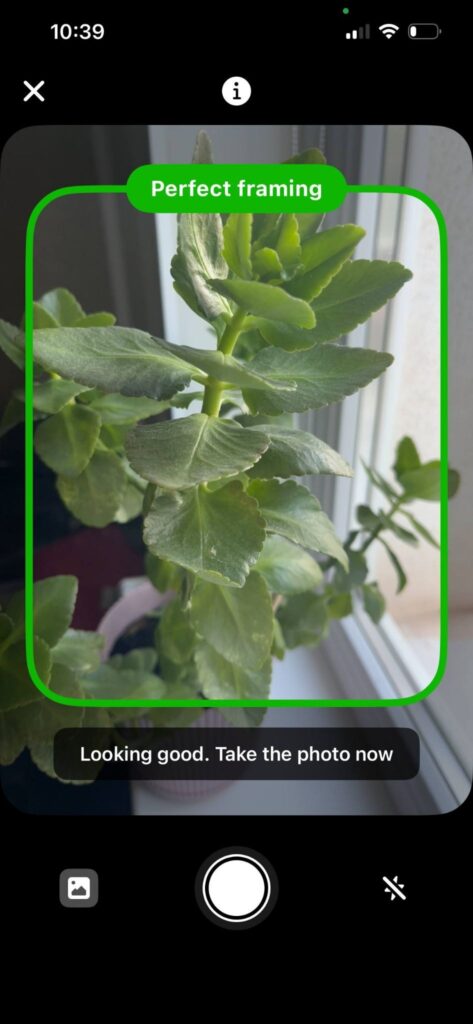
To start with, we scanned 5 different plants during testing — common houseplants, one succulent, and one outdoor species. Here are the results:
- Monstera deliciosa: The app correctly named the plant and indicated its Central American origin, watering schedule, humidity requirements, and lighting recommendations.
- Flaming Katy: Botan provided a correct species ID and also showed its Madagascar origin, pruning tips, fertilizing schedule, and soil recommendations.
- Sansevieria: We saw the exact ID and the app explained its West African origin, watering needs, and tolerance for low light.
- Echeveria: Botan recognized the genus and named it after its Mexican origin, plus indicated the need for dry soil and bright light.
- English ivy: The app gave a partial match and listed its European origin, cooler-temperature needs, and regular watering advice.
According to our tests, the app can identify plants by photo and showed correct results in four cases. It had difficulty identifying the exact species of Echeveria. The care notes were helpful, although some advice seemed general.
2. Setting Up Care Reminders
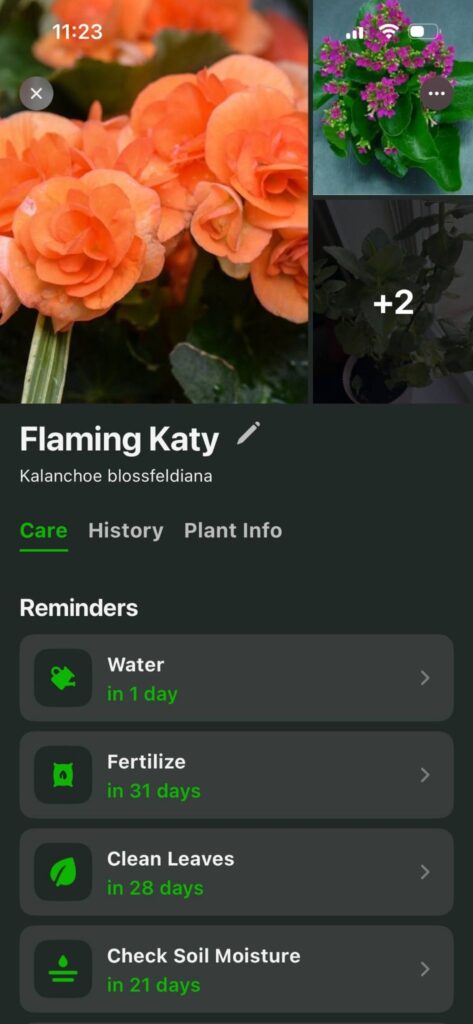
The next step we created three care reminders for the Kalanchoe blossfeldiana: watering every day and fertilizing every 31 days, and cleaning leaves every 28 days. We also scheduled repotting after 184 days. During testing, each reminder appeared at the selected time:
- The watering reminder included checking the soil before adding water.
- The fertilizing notification gave basic advice on diluting.
- Recommendations on repotting had information on pot size and drainage.
These reminders were really helpful — brief and easy to use. None of them appeared too frequently on the phone.
3. Using the Light Meter
We tested the light meter on a Calathea orbifolia. We took measurements near an east-facing window, one meter from the glass. Botan rated the window location as suitable for indirect lighting. In the middle of the room, it detected lighting as moderate, while at the far corner — insufficient lighting.
The results were readable, and the tool provided correct placement instructions. Botan recommended keeping the plant away from direct afternoon sunlight. It also rated the far corner of the room as too dark. These recommendations helped us choose the best indoor location without any additional equipment.
4. Identifying Pests and Plant Problems
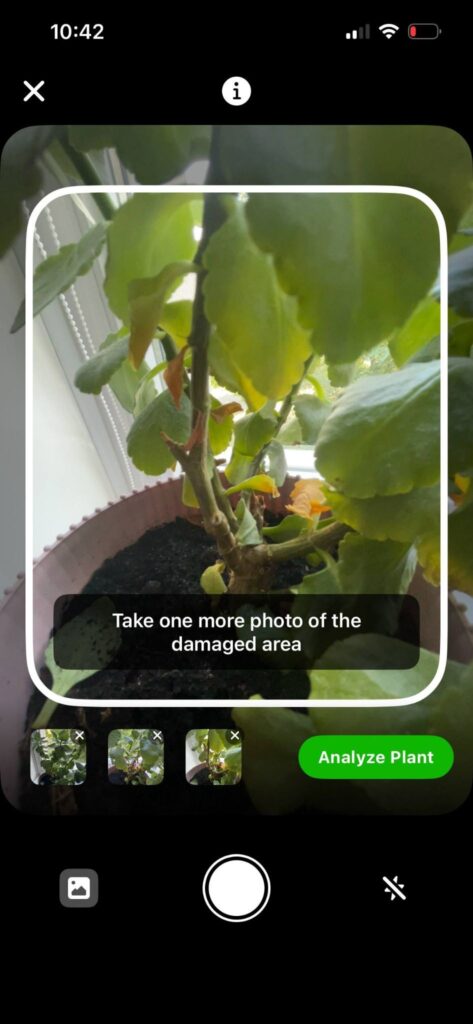
For the further stage, we photographed a Flaming Katy with slightly yellow and dry leaves. Here is what Botan returned:
- Possible problem: Insufficient watering and damage from direct sunlight.
- Care adjustments: Suspend watering until the top layer of soil dries out.
- Further inspection: Take photos after two weeks and compare new growth.
The recommendations were clear and easy to use. For an AI plant disease detection app, Botan worked well.
5. Chat With a Plant Care Expert
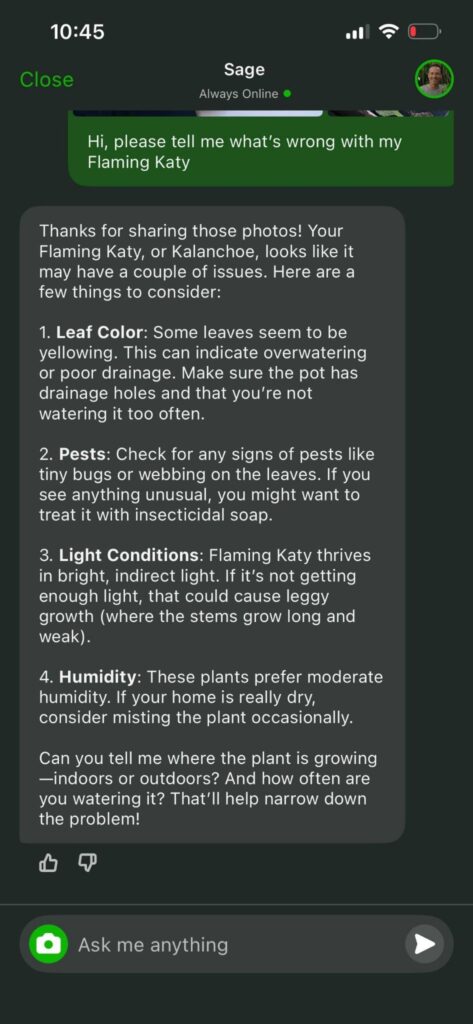
Next, we were curious about how practical the integrated chat was. We sent a photo of a Flaming Katy with slightly yellowing leaves and dry edges and described our watering schedule. We received a response in about 7 minutes. The expert attributed the symptoms to dry air and uneven watering.
The advice was specific: check the soil to a depth of 1 inch (2.5 cm) and water thoroughly when dry. The expert also advised placing the pot away from heating devices and inspecting the roots if the leaf yellowing continued for 2 weeks.
We found this more helpful than general care instructions. The response provided clear next steps without unnecessary detail.
How Botan Diagnoses Plant Problems with AI
The Botan plant identifier app checks for visible damage by scanning photos. It uses images of the entire plant and close-up shots of affected areas. Here is how it works in practice:
- Take a photo of the entire plant. Place it in good lighting and ensure the entire shape is within the frame. This gives the app an idea of the overall growth.
- Photograph damaged parts. Take close-up shots of marked leaves, stems, flowers, or visible pests. Clear detail helps the system recognize color changes, spots, webbing, and tissue damage.
- Perform analysis. Botan’s AI analyzes visible symptoms and compares them to known problems.
- Read the result. The app reports possible diseases, pest problems, or care errors. It also provides treatment and prevention recommendations.
AI is directly involved in this function. It processes the provided photos and returns a suggested diagnosis.
Botan vs. PictureThis
Botan and PictureThis have similar tasks for taking care of plants. We compared how each app performs the most important functions.
| Feature | Botan | PictureThis |
| Plant database | 30,000+ | 40,000+ |
| Disease detection | AI diagnostics and suggestions on treatment | AI diagnostics and detailed reports |
| Care tools | Daily reminders for watering, fertilizing, and repotting | Care plans, reminder tools, and growth tracking |
| Light meter | Integrated light measurement function | Integrated light meter |
| Expert support | Chat with a botanist | Plant expert service available with premium access |
Botan: Strengths and Weaknesses
After testing all the main features, we identified both strengths and some limitations. Here is a quick overview.
Strengths
- Quick plant identification
- Helpful AI disease detection
- Easy reminder setup
- Integrated light meter
- Helpful chat with a botanist
Weaknesses
- Some species require rescanning
- Expert chat is not instant every time
- Some features require a subscription
- Disease detection depends on photo quality
The strengths clearly outweigh the weaknesses. Botan covers essential identification and care tasks in one place, which makes it a reliable AI plant app for everyday use.
Who Is Botan For?
Botan is suitable for different users. It is especially good for:
- People who keep indoor plants
- Beginners who learn the basics of plant care
- Users who often forget to water their plants
- Gardeners who need to quickly detect diseases
- Enthusiasts who just want to identify plants by photo
The app combines several tools, so most owners of houseplants will find something useful here.
Frequently Asked Questions
Can Botan replace a plant care expert?
No. Botan helps identify a plant and provides care tips. It can also detect possible diseases, but it cannot replace an experienced botanist.
Does Botan use AI to identify plants?
Sometimes. Botan first checks its plant database and uses AI when it cannot find an exact match.
How does Botan handle plant disease detection?
Botan analyzes photos of damaged leaves, stems, or flowers and suggests possible diseases, pests, or deficiencies along with treatment recommendations.
