


Choosing a writing assistant feels harder than it should. Grammarly and Wordtune both promise cleaner, sharper writing, but they take different paths to get there. So, which one deserves a spot in your browser? This guide breaks down pricing, features, and real use cases. By the end, you’ll know exactly which tool fits your workflow.
Overview of Grammarly
Grammarly is the writing assistant most people try first. It started as a grammar and spelling checker, and it still does that job exceptionally well. However, it has grown into a full writing suite. Today, it also offers tone detection, full-sentence rewrites, plagiarism checks, and an AI text detector.
Grammarly works almost everywhere you type. Its browser extension covers Gmail, Google Docs, Slack, and most web forms. A desktop app extends that coverage to Microsoft Word and other native apps. As a result, you rarely have to copy and paste text into a separate tab.
Grammarly pricing:
- Free: $0. Includes live grammar and spelling checks, basic tone detection, and 100 AI prompts per month.
- Pro: $12 per month billed annually, $20 per month billed quarterly, or $30 per month billed monthly. Pro provides full-sentence rewrites, plagiarism detection, AI text detection, and 2,000 AI prompts per month. It also replaced the old Premium and Business tiers, so it now supports individuals and teams of up to 149 members.
- Enterprise: Custom pricing. This tier adds centralized admin controls, SSO, and stronger data governance for larger organizations.
Because Pro absorbed the old Business plan, Grammarly no longer sells a separate mid-tier team plan. Instead, teams simply add seats under Pro or move to Enterprise once they need advanced security features.
Overview of Wordtune
Wordtune takes a different approach. It rewrites your sentences and gives you several phrasing options to choose from. Built by AI21 Labs, the team behind the Jurassic language models, Wordtune focuses on expression rather than correction. If you know what you want to say but can’t find the right words, Wordtune helps you get there faster.
The tool highlights a sentence and instantly suggests alternatives. You can shift the tone between casual and formal, shorten or expand a passage, or generate a quick summary of a longer document. This makes Wordtune especially useful during the editing and polishing phase of writing, rather than the initial drafting phase.
Wordtune pricing:
- Basic (Free): $0. Includes 10 rewrites and AI suggestions per day, 3 AI summaries per month, and unlimited spelling and grammar corrections.
- Advanced: $6.99 per month billed monthly, or $4.89 per month billed annually. This tier raises the daily limit to 30 rewrites, adds 15 AI summaries per month, and includes unlimited AI recommendations.
- Unlimited: $9.99 per month billed monthly, or $6.99 per month billed annually. This plan removes daily rewrite caps entirely and adds vocabulary enhancements, fluency improvements, and premium support.
- Teams: Custom pricing. Contact Wordtune’s sales team for seat-based rates, centralized billing, and business support.
Annual billing consistently saves you around 30 to 50 percent compared to paying month to month. So, if you plan to stick with Wordtune long-term, the annual plan is worth locking in early.
Feature Comparison
1. Grammar and Error Correction
Grammarly is the better pick here. Its grammar engine catches subtle punctuation errors, subject-verb agreement issues, and awkward phrasing that Wordtune often misses. Wordtune corrects grammar too, but that’s not its main focus, so the checks feel lighter by comparison.
These are screenshots of text corrected by Wordtune and Grammarly respectively.
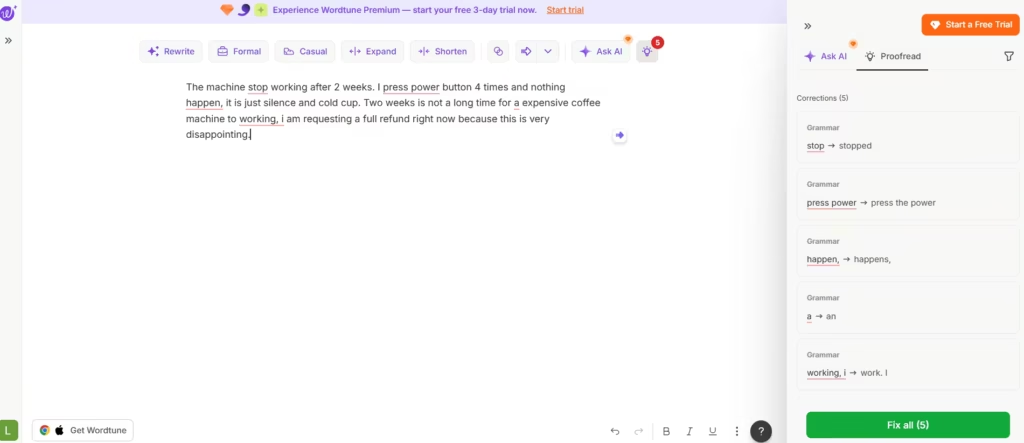
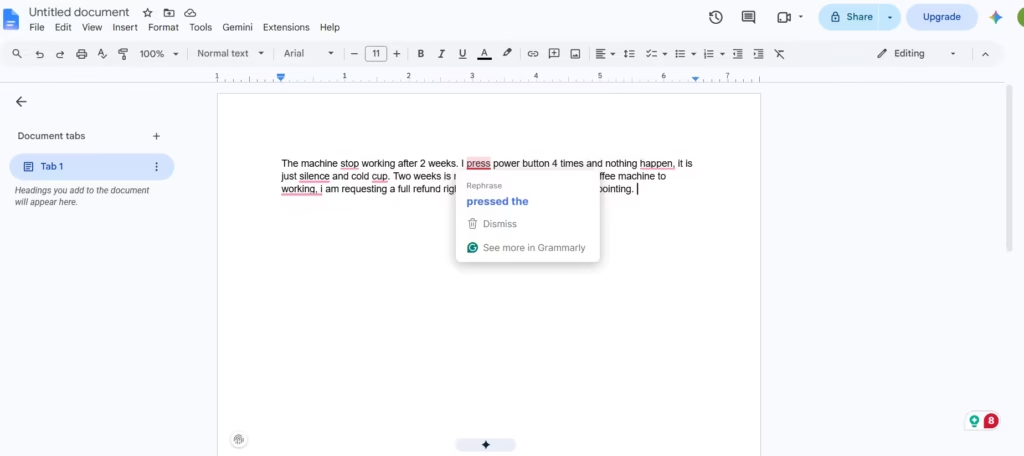
The sentence “The machine stop working after 2 weeks. I press power button 4 times and nothing happen,” was corrected by Grammarly to “The machine stopped working after 2 weeks. I pressed the power button 4 times and nothing happened.”
Wordtune’s correction to “The machine stopped working after 2 weeks. I pressed the power button 4 times but nothing happens” was less adequate. It had missed a tense agreement. “Happen” was changed to “happens” instead of “happened.”
I wouldn’t rely on Wordtune for writing tasks where grammar correctness is strictly required. You shouldn’t also.
2. Rewriting and Style
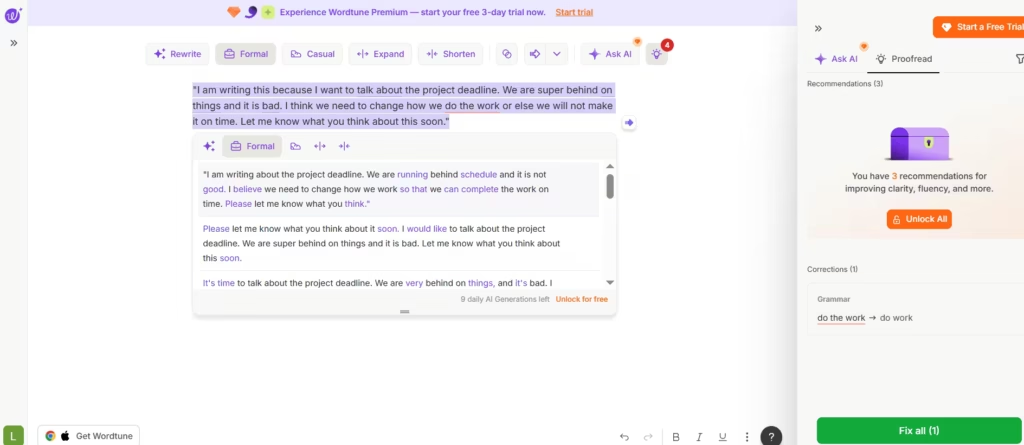
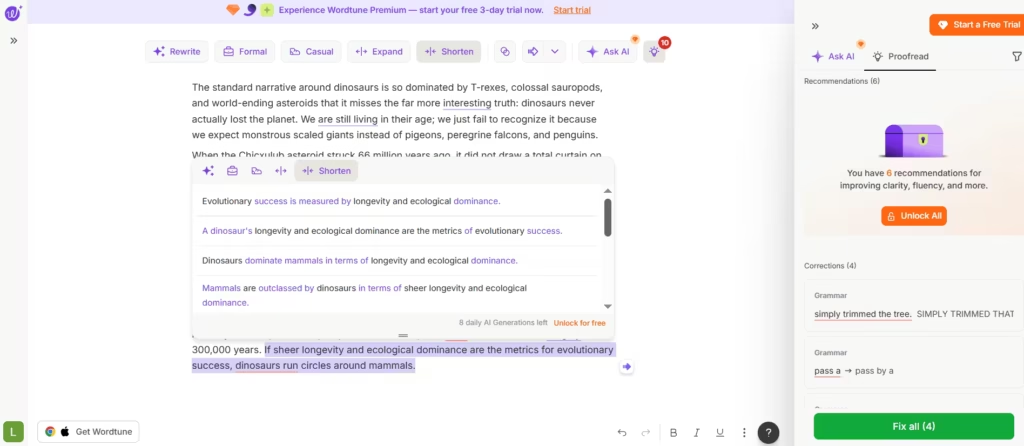
Wordtune’s writing expression makes it the better choice here. Instead of a single fix, it offers multiple rewrite options for the same sentence. That gives you room to experiment with tone and voice. In my testing, Grammarly failed to flag the awkward phrasing in the sentence I used.
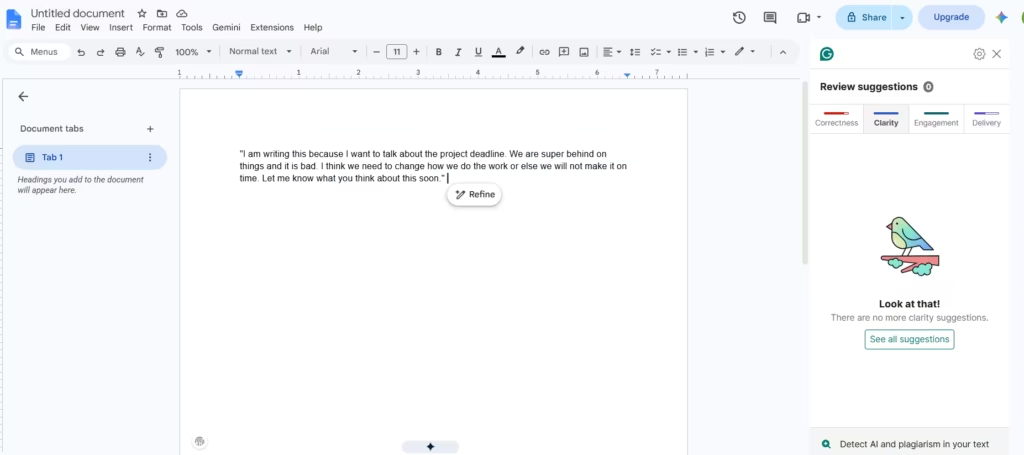
I could, however, use Wordtune to restructure the phrasing and make it formal. And yes, it did catch the weird phrasing and suggested alternatives.
3. Plagiarism and AI Detection
Grammarly Pro includes a built-in plagiarism checker and an AI text detector. Wordtune doesn’t offer either feature, so if originality checks matter for your work, Grammarly is the clear choice.
4. Summarization
Wordtune includes a dedicated AI summary tool, which condenses long documents into digestible takeaways. Grammarly doesn’t offer a comparable standalone summarizer, though its AI prompts can approximate one.
5. Integrations and Platform Reach
Grammarly integrates with more platforms overall, including Slack, most CRMs, and nearly every major browser and desktop app. Wordtune covers the essentials, like Gmail, Google Docs, and Microsoft Word, but its integration list is shorter.
Which Is the Better Pick?
The right choice depends on what slows you down most while writing. Choose Grammarly if accuracy is your top priority. It excels at catching technical errors, and its plagiarism and AI detection tools helps with academic, business, or client-facing work. Because it works across nearly any app, it also fits naturally into a busy, multi-platform workflow.
Choose Wordtune if you already write clean sentences but struggle to phrase them well. It’s the stronger pick for anyone facing writer’s block, translating ideas from a second language, or simply wanting more expressive options. Its lower entry price also makes it attractive for individuals on a tight budget.
Some writers use both together. Grammarly can run in the background catching errors, while Wordtune handles the heavier lifting during revision. That combination costs more, roughly $19 to $22 per month combined on annual billing, but it covers both correction and expression in one workflow.
I recommend Grammarly as the safer, more comprehensive choice for error-free, polished writing. Wordtune is the sharper tool for creative rephrasing and tone control. Match the tool to your writing habits, and you’ll get far more value than picking based on price alone.
