

Most AI video tools start with a text prompt, but Freebeat starts with the song instead. You upload an MP3 or paste a link from Suno, Udio, TikTok, or YouTube, and the AI maps the track’s rhythm and structure.
From there, you pick a mode and style. The agent handles the rest, planning shots, pacing, and atmosphere around the music. Therefore, the output feels like an edited music video. It does not feel like random clips over a track.
Freebeat runs in your browser but offers a Mac app plus iOS and Android apps. It also offers MCP and CLI access for developers. Its own terms warn that results may be unstable or inconsistent. Therefore, plan to regenerate a scene or two.
Key Features
1. AI Music Video Agent
This is Freebeat’s core tool. You upload a song or paste a link from Suno, Udio, TikTok, or YouTube. Then, the agent analyzes BPM, beats, drops, and song sections. Next, it plans shots and builds a full video.
To stretch my free 500-credit allowance, I tried switching to a lower-performing model (costing 130 credits) rather than the recommended Freebeat 2.0. However, each attempt to generate with this resulted in an error.
I eventually went with the recommended model, and that cost 320 credits. The eventual video was 10 seconds and took about 15 minutes to generate.
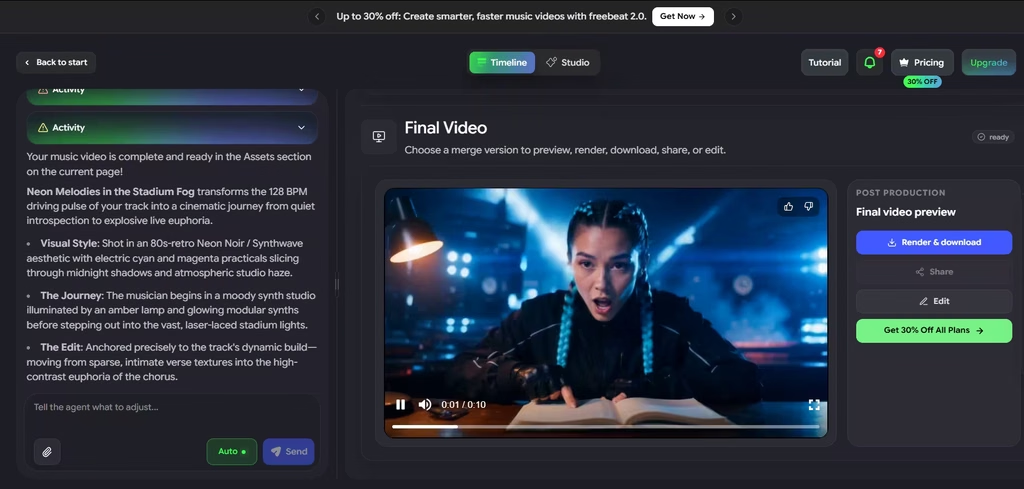
In my prompt, I had asked for “A young musician with glowing neon braids who transitions from writing melodies in a quiet studio to performing under bright stadium lights.” However, Freebeat had other plans.
Freebeat nailed the character’s neon braids and kept them consistent across the scene transition. I did expect an outfit change, but that stayed the same.
The first scene had some incorrect details. The bright stadium lighting, which was supposed to appear later on in the video, was present in the quiet studio scene. That didn’t look like the credible interior space I envisioned. The short stage performance, however, looked complete, with a palpable audience presence.
I liked that this scene transition happened in sync with a major beat peak in the soundtrack. That gave it a much-needed effect alongside the rhythm-matching camera movements, which reflected the tempo and energy of the music.
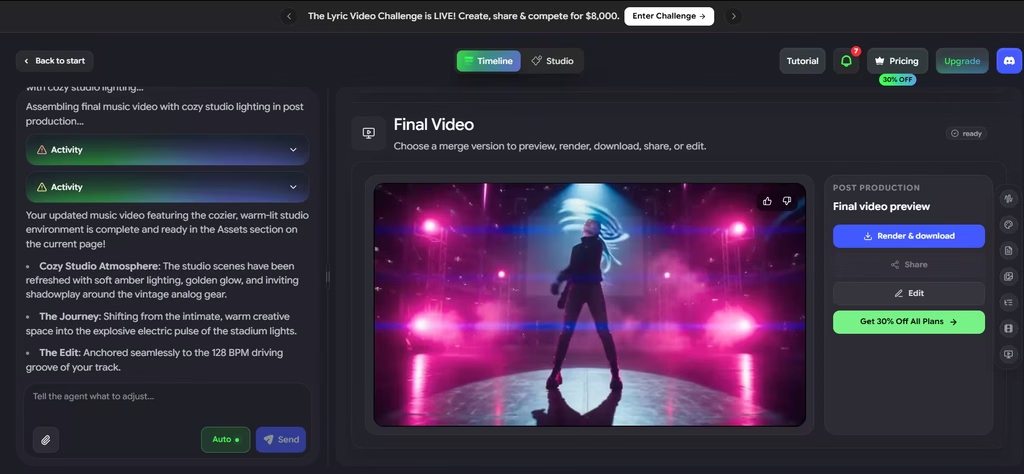
The Agent 2.0 lets users chat to make edits, so I asked it to generate a more credible studio scene (warm and cozy). Still, this didn’t result in a warm and cozy space. Also, the AI changed other video details such as the camera movements. I noticed some glitching as well.
2. Dance Video
Freebeat also works as an AI dance generator. I uploaded a reference photo and selected a song, and the AI choreographs a dance synced to the beat. The resulting dance video synced with the upbeat song I had chosen.
For dancers and fitness creators, that means beat-matched motion without filming. The newer Dance Replica tool applies iconic dance moves to your own characters.
3. Lyric Video
Turn on lyrics, and Freebeat times them to the vocals automatically. You can then adjust motion, highlights, and karaoke-style timing yourself. Release-day promos and YouTube lyric uploads are the natural fit here.
4. Realtime Music Video
Instead of making you wait for a render, Realtime generates visuals in sync with your audio as it plays. Freebeat now runs Realtime 2.0. Live sets, quick previews, and VJ-style performances are where it makes the most sense.
5. Photo Karaoke
Photo Karaoke makes a still photo sing your song. People, pets, and artwork all work. You also get Solo, Duet, and Pet modes, plus more than 50 stage presets. Freebeat says it supports lip sync in over 50 languages and exports in 1080p. That 1080p claim sits oddly beside the 720p cap on Basic and Pro, so check your export settings before you pay.
6. Onbeat Effects
Onbeat Effects is Freebeat’s library of music-synced visual effects that fire on beats and drops. With one click, artists can turn a track into a pro-style visualizer or a punchy short clip.
7. Clone Video
Clone Video is one of Freebeat’s newest tools. You upload a short clip in MP4, MOV, or WebM format, up to 80 MB. Then, Freebeat recreates it, including talking-head clips, ads, and ranking videos. Music, dance, and lyric clips go to the matching Freebeat tool. Given the prompt problems in my test, cloning a reference video may be a more reliable way to get a specific look than describing it in text.
8. Music Creation and Editing
No song yet? Freebeat includes a music generator with models such as Suno V6, Lyria 3.5, and Mureka V9.5. It also offers Music Edit, so you can go from melody to mix in one session. Plus, it offers video-to-music generation and an animated album cover generator.
9. Editing, Formats, and Developer Access
After the first cut, the AI video editor lets you change individual shots. Exports come in 16:9, 9:16, or 1:1 for YouTube, TikTok, and Instagram. Developers can also connect Freebeat to other tools through its MCP and CLI access.
Can Freebeat Create Good Music Videos?
Yes, but only if beat sync matters more to you than following a script. Freebeat nails rhythm. In my test, the scene transition landed on a major beat peak, and the camera moved with the music’s energy.
The prompt adherence is another story. I asked for a quiet studio, and Freebeat lit it like a stadium. When I asked the chat editor for a warm, cozy studio instead, it still missed, and it changed the camera movements and added glitches.
If your music video depends on specific scenes, try an alternative like LTX Studio, which showed better prompt adherence in my testing. I asked it for a video of a woman sitting in a cafe, who proceeds to take a sip of coffee. And it did just that, with the only miss being a slight nod of the head after the sip instead of during, like I requested.
For musicians without strict video scripts, Freebeat is worth using. Its story, performance, dance, lyric, and real-time modes all live in one workspace. Plus, the built-in music generator helps creators who have no track yet.
There are also other limitations. First, the free plan is for non-commercial use only. Second, Basic and Pro cap resolution at 720p. So, if you need 1080p, you need Ultimate or higher. Third, refunds are limited. Unused credits also expire each billing cycle.
My recommendation: use the free credits for one test video, then move to the Basic weekly plan if the beat sync fits your sound. Choose Ultimate only if you release often and need 1080p. Skip Freebeat entirely if you need every scene to match your script.