


In today’s fast-paced world, shifting through mountains of documents can be overwhelming.
Humata AI steps in as a smart, AI-powered assistant designed to make document research and analysis effortless.
Using advanced natural language processing and the powerful GPT-5 model, Humata AI reads, understands, and summarizes your documents.
With a user-friendly interface, multi-file handling, and strong security measures, Humata AI is quickly becoming a go-to tool for anyone who deals with heavy document workloads and wants to save time without sacrificing accuracy.
Also Read: Best AI Tools for Chatting With PDFs
Key Features
1. Semantic Search
Humata AI goes beyond simple keyword matching by understanding the meaning and relationships between words in your documents.
This lets you ask complex, natural language questions and get highly relevant results, making your searches smarter and more intuitive.
2. Document Summarization
Long reports or research papers can be overwhelming, but Humata AI distills them into clear, concise summaries that highlight the most important points.
This saves you time and helps you grasp the essence of any document quickly.
3. Instant Question Answering with Citations
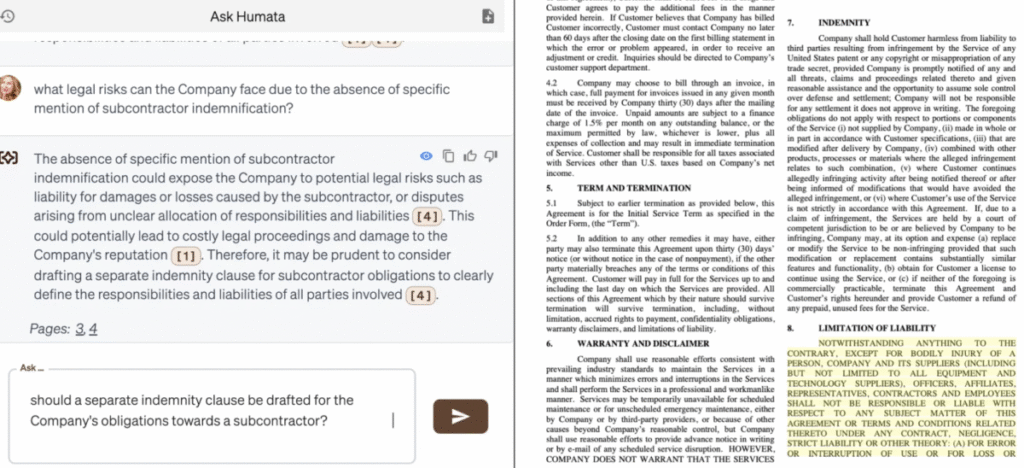
Instead of skimming through pages, just ask Humata AI specific questions about your documentation.
It provides precise answers backed by exact citations, so you can trust the information and easily verify the source.
4. Multi-File and Multi-Format Support
Upload PDFs, Word documents, spreadsheets, and even scanned images thanks to built-in OCR technology.
You can analyze multiple files at once, compare data, or synthesize insights across documents seamlessly.
5. Collaboration and Secure Sharing
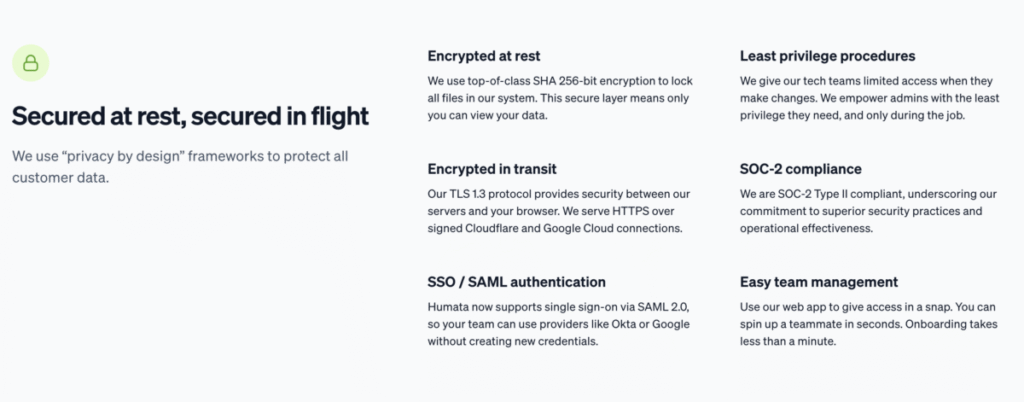
Humata AI supports real-time teamwork by allowing users to share files and analyzes securely within teams.
Enterprise-grade encryption and access controls ensure your sensitive documents stay private and protected.
6. Embeddable AI for Webpages
You can integrate Humata’s AI directly into your website with a simple click. This feature lets your customers or users interact with your documents, ask questions, and get instant answers without leaving your site.
Competitors Comparison
| Feature / Tool | Humata AI | ChatGPT + PDF Plugins | Jasper AI | Scholarcy | Kira Systems |
|---|---|---|---|---|---|
| Document Summarization | Advanced, with context-aware summaries | Basic, depends on plugin | Strong content creation focus | Specialized for academic papers | Focused on contracts and legal docs |
| Instant Q&A with Citations | Precise answers with source citations | No native citation support | Limited | No | Yes |
| Multi-file Upload | Supports multiple documents simultaneously | Usually one file at a time | Limited | Supports batch processing | Yes |
| OCR Support for Scanned Docs | Built-in OCR for scanned images | No | No | No | Yes |
| Collaboration Features | Team sharing, permissions, secure collaboration | No | Limited | No | Yes |
| Enterprise Security | Enterprise-grade encryption and compliance | No | No | No | Yes |
| Ease of Use | User-friendly with intuitive chat interface | Familiar chat UI, plugin setup required | Easy for marketers and writers | Academic-focused UI | Designed for legal professionals |
| Best For | Researchers, students, business & legal teams | General users needing quick PDF Q&A | Content creators and marketers | Academics and researchers | Legal teams and contract analysts |