
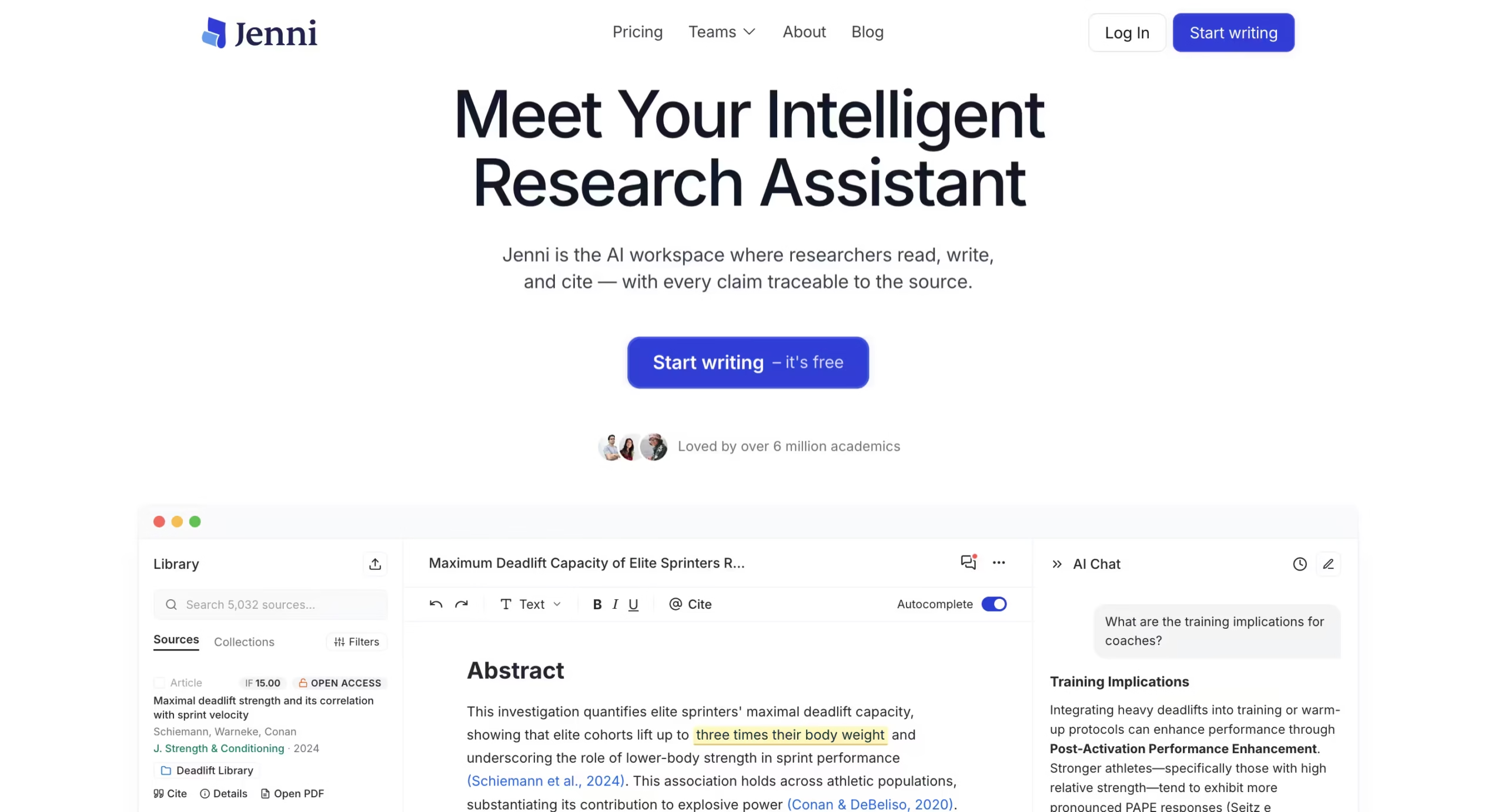


I set up a test project in Jenni: a literature review section covering transformer-based approaches to low-resource NLP, roughly 2,000 words.
I uploaded three PDFs – two conference papers from ACL and one survey paper from arXiv – and started writing from a blank document with only a section heading.
The goal was to see how well Jenni could accelerate drafting when the sources were loaded and the topic was defined.
Setup took about four minutes.
The interface is a clean, minimal text editor – closer to Notion than to Microsoft Word.
You create a project, upload PDFs, and start typing. There is no template library, no outline generator on the free plan, and no onboarding wizard. You get a blank page and a blinking cursor.
For an academic tool, this is either refreshingly simple or frustratingly bare depending on how much hand-holding you expect.
The core loop works like this: you type the first few words of a sentence, and Jenni suggests the rest in gray text.
Press Tab to accept. If the suggestion draws from one of your uploaded papers, it appends the citation inline – author, year, and page range in whatever format you have selected.
You can also highlight any text and use the AI Edit toolbar to rewrite, shorten, expand, or adjust tone.
The Claim Review feature, which I tested separately, flags statements as “supported,” “overstated,” or “contradicted” by your sources.
Jenni AI was founded by David Park.
The company has reported $8 million in annual recurring revenue and a $25 million valuation.
Their marketing claims 6 million academics and 15 million papers written on the platform, with logos from Google, Penn, and Cambridge on the homepage.
Papers written using Jenni have appeared in IEEE, Springer, and Elsevier publications, according to the company. The 200-million-paper search index pulls from Semantic Scholar, PubMed, arXiv, and CrossRef.
The autocomplete quality varied by section type.
For factual summary paragraphs (“Study X found that…”), Jenni performed well – the suggestions were fluent, correctly cited, and saved real time.
For analytical paragraphs where I needed to synthesize across multiple papers and draw an original conclusion, the tool defaulted to safe, generic connective tissue.
“These findings suggest that further research is needed” appeared three times before I stopped accepting suggestions in those sections and wrote them manually.
Key Features
AI Autocomplete with Source Grounding
This is the feature that separates Jenni from general-purpose AI writing tools.
When you upload PDFs and start typing, the autocomplete draws from your actual sources rather than from its general training data.
In practice, this means the suggestions reference specific findings, methodologies, and data points from the papers you uploaded. I found the grounding worked best for single-source paragraphs.
When a sentence needed to synthesize two or three papers, Jenni tended to pick one and ignore the others, which meant I had to manually add the cross-references.
The citation attachment was correct about 80% of the time – the other 20% either cited the wrong paper or placed the citation at an awkward point in the sentence.
Citation Management (10,000+ Styles)
You pick your citation style once at the project level – APA 7th, MLA 9th, Harvard, IEEE, Chicago, Vancouver, or any of the 10,000+ formats Jenni supports – and every autocomplete suggestion formats its citation accordingly.
Switching styles mid-project reformats all existing citations. This worked cleanly in my testing.
Where it falls short is integration: Jenni connects to Zotero and Mendeley for importing your existing library, but there is no reverse sync. Citations you create in Jenni stay in Jenni unless you export the whole document.
PDF Chat
Upload a PDF and ask questions about it in a chat sidebar.
This is useful for extracting specific data points without reading the full paper – I used it to pull sample sizes and evaluation metrics from methods sections.
The responses are grounded in the document content and include page references. But Jenni only chats with one PDF at a time.
You cannot ask a question across your entire uploaded library, which limits it for literature review work where you need to compare findings across papers.
Claim Review
Highlight a paragraph and Jenni flags each claim as supported, overstated, or contradicted by your sources. I tested this on four paragraphs from my draft.
It correctly caught one overstated claim where I wrote “consistently outperforms” when the source data showed mixed results across datasets. It missed a claim where I cited a sample size that was actually from a different table in the paper.
The feature is helpful as a sanity check, but it is not a replacement for actually reading your sources carefully.
200M+ Paper Search
Jenni integrates a semantic search engine that pulls from Semantic Scholar, PubMed, arXiv, and CrossRef. You can search by keyword, filter by year and publication, and add papers directly to your project.
The search results include abstracts, citation counts, and relevance scores.
This worked well for finding additional sources mid-writing, though it returned noticeably fewer results for niche sub-topics compared to a direct Semantic Scholar search. It is a convenience feature, not a replacement for a dedicated literature search tool.
AI Edit Toolbar
Highlight any text and choose from rewrite, shorten, expand, adjust tone, or check clarity. These are standard LLM editing operations and they work about as well as you would expect.
The “adjust tone” option was the most useful for academic writing – it shifted informal draft language into formal register without overwriting the meaning.
“Shorten” was aggressive, sometimes cutting important qualifiers. “Expand” tended to add filler.