


“If a connected Google Drive file gets indexed, then someone tightens the share settings…how does the search engine avoid leaking it?” asks one Hacker News thread on enterprise search. It nails the risk in letting AI rummage through Slack, Google Drive, and GitHub: one permission tweak—or one outdated doc—flips the system from asset to liability.
There are two ways AI search can fail:
- Stale access — permission revoked, file still shows up
- Stale truth — document is visible, but the content no longer matches reality
Most buyers test only the first. We graded seven platforms against both.
How We Compared AI Search Across Slack, Google Drive And GitHub
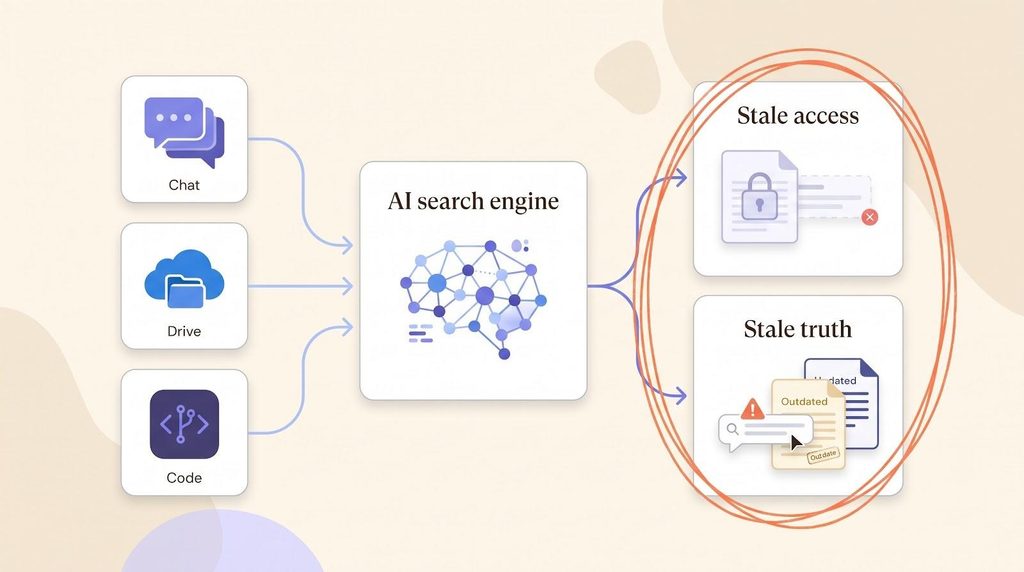
To make the cut, a product had to answer questions, not just keywords, across Slack, Google Drive, and GitHub. We scored each on five factors, in this order:
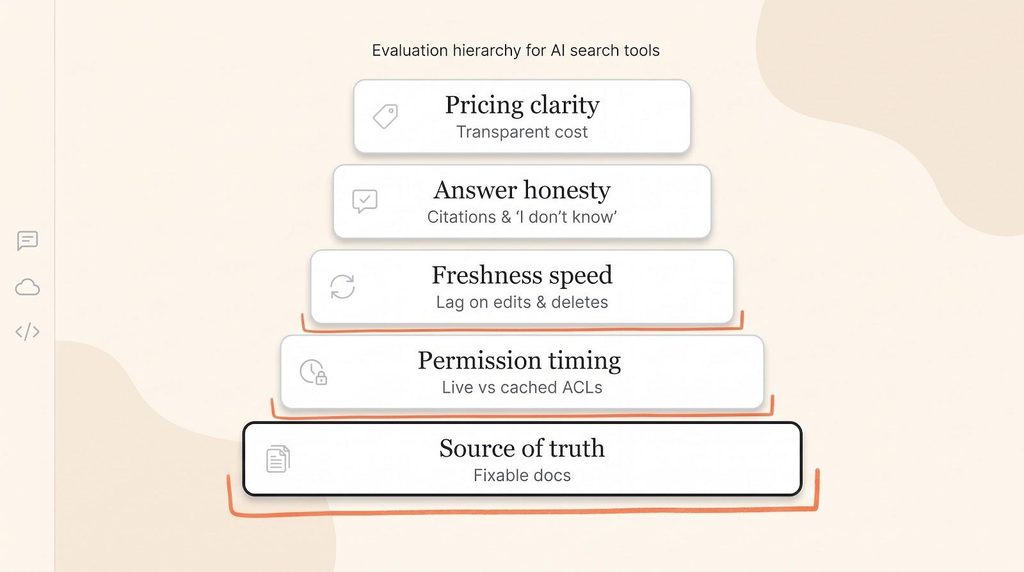
- Source of truth. Does it keep—or fix—the original document?
- Permission timing. Live check, or a cached ACL?
- Freshness speed. How fast do edits, group changes, and deletions reach results?
- Answer honesty. Can it cite sources, or say “I don’t know”?
- Pricing clarity. Is cost transparent for the companies that will deploy it?
One caveat to carry through the rankings: a “live” permission still exposes a file that was shared too broadly in the first place.
Why This Is Really A Company Brain Problem
Both failure modes point at the same missing piece. A company brain is a persistent context layer: it gathers knowledge from wherever a company actually creates it and makes that context usable by people and AI agents alike. It is not company search, and it is not a chatbot bolted onto a wiki.
The context layer is the tier between your raw sources—documents, Slack threads, code, CRM records—and the model answering the question, deciding what crosses into the context window at inference. Stale access and stale truth are both failures of that layer, not of the search box in front of it.
That framing explains a split you will see below. Some products are search overlays: they index other systems and rank whatever they find. Others own a maintained source of truth and expose it to humans and agents alike. The distinction matters because stored context graphs rot—last quarter’s relationship model becomes one more artifact somebody has to keep accurate. Retrieval that runs against verified sources at query time, inheriting permissions as it goes, ages better than a copy that was correct on the day it was made.
It also explains why the usual fix underperforms. Bolting a search layer onto a wiki nobody maintains leaves two tools covering for each other’s weaknesses: one stores documents but cannot make them true, the other finds documents but cannot repair them. Below about 1,000 people, one system doing both costs less in staff time than the pair.
AI Search Tools Compared At A Glance
Use the table as a cheat sheet.
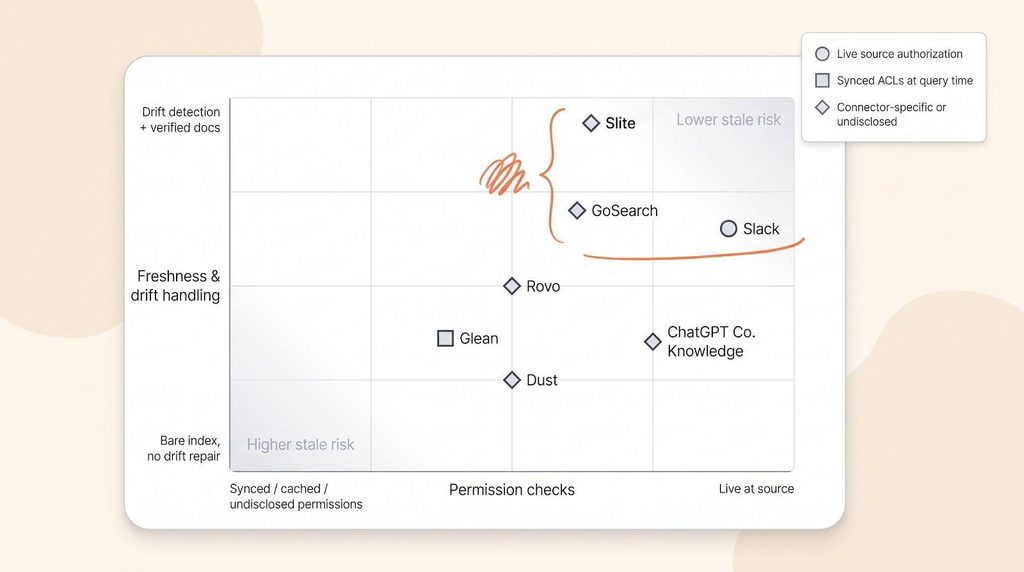
| Rank & tool | Core differentiator | When permissions are resolved | How freshness is handled | Pricing model* | Ideal company size | Key drawbacks |
| 1 Slite | Self-maintaining KB; Slite Agent proposes every fix | Permission-aware at query time, with real-time sync | Drift detection + human verification loop | Public per-seat pricing; Enterprise custom | 100–1,000 employees | No Teams or on-prem; AI always on |
| 2 Slack Enterprise Search | Live, federated permission checks | Live at source (API call) | No external index; answers come from live data | Enterprise+ custom | Slack-centric large orgs | Source-API latency; no doc-quality repair |
| 3 GoSearch | Hybrid: mix live and indexed retrieval | Connector-specific (live for federated) | Admins can verify or hide stale items | $20 user/mo Pro; Enterprise custom | Mid-market to enterprise | Mode complexity; security varies by connector |
| 4 Glean | Broad connector catalog and org graph | Query-time filter on synced ACLs | Webhooks + crawls shrink but don’t erase lag | $80k/yr min; ~$98.7k median | 2,000+ employees | Heavy governance overhead; opaque cost |
| 5 Atlassian Rovo | Deep Jira/Confluence context | Mixed: live and synced | Listens for updates; hours-level Drive ingest | Included + usage credits | Atlassian-centric orgs | Connector inconsistency; credit math |
| 6 ChatGPT Company Knowledge | Search inside existing ChatGPT workflow | Mixed; GitHub lacks admin sync | Varies by provider; cites but won’t fix docs | Bundled with ChatGPT plans | ChatGPT-first companies | No uniform SLA; data-residency gaps |
| 7 Dust | Agent workflows powered by search | Undisclosed live-check window | Sync keeps agents fresh but no drift repair | ≈ $30 user/mo; verify | Technical mid-market teams | Broader platform than pure search |
*Prices and connector details reflect public information as of September 9, 2026; confirm with each vendor before purchase.
Read that pricing column as scope, not discount. Glean’s six-figure floor buys 275-plus connectors and the programme to run them. The question is whether you are paying enterprise rates for answers drawn from unverified documents.
Key takeaways:
- Slite and Slack are the only two here that resolve permissions against live authority instead of a synced copy.
- Slite leads overall because it is the only one that also repairs the documents underneath the search.
1. Slite: Best For Keeping The Company Context Layer Current
Founded in 2016 and the first knowledge base to ship AI search in February 2023, Slite starts with a tougher question than “Can I find this document?”—“Is the document still true?” It is the closest thing here to a managed company brain: the knowledge base is the maintained source of truth, and search runs across it and the tools around it.
At the center is Slite Agent, released in June 2026. It spots stale or missing docs by cross-checking Slite content against Slack, Linear, GitHub, Intercom, and 20-plus other tools, then proposes fixes—updating docs from natural-language intent, or using the Slite MCP to write new docs, merge duplicates, restructure, rename, archive, and change ownership. Every suggestion flows through a human-review Triage UI; nothing is auto-applied. When you use Ask, verified docs rank first, outdated sources drop, and the system is willing to answer “no result” instead of guessing.
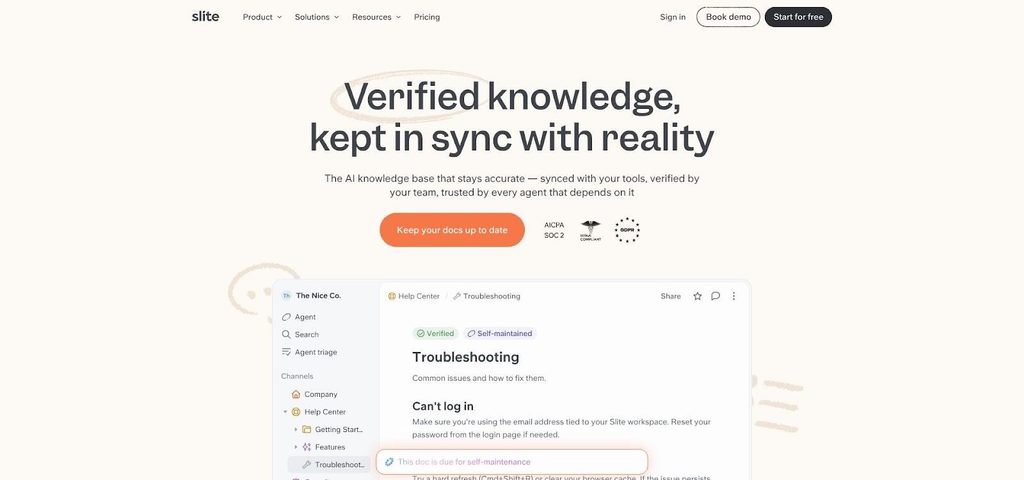
Slite’s verified, self-maintaining knowledge base.
On permissions, Slite resolves access at query time and keeps group membership in real-time sync, so a tightened share setting takes effect on the next search rather than the next crawl—the same live-authority model Slack uses, applied to a knowledge base Slite also maintains. An index that inherits access rights once, at ingest, is the mechanism behind most leak stories.
The search holds up in the field, too. In Slite’s 2026 enterprise search survey of more than 100 knowledge workers, Slite AI search was the most-used tool among teams that have enterprise search at all—31 percent, against 15 percent for Glean—in a market where 73 percent of companies do not know these tools exist and the average worker still loses 3.2 hours a week hunting for answers.
Because MCP ships on every plan, including Basic, with read and write access, agents such as Claude and Cursor browse the same verified context and propose changes back into it. That is the practical test of a context layer: people and agents reading one maintained picture, not two divergent ones.
Cross-tool search appears on Pro and higher, pulling context from Slack, Google Drive, GitHub, and other connectors; Basic limits Ask to native Slite docs. Pro also adds Slite Agent, agent workflows, and 50 agent credits per seat, per month.
On compliance, Slite covers SOC 2 Type II, HIPAA on Pro, GDPR, SSO/SCIM, and an EU-hosted option.
For mid-market companies of roughly 100–1,000 employees battling stale docs, Slite is the rare tool that fixes the knowledge base while it searches it.
2. Slack Enterprise Search: Best For Live Source Permissions
Slack follows a simple rule: don’t copy external data at all.
Each query triggers a real-time call to Google Drive, GitHub, Box, or Salesforce with the requesting user’s OAuth token. No shadow index means no stale ACL cache: change a Drive share from “anyone” to “team only,” search again, and the file is gone.
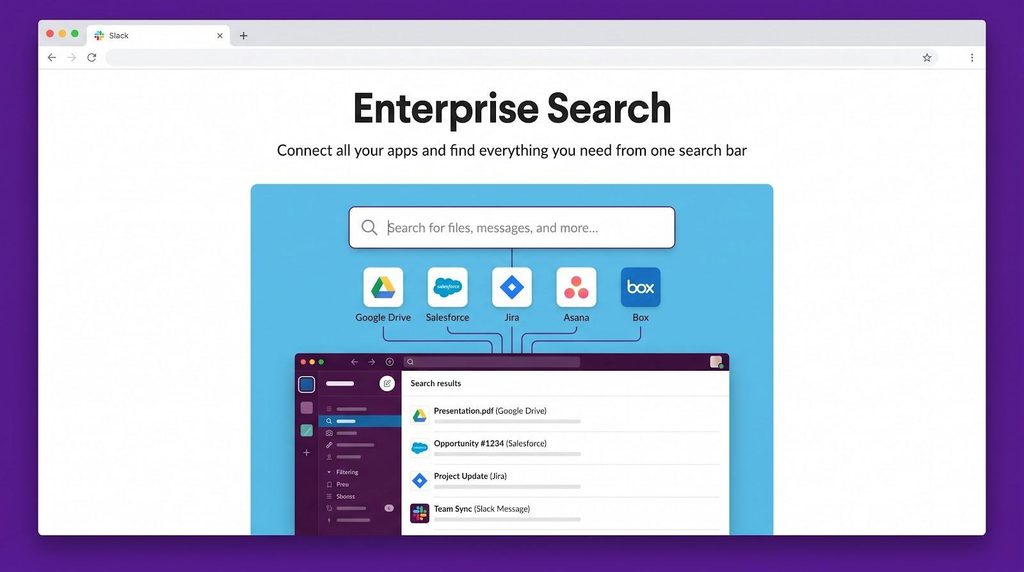
Slack Enterprise Search federated permissions search results interface.
Security teams love that immediacy, but it costs latency: every result waits on the upstream API, and Slack cannot repair a document it sees for a millisecond.
Enterprise Search sits inside the Enterprise+ plan (pricing on request). If your only concern is leakage after a permission change, few tools close the window faster.
3. GoSearch: Best For Mixing Federated And Indexed Search
GoSearch sits in the middle ground. Every connector can run federated (live source check) or indexed (copied for speed and deeper ranking).
GoSearch hybrid federated and indexed enterprise search UI.
Keep Slack DMs and sensitive Drive folders federated so permissions are rechecked on every query; put low-risk Confluence spaces in indexed mode for speed and broader recall.
Admins also get post-ingest controls: verify, hide, or deprecate docs before employees see them. What it will not do is fix a bad source file. Pricing is public—$20 per user per month on Pro, Enterprise above 35 seats—but budget extra due-diligence time, because each connector ships its own security and freshness SLO.
4. Glean: Best For Large, Connector-Heavy Enterprises
Glean’s edge is coverage. With more than 275 connectors, if your IT map spans Salesforce orgs, legacy file shares, and niche HR portals, Glean probably has one ready.
That breadth rides on a classic sync-and-filter engine: each connector crawls content and permissions on a schedule, stores them in Glean’s index, then applies the last-known ACLs at query time. Webhooks shorten, but never erase, the gap. Drop an intern from “Finance” and you wait for the next crawl before results catch up.
Where Glean shines is governance: admins restrict which fields enter the index, require approvals for new connectors, and audit every answer. Add the company graph and personalized ranking, and a 5,000-person org sees permission-filtered answers tuned to each role.
Glean has no public price list, but published references show an $80,000 per year minimum, median contracts around $98,700 per year, and mid-market deals reaching roughly $250,000 per year all-in. It also needs owners for connector health, schema drift, and compliance reviews. At Fortune scale that breadth can outweigh the index-staleness trade-off—but be ready to staff it.
If Glean is on your shortlist, the objections are specific. Slite’s roundup of enterprise search alternatives to Glean names permission amplification—surfacing everything a person can reach rather than what they need to know—alongside opaque pricing and a stored context graph that becomes one more artifact to keep accurate. It is a competitor’s analysis, but those are the failure modes the tests below are built to expose.
When is glean still the right choice? Glean’s heavyweight model fits one specific context:
- Scale. You run an enterprise of roughly 2,000+ employees with strict on-prem or isolated-cloud compliance rules.
- System sprawl. You rely on ServiceNow, SAP, SharePoint Online, and other niche tools that few competitors connect to today.
- Governance depth. A dedicated team manages crawl schedules, retention policies, and schema drift, and requires approvals before any new connector goes live.
In that world, replacing Glean can cost more than tuning it, and if it is embedded and working, the switching cost is real. Negotiate fresh SLAs on permission lag, keep investing in source-document cleanup, and accept crawl-and-filter as the price of coverage. Everyone else can move on.
5. Atlassian Rovo: Best For Atlassian-Centric Workflows
Rovo is built on Atlassian’s Teamwork Graph, so it understands Jira issues, Confluence pages, and comments at a field level. Add the Slack connector and chat threads land in a sprint retrospective without leaving Atlassian.
Permission handling is mixed. Slack data is fetched live, so a revoked channel invite disappears immediately. Google Drive and GitHub use synced connectors driven by webhooks and scheduled crawls; Atlassian notes that Drive files usually appear in search within a few hours of connection, with deletions and group changes on the same cadence.
Pricing is bundled: basic search and Q&A come with any paid Atlassian plan, while advanced chat, agent executions, and heavy MCP usage consume Rovo credits. Extra usage billing starts December 3, 2026.
For teams already living in Jira and Confluence, Rovo adds cross-tool answers with almost no rollout friction—just map which connector is live versus synced first.
6. ChatGPT Company Knowledge: Best For Teams Already Living In ChatGPT
For teams that already ask ChatGPT everything, Company Knowledge adds work data to a familiar conversation.
It layers Slack, Google Drive, GitHub, and select custom apps into the chat window with inline citations. Architecture is mixed: Google Drive syncs snapshots into an index, Slack is queried live with each user’s token, and GitHub currently offers no administrator-managed sync—access rides on each developer’s OAuth grant.
So freshness and revocation timing vary by connector, and OpenAI publishes no universal SLA. The feature is bundled into eligible ChatGPT Business, Enterprise, and Edu subscriptions. It cuts copy-paste friction, but “easy” does not mean “uniform”—track which connector uses which security path.
7. Dust: Best For Agent Workflows Powered By Search
Dust is an agent platform that indexes your docs so its agents can act with context.
It syncs Slack, Google Drive, GitHub, and 20-plus other sources into a retrieval layer, then feeds that layer to custom agents you build in a low-code studio—a bot that files Jira tickets when a Drive spec changes, say. Search is only the on-ramp that hands each agent the right paragraph.
Security detail is thin. Public docs confirm data is synchronized, but Dust publishes no maximum window for permission revocations or group-membership changes. Run your own revocation tests.
Pricing is public: Pro seats start at $30 per user per month with 8,000 credits, scaling by credit pack; Enterprise adds SSO, audit logs, and dedicated support.
For teams building code-review helpers or incident responders, Dust bundles search, orchestration, and UI in one place—but you are buying a platform, not a turnkey search appliance.
Conclusion: How To Test Permission And Answer Freshness Before You Buy
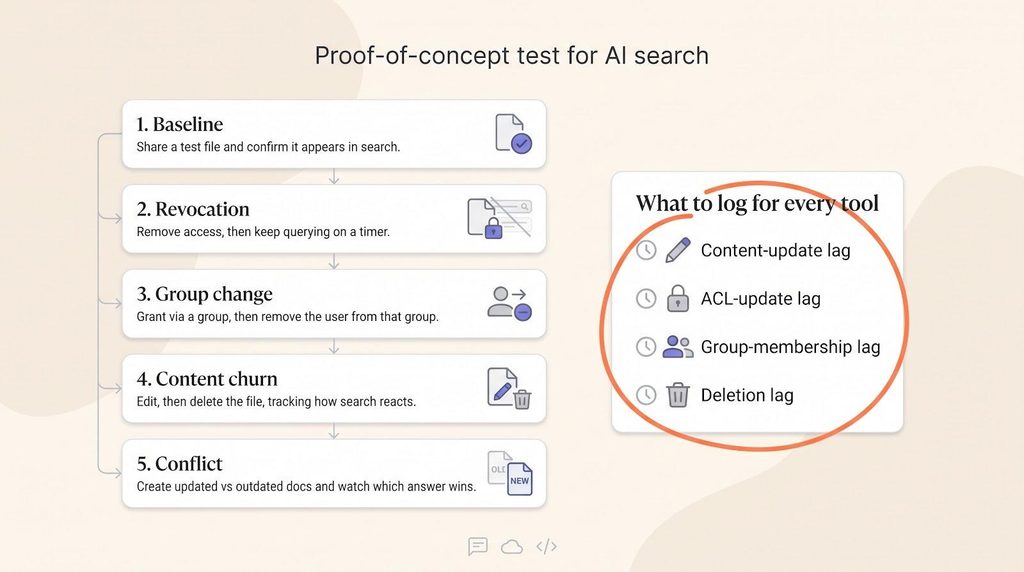
Slide decks look great; real security shows up only in live tests. Run this proof of concept before signing:
- Baseline. Share a Google Drive file with a test user and confirm it appears in search.
- Revocation. Remove that user’s access. Query every 10 minutes for an hour, and record when the result, snippet, and citation disappear.
- Group change. Re-grant access through a group, remove the user from it, and time the change again.
- Content churn. Edit the file, then delete it. Measure how long the edit takes to surface and when the dead link vanishes.
- Conflict. Create two contradictory files—one updated, one outdated—and note whether the engine ranks the fresh doc higher, cites both, or replies “no answer found.”
Log four numbers per test: content-update, ACL-update, group-membership, and deletion lag. Repeat on Slack channels and GitHub repositories.
Any product that still shows a revoked file past your tolerance—say, 60 minutes—belongs in the penalty box. And if test five turns up two contradictory documents nobody owns, the search engine was never the problem.
