

CodeRabbit promises to do one major thing: look over code for errors that developers often miss. Its main aim is to move blocks of code closer to being functional and high-performing. But as with all tools, there are reservations about its ability to deliver on its claims.
Therefore, this article will explore what CodeRabbit is, how it works, and whether it works.
What’s CodeRabbit?
CodeRabbit is a code review tool that integrates with other coding platforms, like GitHub. It automatically reviews code changes when a pull request is initiated. A pull request (PR) is a formal way of proposing changes to a codebase and asking for a review before accepting them into a project.
CodeRabbit reviews changes and leaves comments directly in the pull request. Each review sees the tool focus on code quality, correctness, and risk detection. It looks for potential bugs, logic issues, security concerns, performance problems, and unclear or overly complex code.
When it spots issues, it flags them and backs them up with explanations detailing why something might be problematic. It then suggests improvements. This can be very helpful for someone who is not deeply technical but still needs to review or approve changes. It also helps to move collaboration workflows along faster.
Explanations are written in clear language for easy comprehension.
Also read: 7 Best AI Code Review Tools in 2026
How Does CodeRabbit Work?
CodeRabbit integrates directly with a GitHub repository to automatically monitor pull requests.
Note: A pull request is a set of proposed changes to a project that someone wants reviewed before merging into the main codebase.
A pull request is what activates CodeRabbit.
Step 1
After activation, CodeRabbit first analyzes the changes that were made. It focuses on what was added, removed, or modified, then compares the new version of the code against the previous version to understand what changed and why the change was made.
Step 2
Next, CodeRabbit runs an AI analysis of those changes to evaluate the code’s reasoning and structure. The analysis points out logical errors, security risks, performance concerns, and missing edge cases. It also includes unclear variable names, overly complex functions, and deviations from best practices.
Step 3
CodeRabbit then posts comments directly inside the pull request on GitHub, right next to the lines of code being questioned. The comment explains the issue and, in many cases, suggests improvement. Comments may also be accompanied by summaries of concerns about the pull request from an wholistic point of view.
Step 4
If the developer chooses to accept the feedback and merge the code, CodeRabbit can re-analyze the updated changes and adjust its comments. The cycle goes on till the code is logically correct and functionally accurate.
Note: CodeRabbit does not change code automatically or merge anything by itself; it only provides feedback. A human overseer still needs to approve the pull request and merge the changes.
Does It Work?
A Reddit comment appears mixed but ultimately leans towards the positive.
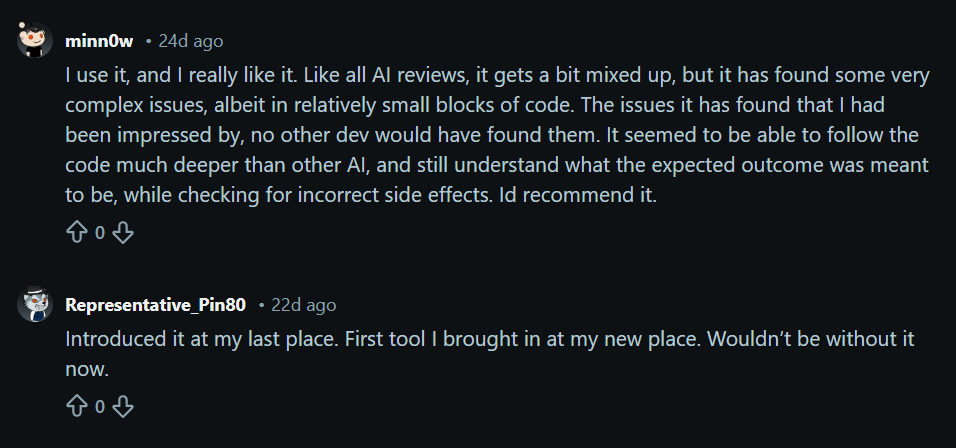
The user praises CodeRabbit’s ability to find issues no other developer would have. The comment also highlights CodeRabbit’s ability to understand code on a deeper level while keeping an eye on the expected outcome.
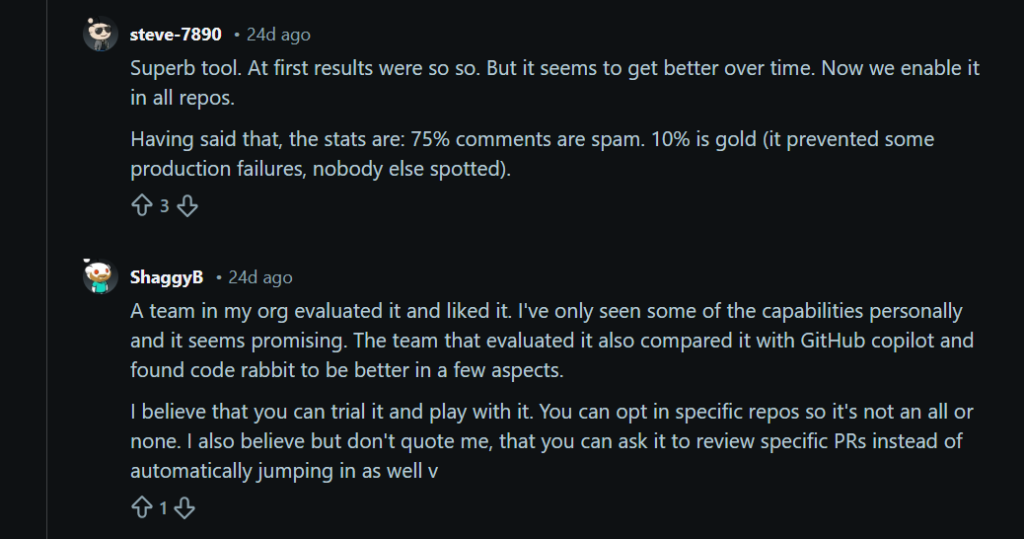
Another comment echoes the first. It describes CodeRabbit as a tool whose comments prevented production failures.
A Reddit user went ahead to suggest an excellent way to use: targeted code review. It appears that the same old trial-and-error technique will help get the best out of CodeRabbit.
Other reviews note significant benefits like time savings. Using CodeRabbit has removed the need to have senior developers vet code before merging. This is an excellent advantage, in addition to faster development cycles and increased efficiency.
The Bottom Line
CodeRabbit is a tool for developers and development teams. Just as reviewers pointed out, it helps to highlight potential software development problems that would ordinarily take cycles of iteration to fish out.
FAQs
1. Is CodeRabbit Reliable?
CodeRabbit is generally reliable as a support tool for reviewing code. It can identify common issues such as bugs, missing checks, and unclear logic. It often provides useful suggestions. However, it is not perfect and can miss problems or suggest unnecessary changes. It should be treated as an assistant, not a replacement for human judgment.
2. Is AI Pushing 75% of Code?
AI tools like GitHub Copilot can generate a large portion of code in some situations, but the “75%” figure is not a universal rule. The amount of AI-generated code varies depending on the project, the developer’s experience, and how the tool is used. In a practical sense, humans still guide the design, review, and final decisions.
3. Is Coding With AI Illegal?
Coding with AI is not illegal. Many developers and companies use AI tools to help write and review code. However, users are responsible for how they use the generated code. It is important to follow software licenses, respect intellectual property, and ensure the code is appropriate for your project.
4. Is CodeRabbit Free Forever?
CodeRabbit is not completely free forever for all features. Pricing and limits can change over time, and advanced features or team use may require a paid plan. It is best to check the official pricing page for the most up-to-date information.
