


What Is Dokie?
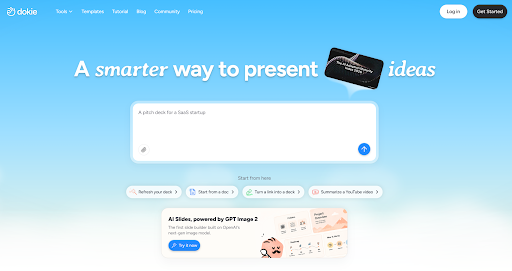
Dokie is an AI presentation maker that helps users create professional, brand-aligned slide decks from ideas, notes, documents, URLs, and other source materials. It is designed for people who need business-ready presentations without spending hours manually formatting slides.
For corporate teams, Dokie is useful because it addresses a common problem: most pitch decks start messy.
A team may have a product brief, sales notes, customer research, market data, pricing information, competitor analysis, case studies, and an old deck from last quarter. Turning all of that into a clean presentation usually takes a lot of manual work.
Dokie helps by creating a structured first draft and supporting revisions after generation. Users can adjust layouts, rewrite slides, improve visuals, refine sections, and keep the deck closer to a consistent style.
That makes Dokie useful for pitch decks, sales presentations, client proposals, investor-style decks, internal strategy presentations, training decks, marketing reports, and executive updates.
The Old Workflow: Too Many People, Too Many Manual Fixes
Before using Dokie, our corporate pitch deck process followed a familiar pattern.
First, someone created a rough outline in a document. Then another person turned that outline into slide titles. Then the sales or business team added positioning points. Marketing adjusted the language. Product reviewed accuracy. Leadership added comments. Finally, someone had to make the deck look polished.
The actual slide creation was only one part of the problem.
The larger problem was revision.
Every stakeholder changed something. One person wanted a stronger opening. Another wanted fewer slides. Someone asked for a new comparison page. Someone wanted the product section to be more visual. Someone else wanted the deck to match the brand template more closely.
By the end, the deck looked patched together. Some slides used one layout style. Others used another. Titles were inconsistent. Spacing changed from page to page. Some slides had too much text. Others looked empty.
This is where a corporate pitch deck workflow often breaks down. The team does not lack ideas. It lacks a fast way to turn those ideas into a clean, consistent presentation.
Why Pitch Decks Are Hard for Corporate Teams
Corporate pitch decks are harder than ordinary presentations because they need to satisfy many different goals at once.
A pitch deck needs to be strategic enough for leadership, clear enough for sales, accurate enough for product, polished enough for clients, and consistent enough for the brand team.
A basic AI slide generator can create a draft, but it may not survive this workflow. The deck still needs to be revised, customized, shortened, expanded, and polished.
That is why Dokie felt more useful than a one-click PPT generator. It helped with the messy middle of the process: the revision stage between first draft and final deck.
How Dokie Changed the First Draft Stage
The first major change was speed.
Instead of starting from a blank PowerPoint file, we could start with raw materials. A product brief, campaign summary, sales notes, website URL, or rough outline could become the foundation of a deck.
This changed the role of the first draft.
Before Dokie, the first draft was often a manual assembly job. Someone had to decide the section order, write slide titles, create layouts, paste content, add visuals, and make the deck look presentable enough for review.
With Dokie, the first draft became a structured starting point. It was not always final, but it gave the team something real to react to.
That is important in corporate workflows. Stakeholders often give better feedback when they can see a deck instead of reading an outline.
Dokie helped us move from abstract planning to visual review much faster.
How Dokie Improved Deck Structure
A strong pitch deck needs a clear structure. It should not feel like a random collection of slides.
A typical corporate pitch deck may need sections such as:
- Problem
- Market context
- Customer pain points
- Solution
- Product overview
- Key benefits
- Proof or case study
- Competitive advantage
- Implementation plan
- Pricing or package
- Next steps
In the old workflow, the structure often changed several times because the team was still figuring out the story while building the slides.
Dokie helped create a more coherent first version. The deck still needed human review, but the initial flow was easier to work with than a blank canvas.
This saved time because the team could focus on improving the story instead of building the structure from scratch.
For corporate pitch decks, structure is not a minor detail. It determines whether the audience understands the offer.
How Dokie Helped With Messaging
Pitch deck messaging is difficult because the language needs to be clear, persuasive, and audience-specific.
A product team may describe features. A sales team needs value propositions. A client needs outcomes. Leadership wants the message to be concise.
Dokie helped by making it easier to rewrite and refine slides during the editing process.
Instead of manually rewriting every slide, we could use AI-assisted edits to make sections clearer, shorter, more executive-friendly, or more client-focused.
For example, a feature-heavy slide could become a benefits slide. A dense product overview could become a cleaner value proposition. A generic closing slide could become a stronger next-step page.
This was one of the biggest workflow improvements. The team could revise the message directly inside the deck workflow instead of constantly moving between documents, comments, and slides.
How Dokie Reduced Formatting Cleanup
Formatting cleanup used to be one of the most frustrating parts of the process.
After several rounds of edits, the deck would often become visually inconsistent. A slide title would shift. A text box would be misaligned. An image would not match the style. A section divider would look different from the others.
These issues sound small, but they make a pitch deck look less professional.
Dokie helped reduce formatting cleanup by supporting more consistent layouts and targeted changes. Instead of manually fixing every detail, we could refine slides while keeping the overall presentation style more controlled.
This does not mean no human review is needed. A final deck should always be checked carefully. But Dokie reduced the amount of repetitive formatting work that usually happens after every revision round.
For corporate teams, that is a real productivity gain.
How Dokie Helped With Brand Consistency
Brand consistency matters in pitch decks because the deck represents the company.
A corporate pitch deck should not look like a generic AI-generated file. It should feel like it belongs to the organization. Colors, fonts, spacing, section pages, visual hierarchy, and slide rhythm should feel connected from beginning to end.
Dokie supports brand-aligned workflows, including the ability to work with themes, templates, and reference styles. That made it easier to keep the deck closer to a consistent visual direction.
This was especially useful when multiple people were involved in the deck. Without a controlled workflow, every contributor can unintentionally introduce a different style.
Dokie helped keep the deck more unified.
For teams creating client-facing materials, this matters. A deck that looks consistent feels more credible.
How Dokie Changed the Review Process
The biggest change was not only how we created slides. It was how we reviewed them.
Before Dokie, review often happened in scattered comments. Someone would leave notes in a document. Someone else would comment in PowerPoint. Another person would send a message saying a slide “needs to feel more strategic.” Then someone had to interpret all of that feedback manually.
With Dokie, more feedback could be translated directly into slide edits.
A vague comment like “make this more executive-friendly” could become an actual revision request. A request like “turn this into a timeline” could become a layout change. A note like “this section is too wordy” could become a shorter version.
That made the review process more actionable.
Instead of collecting feedback and then manually rebuilding slides, the team could move from feedback to revision faster.
Example Workflow: From Raw Notes to Pitch Deck
A typical Dokie-assisted pitch deck workflow looks like this:
Start with raw materials.
Upload or paste notes, documents, URLs, product information, or a rough outline.
Generate the first deck.
Review the initial structure and identify what needs to change.
Refine the storyline.
Ask Dokie to make sections clearer, more client-focused, or more concise.
Improve the layouts.
Turn bullet-heavy slides into comparisons, timelines, process slides, or visual summaries.
Apply style direction.
Use a theme, template, or reference file to keep the deck closer to the company’s visual standard.
Review with stakeholders.
Collect feedback from sales, product, marketing, leadership, and design.
Make targeted edits.
Revise individual slides instead of rebuilding the full deck.
Prepare final output.
Check content, formatting, brand consistency, and audience fit before sharing or presenting.
This workflow is not magic. It still requires thinking. But it removes a lot of the mechanical slide work that slows teams down.
Where Dokie Saved the Most Time
Dokie saved the most time in five areas.
First, it reduced blank-page time. Starting from a generated structure was much faster than building a deck manually.
Second, it reduced layout decisions. Users did not have to manually decide every slide format from scratch.
Third, it reduced formatting cleanup. The deck stayed more consistent through revisions.
Fourth, it reduced rewriting friction. Users could refine slide copy and structure faster.
Fifth, it reduced revision loops. Stakeholder feedback could become targeted edits instead of a full rebuild.
The largest benefit was not one single feature. It was the way Dokie improved the entire workflow from draft to final review.
Where Dokie Still Needs Human Review
Dokie is useful, but it does not remove the need for human judgment.
A corporate pitch deck may include product claims, client-specific details, pricing, timelines, financial information, case studies, or strategic recommendations. These details should always be reviewed by the team.
AI can help with structure, layout, wording, and formatting, but it should not be treated as the final authority on business accuracy.
The team still needs to check:
Is the message accurate?
Does the deck match the audience?
Are the claims supported?
Is the tone appropriate?
Are the numbers correct?
Does the deck follow internal brand standards?
Is the final version ready to send?
Dokie speeds up the workflow, but the team remains responsible for the final deck.
Dokie for Sales Teams
Sales teams benefit from Dokie because they often need to customize pitch decks quickly.
A sales team may have a standard deck, but every prospect has different needs. One client cares about ROI. Another cares about implementation. Another wants security details. Another wants a case study.
Dokie makes it easier to adapt a deck for different situations. Users can revise sections, change layouts, rewrite value propositions, and make slides more client-specific.
This is useful because sales teams rarely have design support for every opportunity.
Dokie helps reps create cleaner, more customized decks without spending hours formatting slides.
Dokie for Marketing Teams
Marketing teams benefit from Dokie because they often own pitch deck messaging and brand quality.
A marketing team may need to create product decks, campaign decks, sales enablement materials, client proposals, launch presentations, and partner decks.
Dokie helps by turning raw content into structured slides and allowing the team to refine the deck through AI-assisted edits.
It is especially useful for making decks more consistent. Marketing teams care about brand, but they also care about speed. Dokie helps balance both.
For marketing teams, Dokie is not only a slide generator. It is a faster way to turn messaging into presentation assets.
Dokie for Product Teams
Product teams often contribute to pitch decks, but their content can be too technical for client-facing slides.
Dokie helps translate dense product information into clearer presentation sections. A feature list can become a benefit slide. A workflow can become a process diagram. A product roadmap can become a timeline. A technical explanation can become a simpler visual summary.
This helps product teams communicate more clearly with non-technical audiences.
Dokie does not replace product review. The team still needs to verify accuracy. But it can make product content more presentation-friendly.
Dokie for Leadership and Strategy Teams
Leadership and strategy teams often need decks that are concise, structured, and decision-oriented.
Dokie helps by turning long source materials into cleaner executive-style presentations. It can help reduce unnecessary detail, improve slide hierarchy, and create stronger section flow.
This is useful for internal pitch decks, strategy reviews, business updates, board-style presentations, and cross-functional alignment decks.
For leadership teams, the value is clarity.
Dokie helps reduce the noise between raw information and executive-ready communication.
Dokie for Client-Facing Decks
Client-facing decks need a higher standard than internal drafts.
They must be clear, polished, specific, and credible. A client deck should not look like a generic template. It should feel intentional and aligned with the company’s brand.
Dokie helps because users can refine the deck after generation. They can adjust the tone, improve visuals, change layouts, and make the presentation more client-ready.
This is where Dokie’s editing workflow matters most. A first draft is useful, but a client deck needs more than a first draft.
Dokie helps close the gap between generated deck and client-ready presentation.
What Dokie Does Better Than Basic AI PPT Generators
Basic AI PPT generators are useful for creating a quick deck from a prompt.
The problem is that many stop at the first draft. If the deck needs revisions, users must manually fix everything.
Dokie feels more practical because it supports the revision workflow. Users can make targeted changes, refine layouts, improve structure, and keep the deck closer to a consistent style.
For corporate pitch decks, this is essential.
A pitch deck is not finished when the slides are generated. It is finished when the team has reviewed, revised, and polished it.
Dokie is better suited for that reality.
What Dokie Does Not Replace
Dokie does not replace every tool in a corporate presentation stack.
It may not replace deep collaboration platforms for teams that need advanced commenting, analytics, deal rooms, or viewer tracking.
It may not replace PowerPoint for users who need pixel-perfect manual control at the final production stage.
It may not replace design teams for high-stakes brand campaigns, major investor presentations, or heavily custom creative decks.
Dokie is best understood as an AI presentation workflow tool. It speeds up drafting, editing, and refinement, but the final deck still benefits from human review.
Is Dokie Worth It for Corporate Teams?
Yes, Dokie is worth considering for corporate teams that create pitch decks regularly.
The value is strongest when the team often deals with:
Repeated pitch deck revisions
Cross-functional feedback
Messy source content
Brand consistency issues
Time-consuming formatting
Client-specific customization
Sales and marketing deck production
Internal strategy presentations
If a team only creates one simple deck a year, Dokie may not be essential. But if presentation creation is a recurring workflow, Dokie can save meaningful time.
The more often the team creates and revises decks, the more valuable Dokie becomes.
Pros and Cons of Using Dokie for Pitch Decks
Pros
Dokie helps teams create structured pitch decks faster.
It reduces blank-page work and gives teams a better first draft.
It supports editing after generation, which is important for real pitch deck workflows.
It helps maintain more consistent formatting and brand direction.
It makes slide revisions easier for non-designers.
It is useful for sales, marketing, product, leadership, and client-facing teams.
It helps teams spend less time on manual formatting and more time improving the message.
Cons
Dokie still requires human review for accuracy, strategy, tone, and final approval.
It may not replace advanced design tools for highly custom creative decks.
It may not replace collaboration platforms with analytics, deal rooms, or deep team management features.
Some complex decks may still need final manual polish in PowerPoint or another presentation editor.
Dokie is strongest as a workflow accelerator, not a complete replacement for every presentation-related tool.
Final Verdict
Dokie changed our corporate pitch deck workflow by making the process faster, cleaner, and less dependent on manual slide formatting.
The biggest improvement was not only AI generation. It was the ability to keep refining the deck after generation. That matters because corporate pitch decks are built through revision. They need feedback, customization, brand alignment, layout changes, and final polish.
Dokie helped us move from raw content to structured deck faster. It made layout changes easier. It reduced formatting cleanup. It helped the deck stay more consistent. It made stakeholder feedback easier to turn into actual slide revisions.
It did not remove the need for human judgment. A corporate team still needs to check facts, strategy, claims, tone, and final presentation quality.
But it did reduce the manual work that usually slows pitch deck production.
For corporate teams that regularly create pitch decks, sales decks, client proposals, and internal strategy presentations, Dokie is a practical AI presentation tool worth trying.
It rewrites the workflow by changing the team’s role: less slide production, more message refinement.
FAQs
What is Dokie?
Dokie is an AI presentation maker that helps users create professional, brand-aligned slide decks from ideas, notes, documents, URLs, and source materials.
Is Dokie good for corporate pitch decks?
Yes. Dokie is useful for corporate pitch decks because it helps teams generate structured drafts, refine layouts, improve messaging, maintain brand consistency, and reduce manual formatting work.
How does Dokie improve pitch deck workflows?
Dokie improves pitch deck workflows by helping teams move from raw content to a structured first draft, then refine slides through targeted AI-assisted edits.
Can Dokie replace PowerPoint?
Dokie may not fully replace PowerPoint for every team. It is best used to generate and refine decks faster, while PowerPoint may still be useful for final manual polish or advanced editing.
Can Dokie help with brand consistency?
Yes. Dokie supports brand-aligned workflows using themes, templates, and reference styles, helping teams keep pitch decks more visually consistent.
Is Dokie useful for sales teams?
Yes. Sales teams can use Dokie to create and customize client-facing pitch decks, product presentations, proposal decks, and value proposition slides faster.
Is Dokie useful for marketing teams?
Yes. Marketing teams can use Dokie to create campaign decks, product launch presentations, sales enablement materials, and client-facing decks with more consistent messaging and design.
Is Dokie useful for product teams?
Yes. Product teams can use Dokie to turn technical product information into clearer, more presentation-friendly slides.
Does Dokie still require human review?
Yes. Teams should review every final deck for accuracy, tone, brand compliance, business claims, and audience fit.
What is Dokie’s biggest advantage for corporate teams?
Dokie’s biggest advantage is that it supports both generation and revision. It helps teams create a first draft quickly and keep refining it without rebuilding the entire deck manually.
Is Dokie better than basic AI PPT generators?
Dokie is better than basic AI PPT generators for teams that need post-generation editing, layout refinement, brand consistency, and client-ready presentation quality.
Who should use Dokie?
Dokie is best for corporate teams, marketers, sales teams, product teams, founders, consultants, teachers, students, and professionals who create or revise presentations regularly.
Is Dokie worth trying?
Yes. Dokie is worth trying if your team spends too much time creating pitch decks, fixing layouts, applying feedback, and cleaning up formatting.
What kind of decks can Dokie help create?
Dokie can help create pitch decks, sales decks, client proposals, product presentations, marketing reports, strategy decks, training materials, classroom slides, and executive updates.
