


Chainlink plays a very important role in the crypto ecosystem, especially among DeFi traders. For that reason, it is one of the top 15 coins by market capitalization. This article will help investors who want to buy Chainlink and also want to learn how this token works.
Chainlink is a decentralized network of oracles that bridge off-chain data with on-chain protocols. To understand this, we must look at how smart contracts work. Smart contracts automatically execute certain actions if the preset conditions are met.
However, some protocols require external information to verify these conditions, and, ideally, the source of this information should be as decentralized as the smart contract and blockchain technology. Chainlink provides this input of external information through a decentralized network of data providers that constantly cross-reference and check their data to verify its authenticity.
This is extremely useful in the crypto ecosystem, for example, to provide accurate and updated rates for the different tokens and coins in a DeFi protocol.
What Are Utility Tokens?
Crypto tokens can be divided into different types according to their function within their own protocol and in the ecosystem as a whole. Utility tokens are assets that are meant to serve a purpose within their protocol, such as paying for a service or a specific item. They can be but are not often used as an investment.
Another type of token is a stablecoin, which is a cryptocurrency with a fixed price that is pegged to the value of a fiat currency, like the USD or EUR, or a commodity like gold.
There are also memecoins, which don’t have a solid purpose besides entertainment. However, some memecoins have developed DeFi protocols and act as utility tokens in this case.
In this classification, we can consider Chainlink a utility token because its purpose is to pay for the services provided in the network by compensating the nodes that contribute data to the ecosystem.
Step-by-Step Guide to Buying Chainlink
Now let’s take a detailed look at how to buy Chainlink on the Paybis platform, a fast and reliable exchange for buying and selling cryptocurrencies.
1. Sign Up or Log In at Paybis
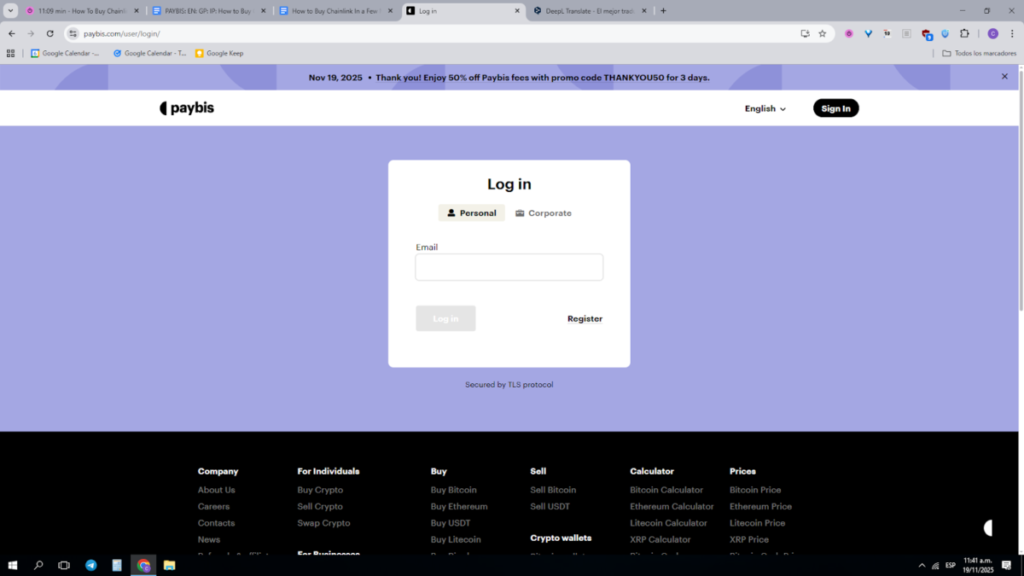
The first step is to log into your account or, if you don’t have one already, register on the platform. To create an account, you only need to provide and verify your email. Then, you’ll need to complete a quick KYC check to validate your identity. This is necessary because Paybis is a registered exchange, so it needs to comply with financial regulators to provide its service.
2. Choose Payment Method
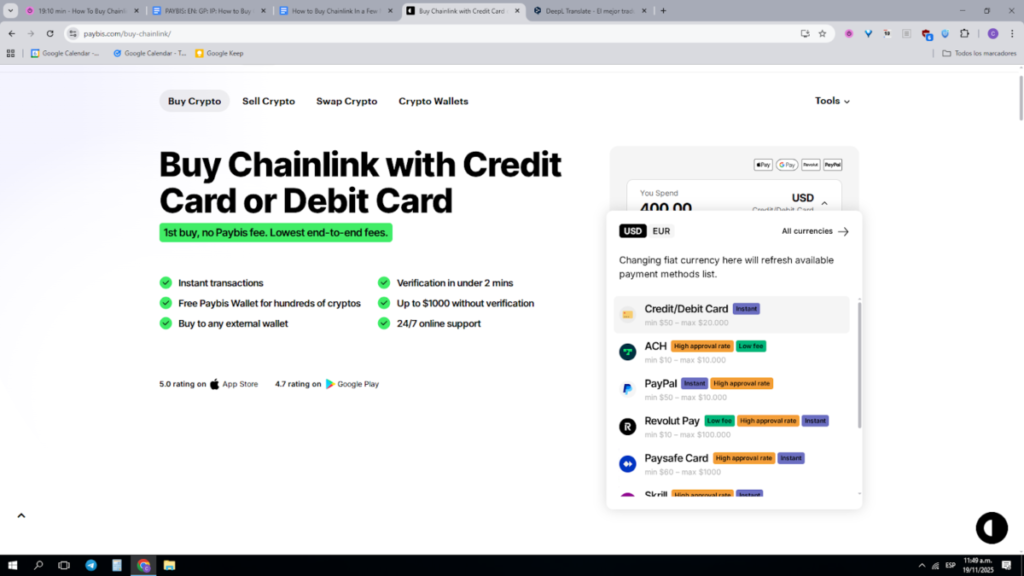
Paybis supports many payment methods, like credit and debit cards, digital wallets, and bank transfers. Each method will have particular transaction limits, fees, and processing times.
To see all available payment methods, you must select USD (or the fiat currency you’re using), and you’ll see a dropdown menu. For the US Dollar, for example, besides credit and debit cards, we have PayPal, Revolut, and Neteller, as well as ACH and SWIFT, among others.
3. Select Chainlink (LINK) and Enter Amount
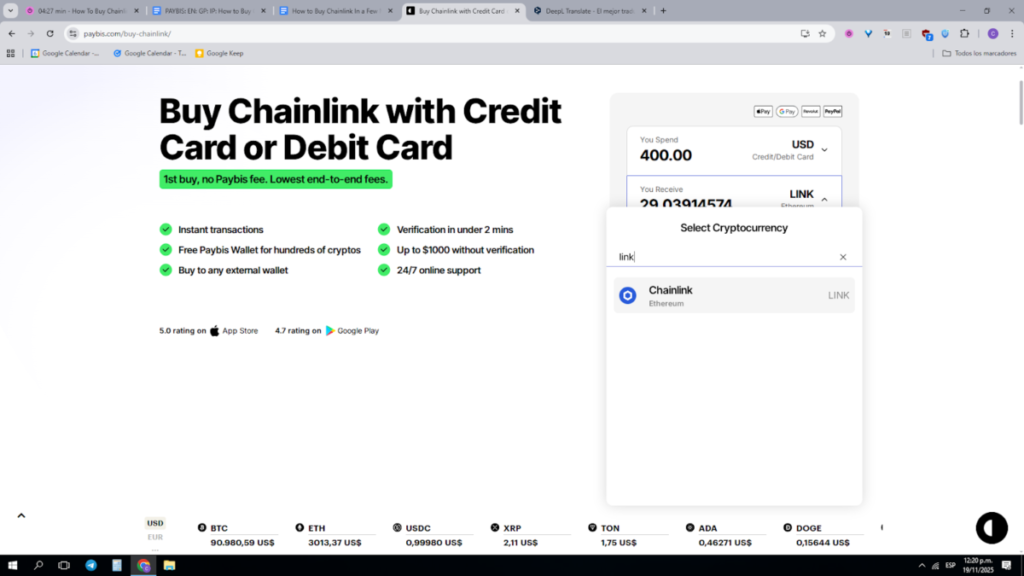
Once you select the currency and payment method, it’s time to choose LINK, the token of the Chainlink protocol. The cryptocurrency field is right below the fiat one. Here, you can either scroll down until you find LINK or type the name in the search bar.
After selecting LINK, it’s time to enter the amount. Paybis lets you enter the amount in fiat or crypto, and the interface will instantly show the equivalent in the other currency, including the fees. Below, you can see the exact rate for 1 LINK, as well as the corresponding fees charged. Then, you only need to click on “Buy Chainlink” and proceed to make the payment. The completion time will depend on the payment method you chose.
4. Receive LINK In Your Wallet
There are different ways to store LINK after you purchase it. The Paybis platform comes with a built-in wallet, where you can store any token bought in the exchange. However, you can also transfer it to an external wallet.
If you already have one, you will need to enter the wallet address on Paybis and make the transfer. Make sure to provide a compatible wallet and verify the address to avoid losing your funds. Since Chainlink runs on the Ethereum network, any popular Web3 wallet will work; however, if your LINK is bridged to other networks, make sure you choose a wallet that supports them.
Pros and Cons of Buying Chainlink
Let’s evaluate some pros and cons of buying Chainlink. It’s important to remember that crypto investments are risky, and traders should do their own research before investing in any asset.
| Pros | Cons |
| It’s a secure and decentralized ecosystem with active development. | The price is very volatile. |
| It’s well-positioned in the crypto market, with high market valuation and daily trading volume. | It has had a negative market performance in the last couple of months. |
| Chainlink has real utility in the crypto ecosystem. |
FAQs
Is Chainlink a good investment in 2025?
Chainlink is a solid project with an active community that can provide value in the current state of the market.
What wallets support LINK?
The Paybis wallet supports the LINK token, as well as any Web3 wallet compatible with Ethereum.
Is it safe to buy Chainlink with a credit card?
It’s safe to buy Chainlink with a credit card on a reliable platform, like Paybis.
Can Chainlink reach $100?
It’s hard to make accurate predictions in the crypto market. The highest recorded price of LINK is $53, and it is currently priced at $12-13.
Final Words
Chainlink is one of the most promising projects in the crypto ecosystem. Its utility token, LINK, is used to pay for the services provided by the oracle nodes, and helps fuel the whole protocol, so it’s a good investment option for traders who want to expand their portfolio. It can be purchased and stored safely on the Paybis platform, using different payment methods, from credit cards to SWIFT transfers.
