

InVideo has surpassed 8 million registered users as of early 2026, with the platform processing over 2 million video exports per month. That kind of scale is impressive. However, the subscription cost still stings, especially for solo creators and lean startup teams. That is why so many people hunt aggressively for InVideo discounts and group buy deals before committing to a plan.
This guide provides clear information. You will get real discount strategies, an honest look at how group buys work, and a clear recommendation on which path actually makes sense for most users.
What Is InVideo?
InVideo is a cloud-based, AI video creation platform. It helps users produce professional-quality videos without needing editing experience. There are thousands of templates, a text-to-video tool, and an AI script generator.
It is used for creating YouTube videos, social media reels, marketing campaigns, product demos, and brand storytelling. That said, the platform is not without its quirks. When I tested InVideo’s AI script generator, I noticed it consistently produces generic hooks that need heavy editing before they sound human.
You cannot simply paste the AI output and publish it. Factor that extra revision time into your workflow before choosing a plan.
Understanding InVideo’s Pricing Structure
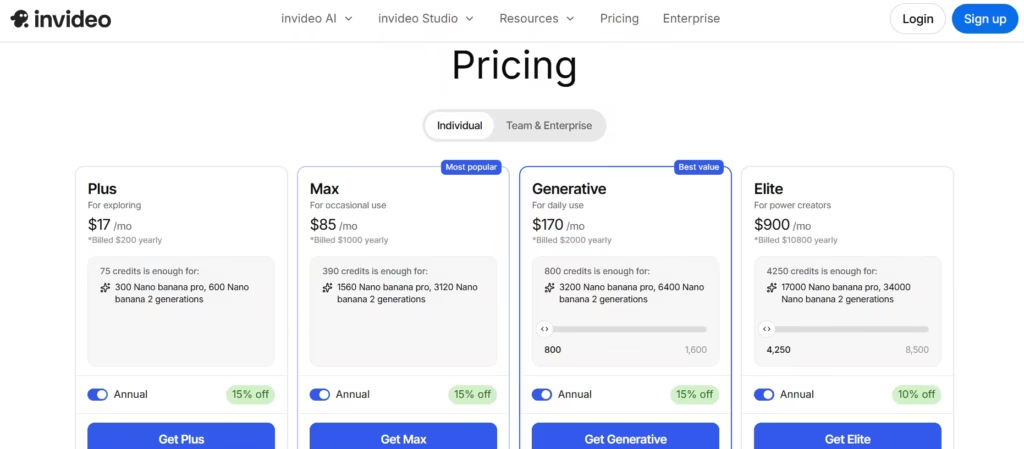
InVideo has four plans for individual packages. The major differences between all four pricing tiers are the amount of credits, storage capacity, and avatars that can be accessed. In detail;
- Plus plan ($17/month, billed annually), 75 credits.
- Max plan ($85/month, billed annually), 390 credits.
- Generative plan ($170/month, billed annually), 800 credits.
- Elite plan ($17/month, billed annually), 4250 credits.
Annual billing is significantly cheaper and cuts the cost compared to month-to-month payments. Committing to a yearly plan is, therefore, the single easiest discount anyone can apply, before even searching for a promo code.
How to Find Legitimate InVideo Discount Codes
1. Official InVideo Promotions
InVideo runs its own seasonal sales regularly. These include Black Friday deals, New Year promotions, and anniversary discounts. Active coupon banners appear there directly. Subscribing to their email newsletter also pays off; the company frequently sends exclusive codes to subscribers before announcing them publicly.
2. Coupon Aggregator Websites
Sites like Honey, RetailMeNot, and CouponFollow track InVideo codes in real time. From my experience, not all of them work, so always verify a code in your cart before assuming it is valid. The Honey browser extension claims to automate this process and apply the best available code automatically. However, this has been shown not to always function consistently, as users of a Reddit post expressed.
3. YouTube and Influencer Affiliate Codes
Many tech and video marketing creators partner with InVideo directly. They receive unique affiliate codes that typically offer 20% to 30% off a first payment. Search YouTube for InVideo tutorials or reviews and check the video descriptions. Moreover, these influencer codes tend to stay active longer than generic promo codes because the creator has a financial incentive to keep them working.
What Is an InVideo Group Buy?
A group buy is a cost-sharing arrangement between multiple users. One person purchases a subscription. Others split the cost. Everyone shares access to the same account.
The math looks attractive on paper. A $30-per-month Business plan shared across ten users drops to $3 each. Group buy platforms have formalized this model, offering access to InVideo and dozens of other SaaS tools through a single flat monthly fee, typically between $3 and $10.
How InVideo Group Buys Work
An organizer purchases an InVideo subscription and then opens access to paying participants. Some group buy services operate dedicated platforms that bundle multiple tool subscriptions together. Users pay once and get access to a shared library of premium tools, including InVideo.
Popular InVideo Group Buy Platforms
- SEO Tools Group Buy, Bundles InVideo with SEO and marketing tools. Suits marketers who need multiple tools at once, but account reliability varies.
- Group Buy SEO Tools, a well-known hub for shared SaaS subscriptions. Pricing is competitive, though customer support is minimal if access drops.
- ToolsZap, Covers video and design tools alongside InVideo. Generally considered more stable than newer alternatives, though no group buy platform offers guarantees.
None of these platforms is risk-free. I would treat all of them as short-term experiments rather than reliable long-term solutions.
The Risks of InVideo Group Buys
1. Account Security and Privacy Concerns
Shared accounts mean shared visibility. Other participants may see your projects, video drafts, and account activity. For anyone handling client work or proprietary content, that is an unacceptable exposure risk.
2. Terms of Service Violations
InVideo’s terms of service prohibit account sharing. Participating in a group buy violates that policy directly. InVideo can suspend or permanently ban accounts flagged for shared access. When that happens, every project stored on the account disappears with it.
3. Unreliable Access
Group buy services offer no uptime guarantees. If the organizer’s payment fails or InVideo bans the account, your access vanishes immediately. Furthermore, multiple users logging into the same account simultaneously creates constant login conflicts.
Better Alternatives to Group Buys
1. InVideo Free Plan
Start here. The free plan offers enough functionality to evaluate whether InVideo fits your workflow. Test the templates, run the AI tools, and export a few watermarked videos. Upgrade only once you have confirmed the platform delivers value for your specific use case.
2. Annual Plan Discounts
Switching to annual billing saves approximately 10% to 15% compared to monthly rates. This is the safest discount available, no code required, no account risk, no expiry date. It should be the first move for any serious user.
3. Student and Non-Profit Discounts
InVideo offers special pricing for students, educators, and registered non-profits. Most users skip this option simply because it requires contacting support directly. One email to their team is worth sending if you qualify.
4. Referral Programs
InVideo’s referral program rewards users for bringing in new subscribers. Each successful referral earns credits or subscription discounts. Over time, consistent referrals meaningfully reduce your monthly cost.
Which Option Is Right for You?
Here is my recommendation: skip the group buy entirely and go straight to the annual Business plan. In my view, the annual Plus plan is the sweet spot for the majority of creators. It is affordable enough for solo users, robust enough to handle client work, and it keeps your account and your content fully secure.
The group buy route saves a few dollars per month but introduces account-ban risk, privacy exposure, and unreliable access. That trade-off is simply not worth it for anyone doing serious work.
The only scenario where I would consider the free plan long-term is if your video output is minimal and watermarks are acceptable. For everyone else, freelancers, small teams, and growing agencies, annual billing on the Business or Unlimited plan is the move. Use an influencer code from YouTube to knock an additional 20% to 30% off your first payment, and you have locked in genuine savings without touching a group buy.
