

Loopa AI is an AI agent workspace that plans and executes multi-step tasks — research, writing, presentations, and more — using a mix of leading models including GPT, Claude, Gemini, DeepSeek, and OpenAI’s GPT Image 2. One of its more practical features is slide generation: instead of the bullet-point templates most “AI slide tools” default to, it turns raw documents or prompts into fully designed, image-based presentations.
Starting Price: Free plan available; paid tiers unlock higher usage limits and priority generation.
TL;DR
Loopa’s slide maker uses GPT Image 2 to generate each slide as a single designed visual — headline, layout, and imagery rendered together — instead of text boxes dropped onto a stock template. It’s built inside a broader AI agent workspace, so a deck can be generated directly from a PDF, a research task, or a chat prompt without switching tools, and the underlying image model’s text-in-image accuracy is noticeably better than older generators, which is really the whole reason this approach works for slides in the first place. It’s best suited for people who want a fast, visually polished first draft rather than teams that need pixel-perfect brand template compliance straight out of the gate, and it’s free to start with no credit card required.
Who It’s Built For
In practice, this tool ends up in the hands of a fairly specific mix of people:
- Founders and consultants who build pitch decks and client presentations regularly
- Marketers repurposing reports and research into visual, presentable formats
- Students turning notes or research into a class presentation under time pressure
- Small teams without a dedicated designer on staff
The common thread isn’t a job title so much as a recurring need — anyone who wants a finished-looking deck without opening PowerPoint from a blank page every time.
Pricing
Loopa runs on a freemium model. The free tier gives new users enough credits to test document uploads, research tasks, and slide generation, including the GPT Image 2 workflow. Paid plans sit above that for people who need higher generation volume, faster processing, or access to Loopa’s broader agent features (research automation, video generation, email workflows) beyond just slides. Exact tier pricing isn’t published as a flat rate on the site — it’s worth checking the pricing page directly, since Loopa adjusts credit allowances by plan rather than locking specific features behind hard paywalls.
Overview
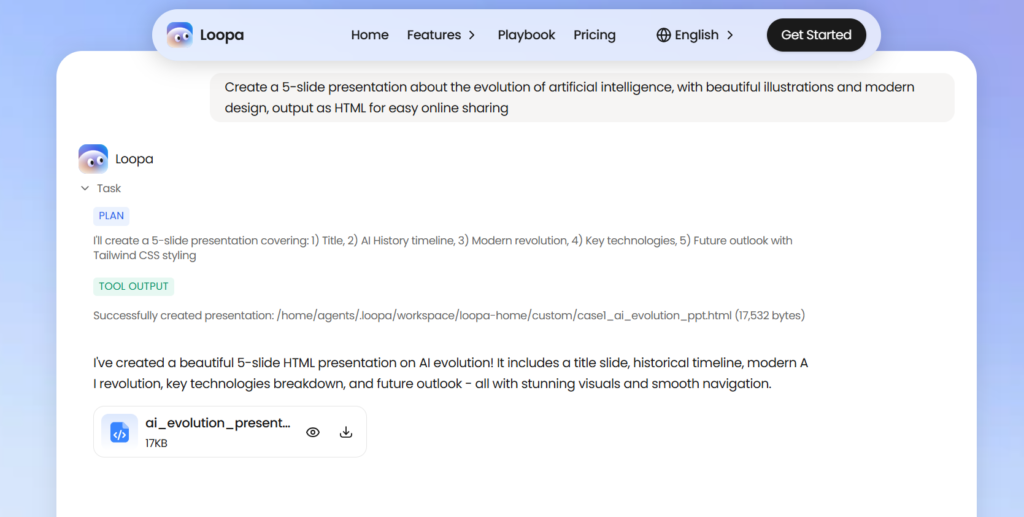
Most “AI presentation generators” fall into one of two buckets: tools that write you an outline and let a template handle the visuals, or tools that generate individual images but leave the deck-assembly work to you. Loopa’s GPT Image 2 Slides Maker is trying to close that gap by using an image model that’s actually good at laying out text, headlines, and supporting visuals together — inside one generated image per slide, rather than a text layer bolted on top of a background.
The practical effect: you feed it a source (a PDF, a set of notes, or just a written prompt describing your topic), and it returns a set of slides that already look considered — consistent color palette, readable typography, and imagery that’s contextually relevant instead of generic stock photography. Because it lives inside Loopa’s larger agent workspace, the same session can also pull research, summarize a document, or draft supporting copy before it ever gets to the slide stage, which matters if your starting point is “a vague idea” rather than “a finished report.”
Key Features
The core differentiator is the image model doing the heavy lifting. When you create slides with GPT Image 2, the model handles text rendering, layout, and composition well enough that headlines and labels come out legible and properly aligned in a single generated image per slide — a persistent weak point in earlier AI image generators that made them impractical for anything as text-heavy as a presentation. Everything else Loopa does around that engine is really in service of making it easier to feed the model good input and get a usable deck out the other side, summarized below.
| Feature | What it actually does |
| Document-to-deck generation | Upload a PDF, paste a report, or describe your topic directly, and the agent extracts the key structure before generating slides — no need to rewrite a prompt from scratch to get usable output. |
| Multi-model workspace access | Because Loopa runs GPT, Claude, Gemini, and DeepSeek alongside GPT Image 2 in the same environment, research and drafting can happen before the slide stage without exporting content between separate apps. |
| Style and topic flexibility | Outputs adjust based on the tone of your input — a technical report and a startup pitch produce noticeably different visual styles automatically, without picking a theme from a dropdown first. |
| Slide-level regeneration | Individual slides can be reviewed and regenerated on their own rather than forcing a full re-run of the entire deck for one slide that didn’t land, which saves both time and credits. |
What It’s Not Great At
To be fair to anyone comparing options, it’s worth being upfront about the limitations too. If your company has an exact color, font, and logo-placement spec, expect to do some manual cleanup after export rather than getting perfect brand compliance on the first pass. Like most image-based slide generators, it’s also stronger with narrative and visual content than with dense financial models or spreadsheets crammed onto a single slide — that kind of data-heavy work still benefits from a human doing the final formatting. And the marketing site doesn’t lay out specific tier limits as clearly as some competitors do, so it’s worth testing the free plan yourself to get a feel for how far your credits actually stretch before committing to a paid tier.
How It Compares to Just Using PowerPoint
PowerPoint is still the default most people reach for, and for good reason — it’s familiar, it’s precise, and nobody questions whether a client can open the file. But that familiarity comes with a cost: every slide starts from a blank layout, and getting from raw notes to something presentable is entirely manual work. Loopa’s slide maker flips that starting point. Instead of a blank canvas, you start from a generated first draft that already has a coherent visual identity — matched colors, a considered layout, and imagery pulled from the actual content rather than a generic clip-art library. The tradeoff is control: PowerPoint gives you pixel-level authority over every element, while Loopa gives you speed and a stronger starting aesthetic, with manual fine-tuning still available afterward for the details that matter most. In practice, a lot of people end up using both — Loopa for the first draft, PowerPoint (or Google Slides) for the final polish once the deck is exported.
Bottom Line
Loopa’s GPT Image 2 Slides Maker isn’t trying to be a full design suite replacement for teams with strict brand systems — it’s aimed at the much more common problem of getting from “raw content” to “presentable deck” fast, without the layout grind. For freelancers, students, and small teams who need a strong first draft rather than pixel-perfect brand compliance, it’s a genuinely useful shortcut, especially since it sits inside a workspace that can also handle the research and writing steps that usually come before slide-building in the first place.
FAQ
1) Do I need design experience to use the GPT Image 2 Slides Maker? No. The tool is built to take raw content (a document, notes, or a prompt) and handle layout and visual design automatically. Manual design skills help for fine-tuning, but aren’t required to get a usable deck.
2) Can I edit the slides after they’re generated? Yes. Individual slides can be regenerated or adjusted rather than being locked once created, and decks can typically be exported to formats compatible with PowerPoint or Google Slides for further manual editing.
3) Is Loopa only useful for presentations? No — slides are one feature inside a broader AI agent workspace that also handles research, document analysis, video generation, and workflow automation. If you only need slides, you can use that feature in isolation, but the platform is built for more.
4) How does GPT Image 2 make a real difference for slides specifically? The biggest historical weakness of AI image generators for slide-making was unreliable text rendering — misspelled words, misaligned layouts, illegible headlines. GPT Image 2’s improved text and layout accuracy is what makes generating a full, readable slide as a single image actually practical instead of a novelty.
