

Visual communication plays a central role in pitching ideas. Strong visuals help audiences understand ideas faster and remember them longer. 3D assets can be used to present realistic representations that bring concepts to life. Tripo 3D enables users to convert sketches, photos, and text into digital assets. AI-generated visuals can reduce preparation time and support more refined presentations. In increasingly competitive creative industries, visual storytelling helps communicate ideas to stakeholders and can support faster project approval.
The Evolution of Visual Pitching in Creative Industries
Visual pitching in creative industries has evolved over time. Many earlier presentations were static, relying heavily on slides and illustrations with dense information. Today’s audiences expect more engaging and immersive experiences. Many businesses now use 3D visuals to support clearer understanding of concepts. Visual assets help explain complex ideas more clearly. They can also connect with viewers on an emotional level. Tripo 3D supports this shift by generating digital assets efficiently. Improved visualization can support idea validation and more constructive discussions. Expectations continue to rise, making dynamic presentations important for communication and decision-making.
Why AI-Generated 3D Assets Strengthen Presentations
Producing high-quality visuals can be time-consuming and expensive. AI-generated assets can make this process more efficient and structured. An AI 3d model generator allows creators to produce visual elements more quickly. Faster production allows teams to focus more on presentation narratives. Detailed models can clarify concepts, reduce misunderstandings, and support multiple design directions through flexible workflows. Stakeholders can better understand products, environments, and experiences. Including more visuals in a presentation can encourage more engaging discussions. Tripo 3D helps translate abstract concepts into visual form, supporting clearer storytelling.
Types of Presentation Assets Created with Tripo 3D
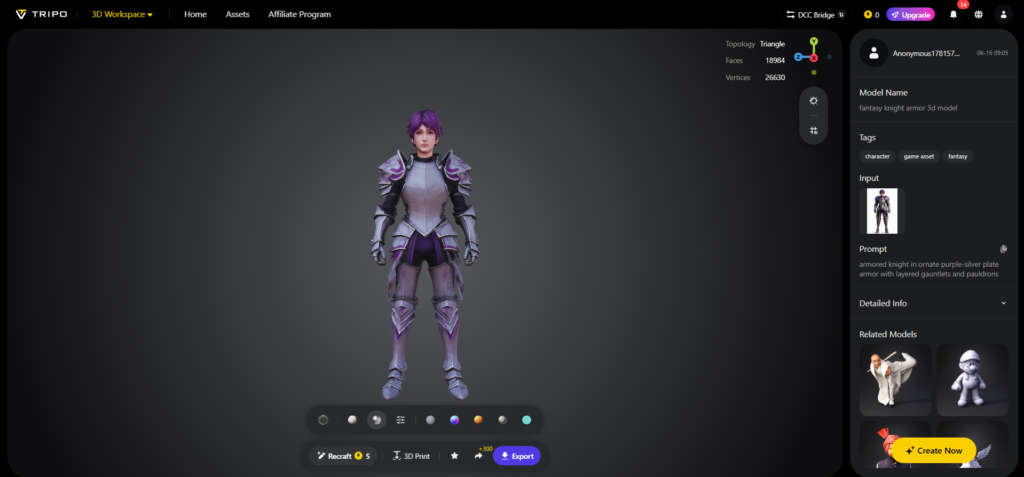
Different projects require different types of visual assets. Tripo 3D can be used to create product concepts, scenes, characters, architectural models, and marketing visuals. These assets help product designers create realistic prototypes for presentation. Marketing teams can use them for campaign visuals and investor presentations. Character concepts can support the communication of creative direction in entertainment projects. Interactive assets can help increase audience engagement. The platform also offers image to 3d workflows for faster conversion of images into presentation assets. This flexibility makes Tripo 3D applicable across various creative fields.
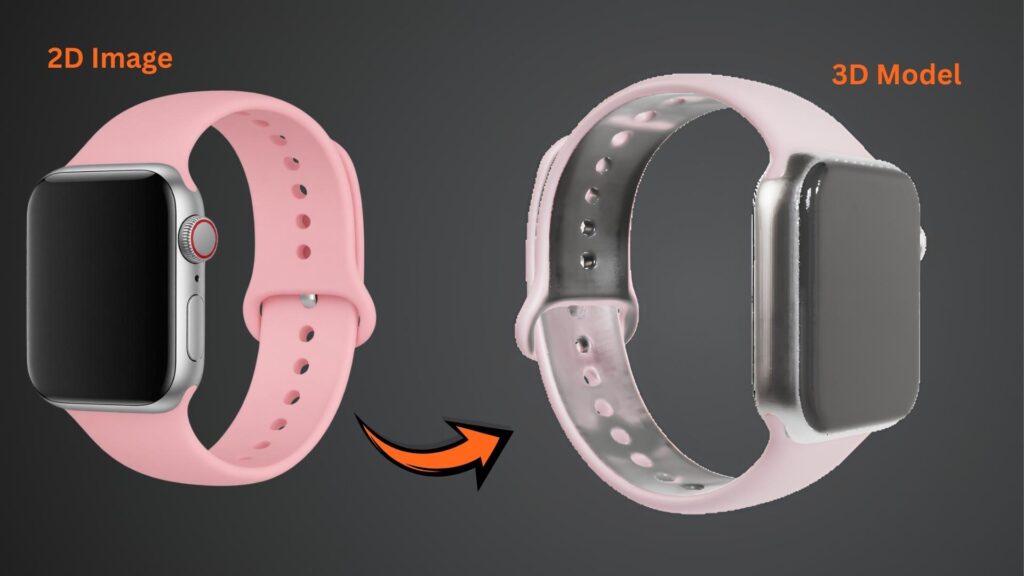
Steps to Accelerate creative pitching using AI 3D model generator presentation assets
Step 1: Gather Inputs for Presentation Concepts
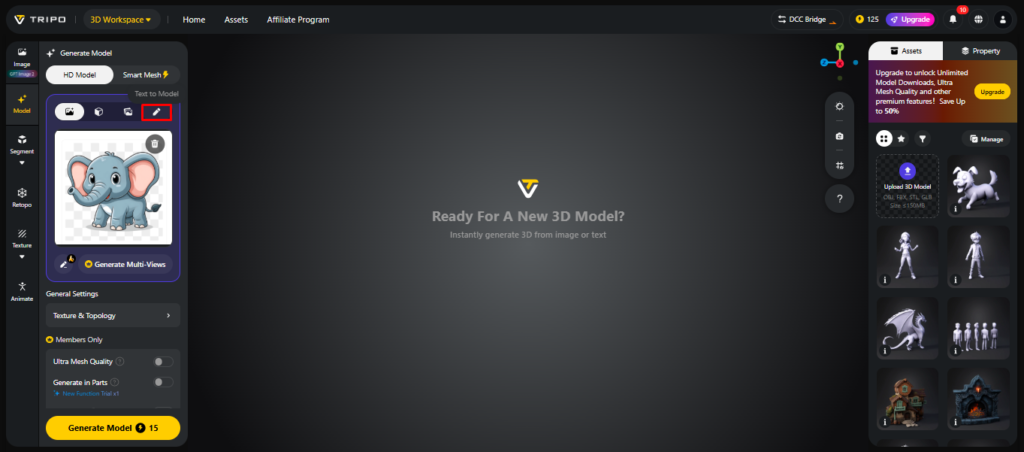
- First, you need to access Tripo 3D and signup. Next, go to the “Model” tab present in the vertical left menu bar.
- Under the menu, click on the “HD Model”. You can generate the model either using the text prompt or through image upload.
- You can drag and drop to upload the image, or you can also upload the image from a specific location of your device using the “Upload” tab.
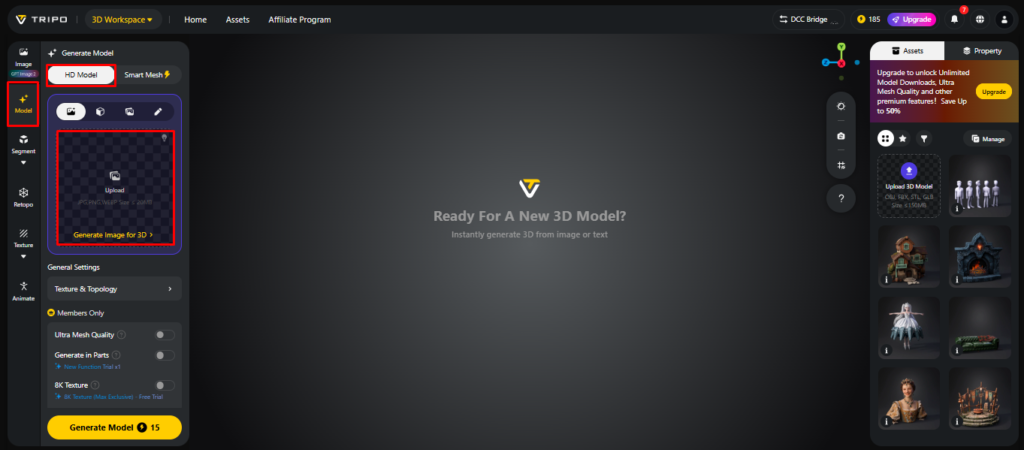
- If you don’t have an image, click on the “Text to model” tab to generate the model using a descriptive text prompt.
Step 2: Adjust Quality for Pitch-Ready Assets
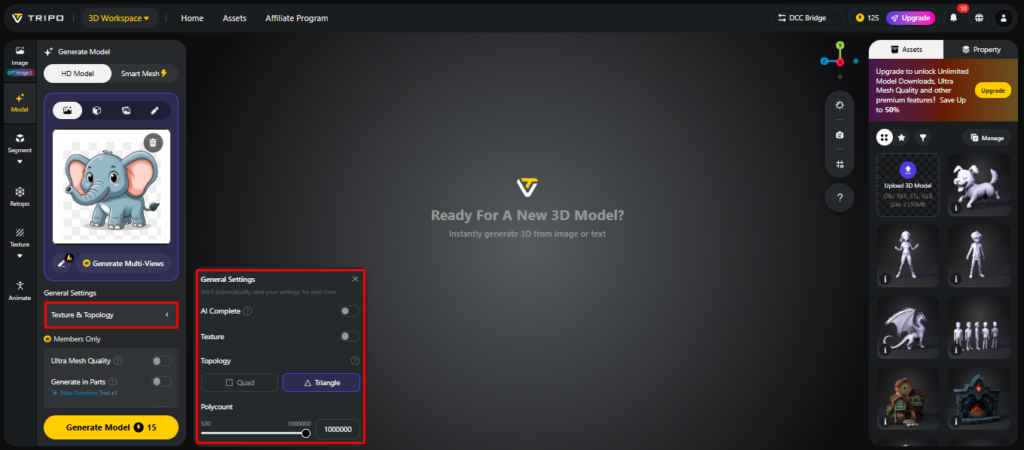
- Under the “General settings” tab, you can either allow the AI to completely generate on its own by switching “AI complete”. Or you can turn on texture and select the custom “Texture Quality” like 2K, 4K, or 8K.
- You can also turn on “PBR” for accurate material reflective properties.
- For better topology characteristics, select either “Quad” or “Triangle” topology.
- You can also set the custom polycount.
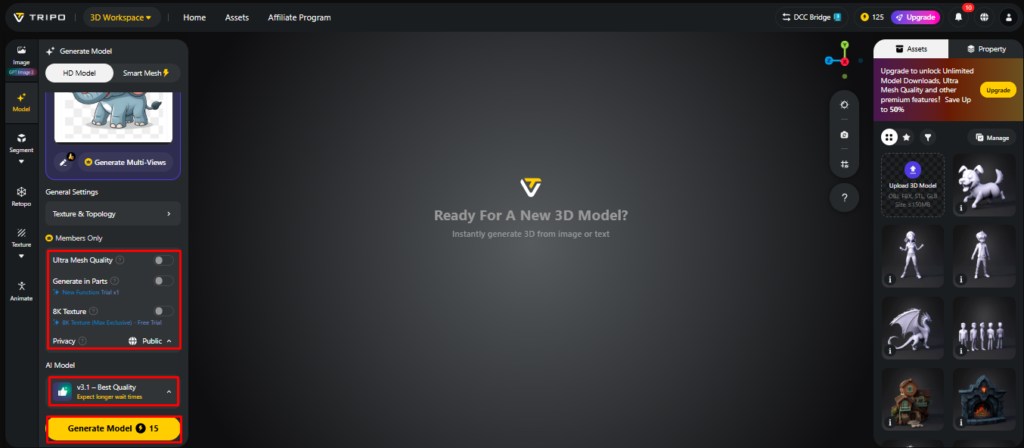
- Later choose the model from the list, including v3.1 best quality, v3.0 fast and balanced, or v2.5 legacy.
- If you are a member, then you can choose “Generate in Parts”, “8K Texture”, and “Privacy” options.
- Finally, click on the “Generate Model” to begin generation.
Step 3: Refine and Export Presentation Models
- Tripo 3D allows complete viewing of the model in styles such as “Solid View”, “Cartoon Style”, “Sketch Style”, “Hologram Style”, and “Unlit” form. You can also “Refine” the design right through the bottom menu.
- You can also edit the “Environment Settings” and camera settings through “Reset Camera”.
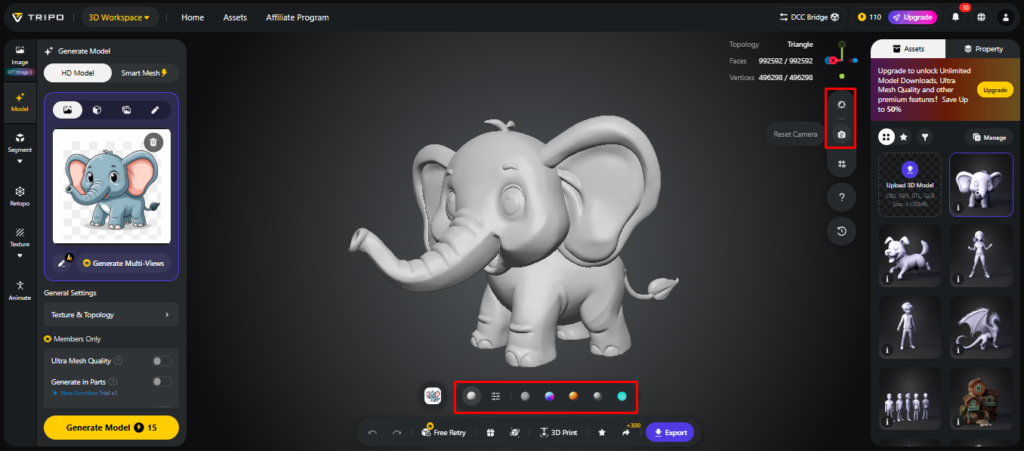
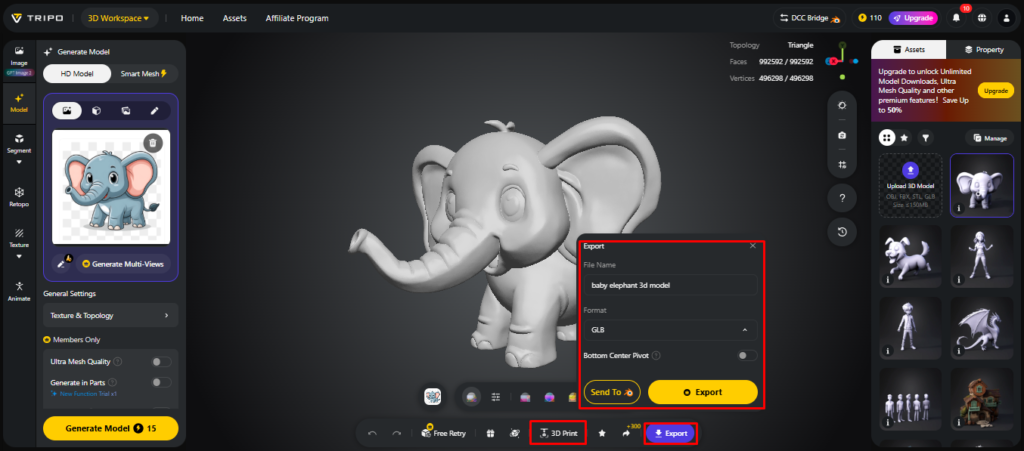
- If needed, you can 3D print the design or share it directly by clicking “3D Print”.
- In the end, click on the “Export” tab from the bottom menu. Next, choose the resolution, format, and file name, and click again on “Export” to save the design to your local device.
Building Strong Narrative Visuals for Pitch Decks
Visual Storytelling is the ability to transform information into stories. The following assets will help to enhance communication during a pitch presentation:
- Concept Models – Visualize ideas prior to production and improve understanding of the project.
- Environment Scenes – Add place ideas to realistic environments, and increase the immersion of presentations.
- Product Demonstrations – Show how things work and improve the audience’s comprehension.
- Brand Visualization – Communicate identity in custom 3D environments, and reinforce messaging.
- Highlight Design Elements – highlight key features of the design and enable focused communication.
- Future Concepts – Imaginative thinking about the future and mobilizing stakeholders.
Using AI Texturing to Enhance Presentation Impact
Textures play an important role in how presentation assets are perceived due to the realism they provide. Detailed materials improve visual clarity and support more polished outputs. With AI-based workflows, Tripo 3D enables faster and more consistent texturing of surfaces. PBR materials improve how lighting interacts with models and support realistic rendering behavior. Better texture quality can bring models closer to intended visual outcomes. Presentations become more detailed and easier to interpret. Stakeholders can evaluate concepts more clearly when surface details are accurately represented. This approach reduces manual effort and allows teams to focus more on presentation planning, storytelling, and design refinement.
Optimizing Assets for Multi-Format Presentations
Presentations today extend beyond traditional slide decks. Content is often delivered through interactive demos and immersive digital experiences. Tripo 3D supports export in multiple formats, enabling flexible workflows. Assets can be optimized for high-resolution rendering, web display, and interactive environments. AR and VR compatibility further expands presentation possibilities. A single well-prepared asset can serve multiple communication needs. Export options also support collaboration across teams and stakeholders. This helps ensure consistent visual output across different platforms.
Improving Creative Iteration During Pitch Development
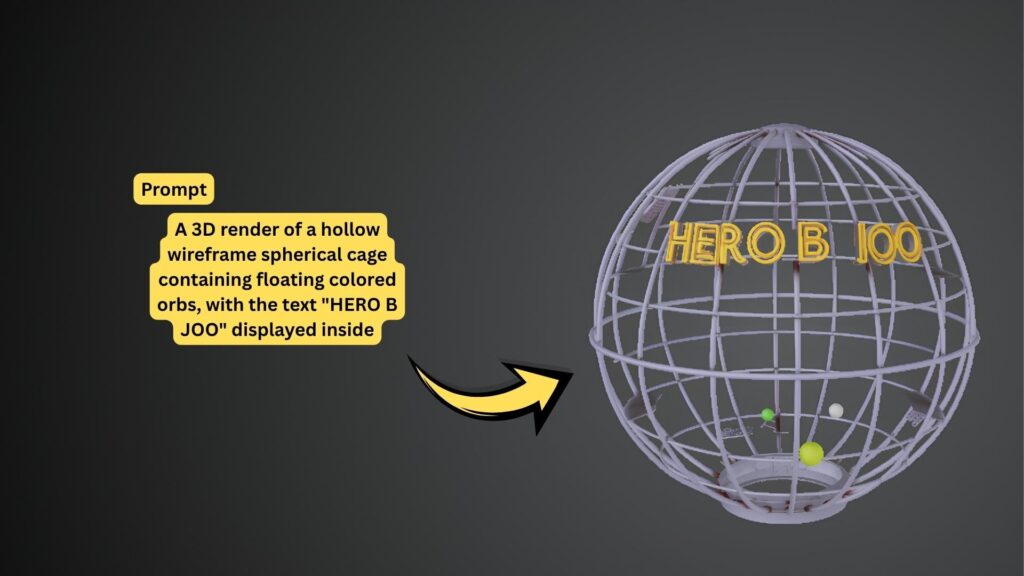
Pitch development often involves repeated revisions based on feedback. Visual updates are frequently required before stakeholders finalize decisions. Tripo 3D reduces iteration time by simplifying asset modification. Ideas can be tested without rebuilding models from scratch. Faster refinement cycles allow teams to respond more effectively to feedback. Reduced production bottlenecks support smoother project development. Rapid visualization also helps identify design opportunities earlier. The platform supports workflows based on sketches, images, and text to 3d model generation, expanding creative possibilities. Iterative development leads to clearer presentations aligned with project goals.
Conclusion
Across industries, AI is changing how creative presentations are produced and delivered. Tripo 3D helps users translate ideas into 3D models more efficiently. Faster asset generation, realistic texturing, and flexible export options can improve presentation quality while reducing effort. Strong visual communication helps audiences understand ideas more clearly and make informed decisions. As AI technology advances, presentation workflows are expected to become more efficient. More advanced visualization tools can help companies communicate ideas more effectively in future presentations.
