


Your front desk probably isn’t failing because your team is weak. It’s failing because the workload is stacked against them.
A typical day looks like this: the phone rings while someone is checking in a visitor, a new lead fills out a form, a customer replies to yesterday’s email, and a staff member needs help finding the right calendar slot. The person at the desk keeps switching contexts, trying to sound calm while juggling work that should’ve been split across three systems and two people. That’s where revenue leaks out. Calls go to voicemail. Follow-ups get delayed. Appointment mistakes pile up. Good staff burn out doing work that provides little value.
That pressure is exactly why the category has grown so fast. The AI receptionist market is projected to reach $14.6 billion by 2030 at a 24.3% CAGR, and the broader virtual receptionist market was valued at $3.85 billion in 2024. That growth matters because it signals something practical. AI front desk systems aren’t experimental anymore. They’re being adopted as operating infrastructure for businesses that need coverage without adding headcount.
Table of Contents
- Your Front Desk is Overwhelmed and It’s Costing You
- What an AI Front Desk Actually Is
- Core Capabilities That Drive Business Value
- Measuring the ROI of Your AI Front Desk
- AI Front Desk Use Cases Across Industries
- Your Implementation Roadmap and Vendor Checklist
- Answering Key Questions on Security and Accuracy
Your Front Desk is Overwhelmed and It’s Costing You
The breaking point usually isn’t dramatic. It shows up in small misses.
A caller asks about availability and gets sent to voicemail because the receptionist is helping someone in the lobby. A returning customer calls with a billing question and gets transferred twice because no one captured the reason for the call clearly. A hot lead comes in after hours and doesn’t hear back until the next morning, after they’ve already contacted a competitor. None of this looks catastrophic in isolation. Across a month, it adds up to lost bookings, slower sales cycles, and frustrated staff.
I’ve seen the same pattern in clinics, service businesses, brokerages, and support teams. Front desk work looks simple from the outside, but it’s really live traffic control. Staff are expected to greet people, answer phones, route requests, book appointments, update systems, and remember policy details while staying polite under pressure. Human teams can do that well. They just can’t do it at unlimited volume.
What overloaded teams usually miss
- Lead response slips first: The first casualty is usually speed. When calls aren’t answered immediately, follow-up becomes a task list instead of a live conversation.
- Scheduling gets messy: Double handling happens when one person takes a message and another person has to decode it later.
- Quality drops unevenly: Your strongest staff cover the gaps, which hides the problem until burnout shows up.
“If your front desk is constantly “catching up,” you don’t have a staffing problem alone. You have a workflow design problem.”
An AI front desk helps when it absorbs the repetitive inbound pressure. It answers routine questions, captures intent the first time, routes cleanly, and books or escalates without making the caller start over. That doesn’t replace your team. It protects their time for the conversations that require judgment.
What an AI Front Desk Actually Is
Most buyers get this wrong at first. They think an AI front desk is just a smarter answering service.
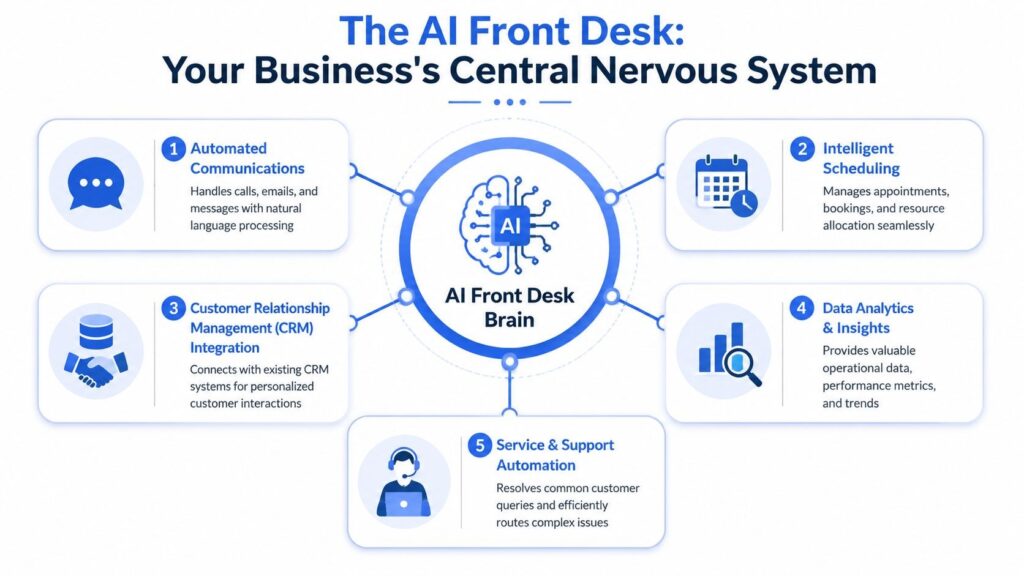
It isn’t. A useful AI front desk is an operational layer that sits between incoming demand and the people or systems that need to act on it. It listens, identifies intent, checks context, decides what should happen next, and then executes that next step.
It acts like an operations layer, not a voicemail box
A strong AI front desk can do more than answer a phone line. It can support voice, messaging, forms, internal routing, and scheduling logic from one place. That matters because your customers don’t care which channel they used. They care whether they got a clear answer and whether the task was completed.
The architecture is what separates a real front desk system from a generic chatbot. Effective AI front desks combine natural language processing, computer vision, and a context-aware knowledge graph, which lets them handle location-specific tasks like lobby check-in, internal routing, and policy-aware responses.
The difference is context and action
Here’s the simplest way to evaluate it. Ask what the system can understand, and ask what it can do after it understands.
A weak setup can only collect messages. A stronger one can:
- Recognize intent: It knows whether the caller wants to book, reschedule, ask a policy question, or reach a department.
- Use live business context: It checks calendars, office hours, provider rules, or site-specific instructions.
- Trigger workflows: It creates a CRM record, logs the interaction, sends a confirmation, or routes to the right person.
- Handle physical front desk tasks: In some environments, it can support visitor check-in or location-aware guidance.
“Practical rule: If the tool can’t take action inside your existing systems, it’s not a front desk. It’s a message taker with better phrasing.”
That’s why I treat AI front desk deployments as operations projects, not just phone projects. The business value comes from connecting conversation to workflow.
Core Capabilities That Drive Business Value
The feature list vendors show in demos is usually too long and not very useful. What matters is which capabilities remove actual friction from your operation.
The first capability I look for is reliable coverage. If the system can’t answer consistently after hours, during lunch, or during peak call windows, nothing else matters.
Start with coverage, then add workflow depth
A practical AI front desk should handle these jobs well:
- Always-on answering: It picks up when your staff can’t. This is the fastest way to stop after-hours lead leakage and reduce voicemail dependence.
- Appointment booking: The system should book directly when the calendar rules are simple enough and escalate when they aren’t.
- Lead qualification: It should ask a few useful follow-up questions and route based on fit, urgency, or location.
- Conversational routing: This is much better than forcing callers through rigid button trees.
- Multilingual support: If your customer base spans languages, language coverage isn’t a bonus feature. It’s part of accessibility and conversion.
- CRM sync: If call details stay trapped in transcripts instead of flowing into your CRM, your team will end up doing cleanup work.
One option in this category is byVoice’s AI calling platform, which supports voice automation across inbound and outbound workflows, along with telephony and CRM-connected use cases. The important point isn’t the vendor name. It’s that the platform has to bridge conversation and action.
The handoff rules matter more than the voice
Buyers often get distracted by whether the AI sounds human enough. That matters, but less than you think.
What matters more is whether the system knows when to stop. Good handoff rules protect customer experience. If the caller is upset, the request is unusual, or the schedule logic gets complicated, the system should transfer with context instead of trapping the person in a loop.
Here’s the short test I use during evaluation:
- Can it solve the common request end to end?
- Can it recognize when confidence is low?
- Can it pass the conversation to a human with notes attached?
A good demo should show all three.
The systems that create value usually share one trait. They reduce work for staff instead of moving work downstream.
Measuring the ROI of Your AI Front Desk
If you can’t measure the before and after, you’ll end up arguing about opinions instead of outcomes.
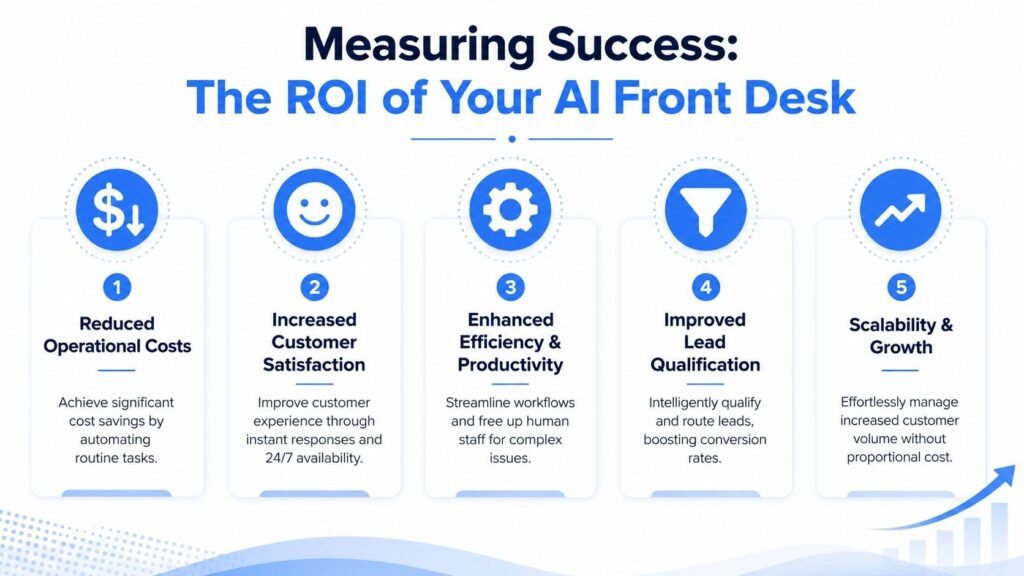
Start with a baseline. Pull a sample of your inbound activity and document what happens today. How many calls are answered live, how many become callbacks, how many turn into appointments, and how much manual admin follows each interaction. You don’t need a perfect model. You need a clean starting point.
Track operational KPIs first
Teams should generally begin with a short KPI set:
- Answer coverage: Are calls being handled consistently across peak hours and after hours?
- Appointment booking rate: Of the callers who want to book, how many complete the process?
- Escalation rate: How often does the AI need to hand off?
- Completion quality: How many booked or logged interactions require staff correction later?
- Cost per handled interaction: Compare the operating cost of the workflow before and after rollout.
Those numbers tell you whether the system is reducing load or creating cleanup.
Build the revenue case carefully
Revenue impact usually comes from faster qualification and better follow-up, not from “AI” in the abstract.
AI front desks can perform real-time intent, sentiment, and urgency analysis and trigger downstream actions like CRM logging, lead capture, booking, or escalation. In that kind of inbound workflow, one industry example reported 25 to 40 percent conversion-rate gains after immediate AI qualification and real-time CRM sync.
A simple ROI model works well:
| Metric | How to use it |
| Current missed or delayed opportunities | Estimate where response lag is hurting bookings or sales |
| Staff time spent on repetitive interactions | Identify what volume can be automated cleanly |
| Conversion lift after faster qualification | Measure only on workflows where AI is handling immediate capture and sync |
| Cleanup effort | Subtract the admin burden if staff still need to repair records or bookings |
Don’t count savings that only exist in a vendor demo. Count the work your team actually stopped doing.
That last line is where many ROI models fall apart.
AI Front Desk Use Cases Across Industries
The same core system behaves very differently depending on the messiness of the workflow. That’s why generic demos can be misleading. A clean single-location office and a multi-provider operation do not need the same front desk logic.
Real estate
A brokerage lives on speed. New inquiries come in at odd hours, listing interest spikes unexpectedly, and callers want fast answers on availability, tours, and next steps.
An AI front desk works well here because it can answer immediately, capture lead details, screen for intent, and route based on geography or property type. For teams comparing workflows in this category, AI real estate agent use cases show how voice automation can support lead handling and scheduling.
The practical win is simple. Agents stop wasting time chasing incomplete inquiries and spend more time with prospects who are ready to move.
Healthcare and multi-provider scheduling
Here, the actual trade-offs show up.
A clinic or multi-provider practice doesn’t just need someone to answer the phone. It needs the system to understand provider availability, appointment types, follow-up rules, and escalation thresholds. Refill requests, billing questions, scheduling changes, and urgent messages can all arrive through the same channel.
In this environment, an AI front desk can reduce front-desk congestion by handling routine requests and routing complex ones with context. But this is also where poor implementations fail. If the booking logic is shallow, staff end up fixing schedules after the fact.
“The harder the workflow, the more important live data sync becomes.”
E-commerce and customer service
E-commerce teams often underrate voice and messaging at the front desk layer. Customers still want answers on order status, returns, exchange rules, delivery windows, and account help. If agents spend the day repeating policy answers, the support queue fills with work that should’ve been automated.
A strong AI front desk handles repetitive service questions well when the policies are clearly documented and updated. It can also collect order context before handing off, which shortens the path to resolution for complex cases.
That’s the common thread across industries. The system creates value when it handles repetitive traffic cleanly and knows when to get out of the way.
Your Implementation Roadmap and Vendor Checklist
Most AI front desk rollouts succeed or fail before launch. The problem usually isn’t the model. It’s bad scoping.
Teams buy software expecting instant automation, then discover their calendars are inconsistent, their call flows aren’t documented, and half their FAQs live in people’s heads. That’s why implementation has to start with operational decisions, not vendor enthusiasm.
A rollout plan that works in real operations
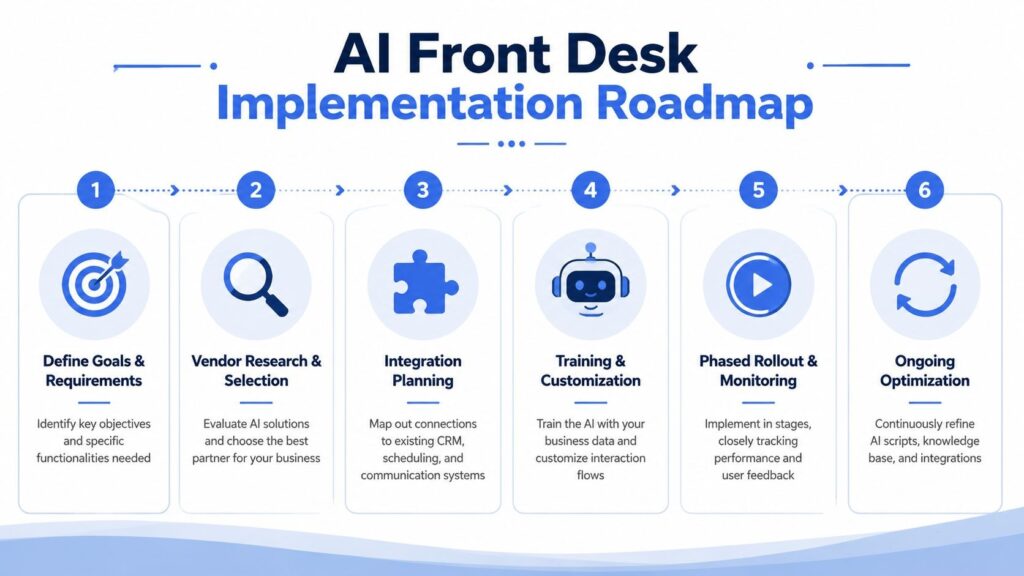
I’d use this sequence:
- Pick one high-volume workflow first. Start with appointment requests, basic intake, or after-hours coverage. Don’t begin with your hardest edge case.
- Map the decision logic. Write down what the front desk does. Routing rules, booking rules, office hours, escalation triggers, and exceptions.
- Connect the systems that matter. Telephony, CRM, calendars, and any key line-of-business tools should be defined before the build starts.
- Train with real language. Use customer questions and internal policy phrasing, not polished marketing copy.
- Launch in a controlled slice. One location, one queue, or one call type is enough to test safely.
- Review the failures first. The missed intents, bad transfers, and edge cases will teach you more than the successful calls.
The hidden costs matter as much as the subscription price. Nextiva’s discussion of AI receptionist use cases makes an important point: buyers often focus on call deflection and overlook knowledge-base maintenance, telephony setup, exception handling, and ongoing admin burden, even though those factors heavily affect total cost of ownership.
For platform research, teams often compare tools from broad CCaaS vendors, niche scheduling-first products, and voice automation platforms such as byVoice, depending on whether the priority is coverage, booking depth, or multi-channel orchestration.
Vendor selection checklist
Use this in sales calls. If a vendor gives vague answers, expect vague results.
| Evaluation Criteria | What to Ask |
| Scheduling depth | Can it book directly into live calendars, and what happens when rules get complex? |
| Handover design | How does it transfer to a human, and what context arrives with the transfer? |
| Knowledge maintenance | Who updates the knowledge base and scripts when policies change? |
| Telephony setup | What parts of call routing, numbers, and setup are included versus handled separately? |
| CRM integration | Does it log outcomes automatically, or will staff need to clean records manually? |
| Exception handling | Show me what happens when the caller asks something unclear or unusual. |
| Multi-location support | How are site-specific rules, hours, teams, and routing managed? |
| Reporting | Which reports show completion quality, escalation patterns, and unresolved intents? |
What works is boring in the best way. Clear workflows, narrow rollout scope, and aggressive review of failure cases.
Answering Key Questions on Security and Accuracy
Security and accuracy are where serious buyers stop nodding and start asking hard questions. They should.
How to think about security
Treat an AI front desk like any system that touches customer communications. Ask where data is stored, how access is controlled, what audit trail exists, and how retention works. If you operate in a regulated environment, make compliance review part of procurement, not a post-purchase task.
You should also ask a practical question that teams miss: who inside your company can change routing logic, knowledge content, and escalation rules? Operational access is part of security.
What accuracy really means in production
No AI front desk gets every interaction perfect. The better question is how it fails.
A reliable system should confirm important details, ask clarifying questions when intent is uncertain, and transfer gracefully when confidence is low. That’s especially important with accents, noisy environments, overlapping requests, or emotionally charged calls. The goal isn’t robotic certainty. It’s controlled recovery.
A good live test includes these scenarios:
- Background noise: Can it still identify the core intent?
- Ambiguous requests: Does it clarify instead of guessing?
- Policy edge cases: Does it know when to route out?
- Frustrated callers: Can it stop the loop and hand off fast?
“Accuracy without graceful escalation is fragile. You need both.”
If a vendor won’t show you failure handling, you’re only seeing the demo path.
If you’re evaluating options and want a platform built for voice and messaging automation across inbound and outbound workflows, byVoice is one option to review.
It supports AI receptionist use cases such as answering, triage, booking, and human handoff, which makes it relevant for teams trying to reduce front desk load without turning the customer experience into a script.
