


So you want to create your own AI model. That means building a system that learns patterns from data and uses those patterns to make predictions, generate content, or automate decisions.
In 2026, you do not need a PhD, a massive budget, or a supercomputer to do this.
But you do need to understand something that most tutorials skip over: there are two very different paths to “building your own AI model,” and picking the wrong one wastes months and thousands of dollars.
Three things have shifted in the AI landscape recently that make building your own model more accessible than ever. First, fine-tuning open-source models with LoRA (Low-Rank Adaptation) became accessible to small teams and solo developers.
Second, tools like Unsloth, Ollama, and LM Studio made it possible to run 7B to 13B parameter models on a single consumer GPU.
Third, open-source models like Llama 4, Qwen 2.5, and DeepSeek-V3.2 now rival proprietary models like GPT-5 and Gemini 3 Pro on domain-specific tasks when fine-tuned properly.
After building custom models across healthcare, e-commerce, and content generation over the past four years, here is the honest version of what it takes.
Which Path Should You Take: Fine-Tuning or From Scratch?
This is the most important decision, and skipping it is the most expensive mistake beginners make. This guide covers both paths. They share the same first three steps, then split into completely different workflows.
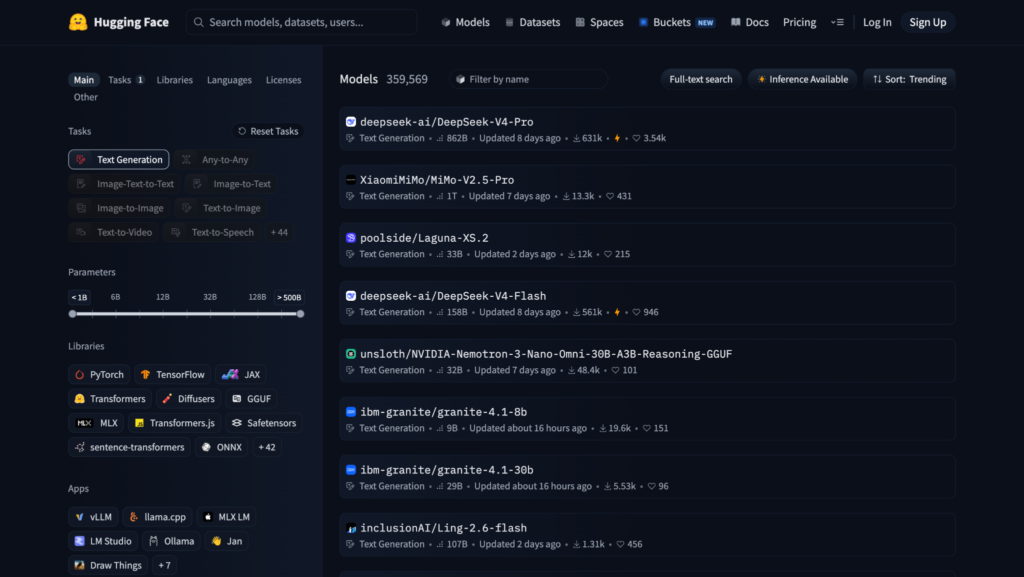
Path A: Fine-tuning an existing model means taking a pre-trained model that already understands language, images, or code, and adapting it to your specific task using a smaller dataset.
If you’re building a vision AI model, high-quality edited image datasets can reduce noise and improve consistency in your training data.
This is what 95% of people actually need, and it is the approach that delivers real results on real budgets.
Path B: Training a model from scratch means initializing random weights and training the entire network on your data from zero.
This requires massive datasets (millions to billions of data points), enormous compute resources (clusters of GPUs running for weeks), and deep expertise. OpenAI spent over $100 million training GPT-4.
Here is how to decide which path fits you:
| Your situation | Right path |
| You want a chatbot that knows your company’s products | Path A: Fine-tune an open-source LLM |
| You want an image classifier for your specific use case | Path A: Fine-tune a pre-trained vision model |
| You want to learn how neural networks work from the ground up | Path B: Train a small model from scratch |
| You want to build a new foundation model to compete with GPT | Path B: Train from scratch ($10M+ budget) |
| You have fewer than 100,000 labeled data points | Path A: Fine-tune |
| You need your data to stay on your own servers | Path A: Fine-tune an open-source model locally |
| You are a researcher exploring novel architectures | Path B: Train from scratch |
| You want a working model by next week | Path A: Fine-tune |
After building custom models across healthcare and e-commerce, I can tell you that Path A delivers real results 95% of the time.
I have never seen a solo developer or small team regret starting there.
The only people who genuinely need Path B are researchers exploring novel architectures or companies with the budget to train a foundation model.
Everyone else should start with Path A and only consider Path B after they have shipped something.
Both paths start with the same three foundational steps.
Step 1: Define Your Problem Clearly (Both Paths)
Every AI project starts with a specific problem. Not “I want to use AI,” but “I need a system that does X with Y data and produces Z output.”
Good problem definitions look like this:
“I need a model that reads customer support tickets and routes them to the correct department with at least 90% accuracy.”
“I want a chatbot trained on my company’s knowledge base that answers product questions in our brand voice.”
“I need an image classifier that identifies defective parts on a manufacturing line from photos.”
Bad problem definitions look like this: “I want to build an AI.” That is not a problem. That is a technology in search of a purpose.
The clearer your problem definition, the easier every subsequent step becomes. It determines your data requirements, your model choice, your evaluation metrics, and your deployment strategy.
Step 2: Pick the Right Type of AI Model (Both Paths)
The type of model you build depends entirely on what you need it to do.
Large Language Models (LLMs) handle text: chatbots, content generation, summarization, translation, code generation. In 2026, the leading open-source LLMs include Llama 4 (Meta), Qwen 2.5 (Alibaba), DeepSeek-V3.2, and Mistral 3.
Computer vision models handle images and video: object detection, image classification, facial recognition, medical imaging. Pre-trained models like ResNet, YOLO, and Vision Transformers (ViT) are the standard starting points.
Supervised learning models (like random forests, gradient boosting, and logistic regression) handle structured data: fraud detection, sales predictions, churn modeling, risk scoring. Libraries like scikit-learn and XGBoost are your tools here.
Reinforcement learning models learn from trial and error: game AI, robotics, autonomous systems. These are the most complex to build and typically require specialized expertise.
If you are just starting out, supervised learning with structured data or fine-tuning an open-source LLM are the most accessible entry points.
Step 3: Collect and Prepare Your Data (Both Paths)
This is the step that takes the most time and matters the most. A well-tuned model trained on clean data will outperform a larger model trained on messy data almost every time.
For LLMs (fine-tuning): You need a dataset of input-output pairs formatted for your task. For a customer support chatbot, that means pairs of questions and correct answers.
Fine-tuning can work with as few as 1,000 to 10,000 high-quality examples for many tasks. More complex domains like legal or biotech may need 10,000 to 100,000.
For LLMs (from scratch): You need billions of tokens of text data. This is why almost nobody outside of well-funded labs trains language models from zero.
For vision models: You need labeled images. Each image needs a tag (or bounding box for detection). Tools like Label Studio and Roboflow help with the labeling process.
For structured data models: You need a clean spreadsheet or database with rows (examples) and columns (features). Remove duplicates, fix missing values, and handle outliers.
Critical step for both paths: split your data. Always separate your data into a training set (typically 80%) and a test set (20%). The test set must never be used during training. It exists only to check whether your model actually learned useful patterns or just memorized the training examples.
Data quality matters far more than data quantity. If you are collecting data manually, aim for consistency in labeling above all else.
Now Pick Your Path
You have defined your problem, chosen your model type, and prepared your data. From here, the two paths diverge completely. Jump to the one that fits your situation:
- Path A: Fine-Tune an Existing Model (recommended for most people)
- Path B: Train a Model From Scratch (for researchers, learners, and well-funded teams)
Path A: Fine-Tune an Existing Model
This is the path for people who want a working custom AI model without spending months or thousands of dollars. You start with a model that already knows a lot about language, images, or code, and teach it to specialize in your domain.
A1: Choose Your Fine-Tuning Tools
| Tool | Best for | Skill level | Cost |
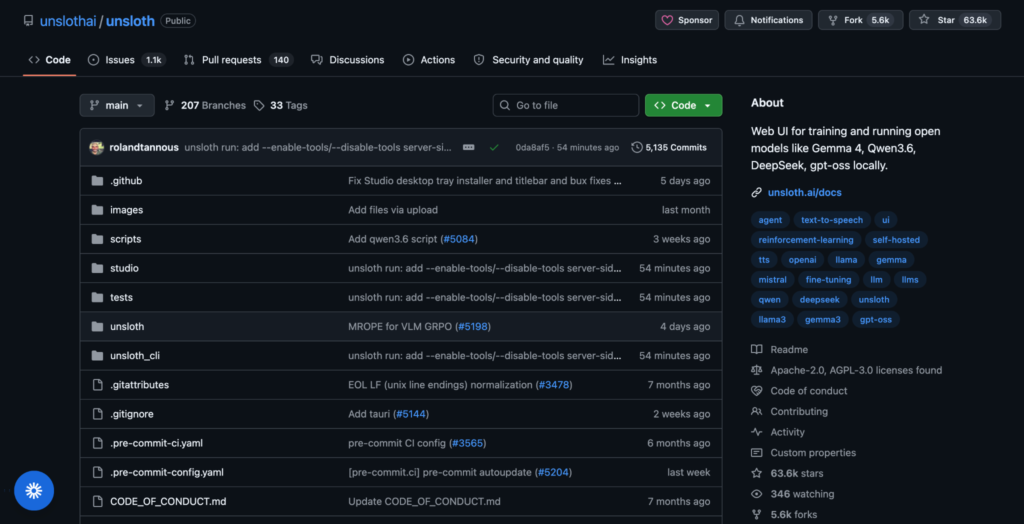
| Unsloth | Fine-tuning on a single GPU, 2x faster than standard methods | Intermediate | Free (open source) |
| Hugging Face + AutoTrain | Managed fine-tuning with minimal code | Beginner to intermediate | Free tier available, paid for compute |
| Together AI | Cloud fine-tuning with downloadable LoRA adapters | Intermediate | Pay per training job |
| SiliconFlow | Managed 3-step pipeline, fastest inference | Beginner to intermediate | Pay per use |
| Axolotl | Open-source, maximum flexibility | Advanced | Free (bring your own GPU) |
| OpenAI fine-tuning API | Fine-tuning GPT-4.1 mini (proprietary, no download) | Beginner | Pay per training token |
In my experience, the fastest path for most people is: pick an open-source model from Hugging Face, fine-tune it with Unsloth or Together AI using LoRA, and deploy it locally with Ollama or vLLM. That entire pipeline can go from zero to working model in a weekend if your data is ready.
One caveat worth mentioning: Together AI is excellent for cloud fine-tuning, but I found their download process for LoRA adapters unintuitive the first time.
The export workflow is not obvious from the dashboard, and I spent an extra 20 minutes clicking through menus before I found the right download path. Once you know where it is, it is fast. But budget that learning curve into your first session.
A2: Pick a Base Model
Start small. A 7B or 13B parameter model is faster to train, cheaper to run, and often good enough for most tasks. Only scale up if the smaller model does not hit your quality bar.
| Model | Parameters | Best for | Context window |
| Llama 4 Scout 8B | 8B | General purpose, multilingual | 128K tokens |
| Qwen 2.5 7B | 7B | Coding, math, reasoning | 128K tokens |
| Mistral 3 7B | 7B | General purpose, instruction following | 128K tokens |
| DeepSeek-V3.2 | 671B (41B active per token) | Complex reasoning, math, coding | 128K tokens |
| Phi-4 14B | 14B | Edge deployment, fast inference | 16K tokens |
A3: Fine-Tune With LoRA
LoRA (Low-Rank Adaptation) is the standard fine-tuning technique in 2026. It freezes the original model weights and trains a small adapter layer (typically just a few megabytes) on top. This means you can fine-tune a massive model on a single consumer GPU because you are only training a tiny fraction of the total weights.
Here is the step-by-step process:
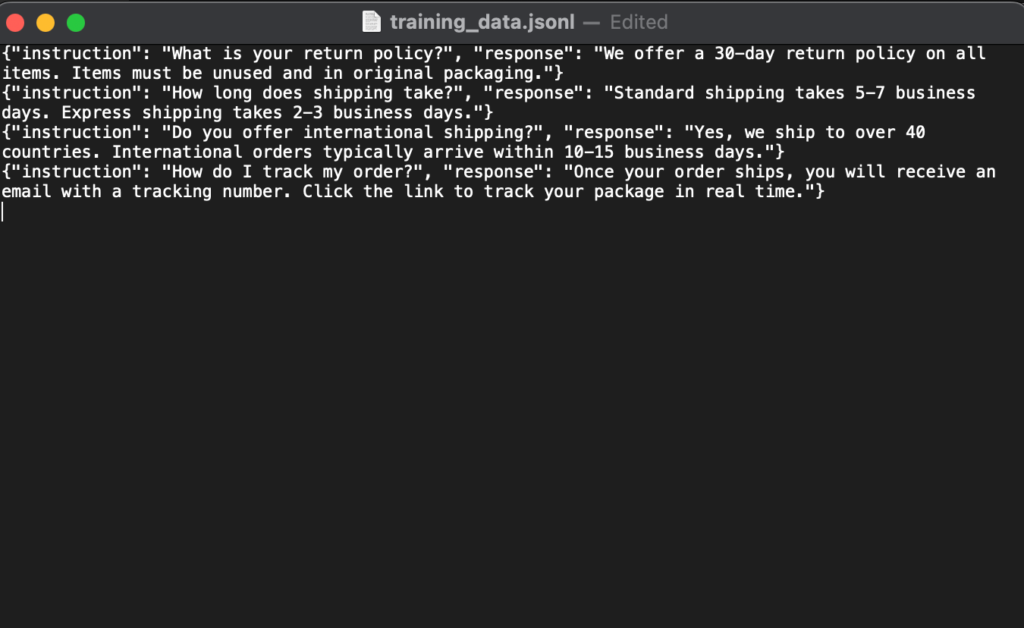
- Format your dataset. Convert your data into JSONL format (one JSON object per line) with “instruction” and “response” fields. Most fine-tuning tools expect this structure.
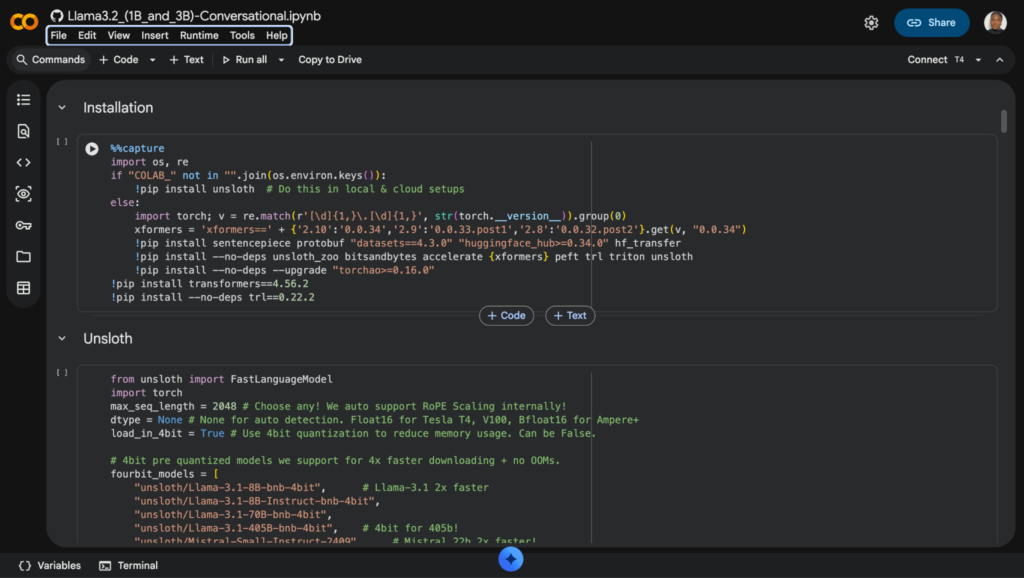
- Configure LoRA parameters. Set the rank (typically 16 to 64), learning rate (typically 2e-4 to 5e-5), and number of training epochs (typically 1 to 5). Unsloth and Together AI set reasonable defaults if you are unsure.
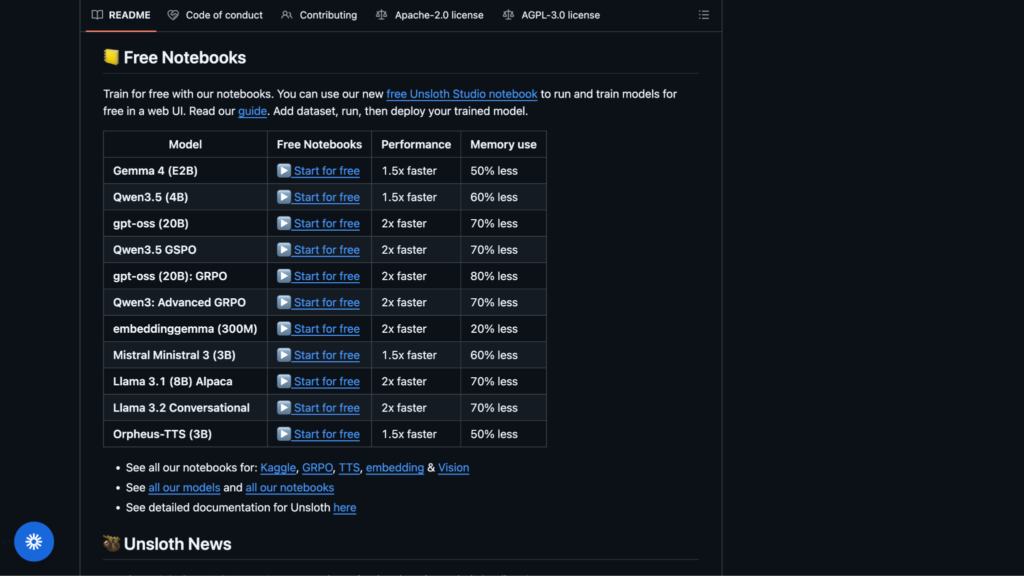
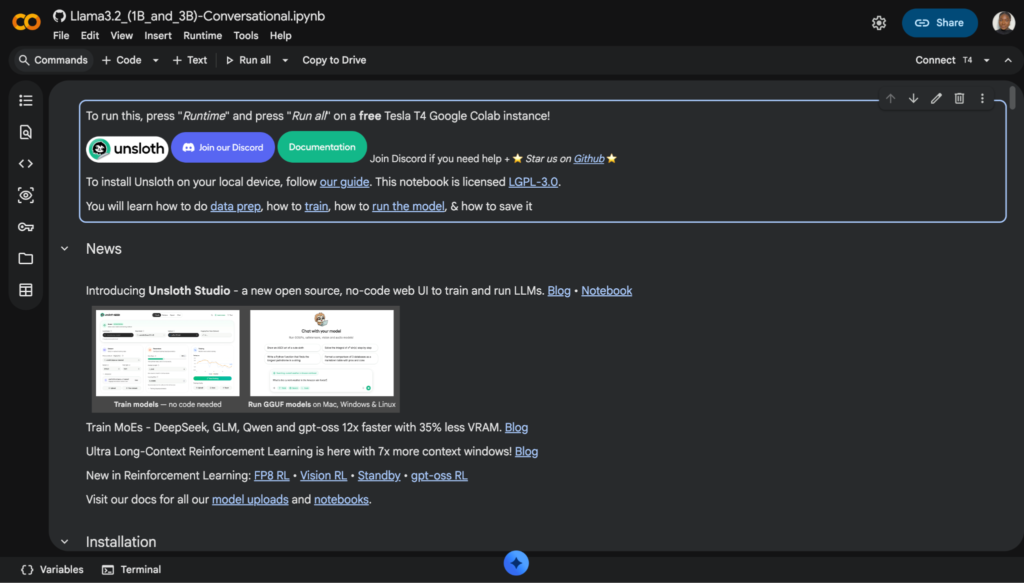
- Run training. On a single NVIDIA GPU (RTX 4090 or equivalent), fine-tuning a 7B model with LoRA typically takes 1 to 4 hours. On Google Colab’s free tier, expect longer but it works. Unsloth runs 2x faster than standard methods on the same hardware.
- Evaluate. Test the fine-tuned model on your held-out test set. Compare outputs against your ground truth. If quality is not where you need it, improve your data (more examples, better labeling) before increasing model size.
- Export your adapter. The LoRA adapter file is portable. You can download it from Together AI and run it anywhere, or export from Unsloth to GGUF format for use with Ollama and llama.cpp.
A4: What Fine-Tuning Costs
| Approach | Estimated cost | Time |
| Fine-tune 7B model on Google Colab (free tier) | $0 | 2 to 6 hours |
| Fine-tune 7B model on Together AI or SiliconFlow | $5 to $50 per run | 1 to 2 hours |
| Fine-tune 13B model on a cloud A100 GPU | $20 to $100 per run | 2 to 6 hours |
| Fine-tune 70B model on cloud GPU cluster | $50 to $500+ per run | 8 to 24 hours |
| Run fine-tuned 13B model locally after training | $0 ongoing | N/A (hardware cost upfront) |
Path B: Train a Model From Scratch
This path is for researchers, students learning fundamentals, or well-funded teams building novel architectures. If you are here because you want a working product quickly, go back to Path A.
Training from scratch is slower, more expensive, and requires far more data and expertise.
That said, understanding this process makes you a better ML engineer even if you spend most of your time fine-tuning.
B1: Choose Your Framework
| Tool | Best for | Skill level |
| PyTorch | Full flexibility, most popular in research | Intermediate to advanced |
| TensorFlow / Keras | Production deployment, beginner-friendly API via Keras | Beginner to intermediate |
| scikit-learn | Structured data, classical ML algorithms (not deep learning) | Beginner |
| JAX | High-performance research, Google ecosystem | Advanced |
For beginners, start with scikit-learn for structured data problems or Keras for simple neural networks. For serious research, PyTorch is the industry standard.
B2: Design Your Model Architecture
This is where from-scratch training fundamentally differs from fine-tuning. You decide the structure of the model itself:
- Choose the architecture type. A feedforward network for simple classification. A convolutional neural network (CNN) for image tasks. A transformer for language tasks. A recurrent network (LSTM/GRU) for sequential data.
- Set the dimensions. Number of layers, hidden units per layer, attention heads (for transformers), dropout rates. Start small. A 3-layer network with 128 hidden units can teach you more than a 96-layer monster you cannot debug.
- Pick your loss function. Cross-entropy for classification. Mean squared error for regression. The loss function tells the model how to measure its own mistakes.
- Choose an optimizer. Adam is the default for most deep learning tasks. SGD with momentum works for simpler models.
B3: Train, Validate, and Iterate
- Initialize weights randomly. Unlike fine-tuning, you start from nothing. The model has zero knowledge.
- Feed training data in batches. The model processes data in batches (typically 16 to 128 examples at a time), calculates how wrong its predictions are, and adjusts its weights to reduce that error. One full pass through the entire training set is called an “epoch.”
- Tune hyperparameters. Learning rate is the most important. Too high and the model overshoots. Too low and it learns nothing. Batch size, number of epochs, and regularization strength also matter. Expect to run dozens of experiments before finding the right combination.
- Validate after every epoch. Check performance on your test set to detect overfitting (when the model memorizes training data instead of learning general patterns). If training accuracy keeps climbing but test accuracy plateaus or drops, you are overfitting.
- Iterate relentlessly. Change the architecture. Add more data. Adjust hyperparameters. Training from scratch is an experimental process. Be prepared to fail many times before the model works well.
B4: What From-Scratch Training Costs
| Approach | Estimated cost | Time |
| Small classifier with scikit-learn on a laptop | $0 | Minutes |
| Simple neural network in PyTorch on Google Colab | $0 | Hours |
| Medium CNN for image classification on a cloud GPU | $10 to $100 | Hours to days |
| Custom transformer model on GPU cluster | $1,000 to $50,000+ | Days to weeks |
| Foundation model (GPT/Llama scale) | $100,000 to $100M+ | Weeks to months |
Training a foundation model from scratch is not a solo project. It requires a team, a budget, and infrastructure that most individuals and small businesses do not have. If your goal is a custom language model for your business, fine-tuning (Path A) gets you 90% of the result at less than 1% of the cost.
Deploying Your Model (Both Paths)
Once your model performs well on the test set, you need to make it accessible. These options apply whether you fine-tuned or trained from scratch.
For Running Models Locally
| Tool | What it does |
| Ollama | Run open-source LLMs locally with one command |
| LM Studio | Desktop app for running and chatting with local models |
| llama.cpp | Run quantized models on CPU or consumer GPU |
| vLLM | High-performance model serving for production |
A 13B model runs on a single consumer GPU with acceptable latency. Running locally costs $0 in ongoing compute if you own the hardware.
For Serving Over the Internet
Deploy as an API using FastAPI, Flask, or a managed platform like Hugging Face Inference Endpoints, Replicate, or SiliconFlow. This lets other applications call your model over HTTP.
Embed in an app by connecting the API to a web interface, mobile app, or Slack bot. For a chatbot, you need a text input and a response display. For an image classifier, you need a file upload button.
Use serverless GPU platforms like Modal, Banana, or RunPod if you need GPU compute on demand without managing infrastructure.
After Deployment: Monitor and Retrain
Deployment is not the finish line. Real-world data drifts over time. A model that performs well today can degrade as conditions change. Plan for periodic retraining from day one. Set up monitoring that tracks prediction quality, and schedule retraining when performance drops below your acceptable threshold.
What Are the Real Challenges?
After building a dozen custom models, these are the problems that actually slow people down:
1. Data is the bottleneck, not compute.
Getting clean, well-labeled data is harder and more time-consuming than the training itself. In one e-commerce project, I spent weeks labeling 8,000 product descriptions, only to discover that our labelers had used inconsistent category definitions across batches.
The model learned nothing useful and we had to relabel from scratch.
Budget twice as much time for data preparation as you think you will need, and write clear labeling guidelines before anyone touches the data.
2. Evaluation is harder than training.
Knowing whether your model is “good enough” requires clear metrics and test cases. For chatbots, this means having humans rate outputs. For classifiers, this means tracking precision and recall. Do not skip this step.
3. Fine-tuning does not fix bad data.
If your training examples contain inconsistencies, errors, or ambiguity, the model learns those problems. Garbage in, garbage out has never been more true than in AI.
4. Open-source model weights are static.
Unlike API providers that patch bugs server-side, you are responsible for pulling updated model weights yourself when issues are discovered.
What Should You Build First?
If you have never built an AI model before, here is the path I recommend:
- Start with Path B at a tiny scale. Build a simple scikit-learn classifier on a public dataset (like Titanic survival prediction on Kaggle). This teaches you the fundamentals of data preparation, training, testing, and evaluation in a few hours. You are not building anything production-ready. You are building intuition.
- Move to Path A. Fine-tune a small LLM (Llama 4 Scout 8B or Qwen 2.5 7B) on a dataset relevant to your work. Use Unsloth on Google Colab. This is free and takes one afternoon.
- Deploy it. Run your fine-tuned model locally with Ollama and build a simple chat interface around it. Now you have something you can actually use.
- Iterate. Improve your data. Add more training examples. Test edge cases. Retrain. This cycle is where the real learning happens.
Creating your own AI model is no longer a privilege reserved for well-funded research labs. The tools, the models, and the knowledge are all freely available. The only thing standing between you and a working custom AI is a clear problem and clean data.
So: what will you build first?
FAQs
1. Do I need coding skills to build an AI model?
For fine-tuning LLMs (Path A), you need basic Python knowledge. Platforms like Hugging Face AutoTrain and SiliconFlow reduce the code to a few lines, but understanding what you are doing matters for debugging. For training from scratch (Path B), Python with PyTorch or TensorFlow is required. For no-code approaches, tools like Google Vertex AI AutoML exist, but they offer less control.
2. How much data do I actually need?
For fine-tuning (Path A), 1,000 to 10,000 high-quality input-output pairs can produce meaningful results. For training from scratch (Path B), you typically need millions to billions of data points for language models, or thousands to hundreds of thousands of labeled examples for classifiers.
3. What is LoRA and why does everyone use it?
LoRA (Low-Rank Adaptation) freezes the original model weights and trains a small adapter layer on top. This adapter is typically just a few megabytes. It lets you fine-tune a 70B parameter model on a single GPU because you are only training a tiny fraction of the total weights. The result: 90% of the quality at 1% of the cost.
4. Can I build an AI model on a regular laptop?
Yes, for small projects. scikit-learn models and lightweight neural networks run fine on a standard machine. For LLM fine-tuning, you need a GPU. Google Colab provides free GPU access, and Kaggle Notebooks offer another free option. For running finished models locally, a laptop with 16GB+ RAM can handle quantized 7B models through Ollama.
5. Should I fine-tune or use RAG (Retrieval-Augmented Generation)?
RAG is better when the model needs access to external, frequently changing, or private knowledge (like a company knowledge base that gets updated weekly). Fine-tuning is better when you need to change the model’s behavior, tone, formatting, or reasoning patterns. Many production systems use both.
6. How long does training take?
Path A: Fine-tuning a 7B model with LoRA on a single GPU takes 1 to 4 hours. Path B: Training a small classifier with scikit-learn takes minutes. Training a simple neural network from scratch takes hours. Training a foundation model takes weeks to months.
