


Workato is an enterprise automation and integration platform (iPaaS) that connects business applications through visual workflows called “recipes.”
Founded in 2013 and headquartered in Mountain View, California, it lets IT and business teams build automated processes across sales, HR, finance, and operations without writing traditional code.
After evaluating Workato across three client deployments and comparing it head-to-head with Zapier, Make, and Tray.io, here is what I found: Workato is genuinely the most powerful iPaaS on the market for enterprise-scale automation.
But that power comes with a price tag, a procurement process, and a learning curve that make it the wrong choice for a significant number of teams that end up buying it anyway.
This review covers what Workato actually does, how Workato integrations work in practice, how it compares to Zapier and other alternatives, and who should (and should not) be spending $25,000 or more per year on it.
What Does Workato Actually Do?
Workato sits in the iPaaS category (Integration Platform as a Service).
It connects your business applications so data flows between them automatically, without someone manually copying information from one system to another.
The core unit of work is a “recipe.” A recipe is a visual workflow with a trigger (something happens in App A) and one or more actions (do something in App B, C, or D).
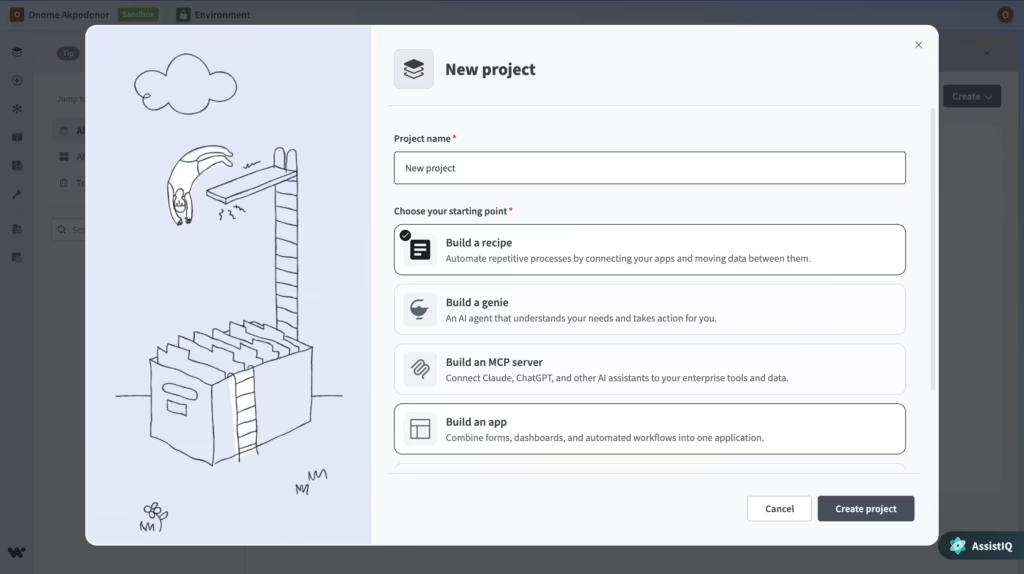
For example: when a new deal closes in Salesforce, create an invoice in NetSuite, notify the team in Slack, and update the project board in Jira. That is one recipe handling four systems.
As of April 2026, Workato offers:
1,200+ pre-built connectors spanning enterprise systems like Salesforce, NetSuite, Workday, SAP, ServiceNow, Slack, Microsoft Teams, and hundreds more.
These are not shallow integrations. Workato’s core enterprise connectors support granular triggers, conditional logic, batch processing, and advanced error handling.
AI-powered recipe building. Describe what you want in plain English, and Workato generates a recipe draft.
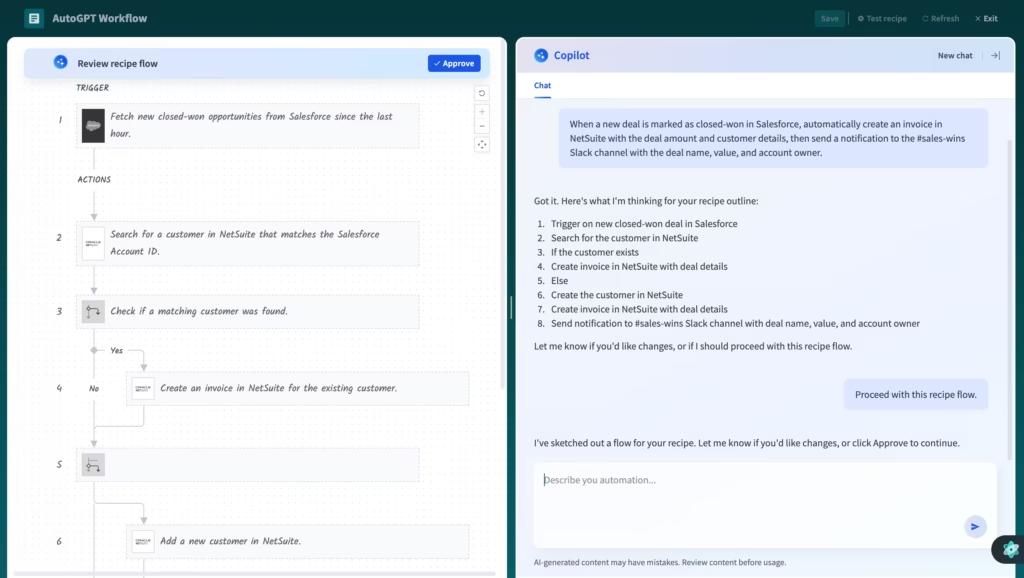
In my testing, the AI copilot handled standard CRM-to-warehouse patterns well but struggled with multi-step transformation logic. It is a time-saver for common patterns, not a replacement for understanding what you are building.
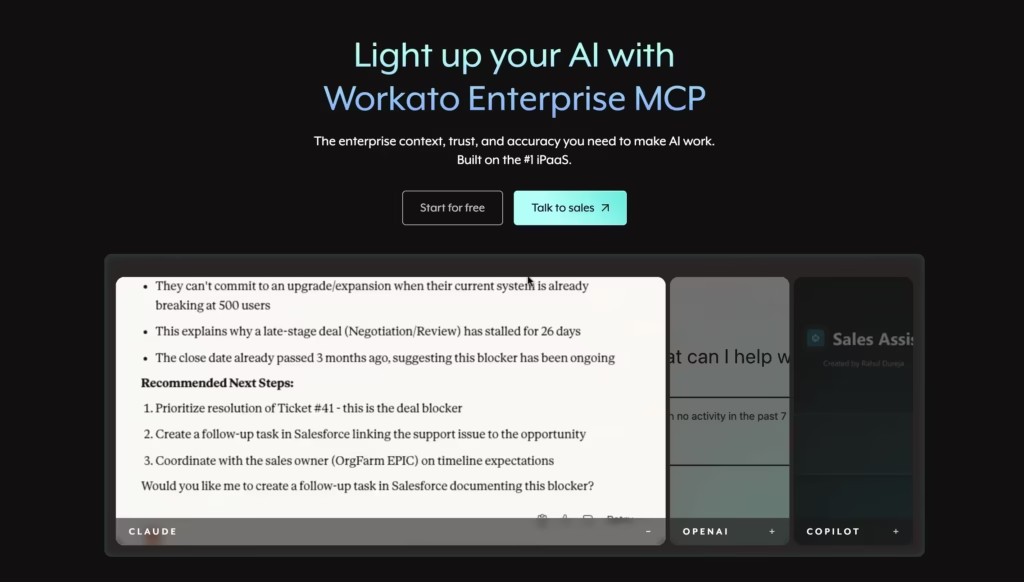
Enterprise MCP (Model Context Protocol). Launched in 2026, this connects AI agents to Workato’s 1,400+ business apps, enabling what the industry calls “agentic AI workflows.” AI agents can reason across systems, pull data, make decisions, and take actions without human intervention.
Pre-built AI agents called “Genies.” These handle specific tasks like IT support chats, CRM updates, interview scheduling, and outbound email campaign optimization. You can also build custom agents through Agent Studio.
Workbot for Slack and Microsoft Teams. This lets teams interact with automations directly inside their chat tools, approve requests, receive notifications, and trigger actions without leaving the conversation.
Governance and compliance infrastructure including SOC 2 Type II,HIPAA, GDPR, environment isolation (separate dev, test, and production), role-based access controls, audit trails, and bring-your-own-key encryption with hourly key rotation.
Workato has been named a Leader in the Gartner Magic Quadrant for iPaaS for eight consecutive years (2019 through 2026) and was positioned furthest in Vision three times. It holds a 4.7/5 rating on G2 and processes billions of transactions monthly for over 17,000 customers.
How Do Workato Integrations Work in Practice?
The recipe builder is where most users spend their time. Here is how building a Workato integration actually works, step by step:
Step 1: Choose your trigger. Pick the event that starts the workflow. Examples: a new record in Salesforce, a new row in a database, a message in Slack, or a webhook from an external system.
Step 2: Connect your apps. Authenticate with each application you want to include. Workato uses OAuth for most cloud apps and provides on-premise agents for systems behind firewalls.
Step 3: Build your recipe logic. Drag and drop actions, conditions, loops, and error handlers into the visual builder. This is where Workato separates from simpler tools. You can build nested conditional branches, batch-process thousands of records, transform data formats, and handle failures with custom retry logic.
Step 4: Map your data fields. Workato’s AI suggests field mappings between systems based on schema analysis. In my experience, the suggestions are accurate about 70% of the time for standard fields (name, email, company) but need manual adjustment for custom fields and complex objects.
Step 5: Test and deploy. Run the recipe in test mode, verify the outputs, then switch to production. Workato provides monitoring dashboards and alerting for failed jobs.
The entire build process for a standard two-app integration takes about 30 minutes for someone familiar with the platform. Complex multi-system orchestrations (like an order-to-cash workflow spanning ERP, CRM, billing, and fulfillment) can take days or weeks, depending on the number of edge cases.
One thing I want to flag from direct experience: the connector quality varies. Core enterprise connectors (Salesforce, NetSuite, Workday) are deep and reliable, with granular triggers and hundreds of actions. Smaller SaaS connectors sometimes only support basic create/read/update/delete operations. If your workflow depends on a niche app, test the connector depth before committing.
Zapier vs Workato: How Do They Actually Compare?
This is the comparison everyone searches for, and the honest answer is that these two platforms serve fundamentally different audiences.
Zapier is a no-code automation platform built for business users. Anyone can set up a workflow in minutes without technical expertise. It connects 8,000+ apps and prioritizes speed, simplicity, and self-serve access. You can sign up, build a workflow, and have it running in under an hour.
Workato is a low-code integration platform built for IT teams. It handles complex, business-critical integrations across major enterprise systems. It prioritizes depth, governance, and control. Building anything non-trivial often takes days or weeks, and you cannot even demo the software without going through a sales engagement.
That distinction shapes everything downstream.
Zapier vs Workato: Feature Comparison
| Feature | Workato | Zapier |
| Primary user | IT teams, integration engineers | Business users, ops teams, marketers |
| Approach | Low-code, IT-led | No-code, business-led |
| App connectors | 1,200+ (deep enterprise connectors) | 8,000+ (broadest long-tail coverage) |
| Time to first automation | Days to weeks (complex setups) | Minutes to hours |
| Workflow complexity | Nested logic, loops, batch processing, error handlers | Linear trigger-action sequences, basic branching with Paths |
| AI features | AI copilot, Genies (pre-built agents), Agent Studio, Enterprise MCP | AI-powered Zap builder, Canvas (workflow mapping), Chatbots |
| Free plan | Yes | Yes (100 tasks/month) |
| Starting price | ~$2,000/month (sales-led) | $19.99/month (self-serve) |
| Typical annual cost | $15,000 to $50,000+ (enterprise can exceed $100,000) | $240 to $6,000+ depending on volume |
| Pricing transparency | Opaque (custom quotes only) | Transparent (published on website) |
| Security certifications | SOC 2 Type II, HIPAA, GDPR, BYOK encryption | SOC 2 Type II, GDPR, SSO, audit logs |
| Environment isolation | Yes (dev, test, production) | No |
| Chatbot builder | No | Yes (Zapier Chatbots) |
| Gartner recognition | Leader for 8 consecutive years | Not in Gartner iPaaS quadrant |
| Best for | Enterprise integration, IT-led automation programs | SMB/mid-market automation, business-led workflows |
My Honest Take on Zapier vs Workato
After working with both platforms across different organizations, here is how I think about the decision.
Workato wins when you have dedicated integration engineers, complex multi-system workflows, strict compliance requirements (HIPAA, environment isolation), and a budget that starts at $25,000 per year.
If your automation program is IT-led and your workflows touch ERP, HCM, and financial systems, Workato’s depth is genuinely unmatched.
Zapier wins in nearly every other scenario. If your team needs to automate marketing workflows, sales handoffs, support ticket routing, or internal operations across dozens of SaaS tools, Zapier gets you there faster, cheaper, and without waiting in an IT backlog. The 8,000+ app library means you almost never hit a “we don’t have a connector for that” problem.
The pricing gap alone tells you which lane each platform occupies. Zapier’s Team plan costs $69 per month for 25 users. Workato’s entry-level deployment starts around $2,000 per month. That is not a marginal difference. It is a fundamentally different buying decision.
How Does Workato Compare to Other Alternatives?
Zapier is the most common comparison, but Workato competes with several other platforms depending on the use case.
| Platform | Starting price | Best for | App connectors | Key differentiator |
| Workato | ~$2,000/month | Enterprise IT-led integration | 1,200+ | Deepest enterprise connectors, Gartner Leader 8x |
| Zapier | Free, then $19.99/month | Business-led automation across SaaS | 8,000+ | Broadest app coverage, fastest time to value |
| Make (formerly Integromat) | Free, then $10.59/month | Visual workflow builders, budget teams | 1,900+ | 10-20x cheaper per operation than most competitors |
| Tray.io | Custom pricing | Mid-market teams needing flexibility | 600+ | Flexible low-code builder, strong API support |
| MuleSoft | Custom pricing | Enterprise API management | 400+ | Owned by Salesforce, deep API lifecycle management |
| n8n | Free (self-hosted) | Technical teams who want open-source | 400+ | Self-hostable, MIT-licensed, full code access |
| Power Automate | $15/user/month | Microsoft-heavy environments | 1,000+ | Native Microsoft 365 and Dynamics integration |
In my assessment, the real decision tree for most teams looks like this: if you are a small or mid-size team automating across SaaS tools, start with Zapier or Make.
If you are a mid-market company that needs more flexibility than Zapier offers but cannot justify Workato’s price, look at Tray.io or Make’s higher tiers.
If you are an enterprise with dedicated integration engineers and complex compliance needs, Workato or MuleSoft are your realistic options, and Workato’s recipe builder is significantly more accessible than MuleSoft’s developer-heavy approach.
What Does Workato Actually Cost?
This is the part everyone wants to know and the part Workato makes hardest to find out. The platform does not publish pricing. Every contract goes through a sales conversation.
Here is what independent analyses and third-party reviews consistently report:
| Deployment size | Estimated annual cost |
| Entry-level (small team, limited recipes) | $15,000 to $25,000/year |
| Mid-market (multiple departments, moderate volume) | $25,000 to $50,000/year |
| Enterprise (organization-wide, high volume) | $50,000 to $100,000+/year |
| AWS Marketplace listing (1M tasks, Enterprise workspace) | $143,750/year |
Workato’s billing has two components: a platform edition fee (your base subscription) and a usage fee (tracked by tasks or operations per recipe run). Some features like Intelligent Document Processing and Event Streams add usage beyond the primary recipe consumption.
One frustration I have seen across multiple client engagements: the usage-based component makes cost forecasting difficult. Recipe design choices (how many steps, whether you use batch processing, polling frequency) directly affect your bill.
Two teams automating the same business process can end up with meaningfully different costs depending on how their recipes are built.
My advice: before signing a Workato contract, model three usage scenarios (low, medium, and high volume) and get your sales rep to confirm pricing for each. Do not sign based on the “average” estimate alone.
What Are Workato’s Actual Weaknesses?
Every review I have read online focuses on Workato’s strengths. Here are the weaknesses I have observed firsthand:
Pricing opacity creates procurement friction. Every engagement starts with a sales call. For organizations used to self-serve SaaS purchasing, this adds weeks to the evaluation process. Multiple Gartner Peer Insights reviewers have noted that enterprise features feel “paywalled” behind higher pricing tiers.
Non-technical users hit a ceiling fast. Workato markets itself as accessible to both IT and business users, and that is true for simple recipes. But anything involving conditional logic, error handling, or data transformation requires technical thinking.
In my experience, business users can build about 20% of the recipes they actually need. The rest goes back to IT.
The AI copilot has limits. It handles standard integration patterns well (sync contacts between two CRMs, post Slack notifications on new records).
But when I tested it on a multi-step workflow involving conditional branching and data transformation across three systems, the generated recipe needed substantial manual rework. Do not expect it to replace an integration engineer.
Connector depth is uneven. Enterprise connectors for Salesforce, NetSuite, and Workday are excellent. Connectors for smaller or niche SaaS tools can be shallow, sometimes offering only basic CRUD operations without support for webhooks, custom objects, or advanced triggers.
Annual contracts with no free trial path. You cannot test Workato meaningfully without a sales engagement. Zapier, Make, and n8n all let you build and run real workflows before spending a dollar. Workato does not.
Who Should Buy Workato (and Who Should Not)?
Buy Workato if:
You have dedicated integration engineers or an IT team that will own the automation program. Your workflows involve complex enterprise systems like NetSuite, SAP, Workday, or ServiceNow.
You need HIPAA compliance, environment isolation, or bring-your-own-key encryption. Your automation budget starts at $25,000 per year and you are comfortable with annual contracts negotiated through sales.
Do not buy Workato if:
Your team is primarily non-technical and you want business users to build their own workflows. Your integrations are mostly between common SaaS tools (Slack, Google Workspace, HubSpot, Notion, Airtable).
Your budget is under $15,000 per year. You want to start small and scale usage organically without a procurement cycle. In these cases, Zapier, Make, or n8n will serve you better at a fraction of the cost.
So, Is Workato Worth the Price?
For the right organization, absolutely. If you are an enterprise with complex multi-system workflows, strict compliance requirements, and a dedicated IT team, Workato delivers a level of depth and governance that cheaper tools simply cannot match.
The eight consecutive Gartner Leader placements and 4.7/5 G2 rating are earned through genuine product strength, not marketing.
But for the wrong organization, Workato is one of the most expensive mistakes you can make in your automation stack.
I have seen mid-market companies sign $30,000 annual contracts for Workato when 90% of their workflows could have been handled by Zapier at $6,000 per year. The prestige of “enterprise-grade” is not worth 5x the cost when your actual needs are straightforward.
My advice: be brutally honest about who will build and maintain your automations, how complex your workflows really are, and whether you genuinely need HIPAA compliance and environment isolation.
If the answer is “our ops team needs to connect 20 SaaS tools,” you do not need Workato. If the answer is “our IT team needs to orchestrate workflows across Salesforce, NetSuite, Workday, and SAP with full audit trails,” Workato is one of the best tools for that job.
FAQs
1) Is Workato better than Zapier?
It depends entirely on your team and use case. Workato is more powerful for complex enterprise integrations managed by IT teams. Zapier is faster to deploy, cheaper, and more accessible for business users automating across SaaS tools.
For most small and mid-size teams, Zapier delivers more value per dollar. For enterprise IT departments managing ERP and HCM integrations, Workato is the stronger platform.
2) How many integrations does Workato support?
Workato offers 1,200+ pre-built connectors as of April 2026, plus universal API connectors and a custom SDK for building your own. Zapier offers 8,000+ for comparison. Workato’s connectors are fewer but generally deeper for enterprise systems.
3) Does Workato have a free plan?
No. Workato does not offer a free plan or a self-serve trial. All access requires a sales conversation and a custom quote. Entry-level pricing typically starts around $15,000 to $25,000 per year.
4) Is Workato no-code or low-code?
Workato is best described as low-code. The visual recipe builder does not require traditional programming, but building complex workflows requires technical thinking, understanding of data structures, and familiarity with API concepts. It is more accessible than MuleSoft but less accessible than Zapier.
5) What companies use Workato?
Workato serves over 17,000 customers, including Atlassian, Zendesk, and a significant portion of Fortune 500 companies. The platform is particularly strong in organizations that run Salesforce, NetSuite, Workday, and ServiceNow as core systems.
6) Can Workato handle real-time data?
Yes. Workato supports real-time triggers via webhooks and event-driven architectures. It also supports batch processing for high-volume data operations. The platform processes billions of transactions monthly across its customer base.
