

Is Artbreeder Good for AI Image Collaboration?
Artbreeder has built its reputation on one idea: art gets better when people build on each other’s work. But does that idea still hold up against modern AI image tools? Artbreeder is a browser-based AI art platform.
It launched in 2018 as “Ganbreeder,” created by artist and researcher Joel Simon. Instead of typing prompts, you blend existing images together and adjust “genes” like age, color, and style. The result feels less like generating art and more like evolving it.
Also read: Top 7 AI Art Generators
What Is Artbreeder?
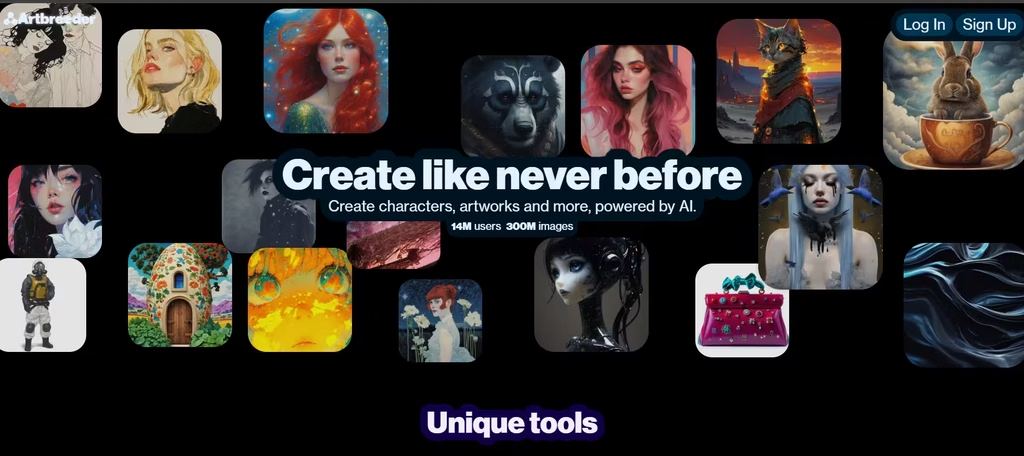
Artbreeder runs on generative adversarial networks, specifically StyleGAN and BigGAN, which power its signature gene-blending tools. More recently, it added diffusion models for text-to-image generation. Now you can type a prompt instead of only mixing images.
This dual approach sets Artbreeder apart. Most AI art tools focus on one method: text prompts. Artbreeder blends both prompts and visual mixing, so you get more starting points for a project.
How Does Artbreeder Support Collaboration?
Collaboration is the core of Artbreeder’s design. Every image you create can become a building block for someone else’s project. That’s a different model than most AI generators, which treat each image as a private, one-off output.
I’ll admit that this wasn’t what I had in mind initially. I thought of Artbreeder as a setup that lets me collaborate with my teammates or friends. However, this is even better because I have a wider scope of creations to work with.
The Community Remix System
When you upload or generate an image on Artbreeder, other users can “breed” it with their own images.
In my testing, remixing the creation of others put me in 395th position. I could customize my creation with edit controls, which I liked. That means I didn’t have to settle for whatever other creators ahead of me had done.
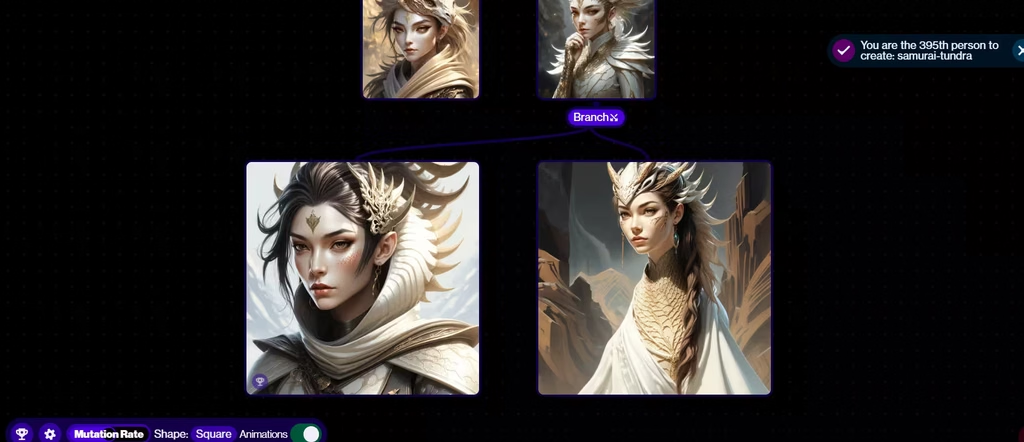
This creation branch-out creates a visible lineage: a family tree of artwork that traces back through multiple creators. Because Artbreeder licenses user-created images under CC0, anyone can legally build on them, remix them, or reuse them commercially, without needing permission first.
This licensing format removes the legal friction that normally blocks true collaboration. You don’t have to ask an artist for rights. You just remix and credit the lineage if you want to be transparent about it.
Genetic Blending Tools
The Mixer and Splicer tools let you combine two or more images and adjust how much each one influences the final result. Move a slider, and the image updates instantly. This makes collaboration feel iterative rather than final.
In my creation, I experimented with the age and hair of the art character. You’re not locking in a single output. You’re building on a chain of decisions other people already made.
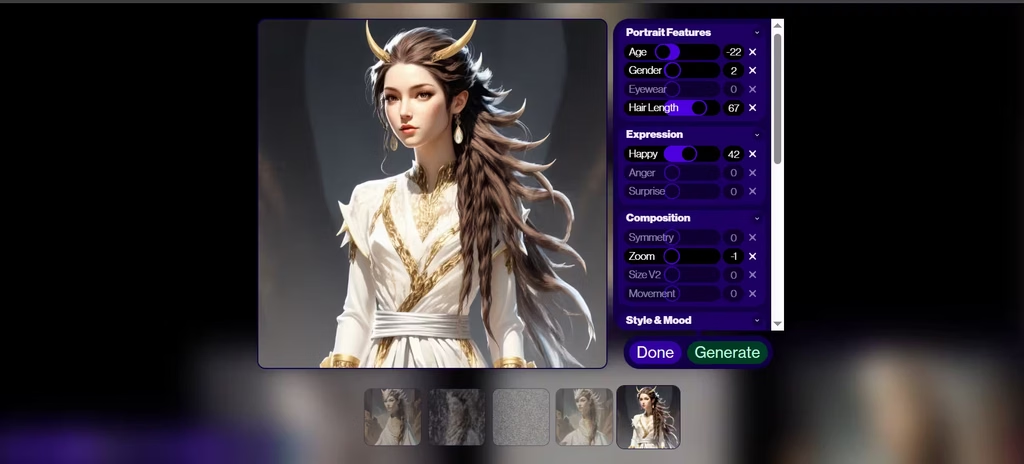
As a side note, I’ll advise to not tamper with the zoom and gender options. They would give an abstract image otherwise.
Key Features for Collaborative Image Creation
Not every tool here matters equally for collaboration. Splicer2 and Mixer are the ones that actually drive the remix chain; they’re what most people touch when they take someone else’s creation and push it further, since sliders for age, expression, and color balance make it easy to nudge a shared image without starting from scratch.
Composer matters almost as much, because separating content from style lets you graft your own aesthetic onto someone else’s structure instead of just splitting the difference between two blended faces.
Collager, Outpainter, and Poser round things out for more specific jobs. Collager turns loose shapes and text into a full scene. Outpainter extends a collaborator’s portrait into a wider setting. Poser matches a pose reference to an existing character using ControlNet-style technology.
Prompter sits apart from the rest, since it works from typed descriptions via diffusion models rather than an existing image, but anything you generate with it still feeds into the same shared library. In my testing, Splicer and Mixer got the most use by far; they’re the tools that make remixing feel fast rather than fiddly.
Artbreeder Pricing
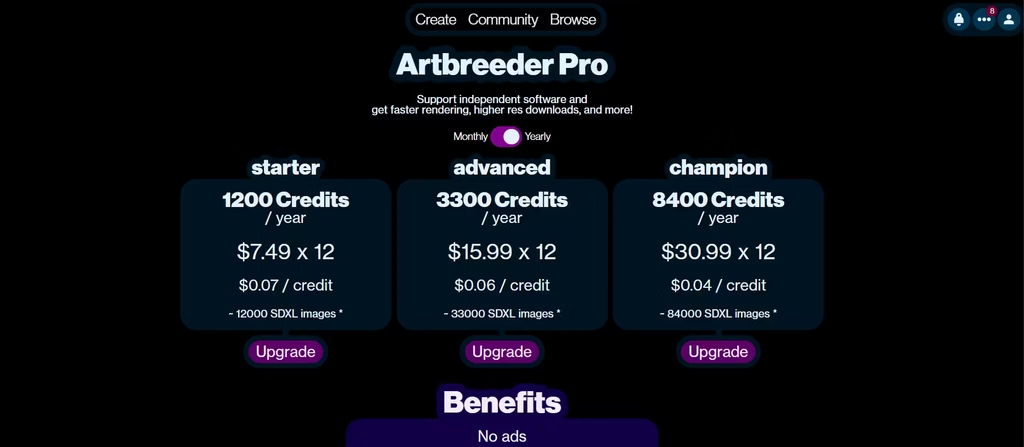
Artbreeder uses a freemium model. The free tier gives you 10 credits per month, enough to test the core tools but not enough for sustained collaboration work. Paid access starts at $7.49 per month (billed annually) for the Starter plan, which includes 1,200 credits per year, or roughly 100 credits per month, about ten times the free allowance. That undercuts several major competitors.
Midjourney, for comparison, starts at $10 per month for its Basic plan, which caps out around 200 image generations (about 3.3 hours of fast GPU time) before you have to buy extra time or wait for the next billing cycle. Higher Artbreeder tiers unlock more credits, higher-resolution exports, and private project mode, so your work stays hidden until you choose to share it.
You should factor that into tasks that require collaboration. If privacy matters to you during early drafts, budget for a paid tier. The free plan leans toward open sharing, which fits Artbreeder’s community model but won’t suit every workflow.
Strengths and Limitations
What Works Well
Artbreeder’s biggest strength is accessibility. You don’t need design training to produce something usable. Move a slider, and you get instant feedback. That low barrier means a writer can sketch a dozen character concepts in an afternoon, a game designer can generate a batch of NPC variations before lunch, and a hobbyist can experiment without worrying about wasting anything.
The community angle matters just as much, and for a concrete reason: because millions of images already exist in the shared library, you rarely start from a blank canvas. You start from someone else’s idea and push it further. For collaborative brainstorming, that’s a meaningful advantage over tools built purely for solo prompt-based generation.
Where Artbreeder Falls Short
However, Artbreeder isn’t built for precision work. It doesn’t offer layer-based editing or pixel-level control, so if you need exact, repeatable output for a commercial campaign, you’ll likely still need Photoshop or a more controlled generator alongside it.
In my experience, the zoom option can easily distort the entire image. Also, the expression (notably the happy feature) didn’t result in a significant mood difference from the previous generation. The same unpredictability showed up when I tried other controls: the face came out with visibly asymmetrical eyes, and it took re-rolls before the proportions looked right.
I’ll also advise you to change one feature at a time to prevent optimizing the image further down the path of abstraction. Additionally, because sharing sits at the center of the platform, users who want fully private experimentation need to budget for a paid plan. That’s a fair trade-off given the platform’s purpose, but it’s worth knowing upfront.
Artbreeder vs. Other AI Tools
Compared to Midjourney or DALL-E 3, Artbreeder trades polish for flexibility. Midjourney generally produces more refined, gallery-ready images straight out of the box, and DALL-E 3 tends to follow detailed prompts more literally. Artbreeder instead gives you raw material to reshape collaboratively. Pick based on the job, not the hype.
So, Is Artbreeder Good for AI Image Collaboration?
Yes, Artbreeder is good for collaboration, but only if collaboration is what you’re after. Its remix-friendly licensing, shared image library, and gene-blending tools create a workflow that few other AI platforms attempt.
Writers can pull character references in minutes instead of hours, indie game developers can rough out a cast of NPCs without hiring an illustrator, and creative teams can use the shared library to brainstorm visual directions before a single briefing document exists.
If you need polished, print-ready, or brand-consistent final assets, though, Artbreeder probably shouldn’t be your only tool. Use it to explore ideas quickly and build on a community’s collective creativity. Then, finish your best results elsewhere if precision matters.
For open-ended, collaborative AI art exploration, Artbreeder still does something no other mainstream tool does: it turns other people’s finished images into your next starting point. For final production work, treat it as a starting point rather than the whole solution.
