


Managing thousands of new leads per month is difficult for even the most experienced sales teams.
This is why many people opt to use tools to automate the process. There are many tools for this, and they all work in a similar way:
- Automatically respond to new leads, quickly
- Learn information about new leads using custom criteria
- Leads are then categorized and funneled to the correct department
While the general process is similar, the actual impact of this process varies a lot depending on the tool you choose to use.
In this guide, we’ll explore the specific problems associated with following up thousands of leads, and how tools can help.
Why Automate Lead Follow-Ups for High-Volume Lead Management
Manual follow-up simply doesn’t work when you’re dealing with thousands of leads every month.
It leads to wasted productivity, with sales reps chasing up dead leads and not having the time to follow up on the ones that really count.
Challenges of Manual Lead Follow-Up at Scale
No sales team can realistically respond to thousands of leads fast enough to catch them at peak interest.
Reps forget to reach out, focus on the wrong leads, or send inconsistent messages. Qualified leads end up slipping through the cracks before you even get a chance to talk to them.
Time management also becomes a nightmare for sales reps and productivity as a whole – it becomes impossible to know what to focus on, and when.
Benefits of Automated Lead Follow-Up Tools
Automation makes sure every prospect gets a quick response, no matter how many you’ve got.
These systems can send emails, SMS, or assign tasks based on what the lead does -no human needed for that first touch.
Follow-ups stay consistent across your whole database and the messaging is consistent across the board.
Key automation capabilities include:
- Multi-channel outreach (email, SMS, phone tasks)
- Behavioral triggers based on website activity or form submissions
- Smart lead scoring and prioritization
- Automatic CRM updates and task assignments
- Personalization at scale using dynamic fields
Automation takes care of the early nurturing, so your reps can focus on the high-value conversations. That’s how you get the most out of your sales team’s time.
Impact on Conversion Rates and Sales Productivity
Automation significantly helps with conversion rate – it is well known that the sooner you respond to a lead, the higher the likelihood that they will convert.
This means that your sales productivity can increase to levels never seen before.
Core Features of Automated Lead Follow-Up Tools
Automated lead follow-up tools all share a few key features that help them get the job done.
AI-Powered Personalization and Engagement
AI is obviously a huge part of the process, and has become much more mainstream in the last couple of years.
Lead follow-up tools can now use AI to automatically categorise leads and send them off to the right people. They can also use AI to converse with leads like a human, in your own brand’s tone of voice, and much, much more.
Lead Prioritization and Predictive Scoring
Lead scoring assigns values based on things like demographics, behavior, and engagement. Traditional models use set rules, while predictive scoring uses machine learning to spot patterns in your best customers.
Predictive systems crunch thousands of data points, figuring out what really leads to closed deals. New leads get scored based on how much they look like your previous wins.
You can automatically segment leads into priority tiers. High scores trigger instant follow-up and alerts, while lower-scoring leads get put into longer nurture tracks. That way, reps focus on the leads most likely to close.
Scores update in real-time. A lead who seemed low-priority at first might jump up after attending a webinar or checking out your pricing page a few times.
Automated Lead Assignment and Routing
Lead routing gets new leads to the right rep, fast. Basic systems just rotate through the team or go by territory, but advanced ones look at rep capacity, expertise, and current workload.
Workflow automation can assign leads based on all sorts of details. Big accounts go to senior reps, certain industries go to specialists, and leads from specific campaigns get routed to the right team.
Your rules should match the lead source and quality. Marketing-qualified leads might get nurtured first, while sales-qualified leads go straight to a rep with a notification.
Some systems even tie into calendar tools. If a lead’s ready to buy, the platform can check a rep’s availability and send a meeting invite automatically. That can shrink response time from hours to seconds.
Top Automated Lead Follow-Up Tools and Platforms
Let’s take a quick look at some of the best tools to follow up thousands of new leads every month..
Meera.ai
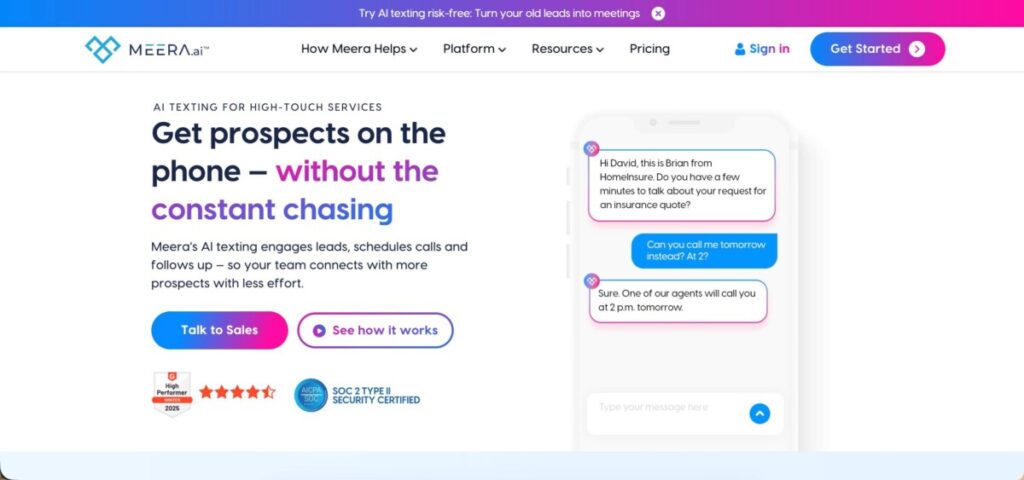
Meera.ai is an AI-powered tool focused on conversational engagement at scale. Its AI agents qualify leads through natural back-and-forth, asking the right questions for your business. This happens completely automatically, and in your brand’s tone of voice and messaging.
If you’re flooded with leads every month, Meera.ai can automatically segment and start personalized conversations – no need for your team to jump in right away.
The system connects with popular lead management software, pulling in data and pushing qualified leads into your pipeline.
You set the criteria, and the AI scores and routes accordingly. The AI even adapts its messaging based on how leads respond, keeping the conversation going until it’s time for a human handoff or a polite goodbye.
Salesforce and Its Automation Ecosystem
Salesforce is one of the most well-known sales platforms, and it offers a full suite of lead follow-up automation, both natively and through integrations.
With Flow Builder, you can trigger follow-up emails, assign tasks, and update records based on conditions like lead score or behavior. Salesforce Einstein brings AI into the mix, predicting lead quality and suggesting the best follow-up timing.
You can plug in tools like Drift for website chat or Zapier to automate across thousands of other apps. Done right, these integrations funnel leads from everywhere into your system and run them through custom nurture sequences automatically.
Salesforce’s automation also takes care of lead distribution, making sure new prospects go to the right rep based on your own rules for territory, product, or workload.
Zoho CRM and Lead Distribution Capabilities
Zoho CRM brings some seriously robust automation features, and you don’t have to shell out enterprise-level cash to get them. The platform’s assignment rules can automatically hand out incoming leads to your team, based on whatever criteria you want.
This helps prevent those annoying bottlenecks that show up when your lead volume suddenly spikes. Blueprint workflows let you set up multi-step follow-ups, mixing emails, tasks, and field updates that kick in after a lead acts or after a certain amount of time.
With Zoho’s SalesIQ, you get conversational AI – chatbots that talk to your website visitors and qualify leads before they ever hit your CRM. The system scores leads using both your own criteria and some AI-powered predictions, so you can actually figure out which ones deserve attention first.
Email templates and scheduling tools are baked right into these automated workflows. That way, you can keep your communication cadence steady across your entire lead list – no matter how many prospects you’re juggling.
