

Murf AI text to speech is the core feature inside Murf AI, a cloud-based voice generation platform that converts written scripts into human-sounding voiceovers using neural speech synthesis.
I have generated over 40 hours of voiceover content across Murf, ElevenLabs, WellSaid Labs, and Speechify for client projects in e-learning, marketing, and product walkthroughs. Murf is not the most realistic voice engine available.
That title belongs to ElevenLabs. What Murf does better than anyone else is give you a full production studio where you can shape exactly how every sentence sounds before you export.
This article focuses specifically on Murf’s text-to-speech capabilities, not the full platform.
If you want a general overview, the Murf AI review and Murf AI pricing guide covers the broader product.
How Does Murf AI Text to Speech Actually Work?
Six steps. That is all it takes from blank page to finished voiceover.
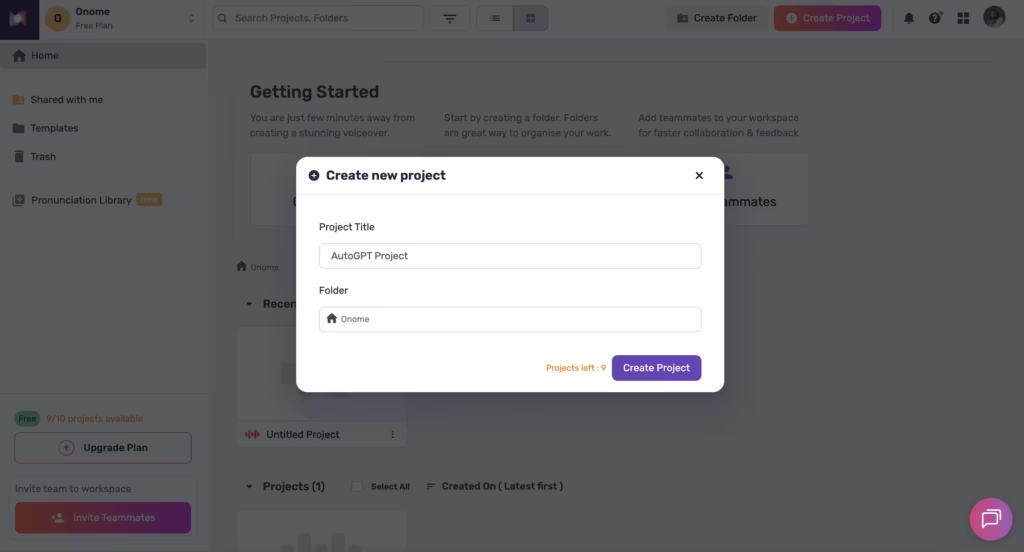
Step 1: Open Murf Studio in your browser. Create a new project.
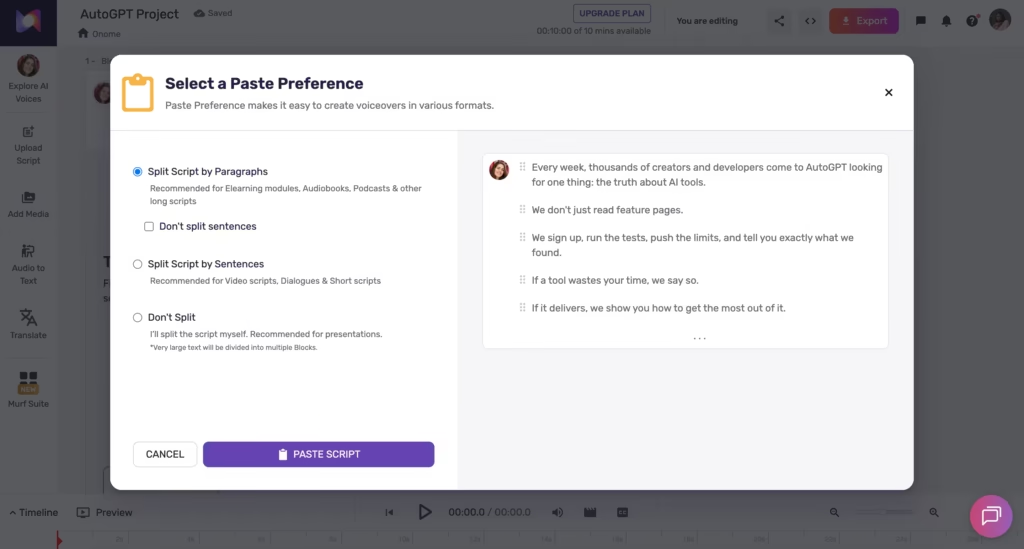
Step 2: Paste your script. The editor auto-splits it into sub-blocks.
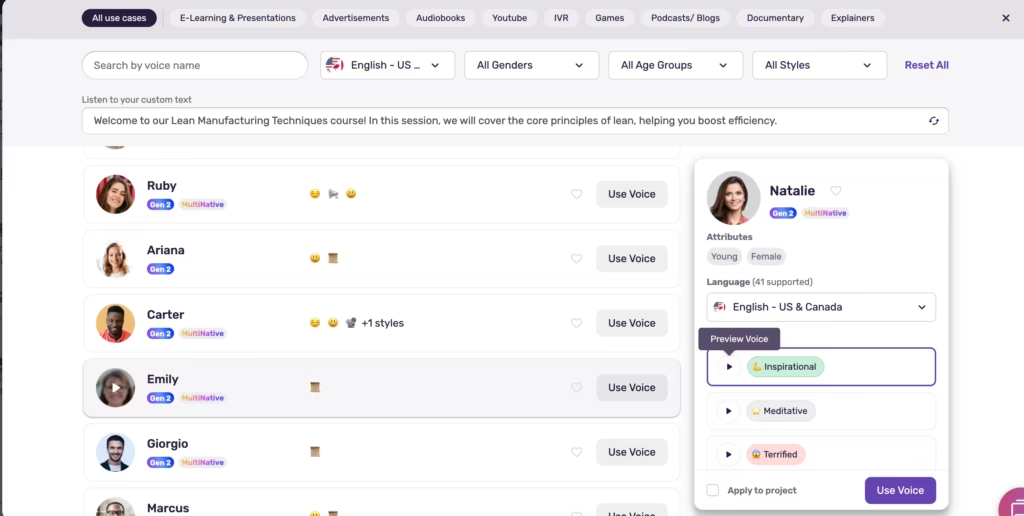
Step 3: Pick a voice. The library has 200+ options. You filter by language, accent, gender, age, and style (conversational, documentary, promotional, calm, among others).
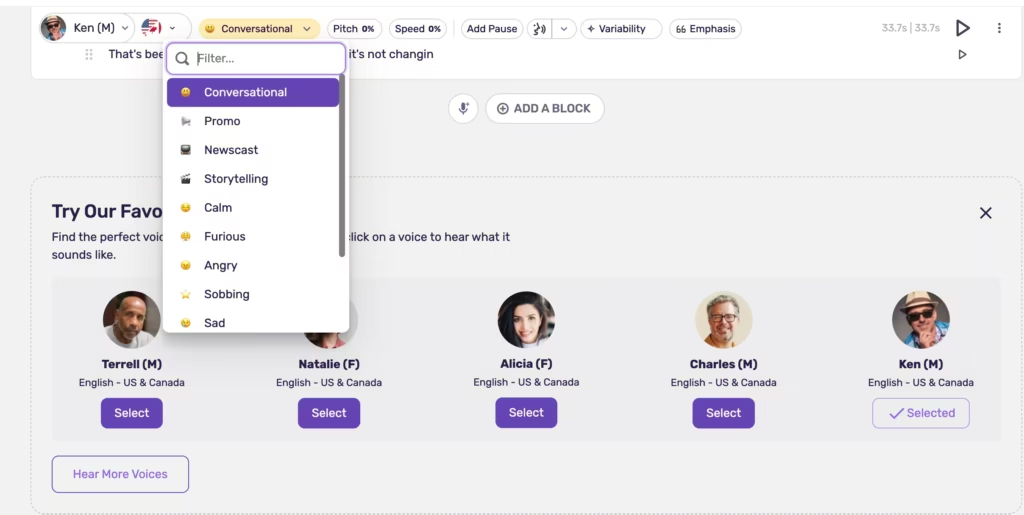
Step 4: This is where Murf earns its price tag. You can adjust pitch and speed globally, but you can also set emphasis on individual words, insert timed pauses between phrases, save custom pronunciations for brand names you will use again, and switch between 10+ speaking styles per voice.
Most TTS tools skip this step entirely and just hand you whatever the AI decides to produce.
Step 5: Click generate. Audio appears within seconds.
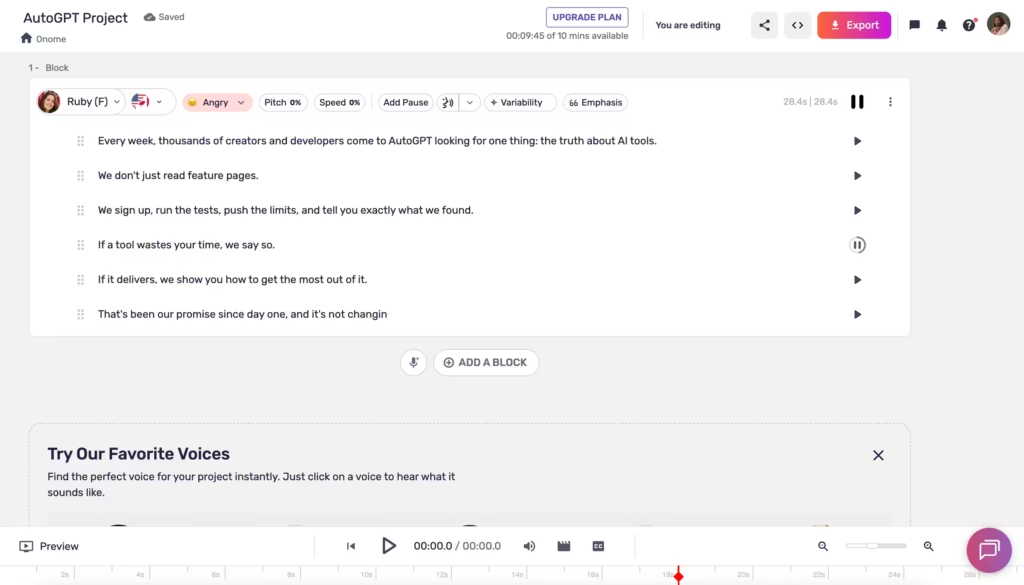
Step 6: Download or export. Paid plans include download rights and commercial licensing.
In my experience, this workflow is more hands-on than ElevenLabs (where you paste text and get audio almost instantly) but gives you significantly more control over the final output.
If you are picky about how specific words land, how pauses feel, and how emphasis shapes a sentence, that trade-off is worth it. If you just want fast, great-sounding audio with minimal fussing, ElevenLabs gets you there faster.
The Two Models Under the Hood
Pick the wrong Murf model and you will either overpay for latency you do not need or get audio too slow for your use case.
Murf runs two completely separate TTS engines:
Gen 2 is the studio-grade model. High-fidelity speech for voiceovers, audiobooks, podcasts, marketing content, and e-learning. This is what you use inside Murf Studio, and it supports the full customization suite (styles, emphasis, pronunciation, pitch, speed).
When I tested Gen 2 on a 15-minute e-learning module about compliance training, the word-level emphasis controls let me stress key regulatory terms in a way that ElevenLabs simply could not match without post-production editing.
Falcon is the real-time model built for developers. Voice agents, IVR systems, conversational AI.
According to Murf’s own benchmarks, Falcon achieves sub-55ms model latency and 130ms time-to-first-audio measured across 33 global locations, beating ElevenLabs, OpenAI, Cartesia, and Deepgram in production latency tests. It handles 10,000 concurrent calls without degrading.
Pricing starts at $0.01 per minute through the API. I did not test Falcon’s API myself, but the benchmarks Murf published align with what developer communities on Reddit and Hacker News have reported.
Content creator? Gen 2. Developer building a voice product? Falcon. Do not mix them up.
What Does Murf AI Text to Speech Cost?
Murf’s pricing revolves around Voice Generation Time (VGT), which is the actual duration of audio you create. Generate a 5-minute voiceover, and that costs 5 minutes of VGT.
| Plan | Monthly price | Annual price | Voice generation time | Key features |
| Free | $0 | $0 | 10 minutes total | 200+ voices, no downloads, no commercial rights |
| Creator | $29/month | $19/month | 24 hours/year (~2 hrs/month) | Downloads, commercial rights, 8,000+ soundtracks, 20+ languages |
| Business | $99/month | $66/month | 96 hours/year (~8 hrs/month) | Voice cloning, team collaboration, 35+ languages, AI translation |
| Enterprise | Custom | Custom | Unlimited | SSO, MSA, no training on your data, dedicated support |
The API is priced separately. Pay-as-you-go starts at $0.03 per 1,000 characters with a minimum $2 purchase. Up to 3 API keys with 15 concurrency and 10,000 requests per minute.
One thing I want to flag: the Creator plan’s 24-hour annual cap sounds generous, but it works out to roughly 2 hours per month. For a freelancer producing a few YouTube videos or e-learning modules monthly, that is often enough.
But if you are producing daily content or long-form audio, you will hit that ceiling faster than you expect. When your VGT runs out, generation simply stops. Murf does not charge automatic overage fees (which is budget-friendly), but it can be disruptive if you are mid-project.
My honest take on value: Murf’s Creator plan at $19/month annual is a fair entry point for solo creators who need clean, professional voiceovers with commercial rights. The Business plan at $66/month annual makes sense for small teams that need voice cloning and collaboration.
But if you are comparing cost per minute of generated audio at high volume, this analysis found that some competitors are 10 to 20x cheaper per operation. Murf charges for quality, not just output.
How Does Murf AI Text to Speech Compare to the Competition?
Murf does not exist in a vacuum.
Here is how it stacks up against the four competitors most likely on your shortlist, scored and compared across the features that actually drive the decision:
Murf vs ElevenLabs vs WellSaid Labs vs Speechify vs LOVO AI
| Feature | Murf AI | ElevenLabs | WellSaid Labs | Speechify | LOVO AI |
| Primary strength | Studio workflow for business voiceovers | Voice realism and emotional range | Enterprise compliance and consistency | Accessibility and reading | Multilingual dubbing |
| Voice library | 200+ voices | 1,000+ voices (community included) | 120+ ethically sourced voices | 100+ voices | 500+ voices |
| Languages | 35+ | 32 (Turbo), 29 (v2/v3) | 10+ | 30+ | 100+ |
| Voice realism score | 8.6/10 (DIY AI dataset) | 8.9/10 (top-ranked) | 8.7/10 | 7.8/10 | 8.3/10 |
| Voice cloning | Business plan and above | All paid plans (from short samples) | Enterprise only (ethically sourced) | Speechify Studio | Available on paid plans |
| Latency (API) | Sub-55ms (Falcon) | Low (Turbo 2.5 optimized for speed) | Not API-focused | Not API-focused | Standard |
| Editor quality | Full studio: pitch, speed, emphasis, pauses, pronunciation | Basic editor, AI-driven | Professional studio | Simple reader interface | Timeline editor |
| Video sync | Yes (built-in timeline) | No (audio only) | No (audio only) | No | Yes |
| Starting paid price | $19/month (annual) | $5/month (Starter) | $50/month | $29/month | $19/month |
| Compliance | ISO 42001, SOC 2 Type II | SOC 2 Type II | SOC 2 Type II, GDPR, HIPAA, ADA | Standard | Standard |
| Best for | Business voiceovers, e-learning, explainers | Creators needing maximum realism | Corporate narration, training, compliance | Reading documents aloud | Multilingual video dubbing |
Where Does Murf AI Text to Speech Win?
After testing Murf against these competitors across real client projects, here are the areas where Murf genuinely outperforms:
The editor is the best in the category for non-technical users. Murf Studio gives you word-level emphasis, custom pronunciation saving, timed pauses, pitch and speed sliders, and 10+ speaking styles, all in a drag-and-drop interface that a marketing manager can learn in 30 minutes.
ElevenLabs produces more realistic voices, but its editing tools are comparatively basic. When I needed to fine-tune a 15-minute product walkthrough voiceover with precise emphasis on specific feature names, Murf’s editor made that possible without any audio editing software.
The “Say it My Way” feature is unique. Gen 2 introduced a feature where you record your own rendition of a line, and the AI mirrors your tone, pacing, and inflections. No other major competitor offers this level of direction.
Video synchronization is built in. Murf lets you sync voiceovers directly to video inside the same editor. You upload a video, align the script to specific timestamps, and export a finished video with voiceover. ElevenLabs and WellSaid are audio-only tools. If your workflow involves video (and in 2026, it usually does), this saves an entire step.
Falcon’s API latency is genuinely best-in-class. For developers building voice agents, the sub-55ms model latency at $0.01 per minute is hard to beat.Third-party benchmarks across 33 global locations confirmed Murf Falcon outperformed ElevenLabs, OpenAI, Cartesia, and Deepgram on time-to-first-audio.
Enterprise compliance is strong. Murf holds ISO 42001 certification for AI management systems, a credential that is still rare in the voice AI space. Combined with SOC 2 Type II and ethically sourced voice training data, this matters for procurement teams in regulated industries.
Where Does Murf AI Text to Speech Fall Short?
I ran into several frustrations during testing that are worth knowing before you commit:
Voice realism is good but not best-in-class. In direct comparison, ElevenLabs produces more emotionally nuanced speech, especially on scripts that require sarcasm, urgency, or subtle tonal shifts.
Murf voices are clean, professional, and consistent. But they lack the last 5% of expressiveness that makes ElevenLabs sound uncannily human. For business voiceovers and e-learning, you will not notice the gap. For audiobook narration or emotionally complex content, you might.
The free plan is essentially a demo. Ten minutes of total generation with no download capability tells you nothing about what Murf can actually do for your workflow. You need the Creator plan ($19/month annual) to evaluate the product meaningfully. ElevenLabs gives you 10,000 characters per month free with downloads, which is a more useful evaluation window.
Language coverage trails ElevenLabs and LOVO. Murf covers 35+ languages. ElevenLabs covers 32 with its high-quality models, and LOVO covers 100+. For projects requiring less common languages or dialects, Murf may not have what you need.
Content moderation can interfere with legitimate use. Multiple G2 reviewers have reported that the AI occasionally struggles with technical terms and brand names, requiring manual pronunciation adjustments. The editor handles this well once you know how, but the initial experience can be frustrating.
Pricing is mid-to-high for the category. At $19/month annual for the Creator plan, Murf is more expensive than ElevenLabs’ Starter ($5/month) and LOVO ($25/month with more language coverage). You are paying for the studio workflow and editor quality, which is justified if you use those features. If you just need a voice engine, cheaper options exist.
Which Tool Should You Actually Pick?
| Your situation | Best pick |
| Need the most realistic, emotionally expressive AI voice | ElevenLabs |
| Want a full voiceover studio with editor, video sync, and team tools | Murf AI |
| Building a voice agent or real-time conversational AI product | Murf AI (Falcon API) |
| Corporate training and e-learning with compliance requirements | Murf AI or WellSaid Labs |
| Need HIPAA compliance specifically | WellSaid Labs |
| Primarily want to listen to documents and articles aloud | Speechify |
| Need multilingual dubbing across 100+ languages | LOVO AI |
| Budget under $10/month and just need good voices | ElevenLabs |
| Need voice cloning without an enterprise contract | ElevenLabs |
FAQs
1) Is Murf AI text to speech free?
Partially. The free plan gives you 10 minutes of voice generation with access to all 200+ voices, but you cannot download the audio or use it commercially. For real work, you need the Creator plan at minimum ($19/month annual or $29/month monthly).
2) Does Murf AI sound realistic?
Yes. Independent testing by DIY AI scored Murf 8.6/10 on voice realism, placing it in the top tier alongside ElevenLabs (8.9/10) and WellSaid Labs (8.7/10). For business voiceovers, product walkthroughs, and e-learning, the quality is indistinguishable from a human narrator in most cases.
3) Can I clone my voice with Murf AI?
Yes, but only on the Business plan ($66/month annual) and above. You record a voice sample, and Murf creates a synthetic clone. ElevenLabs offers voice cloning on all paid plans starting at $5/month, so if cloning is your primary need, ElevenLabs is more accessible.
4) Is Murf AI better than ElevenLabs?
For most individual creators, no. ElevenLabs produces more realistic voices, offers voice cloning on cheaper plans, and costs less at the entry level. I would pick ElevenLabs for YouTube voiceovers, podcast intros, and any project where the voice itself is the star.
For teams producing business content (training videos, product walkthroughs, marketing explainers), yes.
Murf’s editor, video sync, team collaboration, and enterprise compliance give it a clear advantage when you need to control exactly how every sentence sounds and ship polished content on a deadline. That is the use case where I consistently recommend Murf over ElevenLabs.
5) Does Murf AI have an API?
Yes. The Murf API is priced separately from Studio plans. Pay-as-you-go starts at $0.03 per 1,000 characters. The Falcon model (sub-55ms latency) is available through the API at $0.01 per minute, making it competitive for high-volume voice agent deployments.
6) What happened to Play.ht?
Play.ht was acquired by Meta and shut down by December 2025, which pushed many former users toward Murf and ElevenLabs. If you were a Play.ht user looking for a replacement, Murf’s studio workflow and ElevenLabs’ voice quality are the two most common destinations.
