


NotebookLM turns your own documents into summaries, podcasts, and study guides. Even though the free plan is generous, there is more to be gotten from the paid plans. This begs the question, “how much does it cost?”
The answer changed in 2026. Google restructured its pricing, renamed the product, and added new tiers. This guide breaks down every option so you can pick the right plan.
Note: In July 2026, Google renamed NotebookLM to Gemini Notebook. The tool, features, and pricing structure stayed the same. Only the name and web address changed. This article uses “NotebookLM” since that’s still the more familiar name.
Overview of NotebookLM
NotebookLM is Google’s AI research and note-taking assistant, and it works differently than a typical chatbot. Rather than pulling answers from the open internet, it grounds every response in the documents you upload, so it rarely invents facts, and it always points back to your source material.
The tool runs on Google’s Gemini 3 model, which means it handles complex documents quickly. Upload PDFs, Google Docs, slideshows, web pages, even YouTube videos. NotebookLM reads through everything and becomes an expert on that specific content. I tested it with a 60-page research report, and the Audio Overview feature condensed it into a 12-minute podcast that accurately captured the main arguments.
Key Features
First, Audio Overviews turn your documents into podcast-style conversations between two AI hosts. This makes dense material easier to absorb on the go. When I tested Audio Overviews with dense academic material, though, the AI hosts occasionally oversimplified key technical concepts, so I had to cross-check critical details manually.
Second, Video Overviews generate narrated slideshows that walk through your content visually. Third, Deep Research lets the tool search and synthesize information across multiple sources automatically.
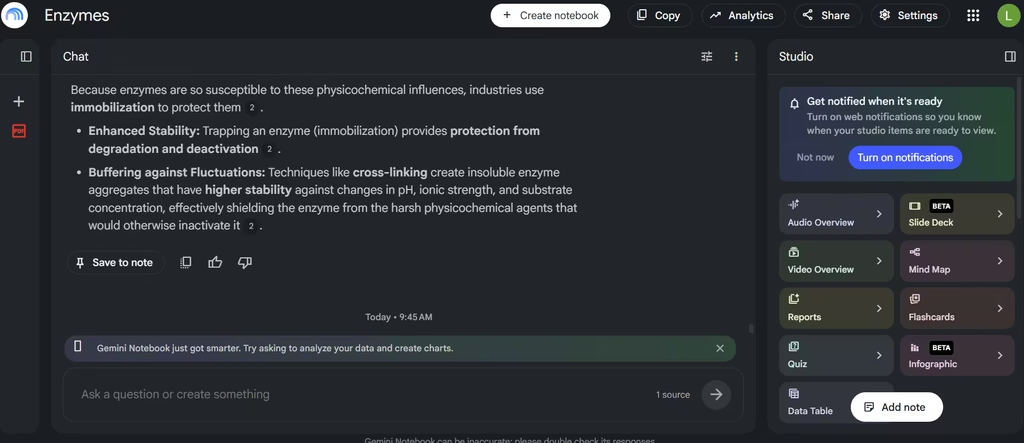
NotebookLM also creates mind maps, flashcards, and quizzes from your uploads. These tools help with studying and retention. I found this to be NotebookLM’s biggest benefit. I used the mind map to organize complex and abstract concepts into something cohesive that I could easily grasp. If you like to see the logical path of a topic as it splits into smaller concepts and the relationships between them, this feature is for you.
The chat interface also lets you ask direct questions and get answers with citations linked to the exact source passage. I found it to be more like a Chat with PDF feature, and every answer traced back to the material I uploaded. That helped me verify and fact-check all the information.
Also read: Best AI Tools for Chatting With PDFs
Common Use Cases
Students use NotebookLM to study for exams. They upload lecture notes and textbooks, then generate quizzes and audio summaries to review on the go. There were times when I had to study certain materials and NotebookLM helped me create quizzes that improved my recall and retention and also listen to the lesson podcast on the go.
Researchers rely on it to digest long academic papers quickly. Instead of reading fifty pages, they can ask targeted questions and get sourced answers. Businesses use it differently. Teams upload internal reports, meeting notes, and policy documents. Then, employees can query that knowledge base instead of digging through folders.
Content creators also use NotebookLM to repurpose research into podcasts, video scripts, or blog outlines. Because the tool adapts to so many formats, it fits nearly any workflow that involves large amounts of reading.
NotebookLM Pricing Plans
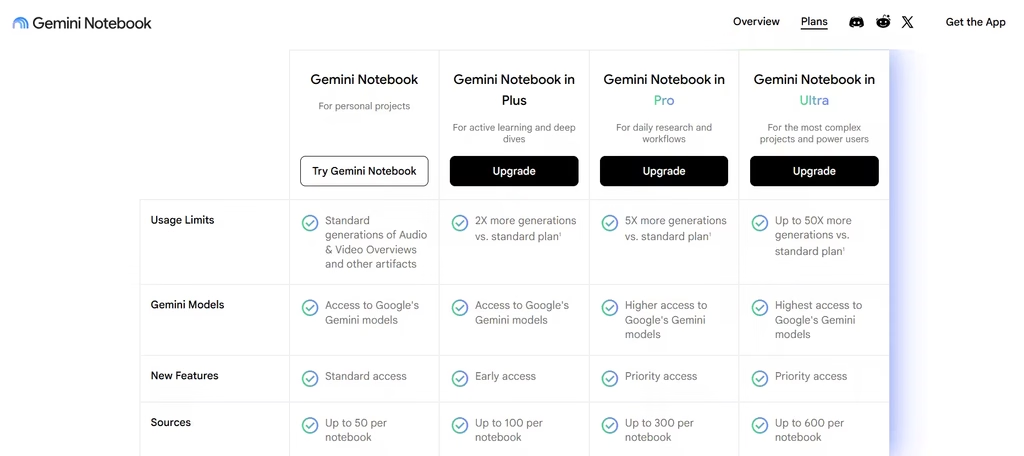
Google folded NotebookLM into its AI subscription during a major restructure in May 2026. As a result, you can no longer buy NotebookLM Plus as a standalone product. Instead, every paid tier arrives bundled inside a Google AI subscription, a Google Workspace plan, or a Google Cloud Enterprise license. Here is the current breakdown.
1. NotebookLM Standard (Free)
NotebookLM’s free tier costs nothing, and it never expires. You just need a Google account. The free plan includes 100 notebooks, 50 sources per notebook, and 50 chat questions per day. Importantly, it also includes Audio Overviews, Video Overviews, mind maps, flashcards, quizzes, and Deep Research. Google doesn’t lock these features behind a paywall. Instead, the free tier limits daily volume, not functionality.
This makes the free plan useful for casual users and students working on a single project. Basically, anyone testing the tool can get value without paying.
2. NotebookLM Plus
NotebookLM Plus comes bundled with Google AI Plus at $4.99 per month in the US. Google confirmed the cut in a June 8, 2026 pricing update, dropping the monthly price from $7.99 to $4.99, making it more accessible. The subscription also throws in 400 GB of shared cloud storage across Gmail, Drive, and Photos, along with limited Veo access for video generation.
Inside NotebookLM itself, Plus roughly doubles the free tier’s limits. You get 200 notebooks, 100 sources per notebook, and 200 daily chats. Additionally, you receive 6 Audio Overviews, 6 Video Overviews, and 20 reports per day. Deep Research jumps from 10 reports per month on the free tier to 3 per day on Plus. For most people who outgrow the free plan, this is the natural next step.
3. NotebookLM Pro
NotebookLM Pro ships with Google AI Pro at $19.99 per month. This tier pushes limits even further, with 500 notebooks and 300 sources per notebook available. Consequently, Pro suits professionals and researchers who manage large, ongoing projects across many source documents. If you regularly hit Plus’s ceilings, Pro removes that friction.
4. NotebookLM Ultra
At the top end sits NotebookLM Ultra, bundled with Google AI Ultra. Google split this tier into two SKUs after its May 2026 restructure: one at $99.99 per month with 20TB of storage, and another at $199.99 per month with 30TB and higher usage caps. Ultra also unlocks Cinematic Video Overviews, a fully animated video format built with Google’s Veo 3 model. This feature isn’t available on any lower tier. Ultra makes sense for power users, agencies, or anyone producing polished video content regularly.
5. Workspace and Enterprise Options
Businesses have two additional paths to check out before paying for individual subscriptions. Google Workspace Business Standard, which historically lists around $16.80 per user per month, includes NotebookLM Plus at no extra cost. This detail gets missed often. If your company already runs Workspace Business Standard or higher, your team may already have Plus-level access without any additional invoice.
Separately, NotebookLM Enterprise is available through Google Cloud, starting at roughly $9 per license per month. This option targets larger organizations that need admin controls, security compliance, and centralized billing.
Since Google has adjusted these consumer and business plan names more than once over the past year, treat exact figures as directional. Always confirm current pricing on Google’s official plans page before committing budget.
Who Should Choose Which Plan
Most people should start with the free plan and upgrade only when they consistently hit its limits, here’s how to know when that happens, based on who’s actually using the tool.
Students and casual researchers rarely need to pay at all. If you’re handling one or two classes or testing NotebookLM for a single project, the free plan’s 50 daily chats and 50 sources per notebook will likely cover you. I have never hit the usage cap, even during regular quizzing for exam week.
Professionals and power researchers are a different story. If you manage large, ongoing projects with hundreds of sources, or you depend on NotebookLM daily for client work, Plus or Pro starts to make sense.
Here’s where I’d push back on the obvious upgrade path, though: in my experience, most people overestimate how much they’ll use NotebookLM and end up paying for Pro when Plus would have been plenty.
Try Plus first, at under $5 a month, and only jump to Pro’s $19.99 tier once you’re consistently bumping against Plus’s 200-chat or 100-source ceiling. The one clear exception is video: if you’re producing client-facing content weekly, Ultra’s Cinematic Video Overviews are polished, and the $99.99-a-month price only makes sense at that level of output.
Teams should check their Workspace plan before anyone reaches for a credit card. If your company already runs Google Workspace Business Standard or higher, you may already have Plus-level access bundled in, paying for individual Google AI subscriptions on top of that just wastes money.
What You Should Know
NotebookLM’s pricing structure changed considerably in 2026, and it’s easy to find outdated information online. The core takeaway is simple: every tier runs the same underlying Gemini 3 model.
Paying more buys you higher limits and extra features like Cinematic Video Overviews, not a fundamentally smarter assistant. Start with the free plan, and upgrade only once you consistently hit its limits. That approach ensures you never overpay for capacity you don’t need.
