
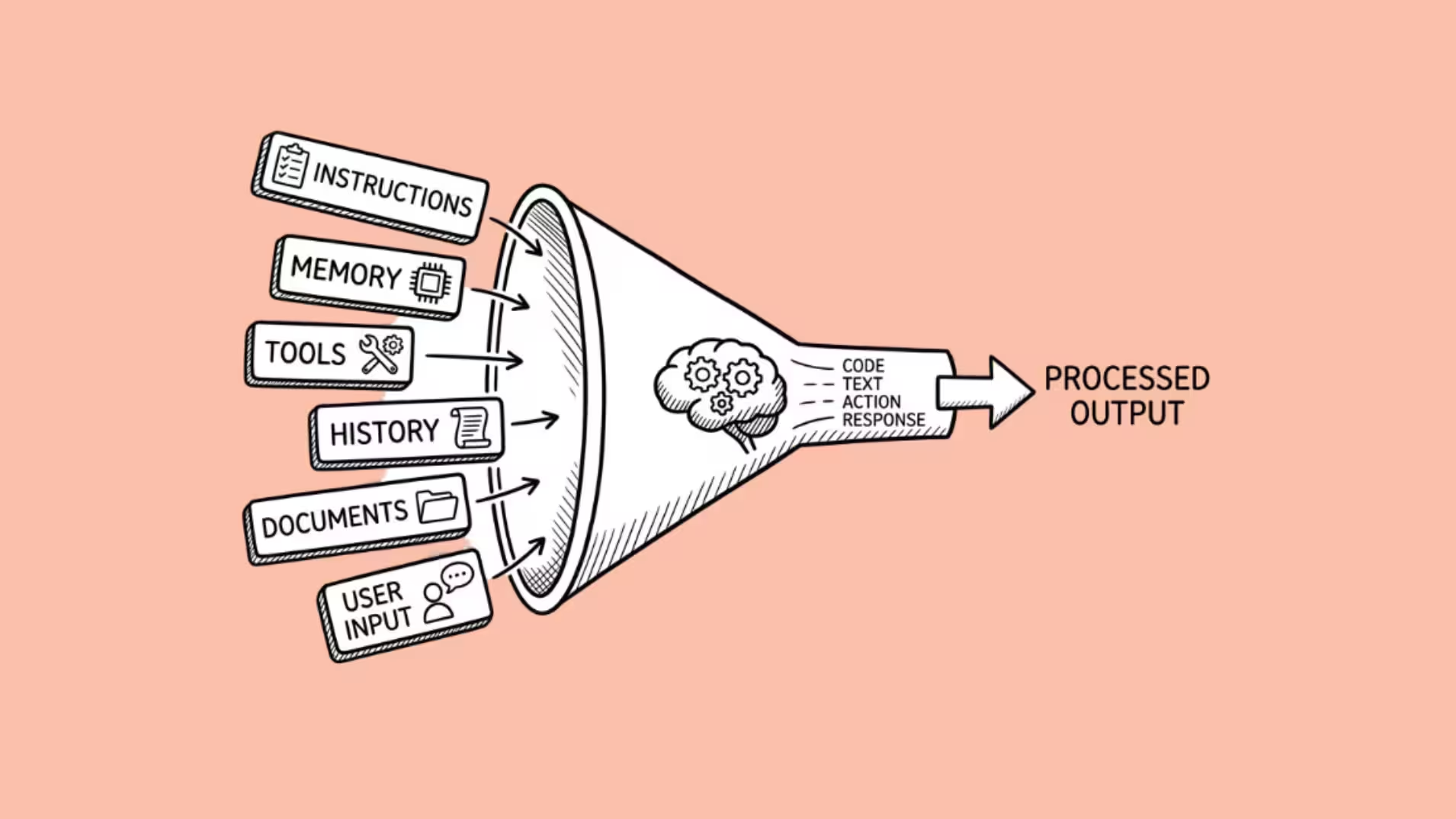

Context engineering is the practice of designing everything a language model sees before it generates a response.
Not just the prompt. Everything: system instructions, conversation history, retrieved documents, tool definitions, memory from past sessions, and dynamically loaded context that arrives mid-task based on what the agent needs right now.
The term was popularized in June 2025 by Shopify CEO Tobi Lutke, who called it “the art of providing all the context for the task to be plausibly solvable by the LLM.”
Six days later, Andrej Karpathy amplified it: “context engineering is the delicate art and science of filling the context window with just the right information for the next step.” Within months, Gartner declared 2026 “the year of context.”
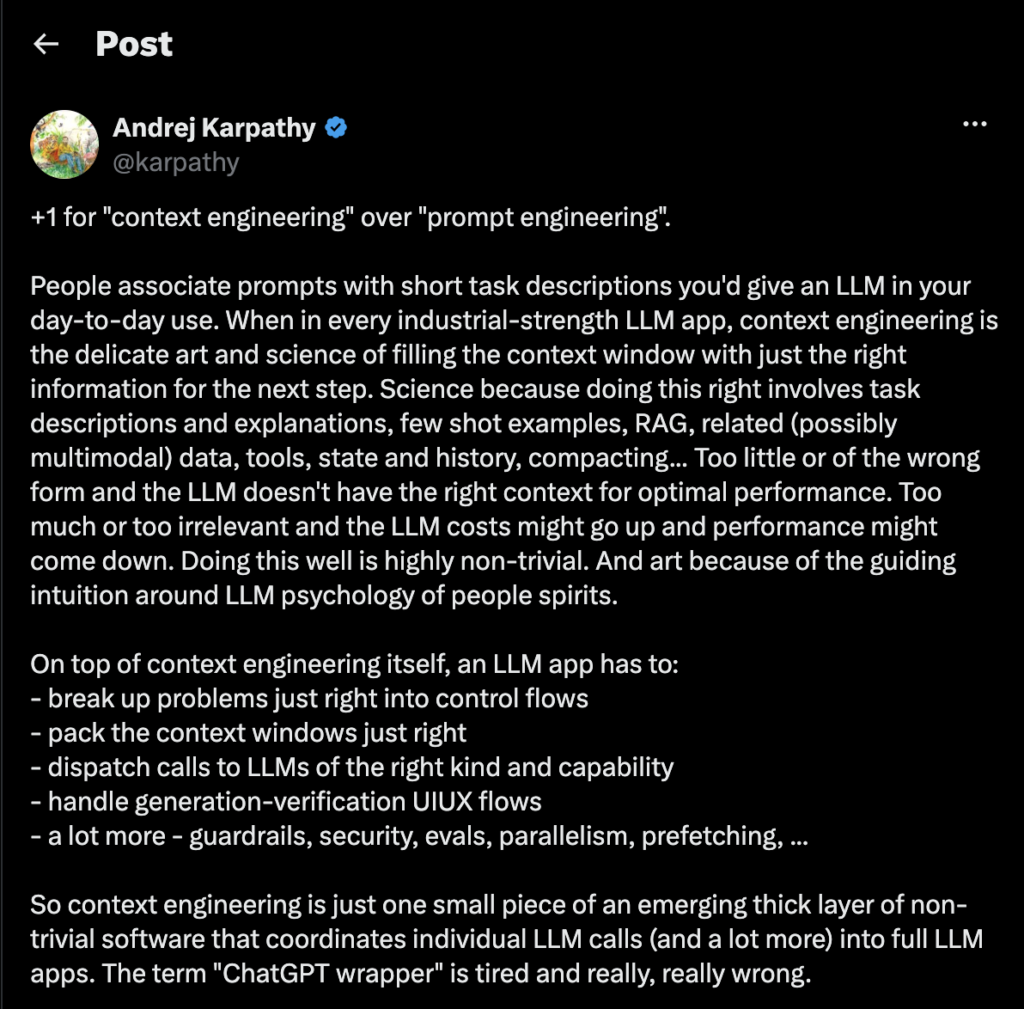
A 2026 State of Context Management Report found that 82% of IT and data leaders agree prompt engineering alone is no longer sufficient to power AI at scale, and 95% of data teams plan to invest in context engineering training during 2026.
Prompt engineering did not die. It got absorbed. Writing a good instruction is still necessary. It is just no longer sufficient. The bottleneck moved.
How Does Context Engineering Differ from Prompt Engineering?
Karpathy’s analogy is the clearest way to understand the shift: “The LLM is like the CPU, and its context window is like RAM.” The context window is the model’s working memory.
Everything the model can reason about during a single response has to fit inside that buffer before the first word of output is generated.
Prompt engineering focuses on one layer: the instruction you write. Context engineering focuses on all six layers that fill that buffer:
| Layer | What it contains | Who controls it |
| System instructions | Rules, persona, output format, safety constraints | Developer (static per deployment) |
| User input | The current message or task | User |
| Conversation history | Prior messages in the current session | System (automatic) |
| Retrieved context | Documents, data, or knowledge pulled from external sources (RAG) | System (dynamic per query) |
| Tool definitions | Descriptions of available tools the model can call | Developer (static or dynamic) |
| Memory | Facts, preferences, and decisions from past sessions | System (persistent) |
Prompt engineering optimizes layer 1. Context engineering optimizes all six simultaneously, including deciding what NOT to load when the window is getting full.
In 2023, optimizing the instruction was enough because most AI interactions were single-turn chatbot exchanges.
In 2026, agents run multi-step workflows across dozens of tool calls, maintain memory across sessions, retrieve documents mid-task, and coordinate with other agents.
The instruction is 5% of what the model sees. The other 95% is context. Engineering that 95% is where the leverage lives now.
What Are the Key Components of Context Engineering?
1. System Instructions
The foundational layer. System instructions define who the model is, what rules it follows, what format it uses, and what it should never do.
In prompt engineering, this was the entire job. In context engineering, it is the starting point.
The skill at this layer is structural clarity. In production agents, system prompts can reach thousands of tokens.
The most common bug I encounter in client deployments is contradictory tool descriptions: one tool’s description says “use this for customer data” while another says “use this for all data queries.” The model cannot resolve the contradiction and picks randomly. Clear, deduplicated system instructions prevent this.
2. Memory (Persistent Context Across Sessions)
Memory is the component that turned chatbots into agents. Without memory, every session starts from zero. The model does not know your name, your project, your preferences, or what you decided last Tuesday.
In 2026, three tiers of memory have emerged:
Static memory (like CLAUDE.md files) loads at session start. You write project conventions, architecture details, and known pitfalls into a file.
The agent reads it automatically before doing anything else. Karpathy’s andrej-karpathy-skills repo (13,300+ stars as of April 2026) proved that the quality of initial context radically changes agent behavior.
Same model, same capabilities, dramatically better output.
Dynamic memory (like claude-mem) persists and compresses context across sessions. The agent summarizes what happened, stores it outside the context window, and retrieves it next session. claude-mem hit 50,000 GitHub stars by proving that agents with cross-session memory outperform amnesic agents on complex multi-day tasks.
One limitation I observed when testing claude-mem on a client project: cross-session compression introduced subtle drift.
By session 5, the agent remembered the project goal accurately but had lost a critical constraint from session 1 (a specific API rate limit that shaped the entire architecture).
The compression algorithm decided the constraint was low-priority context and dropped it during summarization. I now manually pin critical constraints in the static CLAUDE.md file rather than trusting dynamic memory to preserve them.
Dynamic memory works for preferences and general context. It should not be the only place you store hard requirements.
Learned memory (like HippoRAG 2) uses knowledge graphs and personalized retrieval to give models memory architectures that mirror human hippocampal function. This is still mostly research, but the principles are already influencing production tools.
3. Retrieval (RAG and Dynamic Context)
Retrieval-Augmented Generation (RAG) pulls relevant documents, data, or knowledge from external sources and injects them into the context window at query time.
Instead of hoping the model’s training data includes the answer, you supply the answer directly.
The context engineering challenge with RAG is precision, not volume. Dumping a 200-page PDF into the context window is not context engineering.
Feeding the 40 passages that actually matter is. Liu et al. (2024) showed that information in the middle of long contexts gets systematically ignored by models.
A Chroma 2025 study on context degradation found all 18 frontier models tested degraded well before the window fills. More context is not better context. The right context is better context.
4. Tool Orchestration
Agents do not just generate text. They call tools: search engines, databases, APIs, file systems, code interpreters, calculators. Each tool has a description that consumes tokens in the context window.
A production agent with 40 available tools might spend 3,000 to 5,000 tokens just describing those tools before any actual work begins.
The context engineering skill here is knowing which tools to expose per task. Loading all 40 tool descriptions on every call wastes tokens and confuses the model (more tools means more ambiguity about which to use).
Loading only the 5 relevant tools per task keeps the context clean and the model’s decision-making sharp.
5. Context Window Management
This is the layer that does not exist in prompt engineering at all.
When an agent runs a 50-step workflow, the context window fills up. Old messages, tool outputs, intermediate reasoning, and retrieved documents accumulate. At some point, the window overflows and the agent either fails or loses critical information.
Context engineering introduces three techniques for managing this:
Compaction. Summarize the conversation so far, discard redundant content, and continue with the compressed version plus the most recent context.
Claude Code implements this by passing the message history to the model for summarization, preserving architectural decisions and unresolved bugs while discarding redundant tool outputs.
Tool output clearing. Old tool call results often contain data that was relevant 20 steps ago but is no longer needed. Clearing these outputs reclaims tokens without losing the thread of the conversation.
Scratchpad memory. The agent writes notes to an external file (like a to-do list or a NOTES.md), then reads them back when needed. This moves information outside the context window while keeping it accessible. Claude Code uses this pattern to track progress across complex tasks.
Why Is Context Engineering Replacing Prompt Engineering Now?
Three forces converged in 2025 and 2026:
Agents Broke the Single-Turn Model
Chatbots are single-turn: you ask, the model answers, done. Agents are multi-turn, multi-tool, multi-session: they plan, execute, observe, adapt, and remember across dozens or hundreds of steps.
The instruction you wrote at the start is ancient history by step 47.
What matters at step 47 is what the agent remembers, what tools it has access to, what it retrieved, and how much context window remains. Prompt engineering has no answer for step 47. Context engineering does.
Models Got Smart Enough That Instructions Stopped Being the Bottleneck
In 2023, writing “think step by step” actually improved GPT-4’s output. In 2026, Claude, GPT-5, and Gemini 2.5 handle ambiguous requests well without hand-holding.
The marginal return on better phrasing dropped measurably.
A 2025 Stanford CRFM evaluation found that advanced prompting techniques like chain-of-thought improved GPT-4’s accuracy by 12% on reasoning benchmarks, but the same techniques improved Claude 3.5 by only 3% and GPT-5 by less than 2%. As models get smarter, instruction optimization yields diminishing returns.
The marginal return on supplying the right source material, scoped memory, and relevant examples went up sharply. The leverage moved from how you ask to what you give the model to work with.
Context Windows Got Bigger, Which Made the Problem Harder
In 2023, 100K tokens was exotic. In 2026, million-token windows are common. The natural assumption: more room means less curation. The reality is the opposite.
Bigger windows tempt you to dump everything in.
But Liu et al.’s “Lost in the Middle” research proved that models pay the most attention to the beginning and end of the context. Information in the middle gets ignored. Pasting a full codebase into a million-token window does not help if the critical file lands in the middle and the model never reads it.
The discipline shifted from “how do I fit everything in?” to “how do I ensure the model sees the right things at the right time?” That is context engineering.
The Gap Nobody Is Talking About: Just-in-Time Context Loading
Most articles on context engineering stop at the conceptual level: here are the six layers, here are the three failure modes, here is Karpathy’s analogy. What they miss is the practical implementation that makes it work in production.
Anthropic’s Agent Skills system is the clearest implementation of just-in-time context loading available today. Here is how it works:
A Skill is a directory on the filesystem containing a SKILL.md file with instructions, reference documents, and executable scripts.
When a user makes a request, the agent scans the available skill metadata (a few tokens per skill) and loads only the relevant skill’s full instructions into context. The rest remain on disk, consuming zero tokens.
Here is the concrete example that clarifies everything:
A user asks Claude to create a PowerPoint presentation. The agent has 10 installed Skills (PDF, DOCX, PPTX, XLSX, Data Analysis, Frontend Design, and others).
Instead of loading all 10 skill files into the context window (which would consume thousands of tokens and dilute focus), the agent:
- Reads the lightweight metadata for each skill (title and trigger description only)
- Recognizes that the PPTX skill matches the task
- Uses bash to read /mnt/skills/public/pptx/SKILL.md into context
- If that skill references additional files (like a slide-layouts.md or a design-tokens.md), it reads those too
- Proceeds with the task, now holding only the relevant instructions
The next task might be creating a PDF. The agent loads the PDF skill. The PPTX skill drops out. Context stays lean. This is progressive disclosure applied to agent context: load what you need, when you need it, and nothing else.
Why does this matter?
Because the alternative (preloading all possible instructions at session start) wastes 30 to 50% of the context window on instructions that never get used.
In a production agent handling diverse tasks, that waste compounds.
By the time the agent reaches step 30 of a complex workflow, the preloaded instructions from step 1 are consuming tokens that the agent desperately needs for the actual task at hand.
Anthropic’s approach is not the only way to do this.
Hermes Agent generates and refines its own skill files dynamically. Karpathy’s skills repo provides static context files that load at session start. But the core principle is the same: treat context as a resource to be managed, not a bucket to be filled.
In my view, the Agent Skills approach is the right architecture for any agent handling more than 5 distinct task types. Below that threshold, preloading everything works fine because the total instruction volume is small.
Above it, the skill metadata scan adds roughly 200 to 500ms of latency per task, which is negligible when the alternative is a context window so bloated that the agent misses critical instructions entirely.
I have seen preloaded agents fail silently on step 15 of a workflow because relevant instructions from step 1 got pushed into the middle of the context and the model stopped attending to them.
The latency cost of just-in-time loading is real. The cost of not doing it is higher.
FAQs
Is prompt engineering dead?
No. Prompt engineering is a contained discipline inside context engineering. Writing clear instructions still matters.
But in 2026, instructions are roughly 5% of what a production agent sees. The other 95% (memory, retrieved context, tool definitions, conversation history) is where context engineering lives. Prompt engineering did not die. It was reclassified as one layer in a larger stack.
Do I need to learn context engineering?
If you build or manage AI agents, yes. If you use AI as a chatbot for one-off questions, prompt engineering is still sufficient. The distinction: single-turn interactions need good prompts. Multi-turn, multi-tool, multi-session workflows need engineered context.
What are the three failure modes of context engineering?
Too little context (the model does not have the information it needs and hallucinates). Too much context (the model has so much information that critical details get lost in the middle). Conflicting context (two pieces of context contradict each other and the model picks the wrong one). All three are context engineering failures, not model failures.
What tools should I learn for context engineering?
Start with CLAUDE.md files for static context (free, immediate impact). Add claude-mem for persistent memory across sessions. Learn RAG fundamentals (vector stores, chunking, retrieval precision). Study Anthropic’s Agent Skills for just-in-time context loading. For orchestration, LangChain/LangGraph and LlamaIndex are the production standards.
What is the difference between context engineering and harness engineering?
Context engineering manages what the model sees per inference call. Harness engineering, a term emerging in 2026, manages the full system around the model: tools, memory, constraints, feedback loops, and multi-agent coordination.
Ryan Lopopolo of OpenAI’s Codex team named the shift: “Agents aren’t hard; the Harness is hard.” The three disciplines are nested: prompt engineering sits inside context engineering, which sits inside harness engineering.
